PBy the Pickpedia Team·4 picks compared·Last verified October 2026
Affiliate disclosure: As an Amazon Associate, Pickpedia earns from qualifying purchases. Links on this page are paid links, and we may earn a commission at no extra cost to you. This never affects our picks or scores.
This page contains affiliate links. If you buy through one we may earn a
commission, at no cost to you.
The honest answer starts with the fact that the two products are not sold in comparable
units, and nobody mentions it. A television is specified in nits, which is a brightness. A
projector is specified in lumens, which is a total quantity of light with no area attached.
You cannot compare them until you decide how big the picture is, and the screen is usually
bought separately, later, by diagonal.
So here is the conversion, done once. Two hundred lumens on a 100 inch screen is 25.4
nits. A portable monitor in our own catalogue publishes 270. That is a factor of 10.6, and
it is not a scandal, because the number a cinema is built around is 48.
One line of arithmetic, and it is the whole of it
For a screen that scatters light diffusely, the luminance is the illuminance falling on it
multiplied by its gain and divided by pi. The illuminance is just the flux divided by the
area. That is the entire conversion.
Start with the area, because the diagonal is not it. A 100 inch 16:9 screen has a diagonal
of 100 inches, so its width is 100 times 16 divided by the square root of 337, which is 87.16
inches, and its height is 49.03 inches. In metres that is 2.2138 by 1.2453, so 2.75671 square
metres.
An
HP MC425 smart projector
publishes 200 ISO lumens, native 1080p with 4K signal support, Android TV built in, AI auto
focus and keystone, WiFi 6, Bluetooth 5.4, a short-throw 0.8:1 lens and the ability to run
from a 65 watt USB-C power bank.
Two hundred lumens over 2.75671 square metres is 72.55 lux. Our roundup of
projector screens for a cinematic movie-night setup
publishes the other input: a gain of 1.1 for the MaxWhite 2 material on its 100 inch pick, with
a 180 degree viewing angle. So the luminance is 72.55 times 1.1 divided by pi, which is 25.40
candelas per square metre.
On the 120 inch screen from the same page the area is 3.96966 square metres and the answer
is 17.64 nits.
What 25.4 nits is actually like
Three comparators, and two of them come off our own pages.
Our roundup of
portable touchscreen monitors for mobile
work publishes a panel at 270 nits and is blunt about where that leaves it: "at 270 nits
it trails the brightest panels here, so glare in strong light is a limit". The projector on
100 inches is a tenth of that trailing panel. Another of our pages publishes a 500 nit screen,
which is 19.7 times.
And then the number that reframes it. The reference luminance for two-dimensional cinema
projection is 48 candelas per square metre. The projector on a 100 inch screen reaches 52.9
percent of that, and on 120 inches 36.8 percent.
So 200 ISO lumens is not a scandal and it is not a home cinema either. It is about half of
what a commercial cinema puts on its screen, and a commercial cinema is a room with no
windows, black walls and the lights off. The record for the projector arrives at exactly the
right advice without the arithmetic: "it looks great in a properly dark room but washes out in
a bright or daylight-lit room. That is true of most portable projectors, and it is the single
biggest thing to get right: use it after dark or with the room blacked out."
Our own guide to
choosing a
projector opens with the same instruction, and it is the right one: "Start with your room,
not the projector." The next two sections are what that sentence is worth in numbers.
Every ten percent of diagonal removes seventeen percent of the brightness
Area goes as the square of the diagonal, so luminance goes as one over the square of the
diagonal. This is the single most useful consequence of the conversion and it is never stated
in the units people shop in.
From 100 to 120 inches is a factor of 1.2 in diagonal and 1.44 in area, so 30.56 percent of
the brightness is gone and 25.40 nits becomes 17.64. From 100 to 150 inches is 2.25 times the
area, so 55.56 percent is gone and you are at 11.29 nits, which is 23.5 percent of the cinema
reference.
In general, every 10 percent added to the diagonal removes 17.36 percent of the luminance.
That is the exchange rate between picture size and picture brightness, it holds for any
projector and any screen, and it is the number to carry into a screen decision.
One honest softening, because the arithmetic is harsher than the experience. Our page on
what a 100,000 hour LED rating
actually promises sets out the relevant point: "perceived brightness does not track
luminance linearly. It follows roughly a power law." At the conventional exponent of about a
third, a 30.56 percent drop in luminance reads as about an 11.3 percent dimming to the eye. So
going from 100 to 120 inches is a real loss and it is a tenth rather than a third. What it is
not is free.
The conversion is exact. For a diffusely reflecting surface the luminance is the illuminance
times the gain divided by pi, and the illuminance is the luminous flux divided by the area,
so 200 lumens, 2.75671 square meters and a gain of 1.1 give 25.40 candelas per square meter
with nothing assumed in between. The screen area follows from a 100 inch diagonal at 16 by 9,
which is 2.2138 by 1.2453 meters. The ambient contrast arithmetic is the same formula applied
twice, once to the projector's flux and once to the room's illuminance, and the only thing it
leaves out is the projector's own black floor, which makes the figures here slightly
optimistic rather than pessimistic. The published inputs are the 200 ISO lumens, the 0.8 to 1
throw ratio, the 1.1 gain, the 180 degree viewing angle, the 100 and 120 inch diagonals, the
800 lumen pen light, the 540 square feet of star coverage and the 2 by 2 foot skylight panel.
Representative rather than published: the 100, 10 and 1 lux ambient levels, which are ordinary
figures for a lit room, a dark room and a blacked out one; the 48 candelas per square meter
cinema reference, which is a standards figure rather than a product one; the 0.90 reflectance
used to show where a gain above one is borrowed from; the roughly cube root exponent for
perceived brightness, which our own LED rating page sets out; and the 4,000 lumens assumed for
the skylight panel, which publishes no photometric figure at all.
The room is a competing projector
Here is the result that makes the whole category make sense, and it follows from the same
formula applied twice.
A screen does not only reflect the projector. It reflects the room. Whatever ambient
illuminance falls on the screen comes back at the same gain over pi, and that reflection sets
the floor of the image. The darkest thing on the screen can never be darker than the room
bouncing off it.
Take a dim living room at 100 lux. The screen's own black level is 100 times 1.1 divided by
pi, which is 35.01 nits. The projector's full white is 25.40. The room is brighter than the
picture, and the on-screen contrast ratio is 60.41 over 35.01, which is 1.73 to 1.
Turn the lights down to 10 lux. The black level becomes 3.50 nits and the contrast becomes
8.26 to 1.
Black the room out to 1 lux. The black level becomes 0.35 nits and the contrast becomes
73.6 to 1.
That is a factor of 42.6 in contrast ratio, achieved by touching the curtains and not the
projector. No projector upgrade available at any specification does that, because adding
lumens raises the white and leaves the black exactly where the room put it. This is why
"start with your room" is not a preamble. It is the main lever, and it is 42.6 times
stronger than anything on the box.
The figures above leave out the projector's own black floor, which only makes them
flattering. Add it and every contrast number falls.
A pen light with four times the flux
If a lumen figure still feels like a brightness, this is the check that cures it. A
HOKOILN 800 lumen rechargeable
dual-beam pen light publishes 800 lumens from its spotlight, a reach of up to 100 metres, up
to 4 hours of runtime, a side COB floodlight good for 50 metres, an anodized aluminium body
rated for a 1.5 metre drop and a 5.78 inch body weighing 1.51 ounces.
Eight hundred lumens is four times the projector's 200. Spread that flux over the same 100
inch screen and you would get 101.6 nits, four times the picture. A thing that clips to a hat
brim contains four times the luminous flux of a device sold to fill a wall.
The difference, of course, is where the light goes. The pen light concentrates its flux
into a narrow cone, which is why it reaches 100 metres, and our page on
whether more lumens mean a light
shines further works that chain out properly through candelas and lux. This page is the
other branch of the same fork: flux divided by area, for a surface that scatters. Same unit,
two completely different questions, and a projector is the second one.
The pen light is also the most honest listing in this group and it should be said plainly:
"all lumen, distance, and runtime numbers are maker-stated rather than lab-verified", repeated
again in its drawbacks. That caveat applies to every photometric figure on this page and only
one product states it.
The throw distance that takes one multiplication
The projector publishes a 0.8:1 throw ratio, which is a short throw, and our screens page
correctly tells you to check the geometry: "Use the projector's throw calculator or official
manual to find the lens-to-screen distance for the selected image size."
For this projector that calculator is a multiplication. A throw ratio is the lens-to-screen
distance divided by the image width, so for a 100 inch screen 0.8 times 2.2138 metres puts the
lens 1.771 metres from the wall, which is 69.7 inches. For the 120 inch screen it is 2.125
metres, or 83.7 inches. Those are the two numbers a reader actually wants and they are one line
apiece.
Which uncovers a problem that neither page can see on its own. Our screens page says of the
100 inch pick that "Elite Screens marks the Manual B material as incompatible with those
projector types", meaning short-throw and ultra-short-throw, and repeats it: "The M100H is
specifically excluded from short-throw and ultra-short-throw use."
The only projector we carry has a short-throw lens. The only 100 inch screen we recommend is
marked incompatible with short-throw projectors. Both statements are correct and the two pages
do not compose, which is worth knowing before anyone buys the pair. The 120 inch freestanding
screen on the same page carries no such exclusion, and at 17.64 nits it is the dimmer of the
two options.
A gain above one is borrowed, not free
While that screen page is open, there is a second figure on it worth reading carefully. It
publishes a 1.1 gain and a 180 degree viewing angle for the same material.
Screen gain is measured against a perfect Lambertian reflector of unit reflectance, so a
gain above 1 cannot come from reflectance. No white diffuser gets above about 0.90, and a
Lambertian screen at 0.90 reflectance has a gain of 0.90. To publish 1.1 you have to narrow
the distribution and concentrate light on axis, and against a realistic 0.90 that is about 22
percent of concentration taken from the edges of the room and given to the middle.
The two figures are not contradictory. A 180 degree figure is normally the total angle over
which the image remains visible, not the angle over which brightness holds. But 1.1 is easy to
read as 10 percent of free brightness, and it is not free: it is 22 percent of redistribution,
and the seats it comes from are the ones at the sides.
On the arithmetic of this page, a gain of 1.1 against a plain 0.90 wall takes 25.40 nits to
20.78 and back again, which is 22 percent, which is bigger than the difference between a 100
and a 110 inch screen. Gain is the easiest nit on the list to obtain and it is bought with viewing
angle.
Two coverage figures with no light attached
A
Govee star projector with a 7-zone
nebula effect publishes seven individually controllable zones, a stated 540 square feet of
coverage from wide field of view lenses, Matter compatibility, more than 50 scene modes, 18
white noise options, a sleep timer, a 6.18 by 5.51 by 8.94 inch body and a twelve month
warranty. It publishes no luminous flux of any kind.
Five hundred and forty square feet is 50.17 square metres, which is eighteen times the 100
inch screen above. Without a flux figure there is no way to know whether the pattern is visible
at the far corner of that area, because the same conversion applies: luminance is flux over
area, and one of the two terms is missing.
Its own record is right about why the coverage is wide, and the sentence is unusually clear
about what the number is not: the figure "comes from the lens design rather than brute
brightness, which is the right approach. Wide field of view lenses spread the pattern further
without needing more output". That is correct, and it is also the admission. A wider lens over
the same output means a larger area and a proportionally dimmer pattern, which is the
projector arithmetic above running on a ceiling instead of a wall.
This is the same gap, in the same shape, as the one on our page about
why a grow light's coverage area
needs a height, where a published footprint turned out to depend entirely on an unpublished
beam angle. A coverage area is half a specification. The other half is a flux.
A
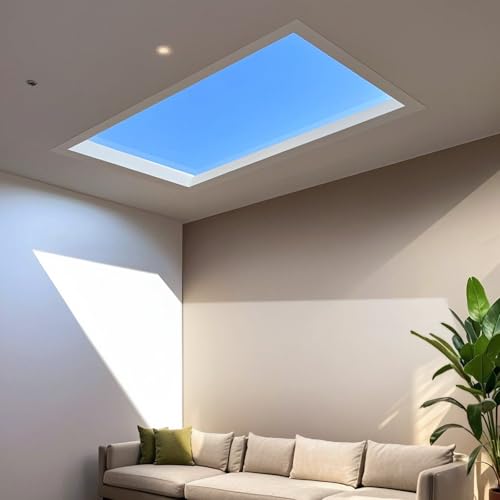
Stecutts artificial blue skylight
is the clearest case of the gap, because its entire proposition is photometric. It is sold as a
2 by 2 foot ceiling panel that "reproduces the light of the sun and the sky", with a sunrise to
sunset rhythm, brightness from 1 to 100 percent, colour temperature from 2000K to 8000K, light
refracting at 40 degrees onto the wall, and a requirement for a 2 by 2 foot ceiling opening at
least 9.5 inches deep.
Every one of those is a real specification and not one of them is a lumen, a lux or a nit.
Take a representative 4,000 lumens for a 2 by 2 foot LED panel of that kind, which is 0.3716
square metres. In a 12 by 12 foot room, which is 13.378 square metres, that is 299 lux at the
floor. Outdoor illuminance on a bright overcast day is around 10,000 lux and full sun is around
100,000, so the panel is delivering something like 3 percent of an overcast day and 0.3 percent
of sunshine.
That is not a criticism of the product, which is clearly doing something people want in
basements. It is a statement about which claim is being made. The panel reproduces the
appearance of a sky, convincingly by all accounts, and it does not reproduce its illuminance,
and the figure that would make the distinction is the one figure the listing does not carry.
Its drawbacks are careful about everything else, including "Do not look directly at the light
on strong mode", which is a luminance warning on a product with no published luminance.
The honest limit, and the answer to the question
What is exact here is the conversion and everything that follows from it. Luminance is
illuminance times gain divided by pi. Illuminance is flux over area. The area of a 16:9 screen
follows from its diagonal. So the 25.40 nits, the 17.64, the 30.56 percent, the 17.36 percent
per ten percent of diagonal, and the three contrast ratios are arithmetic on published figures
with nothing modelled in between. The 101.6 nits from a pen light's published 800 lumens is the
same calculation run on a different flux.
What is representative is the room. The 100, 10 and 1 lux ambient levels are ordinary figures
for a lit living room, a dark one and a blacked-out one, and they are not measurements of
anyone's house. If your room is 30 lux the contrast is 3.4 to 1 rather than 1.73 or 8.26, and
the lesson is unchanged. The 48 candelas per square metre cinema reference is a standards
figure, the 0.90 screen reflectance is a typical value for white diffusing material, the cube
root exponent for perceived brightness comes from our own LED page rather than from this one,
and the 4,000 lumens for the skylight panel is an assumption standing in for an absent
specification.
What this page deliberately does not do is compute a contrast ratio for the projector
itself. That needs a black level in the same units as the white, and our own guide is right
that the figure "is quoted inconsistently, so treat it with caution", which is exactly why
nothing here depends on it. The ambient arithmetic above deliberately uses a projector black of
zero, which flatters every result, and the real numbers are worse by an amount no listing
publishes. Nor has it compared image quality in any sense beyond brightness, because resolution,
colour and motion are not things a lumen figure can answer and the honest reading of a native
1080p panel is the one our own guide already gives.
And the answer to the question, which was projector or television. On brightness alone it is
not close: the published figures put a 200 lumen portable at a tenth of a mid-range portable
monitor and about half of a cinema screen, and the television wins in any room with a window
open. What the projector buys is size, and the exchange rate is the one firm number on this
page, 17.36 percent of brightness for every 10 percent of diagonal. So the decision is really
about whether you can supply the room, because a blacked-out room is worth a factor of 42.6 in
contrast and no amount of specification is worth anything close. If you can make the room dark,
a modest projector on a modest screen is a genuinely cinematic 53 percent of cinema. If you
cannot, the arithmetic says buy the panel, and our guide to
reading
projector specifications says the same thing in words.
Why Projector Lumens Are a Screen Area at a glance
Stecutts Artificial Blue Skylight (Smart Ceiling Light)
Bringing a realistic sky and daylight feel to windowless or gloomy rooms
Convincingly recreates blue sky and sunlight overhead
Requires embedded ceiling install with a 2 by 2 foot opening
Why you can trust this guide
We compared these picks using verified manufacturer specifications, current retailer listings, and patterns in owner feedback, alongside editorial research. We focus on measurable differences such as performance, capacity, usability, and build quality. Pickpedia does not present editorial research as laboratory testing, and we do not claim hands-on testing unless it was actually performed.
Best for A portable all-in-one big screen for dark rooms
8.6/ 10 Pickpedia editorial score
A portable smart projector with native 1080p resolution and 4K signal support, built-in Android TV streaming apps, AI auto focus and keystone, 200 ISO lumens, HiFi dual speakers, WiFi 6 and Bluetooth 5.4, a short-throw 0.8:1 lens and USB-C power-bank compatibility with a 65W or higher bank.
BrandHP
TypePortable smart projector
ResolutionNative 1080p, 4K signal supported
Brightness200 ISO lumens (dark room)
Smart OSAndroid TV, built-in apps
SetupAI auto focus and keystone
ConnectivityWiFi 6, Bluetooth 5.4
LensShort-throw 0.8:1
PowerUSB-C, power bank 65W or higher
ColourGray
Pros
Built-in Android TV apps, no dongle needed
Sharp native 1080p image
Auto focus and keystone for easy setup
WiFi 6 and Bluetooth 5.4
Short-throw lens suits small rooms
Runs off a 65W USB-C power bank
Cons
200 lumens is dark-room only, not for bright rooms
Best for mechanics and DIY users wanting a pocket dual-beam light
8.6/ 10 Pickpedia editorial score
HOKOILN's pen light pairs a top LED spotlight rated to 100 meters with a side COB floodlight for close work. Dual power lets you run the included rechargeable battery or fall back to 2 AAA cells. The maker states charging takes 2 to 3 hours. An anodized aluminum body is rated for 1.5 meter impact resistance, and a steel clip attaches to a hat brim or strap for hands-free lighting.
Spotlight output800 lumens
Spotlight rangeUp to 100 m
Floodlight rangeUp to 50 m
Spotlight runtimeUp to 4 hours
Floodlight runtimeUp to 2 hours
Charge time2 to 3 hours
Length5.78 in
Weight1.51 oz without battery
Pros
Dual power runs a rechargeable battery or 2 AAA cells
Spotlight reaches up to 100 meters for distance work
COB floodlight and zoom handle close inspection
Anodized aluminum body rated to 1.5 meter impact
Steel clip enables hands-free lighting on a hat or strap
Slim 5.78 inch body fits a pocket or tool pouch
Cons
Floodlight runs only up to 2 hours on the side beam
Lumen, range, and runtime figures are maker-stated
Best for Smart homes already running Matter, Alexa or Google Assistant
9.0/ 10 Pickpedia editorial score
A star projector with seven individually controllable light zones covering a stated 540 square feet, Matter compatibility, more than 50 scene modes and 18 white noise options.
BrandGovee
ModelH6095
Part numberH6095111
Star zones7, individually controllable
Coverage540 square feet
LensesLarge field of view
Scene modesMore than 50
White noise18 options
Smart homeMatter, Alexa, Google Assistant
AppGovee Smart Command
MotionsBlink and orbit, flowing and breathing effects
TimerSleep mode with automated shut-off
Dimensions6.18 x 5.51 x 8.94 in
Warranty12 months
ColourBlack
Pros
Seven star zones, each with its own colour, brightness, speed and motion
Stated 540 square feet of coverage from wide field of view lenses
Matter compatible, plus Alexa and Google Assistant
More than 50 scene modes
18 white noise options built in
Sleep timer with automated shut-off
Ultra-quiet motor for use while falling asleep
Cons
Twelve month warranty on a unit with a moving motor
Coverage is more than a small bedroom needs
Per-zone control needs the app, not just the voice assistant
Best for Bringing a realistic sky and daylight feel to windowless or gloomy rooms
8.6/ 10 Pickpedia editorial score
A 2 by 2 foot app-controlled artificial blue skylight ceiling light that reproduces sky and sunlight with a smart sunrise-to-sunset daylight rhythm, adjustable brightness from 1 to 100 percent and color temperature from 2000K to 8000K, and soft 40-degree wall lighting, for brightening windowless kitchens, bathrooms, basements and offices. It requires embedded ceiling installation with a 2 by 2 foot opening and a ceiling height of at least 9.5 inches.
BrandStecutts
TypeArtificial skylight ceiling light
Size2 by 2 by 0.8 ft
ControlApp: brightness and color temp
Brightness1 to 100 percent
Color temp2000K to 8000K
EffectSunrise-to-sunset rhythm
InstallEmbedded; ceiling depth 9.5 in+
Pros
Convincingly recreates blue sky and sunlight overhead
Smart sunrise-to-sunset daylight rhythm feels natural and calming
App control of brightness (1 to 100%) and 2000K to 8000K color
Soft 40-degree wall lighting mimics real skylight
Genuinely transforms windowless rooms, basements and offices
Wide application across home and commercial spaces
Cons
Requires embedded ceiling install with a 2 by 2 foot opening
Needs a ceiling cavity at least 9.5 inches deep; confirm before buying
A semi-permanent fixture, not a plug-in or surface-mount lamp