Webcams Webcams Compared: 7 for Calls and Streaming
P
By the Pickpedia Team
·7 picks compared
·Last verified August 2026
Affiliate disclosure: As an Amazon Associate, Pickpedia earns from qualifying purchases. Links on this page are paid links, and we may earn a commission at no extra cost to you. This never affects our picks or scores.
Quick answer
The Logitech C920 is the best webcam overall, sharp reliable 1080p that works with everything. For the best image the Logitech Brio Ultra 4K wins, and the Logitech C920S is the value pick with a privacy shutter.
Webcams Compared: 7 for Calls and Streaming at a glance
Why you can trust this guide
We compared these picks using verified manufacturer specifications, available manuals and documentation, current retailer listings, and patterns in owner feedback, alongside editorial research. We focus on measurable differences such as performance, capacity, usability, and build quality. Pickpedia does not present editorial research as laboratory testing, and we do not claim hands-on testing unless it was actually performed.
How we chose: We compared resolution, frame rate, field of view, features like privacy shutters and value across seven current webcams, alongside how owners rate real calls and streams.
A dedicated webcam makes you look far sharper on video calls and streams than a laptop camera. The Logitech C920 is our overall pick, a reliable 1080p standard that works with every app at a fair price.
The choice comes down to resolution, frame rate and features against your use. Calls need clean 1080p, streaming benefits from 60fps, and creators may want 4K. We compared the specifications and owner feedback to match each to a real setup.
Our top picks
The long standing standard for video calls, with sharp 1080p at 30fps, good autofocus and dual mics. It works with every major calling and streaming app. Reliable quality at a fair price makes it the top pick.
Video1080p at 30fps
FocusAutofocus
MicsDual stereo
Best forVideo calls and work
Pros
- Sharp reliable 1080p
- Works with everything
- Good value
Check price on Amazon ›
A 4K sensor with HDR delivers the sharpest, most detailed image for streaming and high end calls. Adjustable field of view and strong low light handling round it out. The pick when image quality is everything.
Video4K with HDR
Field of viewAdjustable
Low lightStrong
Best forTop image quality
Pros
- Sharp 4K HDR
- Adjustable field of view
- Great low light
Cons
- Premium price
- 4K needs a good connection
Check price on Amazon ›
The C920S adds a built in privacy shutter to the trusted 1080p C920 formula, so you can physically cover the lens. Same sharp video and dual mics. A smart value pick with peace of mind.
Video1080p at 30fps
FeaturePrivacy shutter
MicsDual
Best forValue with privacy
Pros
- Privacy shutter included
- Sharp 1080p
- Reliable and affordable
Check price on Amazon ›
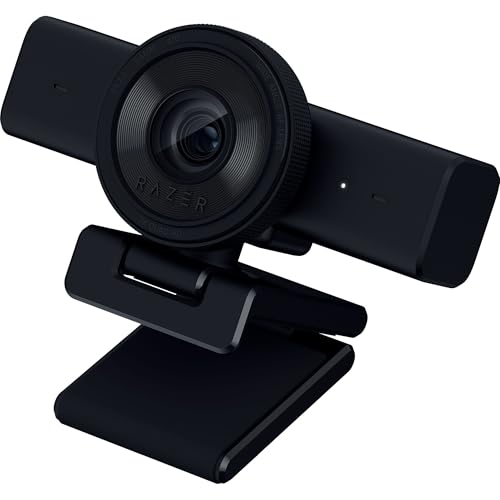
A 1080p 60fps webcam aimed at streamers, with smooth motion and a wide field of view. It fits gaming and creator setups at a friendly price. The pick for smooth streaming on a budget.
Video1080p at 60fps
Field of viewWide
UseStreaming and gaming
Best forBudget streamers
Pros
- Smooth 60fps
- Wide field of view
- Good value for streaming
Check price on Amazon ›
A high end 4K webcam with a large sensor, excellent low light and a show mode for demonstrating objects. It targets creators and professionals who want the best. A polished premium pick.
Video4K, large sensor
Low lightExcellent
FeatureShow mode
Best forCreators and pros
Pros
- Excellent 4K and low light
- Show mode for demos
- Premium build
Cons
- High price
- Overkill for basic calls
Check price on Amazon ›
A budget Logitech that delivers solid 1080p video and a wide field of view for everyday calls. Auto light correction keeps you visible in dim rooms. A dependable cheap upgrade over a laptop camera.
Video1080p
Field of viewWide
FeatureAuto light correction
Best forBudget everyday calls
Pros
- Low price
- Solid 1080p
- Auto light correction
Check price on Amazon ›
A 1080p webcam tuned for work with auto light adjustment, a show mode and a privacy shutter. It keeps you looking sharp on calls in any lighting. A strong pick for home office meetings.
Video1080p
FeatureAuto light, show mode, shutter
UseWork meetings
Best forHome office calls
Pros
- Great for meetings
- Auto light and shutter
- Show mode
Check price on Amazon ›
What to look for
Resolution and use
1080p, on the C920 and C920S, is sharp enough for calls and most streaming. 4K, on the Brio Ultra and MX Brio, adds detail for creators and high end calls but needs a good connection and computer. Match resolution to whether you call or create.
Frame rate for smooth video
30fps is standard and fine for calls. 60fps, on the Razer Kiyo V2 X, gives smoother motion for streaming and gaming. If you stream fast content, look for 60fps; for meetings, 30fps is plenty.
Field of view and framing
A narrower field of view keeps the focus on you, while a wide one fits more of the room or several people. Some webcams let you adjust it. Auto light correction, on the Brio 101 and 501, keeps you visible in dim rooms.
Privacy and extras
A built in privacy shutter, on the C920S and Brio 501, physically covers the lens for peace of mind. A show mode tilts the view to demonstrate objects. Decide which extras, like shutters or show mode, you will actually use.
Frequently asked questions
What is the best webcam overall?
The Logitech C920 is the best all rounder, with sharp reliable 1080p that works with every app at a fair price. For the best image the Logitech Brio Ultra 4K is the pick, and the C920S adds a privacy shutter for value.
Do I need a 4K webcam?
Only if image quality is a priority, like for creators or high end calls, and you have a good connection and computer. For everyday calls and most streaming, sharp 1080p from a C920 or C920S is plenty and cheaper.
What frame rate does a webcam need?
30fps is standard and fine for video calls. 60fps, on the Razer Kiyo V2 X, gives smoother motion for streaming and gaming. Choose 60fps for fast content, 30fps for meetings and general use.
Are webcams better than a laptop camera?
Yes, noticeably. A dedicated webcam like the C920 offers sharper video, better low light and improved framing over most built in laptop cameras. It is one of the easiest upgrades for how you look on calls.
What is a webcam privacy shutter?
A privacy shutter is a built in cover, on the C920S and Brio 501, that physically blocks the lens when not in use. It gives peace of mind that the camera cannot see you, without unplugging it.
Do webcams have good microphones?
Most have built in mics fine for calls, like the dual mics on the C920. For streaming or podcasts, a separate microphone sounds much better. If audio matters, do not rely on the webcam mic alone.
Which webcam is best for streaming?
The Razer Kiyo V2 X suits streamers with smooth 1080p 60fps and a wide field of view at a friendly price. For top image quality, the 4K Logitech Brio models are a step up for serious creators.
Are budget webcams any good?
Yes. The Logitech Brio 101 delivers solid 1080p with auto light correction for a low price, a big upgrade over a laptop camera. The trade offs are no 4K and basic mics, not poor everyday video.
The verdict
Logitech C920 HD Pro Webcam
9.2/10
The Logitech C920 is the webcam most people should buy, sharp reliable 1080p that works everywhere. The Logitech Brio Ultra 4K is the pick for the best image, while the C920S adds a privacy shutter as the value choice.
Check price on Amazon ›
Our top pick, secure checkout via Amazon
Note: Availability and specifications change often. Always confirm the current details on Amazon before buying.