Webcams Webcams Compared: 7 for Streaming and Calls
P
By the Pickpedia Team
·7 picks compared
·Last verified August 2026
Affiliate disclosure: As an Amazon Associate, Pickpedia earns from qualifying purchases. Links on this page are paid links, and we may earn a commission at no extra cost to you. This never affects our picks or scores.
Quick answer
The Logitech C920x is the best webcam overall, sharp 1080p and reliable for calls and streaming. For premium 4K the Elgato Facecam wins, and the Microsoft LifeCam HD-3000 is the best cheap basic pick.
Webcams Compared: 7 for Streaming and Calls at a glance
Why you can trust this guide
We compared these picks using verified manufacturer specifications, available manuals and documentation, current retailer listings, and patterns in owner feedback, alongside editorial research. We focus on measurable differences such as performance, capacity, usability, and build quality. Pickpedia does not present editorial research as laboratory testing, and we do not claim hands-on testing unless it was actually performed.
How we chose: We compared resolution and image quality, low light performance, audio, features and value across seven current webcams, alongside how users rate real calls and streams.
A dedicated webcam gives far sharper, better lit video than a built in laptop camera, for meetings, streaming and content. The Logitech C920x is our overall pick, sharp 1080p and reliable on any computer.
The choice comes down to resolution, low light performance and whether you stream or just take calls. Streamers want high frame rates and 4K, callers want clear 1080p and good light handling. We compared the specifications and user feedback to match each to a real setup.
Our top picks
A reliable 1080p webcam with sharp video and clear stereo audio that suits calls, work and streaming, plug and play on any computer. It is the default choice for good reason. The mix of quality and value makes it the top pick.
Resolution1080p 30fps
AudioStereo mics
SetupPlug and play
Best forAll round use
Pros
- Sharp 1080p video
- Clear audio
- Works everywhere
Check price on Amazon ›
A 4K webcam with DSLR like manual controls and excellent image quality for serious streamers and creators. It captures crisp, detailed video. The pick for premium image quality.
Resolution4K
ControlDSLR like manual
UseStreaming, creation
Best forPremium quality
Pros
- Excellent 4K image
- Manual controls
- Great for creators
Cons
- Premium price
- Needs a capable PC
Check price on Amazon ›
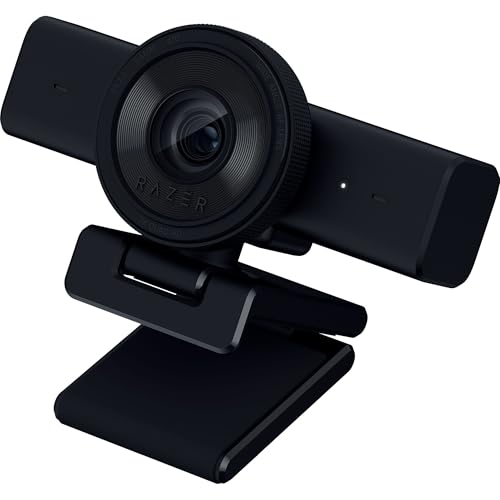
A 1440p 60fps webcam built for smooth, sharp streaming and video calls with a wide field of view. It keeps motion fluid on camera. The pick for streaming.
Resolution1440p 60fps
UseStreaming, meetings
ViewWide field
Best forStreaming
Pros
- Smooth 60fps
- Sharp 1440p
- Wide field of view
Check price on Amazon ›
A 2K webcam with good low light performance and adjustable field of view that suits home office meetings. It frames you clearly in varied lighting. The pick for video calls.
Resolution2K
FeatureLow light, adjustable FOV
UseMeetings
Best forVideo calls
Pros
- Sharp 2K
- Good in low light
- Adjustable framing
Check price on Amazon ›
A 1080p webcam with dual noise reducing microphones and a wide field of view at a friendly price for calls and work. It plugs in and just works. Strong value for everyday use.
Resolution1080p
Audio2 noise reducing mics
View90 degree
Best forValue everyday use
Pros
- Good value
- Dual mics
- Wide field of view
Check price on Amazon ›
A 1080p webcam with a built in privacy cover and a microphone at a low price, a popular budget pick for calls. The cover adds peace of mind. The pick for budget with privacy.
Resolution1080p
FeaturePrivacy cover
AudioBuilt in mic
Best forBudget with privacy
Pros
- Affordable
- Privacy cover
- Simple setup
Cons
- 1080p only
- Average low light
Check price on Amazon ›
A simple 720p webcam at the lowest price here that covers basic video calls and meetings reliably. It is a no fuss, low cost option. A budget friendly basic pick.
Resolution720p
UseBasic calls
PriceBudget
Best forCheap basic use
Pros
- Very affordable
- Simple and reliable
- Compact
Cons
- 720p only
- Basic image quality
Check price on Amazon ›
What to look for
Resolution and frame rate
1080p, on the Logitech C920x and EMEET, is sharp enough for most calls and streaming, while 2K and 4K, on the Anker and Elgato, add detail for creators. A higher frame rate like 60fps, on the Razer, keeps motion smooth. Match resolution to your needs and your computer power.
Low light performance
Good low light handling, on the Anker C200, keeps you clear in dim rooms, which matters for home offices. Cheaper webcams struggle in poor light. If your room is dim, prioritise low light performance or add a light.
Audio and features
Built in microphones, on most webcams here, are handy for calls, though a separate mic sounds better for streaming. Features like a privacy cover, on the NexiGo, and adjustable field of view add value. Decide which extras you will actually use.
Use and computer power
For calls, a reliable 1080p webcam is plenty, while streaming and content benefit from higher resolution and frame rates. Note that 4K webcams need a capable computer to run smoothly. Match the webcam to how you use it and your hardware.
Frequently asked questions
What is the best webcam overall?
The Logitech C920x is the best all rounder, sharp 1080p video with clear audio that works on any computer for calls and streaming. For premium 4K the Elgato Facecam is the pick, and the Microsoft LifeCam HD-3000 is the best cheap basic choice.
Is 1080p enough for a webcam?
For most calls and streaming, yes, and the Logitech C920x and EMEET deliver sharp 1080p. Creators wanting extra detail benefit from 2K or 4K, as on the Anker and Elgato. For everyday use, a good 1080p webcam is plenty.
Do I need a 4K webcam?
Only if you create content where extra detail matters and your computer can handle it, as with the Elgato Facecam. For meetings and casual streaming, 1080p or 2K is smoother and easier to run. Most people do not need 4K.
Which webcam is best for streaming?
The Razer Kiyo V2 X streams smoothly at 1440p 60fps, and the Elgato Facecam leads for 4K image quality. Both are built for creators. For streaming, prioritise higher frame rates and resolution with good software support.
Do webcams work in low light?
Quality varies, and webcams with good low light handling like the Anker C200 stay clear in dim rooms, while cheaper cameras get grainy. Adding a light helps any webcam. If your space is dim, choose a webcam known for low light.
Do webcams have microphones?
Most, including these, have built in microphones that are fine for calls. For streaming or recording, a separate microphone sounds noticeably better. If audio quality matters, use a dedicated mic alongside the webcam.
Is a privacy cover important?
A privacy cover, on the NexiGo N60, physically blocks the lens when not in use, which many find reassuring. You can also add a stick on cover to any webcam. If privacy matters to you, look for a built in cover.
Are budget webcams any good?
Yes for basic calls. The NexiGo N60 and Microsoft LifeCam handle meetings clearly for little money. The trade offs are lower resolution and weaker low light performance, not poor core function for everyday video calls.
The verdict
Logitech C920x HD Pro Webcam
9.2/10
The Logitech C920x is the webcam most people should buy, sharp 1080p and reliable for calls and streaming. The Elgato Facecam is the pick for premium 4K, while the Microsoft LifeCam HD-3000 is the value basic choice.
Check price on Amazon ›
Our top pick, secure checkout via Amazon
Note: Availability and specifications change often. Always confirm the current details on Amazon before buying.