Memory & Storage 7 External Drive Cases for Safe Travel Storage
P
By the Pickpedia Team
·7 picks compared
·Last verified September 2026
Affiliate disclosure: As an Amazon Associate, Pickpedia earns from qualifying purchases. Links on this page are paid links, and we may earn a commission at no extra cost to you. This never affects our picks or scores.
Quick answer
Pick a case sized to your exact drive. For 2.5 inch portables, a padded EVA shell with a mesh cable pocket handles travel knocks. Bare-drive owners may prefer a tool-free enclosure, while collectors with many 3.5 inch disks need a multi-bay organizer instead.
7 External Drive Cases for Safe Travel Storage at a glance
Why you can trust this guide
We compared these picks using verified manufacturer specifications, available manuals and documentation, current retailer listings, and patterns in owner feedback, alongside editorial research. We focus on measurable differences such as performance, capacity, usability, and build quality. Pickpedia does not present editorial research as laboratory testing, and we do not claim hands-on testing unless it was actually performed.
How we chose: We compared seven external drive cases and enclosures across fit, shell protection, accessory storage, and carrying hardware.
External drives survive daily use, then a single drop in a crowded bag ends them. A proper case absorbs impact, keeps cables from tangling, and lets you find the right drive fast. Choosing well starts with matching the case to your drive size and how you carry it.
Some shoppers want a slim sleeve for one portable HDD, others juggle a stack of disks or a bare SATA drive that needs an enclosure. Below, each option is grounded in its listed specifications and what reviewers commonly note, so you can match protection to how you actually travel and store.
Our top picks
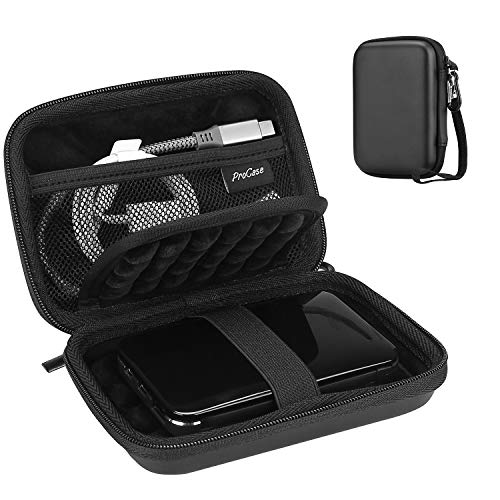
Sized at 5.70 by 3.90 by 1.50 inches outside, this ProCase fits most 2.5 inch portables including Seagate Backup Plus Slim, WD My Passport, Toshiba Canvio, and Samsung T9. A water-resistant EVA shell with soft lining guards against knocks, drops, and scratches, while internal padding removes compression risk. A mesh pocket holds cables and earbuds, and two small plastic slots carry SIM or memory cards. Elastic bands keep contents from spilling. An attached lanyard and carabiner clip it to a bag. Based on specifications it suits one drive plus accessories, so a large stack of disks needs something roomier.
Fits2.5 inch portable HDD/SSD
Exterior5.70 x 3.90 x 1.50 in
ShellWater-resistant EVA
ExtrasMesh pocket, card slots, carabiner
Pros
- Broad compatibility with popular portable drives
- Padded interior with elastic retention bands
- Includes lanyard and carabiner for carrying
Cons
- Holds just one drive plus small accessories
- Too small for 3.5 inch desktop drives
Check price on Amazon ›
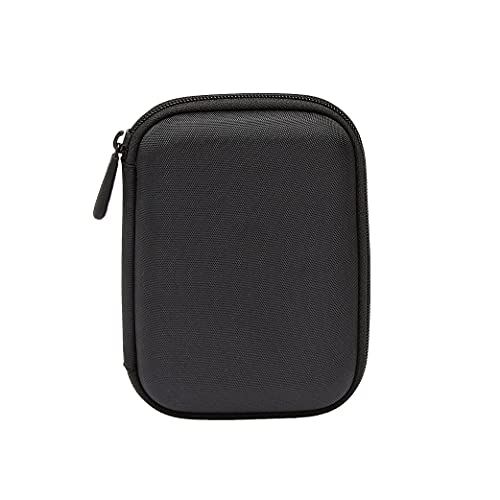
Amazon Basics keeps things straightforward with a slim-line design measuring up to 5.8 by 4.2 by 1.2 inches outside. It slides easily into a backpack or briefcase and suits medium to larger portable drives. An interior strap plus zippered closure holds the drive steady, and an internal mesh pocket stores power cords. The inside compartment measures roughly 5 by 3.25 by 0.4 inches, so it stays snug rather than bulky. Reviewers appreciate the compact profile for one drive. Padding is thinner than rugged rivals, so heavy-duty travelers who expect rough handling may want a thicker EVA shell.
FitsMedium to larger portable drives
ExteriorUp to 5.8 x 4.2 x 1.2 in
Interior5 x 3.25 x 0.4 in
ClosureZipper with interior strap
Pros
- Slim profile fits almost any bag
- Interior strap secures the drive in place
- Mesh pocket keeps cords together
Cons
- Thinner padding than rugged shells
- Tight interior limits accessory room
Check price on Amazon ›
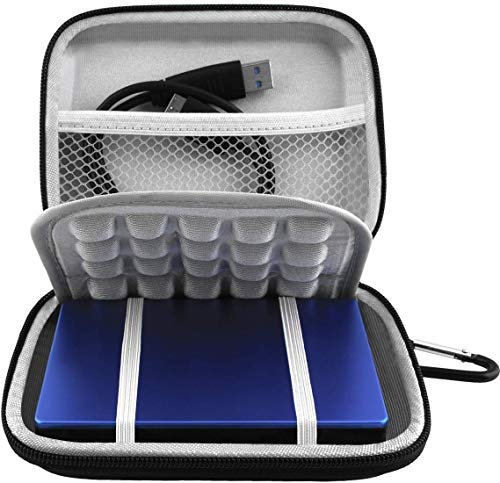
Lacdo wraps drives in a water-resistant, shockproof PU shell backed by soft lycra and shock-absorbing bubble lining. It fits Seagate Portable, Game Drive for PS5, One Touch, WD Elements, My Passport, and Toshiba Canvio drives from 1TB to 6TB. Exterior size runs 5.6 by 4.4 by 1.5 inches with a 4.8 by 3.5 by 1.0 inch interior. A mesh pocket holds cables and chargers, extra slots take SD cards, and an inner elastic strap fastens the drive snugly. A detachable hand strap and metal hook clip it to a backpack. The tighter interior suits one drive, not a collection.
Fits1TB to 6TB portable HDDs
Exterior5.6 x 4.4 x 1.5 in
ShellWater-resistant shockproof PU
CarryDetachable strap, metal hook
Pros
- Rugged splash and shock resistant shell
- Bubble lining cushions daily bumps
- Detachable strap and hook for flexible carry
Cons
- Interior holds a single drive
- Not suited to 3.5 inch desktop disks
Check price on Amazon ›
Rather than a sleeve, BENFEI turns a bare 2.5 inch SATA drive into a working USB disk. It handles SATA I, II, and III HDDs or SSDs up to 6TB in 7 or 9.5mm thickness, with a Type-C and Type-A plug for laptops, phones, or a PS4. Transfer runs up to 5 Gbps with UASP support, which the listing notes is 70 percent faster than traditional USB 3.0. Tool-free assembly means you push out the cover, drop in the drive, and go, with hot-swap and no drivers. It works only with 2.5 inch drives, so desktop disks are out.
Type2.5 inch SATA to USB enclosure
SpeedUp to 5 Gbps, UASP
PortsUSB Type-C and Type-A
CapacityUp to 6TB, 7 or 9.5mm
Pros
- Tool-free install with hot-swap support
- Dual Type-C and Type-A connectivity
- UASP speeds well above basic USB 3.0
Cons
- Fits only 2.5 inch drives
- Adds no padded travel protection
Check price on Amazon ›
Crisinant targets people with a growing drive library. A double-layer design holds up to 14 hard drives in a movable storage layer, and the grid layer with shock-absorbing pads cushions each disk. A built-in combination lock guards against loss, with a code that owners report is simple to set. A top handle makes it portable for home, work, or trips, while mesh and elastic pockets store cables and SIM cards, keeping the desktop tidy. It is built around 3.5 inch drives and bulk storage, so it is oversized for anyone carrying just one portable disk.
Type3.5 inch multi-drive storage bag
CapacityUp to 14 drives
SecurityBuilt-in combination lock
ExtrasMesh and elastic pockets, handle
Pros
- Holds a large stack of drives at once
- Combination lock adds security
- Shock-absorbing grid protects each disk
Cons
- Bulky for carrying a single drive
- Sized for 3.5 inch disks, not slim portables
Check price on Amazon ›
ALKOO shapes this case specifically around the LaCie Rugged Mini in 1TB through 5TB capacities, with a 6 by 4.64 by 1.81 inch outer box. A hard, splash-resistant shell shields the drive surface from knocks and dirt, helping extend its life. Inside, a mesh pocket organizes USB cables, SD cards, and flash drives, while an elastic strap holds the drive snugly. A detachable wrist strap makes it easy to grab for travel, and it slips into a backpack or suitcase. Because it is tuned to LaCie dimensions, owners of chunkier third-party drives should confirm fit before buying.
FitsLaCie Rugged Mini 1TB to 5TB
Exterior6 x 4.64 x 1.81 in
ShellHard splash-resistant
CarryDetachable wrist strap
Pros
- Purpose-shaped for LaCie Rugged Mini
- Mesh pocket sorts cables and cards
- Detachable wrist strap for quick carry
Cons
- Tuned to LaCie sizing, may not fit others
- Single-drive capacity only
Check price on Amazon ›
SABRENT offers a tool-free enclosure that turns a spare 2.5 inch SATA drive into an external one. It reaches up to 5 Gbps on a USB 3.0 port and falls back to 480 Mbps on USB 2.0, with UASP optimization aimed at SSD performance. Standard notebook 2.5 inch SATA and SATA II drives fit, and it stays hot-swappable and plug-and-play with no drivers. Support spans modern Mac and Windows plus older releases. As a bare enclosure it provides connectivity, not cushioning, so pair it with a padded sleeve if you plan to travel with the drive.
Type2.5 inch SATA to USB 3.0 enclosure
SpeedUp to 5 Gbps on USB 3.0
OptimizedUASP for SSD
InstallTool-free, hot-swap
Pros
- SSD-optimized UASP performance
- Tool-free plug-and-play setup
- Wide Mac and Windows support
Cons
- No padding for travel protection
- Older USB 3.0 rather than newer standards
Check price on Amazon ›
What to look for
Match the case to your drive size
Start by knowing whether you own a slim 2.5 inch portable, a chunky 3.5 inch desktop drive, or a bare disk needing an enclosure. Measure your drive and compare it against a case's listed interior dimensions. A snug fit stops the drive sliding around, which is where impact damage usually begins.
Shell material and shock absorption
Water-resistant EVA and PU shells shrug off splashes and knocks, while soft lycra or bubble lining cushions the drive within. Look for internal padding that removes compression risk and elastic bands that keep everything fastened. Reviewers consistently point to lining quality as the difference between a case that merely holds and one that truly protects.
Accessory storage and organization
A good case earns its keep by taming cable clutter. Mesh pockets hold USB cords and chargers, and small plastic slots keep SD or SIM cards from wandering. If you carry several disks, a multi-bay organizer with a grid layer keeps each one separated and easy to find at a glance.
Cases versus enclosures
A carrying case protects a drive that already works on its own. An enclosure is different: it converts a bare internal SATA drive into a usable USB device. If you have a spare disk from an old laptop, a tool-free enclosure brings it back to life, though it adds no travel padding of its own.
Frequently asked questions
How do I know a case will fit my drive?
Compare your drive's measurements against the case's listed interior dimensions, not just the outer size. Most 2.5 inch cases quote both. A snug interior around one inch deep suits standard portable drives and stops movement inside the shell.
What is the difference between a case and an enclosure?
A case cushions a drive that already functions as an external unit. An enclosure houses a bare internal 2.5 inch SATA drive and gives it a USB connection, turning a spare disk into working storage.
Are these cases water resistant?
Several shells, including the EVA and PU options here, are water resistant against splashes and light rain. That guards the drive from spills, though none are described as fully submersible, so keep them out of standing water.
Can one case hold multiple drives?
Most single-drive sleeves fit one disk plus small accessories. For a collection, a multi-bay organizer holds many drives in separate padded slots, which suits anyone storing a stack of desktop disks at home.
Will an enclosure work with an SSD?
Yes. The tool-free enclosures here support 2.5 inch SATA SSDs, and UASP optimization helps them reach faster transfer rates on a USB 3.0 port compared with basic USB connections.
Do these cases fit 3.5 inch desktop drives?
Most slim sleeves are built for 2.5 inch portables and will not fit a bulkier 3.5 inch drive. Choose a dedicated multi-bay storage bag designed for desktop disks if that is what you own.
How do the carrying straps and hooks help?
A detachable strap or carabiner clips the case to a backpack or lets you grab it quickly. That keeps the drive within reach and reduces the chance of leaving it behind while traveling.
Is a tool-free enclosure hard to set up?
No. Tool-free designs let you push out the cover, drop the drive in, and close it, with hot-swap and no drivers on modern systems. Most owners report finishing setup in under a minute.
The verdict
ProCase External Hard Drive Travel Case fo...
9.2/10
For most travelers with a single 2.5 inch portable, the ProCase strikes the best balance of fit, padding, and accessory storage. Choose Lacdo when you want the toughest splash-resistant shell, or the Crisinant bag if you store many desktop drives at once. Reviving a bare disk instead? The BENFEI enclosure adds dual-connector convenience, while SABRENT suits SSD owners. Match the pick to your drive size and how you carry it.
Check price on Amazon ›
Our top pick, secure checkout via Amazon
Note: Availability and specifications change often. Always confirm the current details on Amazon before buying.