Home ›
Electronics › Why Foil Behind a Router Helps One Band and Nulls the Other
Electronics
Why Foil Behind a Router Helps One Band and Nulls the Other
PBy the Pickpedia Team·3 picks compared·Last verified October 2026
Affiliate disclosure: As an Amazon Associate, Pickpedia earns from qualifying purchases. Links on this page are paid links, and we may earn a commission at no extra cost to you. This never affects our picks or scores.
This page contains affiliate links. If you buy through one we may earn a
commission, at no cost to you.
It works, within a limit that is both smaller and stranger than people expect. A
flat conducting sheet behind an antenna can add at most 6.02 decibels in the forward
direction, and only if it stands exactly a quarter of a wavelength off the antenna.
That is 30.7 millimetres at 2.4 gigahertz and 14.5 at 5. Those two numbers are
irreconcilable, and worse than irreconcilable: the spacing that gives 2.4 gigahertz its
full 6 decibels puts 5 gigahertz on the wrong side of a null and takes 8 away.
So on a dual band router, which is every router sold for the last decade, the foil
is not a free improvement. It is a trade, and it trades in the wrong direction, because
5 gigahertz already starts 7 decibels behind on path loss.
The sheet does not reflect, it makes a copy of your antenna
The useful way to think about a conductor behind an antenna is not reflection but
imaging. A perfectly conducting plane makes the field in front of it identical to what
you would get from the real antenna plus a mirror copy of it, sitting the same distance
behind the plane, with its sign reversed. Everything follows from adding those two
together.
The forward field is one plus a copy that has travelled an extra distance of twice
the spacing and had its sign flipped. Work the phase and the magnitude comes out as
twice the absolute sine of two pi times the spacing divided by the wavelength, so the
gain over having no sheet there at all is twenty times the base ten logarithm of
that.
Two sanity checks fall straight out and both are useful. At a quarter wavelength the
sine is one, the two add perfectly and you get 20 log of 2, which is 6.02 decibels. And
at zero spacing the sine is zero, which is a complete null: a sheet of foil taped flat
against an antenna does not reflect its signal forward, it shorts the antenna out. That
second result is the one that catches people, because taping the foil on is the obvious
way to do it and it is the one spacing guaranteed not to work.
So the whole method lives or dies on one measurement, and the measurement is in
millimetres. Channel 6 sits at 2,437 megahertz, so its wavelength is the speed of light
over that, which is 123.0 millimetres, and the quarter wave is 30.7. Channel 36 sits at
5,180 megahertz, wavelength 57.88 millimetres, quarter wave 14.5.
Both curves are 20 log10 of twice the absolute sine of two pi times the spacing over
the wavelength, which is the standard image result for a dipole in front of a perfect
conducting plane, where the sign reversal on reflection is what puts the null at zero
spacing. Wavelengths are the speed of light over the channel centre frequency, 123.0 mm
at 2,437 MHz and 57.88 mm at 5,180 MHz. The indoor range conversions assume path loss
exponents of 3 and 4. Wall losses are typical published ranges rather than measurements,
and no listing we carry publishes an antenna gain other than as a bare spec-table
number.
Why the two bands cannot be served together
Set the sheet at 30.8 millimetres for 2.4 gigahertz and work out what 5 gigahertz
sees. Two pi times 30.8 over 57.88 is 3.344 radians, whose sine is minus 0.200, so the
gain is 20 log of 0.400, which is minus 7.96 decibels. Higher up the band at 5,500
megahertz it recovers to minus 2.00.
And there is no escaping it by picking a different spacing, because the geometry is
periodic and the two bands land in opposite halves of the cycle. For a 30.8 millimetre
sheet the exact null falls where the wavelength is 61.6 millimetres, which is 4,867
megahertz, immediately below the bottom of the 5 gigahertz band. The next constructive
peak is where the wavelength is 41.1 millimetres, which is 7,300 megahertz, above the
top of the 6 gigahertz band. The entire 5 gigahertz allocation sits between a null and
the next peak, which is the destructive half.
Which matters more than it sounds, because of the order the two bands start in. Free
space loss goes as the square of frequency for fixed antennas, so 20 log of 5,500 over
2,437 is 7.08 decibels of penalty that 5 gigahertz carries before any wall or any
reflector is involved. The band that needs help is the one the foil hurts, and the band
the foil helps is the one that was already reaching further.
The one case in our catalogue where it is unambiguously right
There is a category of device for which all of the above collapses into a clean win,
and it is worth naming because it is the honest answer to the question rather than a
dismissal of it. Single band devices.
A ZUMIMALL 2K solar security
camera with 360 degree coverage connects, as its record states, "over 2.4GHz WiFi
through a built-in dual antenna", and its own drawbacks are explicit: it "Works only on
2.4GHz WiFi, not 5G". There is no second band to sacrifice. It is wire free and solar
powered, so it is placed where the view is rather than where the signal is, which is
exactly the situation where a few decibels decides whether it holds a connection at
all.
So for a camera at the far corner of a garden, a sheet of foil or a biscuit tin lid
on the far side of it from the house, standing 30 to 31 millimetres off the antenna, is
a genuinely correct intervention with no trade against anything. Note which end to put
it on: antenna gain is reciprocal, so a reflector helps a link in both directions
equally whether you fit it at the router or at the camera, and the camera is the end
that is usually further from everything and easier to get at. Our
ZUMIMALL solar camera
review has the detection features, which matter more day to day.
And one honest caveat on that record: it publishes a "built-in dual antenna" and no
gain figure for it, so the starting point you are adding 6 decibels to is unknown. That
is the norm in this category rather than a failing of this listing. Across our whole
catalogue, antenna gain appears only as bare spec-table numbers on a couple of USB and
PCIe adapters, where our USB WiFi adapter
coverage records twin 5 dBi antennas on one dongle and a 6 dBi omnidirectional on
another, with no reference point for either.
What the foil cannot touch, and it is usually the thing stopping you
Three limits, in order of how often they are the real problem.
First, distance beats gain and it is not close. Indoors, path loss goes as distance
cubed or worse, because every wall and floor adds its own loss on top of the geometric
spreading. With an exponent of 3, six decibels of gain extends your reach by ten to the
power 6 over 30, which is 1.58, and at an exponent of 4 it is 1.41. Against that,
halving the distance to the router is worth ten times the exponent times the log of two,
which is 9.03 decibels at an exponent of 3 and 12.04 at 4. Moving the router to the
middle of the house beats the best possible foil, by a margin, and it takes a minute.
Second, a single wall can eat the whole gain. Plasterboard runs around 3 decibels at
2.4 gigahertz, interior brick or blockwork 6 to 12, and reinforced concrete more, with
5 gigahertz worse again on all three. So arranging the geometry so the signal crosses
one fewer masonry wall is worth more than any reflector, and that is a question of where
the router sits rather than what is behind it.
Third, and this is the one nobody mentions: gain is reciprocal, so a reflector
increases the interference arriving from the direction it is aimed at by exactly as much
as it increases your own signal. If what is limiting you is a neighbour's access point
on the same channel in roughly the same direction as your own device, the foil raises
signal and interference together and your signal to interference ratio does not move at
all. A directional antenna only helps congestion when the interference is coming from a
direction you are not aiming at.
The device that solves the problem by moving instead
A SIMO Solis Edge 5G WiFi
hotspot is in this article because of one feature that is the correct engineering
answer to the whole question. Its record describes SignalScan, which "automatically
scans and connects to the strongest mobile signal in the area", and names "RVs,
campers, motorhomes and road trips" as the use case.
That is choosing the best available path rather than trying to beat a bad one, and it
is worth far more decibels than any passive gain. The record also makes the sensible
observation that "the thing you want is not raw speed but something that keeps finding a
usable network without you intervening". For a 2.4 gigahertz device at the edge of a
house, the equivalent move is to change channel and change position before touching the
antenna.
Its own record is unusually straight about its gaps, and two are relevant here. It
publishes two conflicting weights, "2.8 ounces and 0.68 pounds", which the record flags
rather than picking the flattering one. And it publishes no antenna specification at all,
which means the WiFi 6 radio inside it is as unquantified as everything else in the
category. Our SIMO Solis Edge
review has the data allowance arithmetic, which matters more than any of this, and
our portable hotspot coverage has the
category view.
The same geometry at a tenth of the frequency
One contrast makes the millimetre figures concrete. FRS radios transmit around 462.6
megahertz, so their wavelength is the speed of light over that, which is 648
millimetres. A quarter of that is 162 millimetres. A reflector for a walkie talkie has
to stand a hand's width off the antenna, where one for 2.4 gigahertz stands roughly the
width of two credit cards off it.
Which is why nobody builds reflectors for handhelds and everybody builds them for
microwave links: at 2.4 gigahertz the hardware is pocket sized, and at 462 megahertz it
is furniture. The physics is identical and the only thing that changed is the one number
the geometry is measured in.
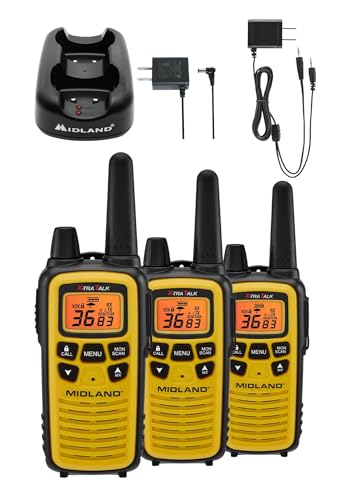
A Midland LXT630VP3 FRS
walkie talkie three pack also happens to carry the best written range paragraph in
our catalogue, and it deserves quoting because it is the same class of claim as a foil
mod: Midland quotes up to 30 miles, and the listing itself qualifies it: longer range
communication in open areas with little or no obstruction. FRS is line of sight. Hills,
buildings and trees all cut it, and in ordinary terrain real usable range is a small
fraction of the headline. Its own drawbacks keep that honest, stating that "The 30
mile range applies only to open, unobstructed ground". That is the right way to publish
a propagation figure, and it is the lens to read any gain claim through. Our
Midland LXT630VP3
review covers the weather alerting, which is its real feature.
The honest limit, and the free technique that settles it in two minutes
The limit is that the 6.02 decibels is a ceiling for a perfect conductor of infinite
extent, and your biscuit tin lid is neither. A finite sheet lets energy diffract around
its edges, so the real gain from a hand-sized piece of foil at 2.4 gigahertz, where the
wavelength is 123 millimetres and the sheet is only a couple of wavelengths across, is
meaningfully less than the ideal. Three to five decibels is a fair expectation and the
drawing's 6 is an upper bound. The spacing sensitivity is real though, and it is the
reason most attempts produce nothing: at 10 millimetres instead of 30.7 the gain is
essentially zero, and at zero millimetres it is negative.
Also honest: the band argument above assumes both radios share the same antennas or
sit close enough together that one sheet covers both, which is true of most consumer
routers and not of all of them. If your router has separate external antennas per band
you could in principle give each one its own spacing, which is the only configuration in
which the trade goes away.
And then the free technique, which is better than every purchase mentioned here and
which nobody does. Measure it. Every phone can report received signal strength in dBm,
on Android through the WiFi details or a developer screen and on an iPhone through
Apple's own AirPort Utility with its scanner enabled. Stand in the spot that is giving
you trouble, write down the number, make your change, wait ten seconds and write it down
again.
That turns the entire question from an argument into an experiment with a unit. If
the foil is worth 4 decibels you will see 4 decibels. If it is worth nothing you will
see nothing, and you will have learned that in two minutes rather than believing
something for a year. And while you are holding the meter, try the two things the
arithmetic says are larger: move the router two metres toward the middle of the house,
and switch your 2.4 gigahertz radio between channels 1, 6 and 11. Those are the only
three channels in the band that do not overlap each other, so they are the only three
worth trying, and one of them is usually several decibels of interference quieter than
the one you are on.
Why Foil Behind a Router Helps One Band and Nulls the Other at a glance
Families on campsites, ski slopes and hikes who want weather alerts included
Three radios with three rechargeable packs, clips and a desktop charger
The 30 mile range applies only to open, unobstructed ground
Why you can trust this guide
We compared these picks using verified manufacturer specifications, current retailer listings, and patterns in owner feedback, alongside editorial research. We focus on measurable differences such as performance, capacity, usability, and build quality. Pickpedia does not present editorial research as laboratory testing, and we do not claim hands-on testing unless it was actually performed.
Best for Wire-free solar home security with wide PTZ coverage
8.8/ 10 Pickpedia editorial score
ZUMIMALL's 2K solar security cameras come as a wire-free 2-pack with 360-degree coverage. A 130-degree wide lens, 355-degree horizontal and 120-degree vertical PTZ rotation, and 4X digital zoom cover a yard or entry. Solar charging and 2.4GHz WiFi mean no wiring. Features include human detection, 10 sensitivity levels, color night vision to 65 feet, two-way audio, an IP66 rating, and micro SD or cloud storage.
Resolution3MP, described as 2K
Field of view130-degree wide angle
Rotation355 horizontal, 120 vertical
Zoom4X digital
Night visionColor up to 65 feet
WiFi2.4GHz only
Waterproof ratingIP66
StorageMicro SD to 128GB or cloud
Pros
PTZ rotation and wide lens cover a full area
Solar charging removes wiring and manual recharge
Color night vision reaches up to 65 feet
Human detection and 10 sensitivity levels cut noise
Best for Frequent international travellers and RV owners who want data without juggling local SIMs
8.2/ 10 Pickpedia editorial score
A pocket-sized 5G and WiFi 6 hotspot that needs no SIM card and no contract, bundled with a lifetime allowance of 1GB a month plus 30GB of global data, covering over 300 carriers in more than 140 countries.
BrandSIMO
ModelS5G25-30
Mobile network5G
WiFiWiFi 6
SIM requiredNo
ContractNone
Lifetime data1GB a month, 12GB a year
Bundled global data30GB
Carriers300+
Countries140+
Signal selectionSignalScan, automatic
Quoted device weight2.8 oz, 78.8 g
Listed weight attribute0.68 lb
BatteryQuoted at multiple days per charge
ColourMidnight Black
WarrantyNot stated, contact the seller
Pros
No SIM card and no locked-in contract
5G with WiFi 6 for multiple connected devices
Lifetime allowance of 1GB a month, 12GB a year
Separate 30GB global data pack included
Over 300 carriers in more than 140 countries
SignalScan finds the strongest local signal automatically
Pocket-sized, quoted at 2.8 ounces
Battery quoted to last multiple days
Cons
No warranty terms on the listing, you are told to ask the seller
Two conflicting weight figures published, 2.8 ounces and 0.68 pounds
Battery life given as multiple days rather than in hours
The 15 times faster claim is a vendor comparison, not independent
Best for Families on campsites, ski slopes and hikes who want weather alerts included
8.4/ 10 Pickpedia editorial score
A three pack of licence-free FRS radios with 36 channels, 121 privacy codes, NOAA weather scan and alerting, and dual power from included rechargeable packs or AAA cells.
BrandMidland
ModelLXT630PAX3VP3
Part numberLXT630X3VP3
Pack size3 radios
ServiceFRS, licence free
Channels36, with channel scan
Privacy codes121 CTCSS, up to 2,662 combinations
Stated rangeUp to 30 miles in open areas with little or no obstruction
WeatherNOAA scan across 10 WX channels, plus alerting
PowerRechargeable packs included, or 3 AAA cells not included
Silent modeTurns off all tones
Dimensions1 x 2 x 7 in
ColourYellow
WarrantyNot published, contact Midland
Pros
Three radios with three rechargeable packs, clips and a desktop charger
Dual power, so AAA cells work when the pack is flat
NOAA Weather Scan across 10 weather channels
Weather Alert sounds an alarm for severe weather in your area
36 FRS channels with 121 privacy codes
Silent operation turns off all tones
High-visibility yellow faceplate
No licence and no network needed
Cons
The 30 mile range applies only to open, unobstructed ground
AAA batteries for the backup power mode are not included
No warranty period published on the listing
Privacy codes reduce interference, they do not encrypt