Electronics Taming Cable Clutter: How to Organize the Wires Around Your Desk and Home
P
By the Pickpedia Team
·1 picks compared
·Last verified August 2026
Affiliate disclosure: As an Amazon Associate, Pickpedia earns from qualifying purchases. Links on this page are paid links, and we may earn a commission at no extra cost to you. This never affects our picks or scores.
Tame cable clutter by first cutting the number of cords, then bundling, routing and anchoring what remains. Unplug unused cables. Group cords heading the same way. Use reusable ties and adhesive clips to run them along desk edges. Hide the bundle in a sleeve. A tidy setup looks cleaner and works better.
Why cable management is worth it
Getting cables under control pays off well beyond looks. The visual gain alone is striking. A cable-free desk or TV area looks cleaner and calmer at once. The practical wins matter too. You can trace the right cord instead of untangling a knot. Adding or swapping a device becomes simple, not a frustrating dig. Neatly routed cables gather less dust. They also get tripped over or unplugged far less. A decluttered setup simply feels better to work at. It cuts the low-level stress of visual mess. For little effort, cable management improves how a space looks, works and feels. That makes it one of the most satisfying quick wins in a home or office.
Start by decluttering the cables themselves
Before organizing, cut how many cables you have. The tidiest routing cannot fix a genuine excess of cords. Unplug and pull out everything. Then sort through the pile. Discard cables for devices you no longer own. Toss duplicates and the mystery cords none of us can identify. Keep only what you actually use. Consolidate where you can. A single multi-device charger or a powered hub can replace several. Fewer cables means less to organize and a cleaner result. This step mirrors decluttering anything else. Routing six needed cables beats wrestling fifteen when half are redundant. Clear out the extras first and everything after gets simpler.
The tools that make it easy
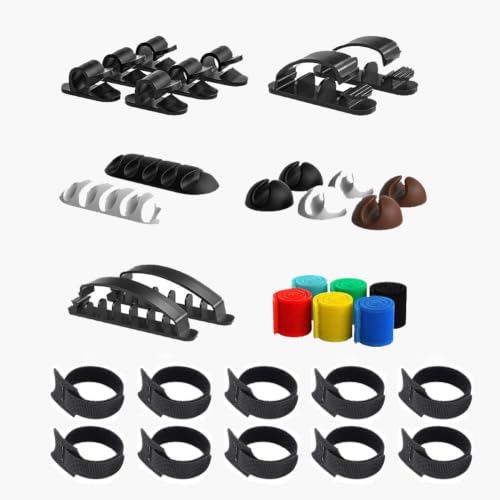
A few inexpensive tools do most of the work. A kit gathers them in one place. The essentials are cable ties to bundle cords. Add adhesive clips to route and anchor individual cables. Sometimes sleeves or channels hide the bundles. A kit like this all-in-one cord management kit includes reusable ties, self-adhesive clips and holders in various sizes. That gives you everything for a whole setup in one go. Choose reusable ties over single-use zip ties. Setups change, and you will want to adjust. Self-adhesive clips need no drilling, ideal for most desks and for renters. To hide bundles, use sleeves, raceways or under-desk trays. You do not need much: ties, clips and maybe a sleeve. A good kit covers it all.
Organizing your desk and workspace
The desk is where cable chaos runs worst. Tidying it pays off most. Start by routing cables logically. Run them along the back edge or legs, not across the top. Group cables heading to the same area. Bundle loose cords with ties so they run as one neat line. Use adhesive clips to anchor cables where they belong. Fix the end of a charging cable in place too. Then it will not slip behind the desk when unplugged. Get power strips and adapters up off the floor and out of sight. An under-desk tray or sleeve hides the main bundle entirely. Label cables at both ends if you have many. A routed, bundled and anchored desk stays tidy and accessible.
Behind the TV and around the home
Cable clutter is not just a desk problem. Apply the same approach elsewhere. Behind the TV, a jungle of cables gathers. Bundle and route the cords neatly. Use clips to run them down the wall or along the unit. Hide the bundle in a sleeve or channel. Organize the power strip rather than leaving it sprawled. Around the home, tidy bedside tables and kitchen counters where chargers pile up. Treat any device cluster the same way, with ties and clips. Route floor cables against walls and out of walkways to prevent trips. For a really clean look, run cables through raceways or behind furniture. The principles hold everywhere: declutter, bundle, route, anchor and hide. Every cabled corner can look as tidy as your desk.
The bottom line
Taming cable clutter is one of the easiest and most satisfying home improvements. A dusty, tangled mess becomes a clean, functional setup. Start by decluttering the cables themselves. Remove what you no longer need. Then reach for simple tools: reusable ties, adhesive clips and maybe a sleeve. An all-in-one kit makes it painless. Bundle, route and anchor your cords. Organize the desk by running cables along edges and legs. Hide power strips and clip cable ends in place. Apply the same method behind the TV and around the home. Do that and your cables turn tidy, accessible and nearly invisible. Every space gains a cleaner, more professional feel.
Taming Cable Clutter: How to Organize the Wires Around Your Desk and Home at a glance
Why you can trust this guide
We compared these picks using verified manufacturer specifications, current retailer listings, and patterns in owner feedback, alongside editorial research. We focus on measurable differences such as performance, capacity, usability, and build quality. Pickpedia does not present editorial research as laboratory testing, and we do not claim hands-on testing unless it was actually performed.
Our top picks
A 34-piece all-in-one cord management kit with multiple sizes of reusable cable ties, self-adhesive cable clips and wire holders that handle everything from thin charging cables to thick power cords, with strong no-drill adhesive that grips desks, walls, glass, wood and ceramic, and reusable ties that open and re-close hundreds of times, for tidying desks, TV areas and home offices.
TypeCable management kit
Pieces34 (ties, clips, holders)
SizesMultiple, thin to thick cords
TiesReusable, adjustable
MountingSelf-adhesive, no drilling
Sticks toDesk, wall, glass, wood, ceramic
UseDesk, TV, office, home
ReuseOpen/close hundreds of times
Pros
- All-in-one: ties, clips and holders in multiple sizes
- Handles everything from thin charging cables to thick power cords
- No drilling; strong self-adhesive on many surfaces
- Reusable ties open and re-close hundreds of times
- Reorganize freely as your setup changes, no waste
- Works on desks, TV areas, nightstands and workbenches
Cons
- Adhesive performs best on clean, smooth surfaces
- Holds less well on rough, textured or dusty surfaces
- Match clips to cable size; very heavy bundles ask more of small clips
- Repositioning adhesive clips can weaken the stick
Read our full review → Check price on Amazon ›
Note: Availability and specifications change often. Always confirm the current details on Amazon before buying.