Electronics 6 Wireless Barcode Scanners for Fast Checkout
P
By the Pickpedia Team
·6 picks compared
·Last verified October 2026
Affiliate disclosure: As an Amazon Associate, Pickpedia earns from qualifying purchases. Links on this page are paid links, and we may earn a commission at no extra cost to you. This never affects our picks or scores.
Quick answer
Pick a scanner by the codes you handle. For plain retail tags, a 1D laser like the Tera reads fast and reliably. For phone screens, coupons, and QR labels, choose a 2D imager such as the Zebra DS2278 or NETUM. Match connection mode and battery life to your counter workflow.
6 Wireless Barcode Scanners for Fast Checkout at a glance
Why you can trust this guide
We compared these picks using verified manufacturer specifications, available manuals and documentation, current retailer listings, and patterns in owner feedback, alongside editorial research. We focus on measurable differences such as performance, capacity, usability, and build quality. Pickpedia does not present editorial research as laboratory testing, and we do not claim hands-on testing unless it was actually performed.
How we chose: We compared six cordless scanners across code support, connection modes, battery life, and durability, based on published specifications and owner feedback.
Checkout slows down when a scanner misreads tags or drops its wireless link mid shift. A good cordless reader clears items in one pass, holds a charge through a full day, and pairs quickly with whatever register or computer you already run. That combination matters more than any single headline spec.
This roundup covers laser 1D readers built for standard retail barcodes and imager based 2D units that also read QR codes and phone screens. We looked at connection flexibility, decoding on worn or reflective labels, and how each unit handles the wear of a busy counter, so you can match one to your setup.
Our top picks
Tera builds this laser reader around a larger battery, and a small indicator light shows the charge left so a shift rarely ends with a dead unit. The curved, widened handle and flat trigger suit long scanning stretches, while an orange silicone cover and IP54 rating help it survive drops and dust on a busy counter. It runs plug and play through a USB receiver or cable with no drivers, and reaches wireless range in open space. Supporting nearly all common 1D symbologies, it reads damaged, fuzzy, and reflective labels well. As a 1D laser unit, it will not scan QR codes or barcodes shown on phone screens.
Code support1D barcodes only
ConnectionUSB receiver or wired USB
Wireless rangeUp to 328 ft, open space
DurabilityIP54, drop resistant cover
Pros
- Battery indicator light reduces mid shift surprises
- Reads damaged, reflective, and smudged 1D labels
- Plug and play with no driver install
Cons
- No 2D or QR code support
- Cannot read barcodes off screens
Check price on Amazon ›
NETUM leans on wide compatibility, pairing over Bluetooth HID, SPP, or BLE with phones, tablets, and computers across major operating systems, plus 2.4G wireless and a wired option. Its high resolution CCD sensor decodes 1D and stacked codes from paper or screens, and even through glass or shrink wrap. Three scan modes and a storage mode that holds many offline scans help when you roam out of range. The large battery supports long stretches between charges, and prefixes, suffixes, and the buzzer are all programmable. Reviewers note it does not work with several named POS platforms, so confirm your system first.
Code support1D and stacked codes
ConnectionBluetooth, 2.4G, wired
Offline storageUp to 100,000 scans
Battery2600mAh rechargeable
Pros
- Reads codes from paper and screens
- Storage mode saves scans out of range
- Programmable prefixes, suffixes, and buzzer
Cons
- Not compatible with several named POS systems
- Setup requires scanning config barcodes first
Check price on Amazon ›
This cordless imager reads a broad list of 1D symbologies plus 2D formats like QR, Data Matrix, PDF417, and Aztec, and it captures codes shown on mobile screens. An upgraded CMOS sensor drives stable decoding, and two modes, key trigger and auto sensing, let you scan hands free when the counter gets busy. It ships with both a wired USB cable and a 2.4G dongle, works across Windows, Mac, and Linux, and slots into QuickBooks, Word, and Excel with no extra software. The built in battery supports long continuous sessions with a month of standby. Its all plastic build feels lighter duty than industrial rated units.
Code support1D and 2D including QR
Connection2.4G dongle or wired USB
Battery2000mAh, 72 hr continuous
CompatibilityWindows, Mac, Linux
Pros
- Reads QR and 2D codes off screens
- Auto sensing mode enables hands free scanning
- Works with common software out of the box
Cons
- No stated dust or drop rating
- Plastic build feels lighter duty
Check price on Amazon ›
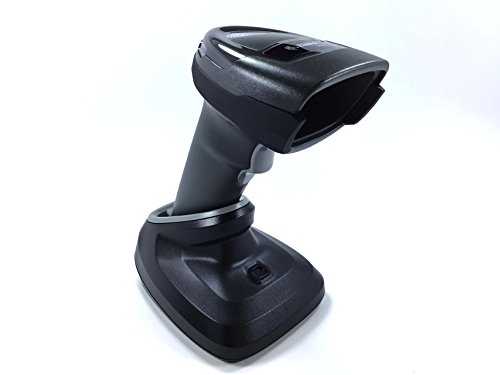
Zebra ships the DS2278 as a full kit with scanner, charging cradle, battery, USB cable, and manual, ready to use out of the box with settings tuned for most jobs. A proprietary Wi-Fi friendly mode keeps its Bluetooth off your WLAN channels, cutting interference in busy stores. Omni directional imaging means workers never line up the code, and the wide focal range speeds checkout and shortens training. You can manage the beeper, LED, and symbologies, view scanned data, and read serial info from Windows, Android, and iOS hosts. As a business grade unit it carries the heft and footprint of a full cradle setup, which suits fixed counters more than pocket carry.
Code support1D and 2D imaging
ConnectionBluetooth with Wi-Fi friendly mode
Scan range0.5 in to 14.5 in
KitScanner, cradle, battery, cable
Pros
- Omni directional scanning, no lining up codes
- Wi-Fi friendly mode reduces interference
- Preconfigured and ready out of the box
Cons
- Cradle setup favors fixed counters
- Larger footprint than pocket units
Check price on Amazon ›
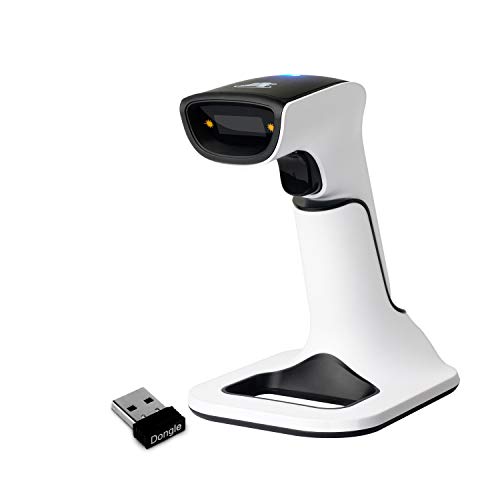
ScanAvenger pairs a 3 in 1 handheld, wireless, Bluetooth, and USB, with a smart charging stand that holds and refills the built in battery and even relays scans wirelessly from the base. Setup needs no software or apps, and vibration feedback confirms reads in noisy rooms where a beep gets lost. It connects to Mac, Windows, mobile devices, and POS systems, and offers manual, continuous, and auto sense modes. Code coverage spans common 1D types and 2D formats including PDF417, Aztec, Data Matrix, and QR. It does not read Maxicode, and it skips POS setups needing proprietary hardware or app level integration.
Code support1D and 2D, no Maxicode
ConnectionBluetooth, wireless, wired
StandCharging cradle with relay
FeedbackVibration and beep
Pros
- Charging stand relays scans wirelessly
- Vibration feedback works in noisy rooms
- No software or app install needed
Cons
- Does not read Maxicode
- Skips POS setups needing proprietary integration
Check price on Amazon ›
Eyoyo shrinks a capable 1D reader to pocket size at just over an ounce, so it travels easily for stocktakes, bookstores, and small retail floors. Three connection modes, 2.4G wireless, Bluetooth, and wired USB, cover most devices, with useful wireless range in open space. It decodes nearly all common 1D symbologies and handles damaged, distorted, colorful, and reflective labels. Broad compatibility spans laptops, POS systems, phones, tablets, and major operating systems. A rechargeable battery runs hours of continuous scanning and stretches to days with auto off. Note that it reads only printed 1D barcodes, not QR codes or any codes shown on screens, and it will not work with Square systems.
Code supportPrinted 1D barcodes only
Connection2.4G, Bluetooth, wired
WeightAbout 1.2 oz
Battery650mAh, up to 8 hr scanning
Pros
- Ultralight and truly pocket sized
- Three connection modes fit most devices
- Reads damaged and reflective printed labels
Cons
- No QR, 2D, or on screen scanning
- Not compatible with Square systems
Check price on Amazon ›
What to look for
Match the scanner to your codes
Start with what you actually scan. Plain retail tags and shelf labels are 1D barcodes, and a laser reader handles them fast. If you take QR coupons, loyalty codes on phones, or 2D shipping labels, you need an imager that reads 2D formats and on screen codes. Buying a 1D unit for a 2D job is the most common mismatch.
Choose the right connection mode
Wireless scanners connect three main ways. A 2.4G USB dongle offers a simple plug and play link with strong range. Bluetooth pairs directly with phones, tablets, and computers without a dongle. A wired USB fallback keeps you running if wireless drops. Units offering all three give the most flexibility as your setup changes.
Weigh battery life and charging
A counter scanner should last a full shift. Larger batteries push continuous scanning into many hours and standby into days or weeks. A charge indicator light or a charging stand makes it obvious when to top up. For roaming stocktakes, offline storage modes that hold scans out of range keep work moving when the link drops.
Check POS and durability fit
Confirm compatibility before buying, since several scanners state they do not work with specific POS platforms like Square. For rough environments, look at drop resistance, dust ratings, and protective covers. Feedback matters too, so vibration alerts help in noisy rooms where you cannot hear a beep.
Frequently asked questions
What is the difference between 1D and 2D scanners?
A 1D scanner reads the striped barcodes on most retail tags. A 2D imager reads those plus QR codes, Data Matrix, and PDF417. Only 2D imagers reliably read codes shown on phone or computer screens.
Can these scanners read barcodes off a phone screen?
Some can, some cannot. Imager based 2D units like the Zebra and NETUM read on screen codes. Laser 1D readers such as the Tera and Eyoyo are built for printed labels only, so they will not scan screens.
Do I need to install software or drivers?
Most of these units are plug and play. They connect through a USB receiver, Bluetooth, or a wired cable with no driver install. A few require scanning a configuration barcode from the manual before first use.
Will a wireless scanner work with my POS system?
Often yes, but always confirm first. Several scanners here list systems they do not support, including certain Square, DoorDash, or Lightspeed setups. Check your specific platform against the product notes before buying.
How long does the battery last?
It varies widely by model. Larger batteries support many hours of continuous scanning and weeks of standby, while compact units run several hours per charge. A charging stand or a battery indicator light makes managing charge easier.
What wireless range should I expect?
In open space, ranges run from roughly 30 meters up to a few hundred feet depending on the mode and model. Walls, shelving, and interference shorten that. For roaming work, pick a unit with offline storage so scans are saved out of range.
Are these scanners durable enough for a busy counter?
It depends on the build. Some carry dust ratings and drop resistant covers for rough use, while lighter plastic units suit gentler retail settings. Match the rating to how hard the scanner gets handled during a shift.
Can one scanner connect to multiple devices?
Many offer several connection modes, letting you switch between a computer, a phone, and a POS terminal. You typically reconnect when moving between devices rather than staying linked to all at once.
The verdict
Tera Wireless 1D Laser Barcode Scanner wit...
9.1/10
For most retail counters scanning standard tags, the Tera laser reader is our top pick, with its battery indicator and rugged cover. Choose the Zebra DS2278 if you want a proven business grade 2D imager, or the NETUM for the widest connection options and offline storage. The QR focused imager suits screen and 2D heavy shops, ScanAvenger favors easy stand charging, and the featherweight Eyoyo wins for mobile 1D work on the move.
Check price on Amazon ›
Our top pick, secure checkout via Amazon
Note: Availability and specifications change often. Always confirm the current details on Amazon before buying.