Wireless Access Points Best Wireless Access Points: 9 Picks Compared
P
By the Pickpedia Team
·9 picks compared
·Last verified November 2026
Affiliate disclosure: As an Amazon Associate, Pickpedia earns from qualifying purchases. Links on this page are paid links, and we may earn a commission at no extra cost to you. This never affects our picks or scores.
Quick answer
For most people, the Ubiquiti U6+ is the best wireless access point thanks to its Wi-Fi 6 radios and PoE+ power. The ASUS ExpertWiFi EBA63 and Zyxel NWA50AXPRO are strong alternatives when you need multi-gig uplinks or cloud management.
Best Wireless Access Points: 9 Picks Compared at a glance
Why you can trust this guide
We compared these picks using verified manufacturer specifications, available manuals and documentation, current retailer listings, and patterns in owner feedback, alongside editorial research. We focus on measurable differences such as performance, capacity, usability, and build quality. Pickpedia does not present editorial research as laboratory testing, and we do not claim hands-on testing unless it was actually performed.
A wireless access point adds Wi-Fi coverage without replacing your router. The models here range from desktop bridges to ceiling-mounted Wi-Fi 6 units, and they differ most in wireless standard, power method, and management options.
We compared the supplied specs on speed, PoE support, port speed, and setup tools. Use the tags and best-for notes to match each access point to a large home, a remote office, a gaming room, or an outdoor space.
Our top picks
The U6+ combines 802.11ax Wi-Fi 6 with a 3 Gbit/s wireless rate and a PoE+ port that carries data and up to 25.5W of power over one cable. That makes it a clean fit for ceiling or wall mounting where no outlet is nearby. It supports the full a/b/g/n/ac/ax standard set for broad client compatibility.
Wireless standardIEEE 802.11 a/b/g/n/ac/ax
Wireless speed3 Gbit/s
PowerPoE+ up to 25.5W
PortSingle PoE+ port
Pros
- Wi-Fi 6 support for modern clients
- Single-cable PoE+ installation
- High 3 Gbit/s wireless rate
Cons
- Power injector or PoE switch needed
- Management details not specified
Check price on Amazon ›
The EBA63 is an AX3000 Wi-Fi 6 access point with support for up to five SSIDs and VLAN tagging, plus a self-defined network option. It handles up to 100 active devices and is PoE or PoE+ powered. The Easy Management app and AiMesh compatibility help with scaling coverage.
Wireless standardWi-Fi 6 802.11ax
SpeedUp to 3000 Mbps
SSIDsUp to 5
PowerPoE and PoE+
Pros
- VLAN and multi-SSID support
- Handles up to 100 active devices
- AiMesh compatible for expansion
Cons
- Flammability rating applies only to top half
- No port speed listed
Check price on Amazon ›
Zyxel's NWA50AXPRO delivers AX3000 Wi-Fi 6 throughput with 160MHz channel support and a 2.5 Gigabit Ethernet uplink that avoids a 1Gbps bottleneck. It includes OFDMA, MU-MIMO, VLAN tagging, band steering, and WPA3 security. Management works locally or through free Nebula cloud, and the unit is TAA compliant.
Wireless standardWi-Fi 6 AX3000
Uplink1x 2.5GbE
PowerPoE+ or DC
SecurityWPA3
Pros
- 2.5G uplink on existing Cat5e cabling
- Free Nebula cloud management
- Fast roaming with 802.11r/k/v
Cons
- Outdoor use not stated
- Advanced features may overwhelm home users
Check price on Amazon ›
The Instant On AP22 is a Wi-Fi Certified 6 access point with 2x2:2 radios and Smart Mesh support. Setup runs through the Instant On mobile app or web portal with no subscription or licence required. This R6M49A bundle includes a 12V local power adapter, mount clip, and Ethernet cable.
Wireless standard802.11ax 2x2:2
PowerPoE or 12V adapter
ManagementInstant On app and portal
IncludedAdapter, mount clip, Ethernet cable
Pros
- No subscription or licence fees
- Power adapter included in this model
- Smart Mesh for cable-free expansion
Cons
- 2x2 radio design limits peak throughput
- Cloudflare integration may need setup
Check price on Amazon ›
This five-pack of Instant On AP25 units brings 4x4 Wi-Fi 6 with 4800 Mbps on 5 GHz and 574 Mbps on 2.4 GHz, for 5374 Mbps total throughput. Each unit has a 2.5G Ethernet port with PoE-in and is recommended for 100+ active devices. The bundle includes five access points and Ethernet cables, but no power sources.
Wireless standardWi-Fi 6 802.11ax
Throughput5374 Mbps total
Port2.5G Ethernet with PoE-in
Pack5 access points
Pros
- Five units for broad coverage
- 2.5G port on each unit
- No extra licensing fees
Cons
- Power injectors or PoE switch not included
- Overkill for a single room
Check price on Amazon ›
The CBW150AX is an enterprise-grade Wi-Fi 6 2x2 access point with a 1 GbE port and a ceiling-mount design. A PoE injector is included, and the unit carries a three-year hardware protection plan. It can be mixed with Cisco Business Wi-Fi 6 access points and mesh extenders to widen coverage.
Wireless standardWi-Fi 6 2x2
Port1 GbE
PowerPoE injector included
Warranty3-year hardware protection
Pros
- PoE injector in the box
- Three-year hardware protection
- Mixes with Cisco Business mesh extenders
Cons
- 1 GbE port caps wired backhaul
- 2x2 design suits lighter loads
Check price on Amazon ›
The DAP-X3060OU is an AX3000 Wi-Fi 6 access point built for outdoor use with an IP68 water- and dust-proof housing. It has one PoE 2.5-Gigabit LAN port for backhaul and is wall or ceiling mountable. Wi-Fi 6 brings greater efficiency and lower latency than earlier standards.
Wireless standardWi-Fi 6 AX3000
PortPoE 2.5GbE
HousingIP68 rated
MountWall or ceiling
Pros
- IP68 weather protection
- 2.5G PoE uplink
- Wi-Fi 6 efficiency
Cons
- Outdoor housing may be unnecessary indoors
- Power source details not listed
Check price on Amazon ›
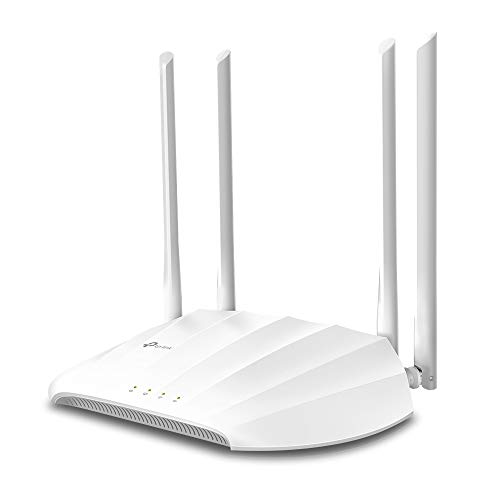
The TL-WA1201 is an AC1200 dual-band access point with 802.11ac Wave 2 MU-MIMO and four fixed antennas. It runs in Client, Multi-SSID, Range Extender, or AP mode and supports passive PoE through the included adapter. WPA and WPA2 encryption protect the network.
Wireless standard802.11ac Wave 2
SpeedUp to 1200 Mbps
ModesClient, Multi-SSID, Range Extender, AP
PowerPassive PoE adapter included
Pros
- Four operating modes
- PoE adapter included
- MU-MIMO for multiple devices
Cons
- Wi-Fi 5 rather than Wi-Fi 6
- Desktop design suits shelf placement
Check price on Amazon ›
The LAPAC1200 is an 802.11ac dual-band access point with PoE and IPv6 support. High-power antennas provide Range Boost for wider coverage. It is a straightforward choice for adding Wi-Fi to a wired network without advanced management features.
Wireless standard802.11ac
Bands2.4 GHz and 5 GHz
PowerPoE
FeatureIPv6 support
Pros
- Dual-band AC1200 operation
- PoE powered
- High-power antennas for range
Cons
- Older Wi-Fi 5 standard
- Fewer management details listed
Check price on Amazon ›
What to look for
Wireless standard and speed
Wi-Fi 6 models like the Ubiquiti U6+, ASUS EBA63, and Zyxel NWA50AXPRO handle more devices at once than Wi-Fi 5 units. Check the total throughput figure and whether the access point uses 2x2 or 4x4 radios. For dense rooms with many clients, 4x4 designs such as the AP25 offer more capacity.
Ports, PoE, and backhaul
A gigabit port is enough for most homes, but a 2.5G uplink avoids bottlenecks when many users stream or game. PoE simplifies mounting because one cable carries data and power. Confirm whether a PoE injector or adapter is included, as bundles vary.
Coverage for large homes and thick walls
Thick walls reduce signal, so plan on more than one access point rather than one high-power unit. Mesh features on the Aruba AP22, ASUS EBA63, and Cisco CBW150AX let units work together. For garden offices, an IP68 outdoor model like the D-Link DAP-X3060OU resists weather.
Setup and management
App-based tools from Aruba Instant On, ASUS, and HPE simplify deployment without a licence fee. Multi-SSID and VLAN support on the ASUS EBA63 and Zyxel NWA50AXPRO help separate guest, work, and gaming traffic. Match the management style to who will maintain the network.
Frequently asked questions
Can a wireless access point with gigabit ports be used for gaming?
Yes. A wired gigabit uplink keeps latency low, and Wi-Fi 6 models like the Ubiquiti U6+ or Zyxel NWA50AXPRO handle multiple devices without congestion. For the best result, connect the console or PC by Ethernet where possible.
What matters most when choosing an access point for a large home?
Radio standard, port speed, and the ability to add more units matter most. Wi-Fi 6 and mesh support let you scale coverage room by room. A single access point rarely covers a large multi-floor home on its own.
Will an access point with gigabit ports work through thick walls?
Thick walls weaken Wi-Fi regardless of port speed. The wired side stays fast, but you should plan on two or more access points placed closer to the rooms you use. Mesh-capable units make that expansion easier.
Do I need a PoE switch or injector?
Most ceiling access points are PoE powered, so you need either a PoE switch or an injector. Some bundles include one, such as the Cisco CBW150AX and the TP-Link TL-WA1201. The HPE AP25 five-pack does not include power sources.
Should I choose an access point with dual band support for remote work?
Dual band is useful because the 5 GHz band reduces interference for video calls and file transfers. Wi-Fi 6 models add efficiency when several people work at once. Look for WPA3 or WPA2 security to protect work traffic.
Is an outdoor access point worth it for a garden office?
An IP68-rated unit like the D-Link DAP-X3060OU is built for weather and temperature swings. That makes it a better fit than an indoor access point placed near a window. It also offers a 2.5G PoE uplink for fast backhaul.
How many access points does a small office need?
Plan on one unit per high-density area and add more as device counts grow. The HPE AP25 is rated for 100+ active devices per unit, while the ASUS EBA63 supports up to 100. Mesh or app management makes adding units simpler.
What should I check before buying an access point for easy setup?
Confirm whether setup uses a mobile app or web portal and whether a subscription is required. Aruba Instant On and HPE Instant On both include app and portal management with no licence fee. Also check what is in the box for power and mounting.
The verdict
Ubiquiti U6+ Dual Band IEEE 802.11 a/b/g/n...
9.2/10/10
The Ubiquiti U6+ earns our top spot for its Wi-Fi 6 radios, 3 Gbit/s rate, and single-cable PoE+ design. Choose the ASUS ExpertWiFi EBA63 if you need VLANs and multiple SSIDs, or the Zyxel NWA50AXPRO for a 2.5G uplink. For outdoor coverage, the D-Link DAP-X3060OU is the clear pick.
Check price on Amazon ›
Our top pick, secure checkout via Amazon
Note: Availability and specifications change often. Always confirm the current details on Amazon before buying.