Vinyl Cutting Machines Best Vinyl Cutting Machines for Home and Shop
P
By the Pickpedia Team
·9 picks compared
·Last verified November 2026
Affiliate disclosure: As an Amazon Associate, Pickpedia earns from qualifying purchases. Links on this page are paid links, and we may earn a commission at no extra cost to you. This never affects our picks or scores.
Quick answer
The Cricut Joy Xtra is the top pick for most people because it is compact and includes bundled supplies. The Silhouette Cameo 5 Alpha stands out for print and cut accuracy, while the Brother SDX125EGY suits crafters who want built-in designs and a touchscreen on a vinyl cutter.
Best Vinyl Cutting Machines for Home and Shop at a glance
Why you can trust this guide
We compared these picks using verified manufacturer specifications, available manuals and documentation, current retailer listings, and patterns in owner feedback, alongside editorial research. We focus on measurable differences such as performance, capacity, usability, and build quality. Pickpedia does not present editorial research as laboratory testing, and we do not claim hands-on testing unless it was actually performed.
Vinyl cutting machines range from small desktop craft cutters to wide-format plotters that handle full rolls of material. The right choice depends on the materials you use, the width you need, and whether you want a scanner, a camera, or a simple blade-and-mat setup.
We compared models on cut width, material compatibility, software, and precision features reported by owners and listed by the manufacturers. The picks below cover card making, t-shirt projects, classroom use, and small craft businesses.
Our top picks
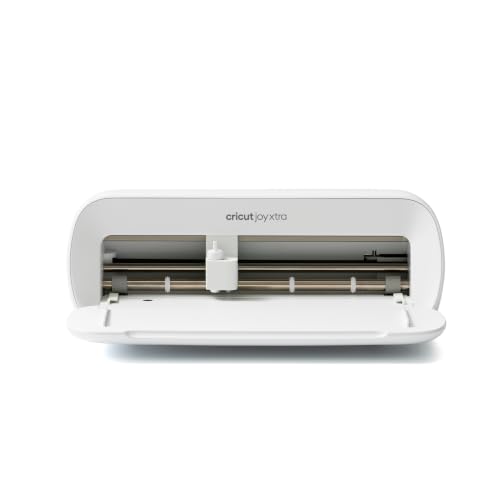
The Joy Xtra cuts vinyl, iron-on HTV, cardstock, and stickers, and it also draws and foils. The bundle includes a fine-point blade, pen, mini weeder, practice materials, and 30 bonus images in the Design Space app. Design Space offers a free content library of over 3,000 images and 100 fonts.
Materials50+ including vinyl, HTV, cardstock, stickers
FunctionsCuts, draws, foils
SoftwareCricut Design Space
IncludedFine-point blade, pen, mini weeder, practice materials
Pros
- Compact design suits small work areas
- Bundle includes blades, pen, and practice materials
- Free Design Space library with 3,000+ images and 100+ fonts
Cons
- Full Design Space library requires an optional Cricut Access subscription
- Narrower material width than wide-format plotters
Check price on Amazon ›
The Cameo 5 Alpha uses a 4-point registration system with vertical and horizontal corrections for accurate print and cut alignment. Intelligent Path Technology optimizes cutting order for cleaner cuts and less material stress. It cuts at speeds up to 400mm/s and handles materials up to 3mm thick.
Registration4-point system with vertical and horizontal corrections
Cutting speedUp to 400mm/s
Material thicknessUp to 3mm
FunctionsCuts, sketches, embosses
Pros
- 4-point registration for precise print and cut
- Intelligent Path Technology reduces material stress
- Quiet operation suited to shared spaces
Cons
- Higher learning curve than basic cutters
- Requires Silhouette Studio software
Check price on Amazon ›
The SDX125EGY includes 682 built-in designs, 100 quilting patterns, and 9 fonts, plus a 5-inch touchscreen LCD for on-machine editing. It cuts materials up to 3mm thick such as paper, vinyl, fabric, balsa wood, chipboard, foam, and felt. A USB port and wireless capability let you add custom designs.
Built-in designs682 including 100 quilting patterns and 9 fonts
Display5-inch touchscreen LCD
Material thicknessUp to 3mm
ConnectivityUSB port and wireless
Pros
- Large built-in design library with fonts and quilting patterns
- Touchscreen editing without a computer
- Cuts a wide range of thick materials
Cons
- Intended for sale only in the US at 120 volts
- Bulkier than compact craft cutters
Check price on Amazon ›
The Romeo is a 24-inch wide cutter bundle with an integrated camera for print and cut. It ships with a 12x12 strong tack mat, adjustable blade housing, two 45-degree blades, one 60-degree blade, and a marker/pen adapter. The bundle also includes 300 designs from So Fontsy with commercial use.
Cut width24 inches
CameraIntegrated for print and cut
BladesTwo 45-degree, one 60-degree
Designs300 SVGs and JPGs with commercial use
Pros
- Integrated camera for print and cut alignment
- Wide 24-inch cutting width
- Commercial-use designs included
Cons
- Takes up more space than desktop cutters
- Manual included rather than app-first setup
Check price on Amazon ›
The S31 uses a high-precision camera and intelligent recognition for automatic calibration, with cutting accuracy within 0.2 mm. It works with over 300 materials from lightweight paper to durable leather. A dual-channel quiet motor adjusts speed based on design complexity, and the library offers over 1 million templates, patterns, and fonts.
Cutting accuracyWithin 0.2 mm
Materials300+ including paper and leather
MotorDual-channel quiet motor with speed control
Library1M+ templates, patterns, and fonts
Pros
- Automatic calibration via camera
- Very tight 0.2 mm cutting accuracy
- Large template and font library
Cons
- Newer platform with a growing design community
- Compact build limits wide-format work
Check price on Amazon ›
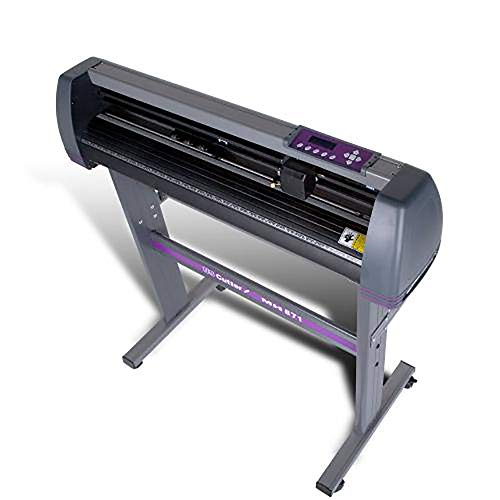
This plotter has a 34-inch feed width and a 30-inch cut width, with three fully adjustable pinch rollers. Adjustable speed and pressure plus a ball-bearing dual roller system help feed vinyl smoothly. It ships with a stand and VinylMaster Cut software, and USCutter provides US-based technical and lifetime phone support.
Feed width34 inches
Cut width30 inches
RollersThree adjustable pinch rollers
SoftwareVinylMaster Cut
Pros
- Wide feed and cut width for roll vinyl
- Adjustable speed and pressure
- Stand and VinylMaster Cut software included
Cons
- Requires significant floor space
- Not a desktop craft machine
Check price on Amazon ›
The VEVOR offers a 34.3-inch maximum paper feed and a 30.7-inch maximum cutting width, with cutting precision of +/-0.01mm. Pressure is adjustable from 20 to 500g and speed from 20 to 800mm per second, with a backlight LCD display. Double spring pinch rollers and a roughened steel roller help keep the feed steady.
Max paper feed34.3 inches
Max cutting width30.7 inches
Cutting precision+/-0.01mm
Pressure range20 to 500g adjustable
Pros
- Wide pressure and speed adjustment range
- Backlight LCD for intuitive operation
- D-typed motherboard with 4M cache memory
Cons
- Software activation method varies between CD and printed code
- Large footprint
Check price on Amazon ›
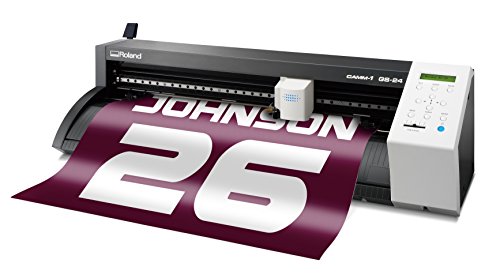
The GS-24 is a 24-inch vinyl cutter backed by a 3-year manufacturer warranty. Roland positions it as a new and improved cutter for vinyl work. It suits steady production cutting where warranty coverage matters.
ModelGS2-24
Warranty3-year manufacturer warranty
MediaVinyl
Pros
- 3-year manufacturer warranty
- Established cutter brand
- Suited to steady vinyl production
Cons
- Fewer bundled accessories than other picks
- Limited detail on included software
Check price on Amazon ›
This plotter has a 28.3-inch maximum paper width and a 24.8-inch maximum plotting width, with a maximum speed of 19.7 inches per second. Two pinch rollers adjust on the guide rail to match different paper widths, and multiple springs provide more uniform pressure. It connects via COM and USB.
Max paper width28.3 inches
Max plotting width24.8 inches
Max plotting speed19.7 inches per second
InterfaceCOM and USB
Pros
- Adjustable pinch rollers for different widths
- LCD display for settings
- Uniform pressure from multiple springs
Cons
- Software does not support Mac OS
- Compatible with older Windows versions listed
Check price on Amazon ›
What to look for
Matching the machine to the material and the width
Small desktop cutters handle vinyl sheets, HTV, cardstock, and stickers on a mat. Wide-format plotters take full rolls with feed widths from 28 to 34 inches. If you cut long runs of sign vinyl, a plotter with adjustable pinch rollers and a stand makes more sense than a compact craft machine.
Precision, pressure, and registration features
Print and cut work depends on registration accuracy, which is why the Cameo 5 Alpha's 4-point system and the Romeo's integrated camera matter. Adjustable pressure lets you move between thin vinyl and thicker materials without crushing the blade into the mat. Speed control helps on intricate designs, and quiet motors matter in shared spaces.
Software and design libraries
Cricut and Silhouette use their own design software, while the VEVOR and TECHTONGDA plotters rely on supplied cutting software with activation codes. Brother builds designs into the machine with a touchscreen, and Likcut offers a large template library. Check that the software runs on your computer before you commit.
Choosing for a home craft room or a small business
Home crafters usually want a compact machine with bundled blades and mats, plus a design app that works without a computer. Small craft businesses should look at cut width, commercial-use design bundles, and warranty length. Classroom users benefit from quiet operation, self-healing mats, and simple on-machine controls.
Frequently asked questions
What should I look for in a vinyl cutting machine for a small craft business?
Prioritize cut width, adjustable pressure, and a reliable feed system. A wide-format plotter with pinch rollers handles roll vinyl, while a camera-equipped cutter like the Romeo helps with print and cut orders. Warranty length also matters when the machine runs daily.
Do I need adjustable pressure for card making and scrapbooking?
Adjustable pressure helps because cardstock and thin vinyl need different force. The VEVOR offers a 20 to 500g range, and the Cameo 5 Alpha handles materials up to 3mm thick. Lighter pressure protects delicate paper and extends blade life.
Which machine is best for t-shirt projects with heat transfer vinyl?
The Cricut Joy Xtra cuts iron-on HTV and includes a fine-point blade, and the Siser Romeo bundle adds commercial-use designs and multiple blades. For high-volume shirt work, a 24-inch cutter reduces reloading between jobs.
Is a self-healing mat important for classroom projects?
A self-healing mat protects desks and keeps cuts clean when students share a machine. Standard tack mats are included with several models, and a strong tack mat ships with the Romeo bundle. Match mat tack to the material so vinyl does not shift.
Can a vinyl cutting machine handle both precision cuts and portable design?
Yes, compact machines like the Cricut Joy Xtra and Likcut S31 combine small footprints with fine detail. The S31 lists accuracy within 0.2 mm, and the Joy Xtra works with more than 50 materials. Portability usually means a narrower cut width.
What software do these vinyl cutters use?
Cricut machines use Design Space, Silhouette uses Studio software, and the USCutter plotter ships with VinylMaster Cut. Brother includes on-machine editing with a 5-inch touchscreen. The TECHTONGDA plotter's software does not support Mac OS.
How do I compare machines for print and cut sticker work?
Look for registration systems and camera alignment. The Cameo 5 Alpha uses a 4-point registration system, and the Romeo includes an integrated camera. Both help align printed sheets with the cut line for stickers and heat transfers.
Are wide-format plotters suitable for beginners?
They can be, but they need more space and a computer connection. The USCutter and VEVOR models offer adjustable pressure and speed, which helps when learning. Beginners often start with a compact craft cutter and move up as order volume grows.
The verdict
Cricut Joy Xtra
9.2/10/10
The Cricut Joy Xtra is our top pick for most buyers because it bundles the blade, pen, and practice materials with a compact design and a large free design library. Choose the Silhouette Cameo 5 Alpha for print and cut precision, or step up to a 24-inch or 34-inch plotter when roll vinyl and production volume matter.
Check price on Amazon ›
Our top pick, secure checkout via Amazon
Note: Availability and specifications change often. Always confirm the current details on Amazon before buying.