TV Wall Mounts Best TV Wall Mounts: Full Motion to Fixed Picks
P
By the Pickpedia Team
·9 picks compared
·Last verified November 2026
Affiliate disclosure: As an Amazon Associate, Pickpedia earns from qualifying purchases. Links on this page are paid links, and we may earn a commission at no extra cost to you. This never affects our picks or scores.
Quick answer
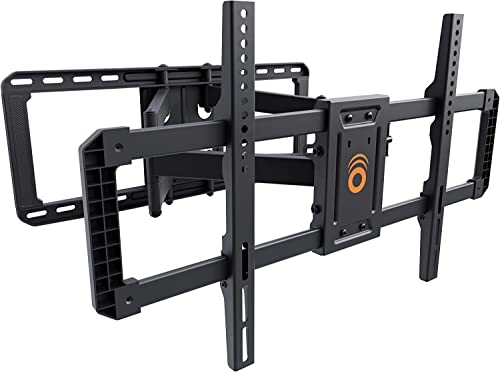
For most rooms the ECHOGEAR MaxMotion is the best TV wall mount overall, handling 42 to 90 inch screens up to 125 lbs with 22 inches of extension. The Amazon Basics full motion mount suits 26 to 55 inch TVs, and the Monoprice EZ fixed mount carries large 60 to 120 inch displays.
Best TV Wall Mounts: Full Motion to Fixed Picks at a glance
Why you can trust this guide
We compared these picks using verified manufacturer specifications, available manuals and documentation, current retailer listings, and patterns in owner feedback, alongside editorial research. We focus on measurable differences such as performance, capacity, usability, and build quality. Pickpedia does not present editorial research as laboratory testing, and we do not claim hands-on testing unless it was actually performed.
A wall mount is only as good as its match to your screen. The two numbers that decide everything are the VESA hole pattern on the back of the TV and the display's weight. Get those right and the rest comes down to how much movement you want.
Full motion arms swivel, tilt, and pull away from the wall, which helps in a corner or a room with seats off to the side. Fixed and tilt mounts sit close to the wall and keep a big screen steady. Below we rank the mounts on this list by how well they cover common setups.
Our top picks
This mount covers the widest range here, fitting 42 to 90 inch TVs up to 125 lbs. The arm extends 22 inches, swivels 130 degrees, and tilts 15 degrees, then folds back to 2.4 inches from the wall. A drilling template and hardware kit are included for a straightforward install.
Screen size42 to 90 inches
Weight capacity125 lbs
Extension2.4 to 22 inches
Swivel130 degrees
Pros
- Wide screen and weight range covers most large TVs
- Long 22 inch extension helps with corner placement
- Drilling template and hardware included
Cons
- Arm depth means it needs a sturdy stud or wall
- Large frame is more mount than a small screen needs
Check price on Amazon ›
A single-stud mount built for 26 to 55 inch displays up to 80 lbs. It articulates from 2.6 to 16.3 inches and swivels 180 degrees, with a tilt range of +10 to -5 degrees. VESA patterns from 3.9 by 3.9 inches through 15.7 by 15.7 inches are supported.
Screen size26 to 55 inches
Weight capacity80 lbs
Extension2.6 to 16.3 inches
Swivel180 degrees
Pros
- Single-stud install suits smaller rooms
- Wide 180 degree swivel
- Broad VESA range for mid-size panels
Cons
- Weight limit rules out heavier large screens
- Tilt range is modest compared with bigger arms
Check price on Amazon ›
A fixed mount for 60 to 120 inch screens with a stated capacity up to 264 lbs. It fits VESA patterns from 50x50 up to 900x600, which covers the wide spacing on very large panels. Because it does not articulate, the screen sits flat and close to the wall.
Screen size60 to 120 inches
Weight capacity264 lbs
VESA range50x50 to 900x600
TypeFixed low profile
Pros
- Very high weight capacity
- Handles wide VESA patterns on big displays
- Low profile keeps the screen close to the wall
Cons
- No swivel or tilt adjustment
- Best suited to a wall with solid framing
Check price on Amazon ›
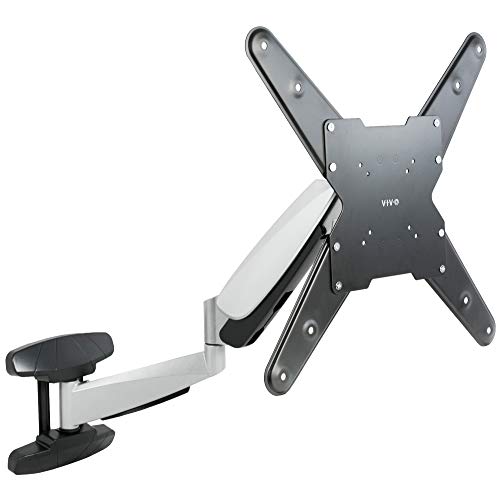
A pneumatic spring arm for 40 to 70 inch screens weighing 17 to 66 lbs. The counterbalance adjusts to the TV's weight, and the arm gives 12.5 inches of height travel plus +10 to -15 degrees of tilt and 90 degrees of swivel each way. It installs to wood studs or concrete and brick.
Screen size40 to 70 inches
Weight range17 to 66 lbs
Height adjustment12.5 inches
Tilt+10 to -15 degrees
Pros
- Spring arm makes height changes easy
- Suits above fireplace and similar high placements
- Wide VESA list up to 400x400
Cons
- Counterbalance needs a TV of at least 17 lbs
- Lower weight limit than heavy-duty fixed mounts
Check price on Amazon ›
An articulating mount in the Paramount series, sized for 39 to 75 inch displays. The arm swings the screen out from the wall and back again, which helps when seating is off to one side. Its steel frame is built for a permanent installation.
Screen size39 to 75 inches
TypeArticulating
ColorBlack
SeriesParamount
Pros
- Covers a broad 39 to 75 inch span
- Articulating arm improves viewing angles
- Sturdy steel construction
Cons
- Weight limit is not listed in the supplied details
- Fewer published adjustment figures than rivals
Check price on Amazon ›
A tilt mount from the Fusion X-Large line with a 250 lb capacity. It measures 42.75 inches wide by 24.5 inches high and sits 2.5 inches deep, so it spreads the load across a wide back plate. Tilt helps angle the screen down when it is mounted high.
Weight capacity250 lbs
Width42.75 inches
Height24.5 inches
Depth2.5 inches
Pros
- High 250 lb capacity
- Wide back plate spreads the load
- Tilt helps with high mounting positions
Cons
- No swivel or extension
- Large frame needs generous wall space
Check price on Amazon ›
A flat wall mount for 32 to 55 inch screens up to 200 lbs. It uses black aluminum and cold rolled steel and fits mounting patterns up to 660x501mm, with a depth of 1.4 inches from the wall. A 10-year warranty backs the frame.
Screen size32 to 55 inches
Weight capacity200 lbs
Depth from wall1.4 inches
Warranty10 years
Pros
- High weight capacity for its screen range
- Sits close to the wall at 1.4 inches
- Long 10-year warranty
Cons
- No tilt or swivel
- Not built for screens above 55 inches
Check price on Amazon ›
A compact articulating arm for 19 to 31 inch screens up to 44 lbs. It swivels 180 degrees, rotates 360 degrees, and tilts 5 degrees each way, retracting to 2.4 inches and extending to 15 inches. VESA 75x75 and 100x100 patterns are supported.
Screen size19 to 31 inches
Weight capacity44 lbs
Extension2.4 to 15 inches
VESA75x75 and 100x100
Pros
- Compact size suits small rooms
- 360 degree rotation for portrait or landscape
- Full hardware pack included
Cons
- Tilt is limited to 5 degrees
- Some Samsung 32 inch models are not compatible
Check price on Amazon ›
An articulating mount for 10 to 29 inch displays that extends 14.46 inches and retracts to 2.42 inches. The One-Touch tilt gives plus or minus 35 degrees, roll adds plus or minus 5 degrees for leveling, and swivel reaches plus or minus 90 degrees.
Screen size10 to 29 inches
Extension14.46 inches
TiltPlus or minus 35 degrees
SwivelPlus or minus 90 degrees
Pros
- Generous tilt range for a small mount
- Roll adjustment helps level the screen
- Long extension for tight spaces
Cons
- Limited to small displays
- Weight capacity is not stated in the supplied details
Check price on Amazon ›
What to look for
Match the VESA pattern first
Every mount lists a VESA range, which is the spacing of the four holes on the back of the TV. Measure that spacing before anything else. A mount like the Monoprice EZ covers 50x50 up to 900x600, while the VideoSecu handles only 75x75 and 100x100.
Check the weight and screen size limits
The screen size range is a guide, but the weight limit is the hard rule. A 55 inch TV can weigh far less than a 75 inch one, so compare the actual weight to the mount's capacity. The ECHOGEAR MaxMotion carries up to 125 lbs, and the Monoprice fixed mount states up to 264 lbs.
Decide between fixed, tilt, and full motion
A fixed mount holds the screen flat and close to the wall, which suits a dedicated theater room. A tilt mount angles the screen down for high placements. A full motion arm swivels and extends, which is the better choice when seats are off to the side or the room is shared.
Plan the wall and the install
Most mounts fix to wood studs, and some also work on concrete or brick. Single-stud designs like the Amazon Basics are simpler for small apartments, while wide back plates like the Chief XTM1U spread the load. A drilling template, as included with the ECHOGEAR, cuts install time.
Frequently asked questions
How do I know which mount fits my TV?
Find the VESA hole spacing and the TV weight in the manual, then compare both to the mount's listed range. Screen size alone is not enough, because two TVs of the same size can differ in weight.
Is a full motion mount worth it for a small apartment?
Often yes. An articulating arm lets one screen serve a sofa and a kitchen or desk without moving furniture. The VideoSecu ML12B and the Amazon Basics mount both retract close to the wall when not extended.
Can a wall mount work above a fireplace?
Yes, if the mount allows height or tilt adjustment. The VIVO pneumatic arm offers 12.5 inches of height travel and tilt down to -15 degrees, which helps when the screen sits high.
Do these mounts support 4K TVs?
A mount does not process the picture, so any TV that fits the VESA pattern and weight limit will work, including 4K sets. Check the VESA pattern on the 4K TV rather than the resolution.
What should renters keep in mind?
Renters usually want fewer holes and a smaller footprint. A single-stud full motion mount or a compact arm is easier to patch later than a wide fixed plate. Confirm the wall type before drilling.
How much swivel do I need for a corner or angled seating?
Enough to turn the screen toward the main seats. The Amazon Basics mount swivels 180 degrees, and the ECHOGEAR MaxMotion swivels 130 degrees, both more than enough for most rooms.
Are these mounts suitable for older users or a senior's room?
Look for easy adjustment and a steady arm. A pneumatic mount like the VIVO lets you change height without tools, and a tilt mount keeps the screen angled toward a recliner.
What tools and hardware come with the mounts?
Most include a hardware pack and some include a drilling template, as the ECHOGEAR does. You will still need a drill, a stud finder, and a level for a safe install.
The verdict
ECHOGEAR MaxMotion TV Wall Mount
9.4/10/10
The ECHOGEAR MaxMotion is the best TV wall mount for most households because it covers a wide range of screen sizes and weights and still offers long extension and swivel. Choose the Amazon Basics mount for a smaller TV on a single stud, or the Monoprice fixed mount when a very large screen will stay in one place.
Check price on Amazon ›
Our top pick, secure checkout via Amazon
Note: Availability and specifications change often. Always confirm the current details on Amazon before buying.