Travel & Luggage Best Travel Electronics Organizers for Clutter-Free Trips
P
By the Pickpedia Team
·2 picks compared
·Last verified September 2026
Affiliate disclosure: As an Amazon Associate, Pickpedia earns from qualifying purchases. Links on this page are paid links, and we may earn a commission at no extra cost to you. This never affects our picks or scores.
Quick answer
The best travel electronics organizer fits the accessories you actually carry and lets you retrieve them without unpacking everything. In this focused comparison, the tomtoc Navigator-T13 Accessory Pouch S suits travelers who prefer loops and smaller pockets, while the tomtoc Light-T12 Electronic Accessory Pouch 1.8L suits a kit organized around two main compartments. Start by laying out your charger, cables and adapters, then choose the layout that suits those shapes.
Best Travel Electronics Organizers for Clutter-Free Trips at a glance
Why you can trust this guide
This research-based guide compares two specific tomtoc designs using manufacturer dimensions, capacity and interior layout. Both linked versions are black. We checked exact model identifiers so the small Navigator-T13 is not confused with its larger sibling, and the Light-T12 here is the standard 1.8L version rather than a Pro model.
We have not conducted packing trials, drop tests or water-resistance testing. Recommendations describe expected organizational fit based on the published construction. They do not establish that a particular laptop charger will fit every pocket or that a fabric pouch protects equipment during immersion.
These figures come from tomtoc's Navigator-T13 S specifications and Light-T12 1.8L specifications. Dimensions retain the manufacturer's published order. Capacity alone does not describe the usable space around an awkwardly shaped adapter.
Our top picks
The Navigator-T13 S combines elastic loops, small pockets and mesh storage. We would choose it for a kit with several separate items that you want to return to assigned positions. The tradeoff is arranging the kit around those divisions. A bulky plug or stiff cable can suit an open compartment better than a small retention point. Skip this design if your main need is one unobstructed space for large accessories. Plan around the actual shapes of your equipment, rather than assuming the published capacity can be filled evenly.
Capacity1.4 L
Exterior, published order9.06 × 5.91 × 2.56 in.
Empty weight230 g
VersionS, Black
Pros
- Elastic loops and small pockets
- Mesh storage for a divided arrangement
Cons
- Divisions can be awkward for bulky plugs
- Not an unobstructed compartment for large accessories
Who should buy it
- Small accessories arranged in loops and pockets.
Skip it if
- Divisions can be awkward for bulky plugs.
Check price on Amazon ›
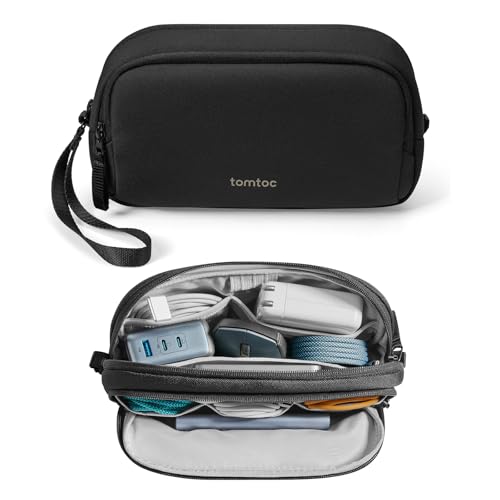
The standard Light-T12 1.8L uses a dual-compartment layout and RPET 600D polyester. It is our pick here for travelers who prefer sorting their equipment into two main groups, such as charging accessories and smaller connection items. Its longer published exterior needs a suitable bag pocket. Skip it if your day bag has only a short, narrow opening for accessories, or if a few phone cables are all you carry. The additional rated capacity is useful only when the pouch's shape and divisions suit your own load.
Capacity1.8 L
Exterior, published order9.65 × 2.76 × 5.12 in.
Empty weight180 g
VersionStandard, Black
Pros
- Dual-compartment layout
- RPET 600D polyester construction
Cons
- Longer exterior needs a suitable bag opening
- Capacity alone does not establish charger fit
Who should buy it
- Equipment sorted into two main groups.
Skip it if
- Longer exterior needs a suitable bag opening.
Check price on Amazon ›
What to look for
Build the kit before choosing the pouch
Lay out only the accessories you need for the trip. Include the actual plug shape, cable length and any protective case you keep around a drive or adapter. A photograph of a neatly arranged demonstration kit cannot tell you how your own equipment will fit. Identify the bulkiest item first. It often determines the compartment you need, while smaller cables can be arranged around it. If an accessory has projecting pins or an unusually rigid shape, account for those features instead of measuring only its main body.
Choose between assigned positions and grouped storage
Loops and small pockets suit a routine in which each item returns to a familiar place. They can make a missing cable easier to notice when you check the kit, but they also require you to keep using that arrangement. Broader compartments suit equipment that changes from trip to trip. Separate the groups by function or frequency of use. Avoid mixing a frequently needed charging cable underneath accessories you rarely touch, even when everything technically fits.
Check the pouch against the bag opening
Measure where the organizer will go, including the zipper opening. A pouch that fits the main compartment can still be inconvenient if removing it catches on a laptop sleeve or another packed item. Leave enough room to grip it and close the bag without compressing the contents. The empty pouch's size is only part of the check. Your load can change its profile, especially around large plugs. Do a trial pack at home and see whether the organizer lies where you intended without pushing sharply against nearby equipment.
Avoid confusing organization with protection
An organizer separates accessories, but it is not automatically a hard protective case. If a device requires impact protection, use protection appropriate to that device and include it in your fit check. Keep sharp or projecting items from pressing directly into vulnerable surfaces. Water-related marketing also needs care. Do not treat a soft organizer as waterproof storage for a phone or drive. Keep it away from spills, and follow the manufacturer's care instructions when cleaning the fabric.
A practical packing routine
Group cables by the devices they connect, then coil them loosely enough that the connectors are not forced into sharp bends. Keep frequently used items accessible. Use the organizer for stored, unplugged equipment, and remove charging equipment from the pouch when setting it up for use. Before closing the pouch, check that no cable is trapped in the zipper path. If the zipper needs force, rearrange or reduce the load. A successful kit closes normally and leaves each item easy to remove without tugging on another cable. After a trip, unpack and check for damaged connectors, frayed cables and items you never used. Remove debris according to the care instructions and let any damp fabric dry before storing equipment again. This is also a useful moment to simplify the kit for the next trip.
Alternatives worth considering
A small zip pouch can be enough for one charger and a cable if you do not need internal divisions. Separate mini pouches can suit a group sharing a larger bag, especially when each person needs to take their own kit away independently. A dedicated protective case is a different choice for equipment that needs structure around it. Do not choose a general cable organizer simply because its exterior is large enough to contain a delicate device. Think about how the equipment will be handled as well as where it will fit.
Frequently asked questions
Does a larger capacity mean a larger charger will fit?
No. Capacity describes overall volume, while charger fit depends on usable compartment dimensions, the opening and the shape of the plug. Check the actual accessory against the intended space.
Should I keep all electronics in one organizer?
Keep together the accessories that make sense to retrieve together. A laptop, a camera and their accessories may require different storage. Avoid making one pouch so full that taking out a cable becomes a complete unpacking exercise.
Can I put spare memory cards loose in a mesh pocket?
Use storage suited to the cards and their contacts, and account for that holder when planning the pouch. A general pocket is not a substitute for the specific protection or labeling your cards need.
How do I know whether I need a tech organizer?
Look at the problem you are trying to solve. If small accessories move around your bag or take too long to find, a divided pouch can help you assign them places. If your existing pouch already keeps a small kit accessible, additional compartments may add little to the routine.
The verdict
tomtoc Navigator-T13 Accessory Pouch S
Choose the Navigator-T13 S for a small-accessory kit arranged around loops and pockets. Choose the Light-T12 1.8L for a two-compartment setup. In either case, a trial pack with your actual equipment is more useful than choosing by capacity alone.
Check price on Amazon ›
Our top pick, secure checkout via Amazon
Note: Availability and specifications change often. Always confirm the current details on Amazon before buying.