Trackball Mice Best Trackball Mice: 9 Models Ranked for Comfort
P
By the Pickpedia Team
·9 picks compared
·Last verified November 2026
Affiliate disclosure: As an Amazon Associate, Pickpedia earns from qualifying purchases. Links on this page are paid links, and we may earn a commission at no extra cost to you. This never affects our picks or scores.
Quick answer
The Logitech MX Ergo S leads our list thanks to its 20-degree tilt and 6 programmable buttons. The Kensington Expert K64325 suits finger control on a large 55mm ball, and the ELECOM EX-G Pro adds three-device connectivity with 8 assignable buttons. This trackball is the one to start with.
Best Trackball Mice: 9 Models Ranked for Comfort at a glance
Why you can trust this guide
We compared these picks using verified manufacturer specifications, available manuals and documentation, current retailer listings, and patterns in owner feedback, alongside editorial research. We focus on measurable differences such as performance, capacity, usability, and build quality. Pickpedia does not present editorial research as laboratory testing, and we do not claim hands-on testing unless it was actually performed.
A trackball mouse keeps your wrist still and puts cursor control under a thumb or finger, which many people find easier on the forearm than sliding a traditional mouse across a desk. The nine models here cover thumb and finger control, wired and wireless, and a range of DPI settings.
We compared the supplied specs on each one: ball size, tilt angle, button count, connectivity and battery. Matching those details to how you work matters more than any single headline number, so the guide below walks through the decision points that separate these trackballs.
Our top picks
The MX Ergo S pairs a 20-degree tilt with a sculpted shape and soft rubber grip, and Logitech says the angle reduces muscle strain by 27%. Six programmable buttons work through the Logi Options+ app, and clicks are 80% quieter than earlier designs. A one-minute USB-C charge gives up to 24 hours of use, or up to 120 days on a full charge.
Tilt20 degrees
Buttons6 programmable
BatteryUp to 120 days, USB-C charging
Hand sizeMedium to large
Pros
- Tilt angle supports forearm posture
- Long battery life with quick top-up charging
- Six buttons configurable in Logi Options+
Cons
- Cable not included
- Sculpted shape favors medium to large hands
Check price on Amazon ›
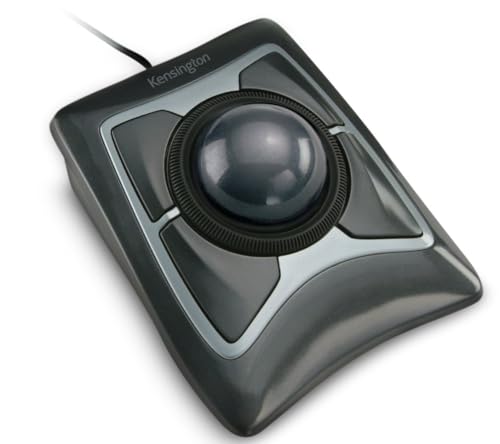
A 55mm ball sits at the center of this design, tracked by Diamond Eye optics for precise cursor control. The patented scroll ring lets you move up and down pages without hunting for a wheel. Four buttons, scroll speed and cursor speed can all be adjusted through KensingtonKonnect software.
Ball size55mm
TrackingDiamond Eye optical
Buttons4 customizable
SoftwareKensingtonKonnect
Pros
- Large ball for fine finger control
- Scroll ring speeds up page navigation
- Button and speed customization in software
Cons
- Software does not support Windows ARM-based computers
- Finger control takes getting used to
Check price on Amazon ›
The EX-G Pro offers eight buttons, each assignable through ELECOM Mouse Assistant software. You can connect over wired USB, Bluetooth or wireless, and switch DPI between 500, 1000 and 1500. The ball rides on three 2.5mm artificial ruby bearings and pops out through a hole in the base for cleaning.
Buttons8 assignable
DPI500 / 1000 / 1500
ConnectivityWired, Bluetooth, wireless
BearingsThree 2.5mm artificial ruby
Pros
- Three connection methods in one device
- Ruby bearings resist dust and dirt
- Ball removes easily for cleaning
Cons
- Battery remaining shown by a light only
- Button setup needs the ELECOM software
Check price on Amazon ›
A hinge lets you set the EM02 at a flat 0 degrees or a raised 15 degrees, so you can change hand posture during the day. It connects over 2.4GHz or Bluetooth and switches between devices with one button. Five DPI steps run from 200 to 1600, and a full charge holds standby for up to 90 days.
Tilt0 or 15 degrees
DPI200 / 400 / 800 / 1200 / 1600
BatteryUSB-C, up to 90 days standby
Connectivity2.4GHz and Bluetooth
Pros
- Two tilt positions for varied posture
- Wide DPI range including slow settings
- Quiet-touch buttons
Cons
- Forward and back buttons not compatible with Mac OS
- Thumb control needs a short learning curve
Check price on Amazon ›
The iMouse T40 is built for both left and right hands, with a 1.5 inch trackball and an optical sensor. Seven buttons are programmable, and a five-level DPI switch adjusts cursor speed from 400 to 4800. A nano USB receiver handles the wireless connection.
Ball size1.5 inch
DPI400 to 4800, five levels
Buttons7 programmable
ReceiverNano USB
Pros
- Works in either hand
- Wide DPI range
- Seven programmable buttons
Cons
- Wireless via USB receiver only
- Finger control layout differs from thumb models
Check price on Amazon ›
TECKNET builds this trackball around a 16-degree vertical angle that the company says cuts muscle strain by up to 50%. It pairs with three devices across two Bluetooth channels and 2.4G, switching with a button press. The 500mAh battery charges fast, with 15 minutes giving a full day of use.
Angle16 degrees vertical
Devices3 (BT1, BT2, 2.4G)
Battery500mAh rechargeable
DPI100 / 200 / 400 / 800 / 1200
Pros
- Three-device pairing with instant switching
- Quick 15-minute top-up charge
- RGB lighting
Cons
- Designed for medium to large hands
- Low DPI ceiling compared with some models
Check price on Amazon ›
SANWA fits a 44mm ball into a body aimed at large hands, with silent clicks and four DPI levels from 600 to 1600. Buttons are programmable through SANWA software, and the DPI setting is confirmed by a count of flashes. Because the cursor stays put, it works on a leg, sofa or other uneven surface as well as a desk.
Ball size44mm
DPI600 / 800 / 1200 / 1600
ClicksSilent
ConnectionWired
Pros
- Silent clicks suit shared spaces
- Four DPI levels
- Programmable buttons with software
Cons
- Software does not work with Mac OS or Chrome OS
- Wired connection limits placement
Check price on Amazon ›
The Perimice-517 is a seven-button wired trackball with quiet clicks and a 1.34 inch ball. It works straight from the box over USB 2.0 with no drivers needed, and a DPI switch toggles between 400 and 1000. The button set covers left, right, back, forward and DPI switching.
Ball size1.34 inch
Buttons7
DPI400 / 1000
InterfaceWired USB 2.0
Pros
- No drivers required
- Quiet click buttons
- Simple DPI toggle
Cons
- Two DPI settings only
- Corded design
Check price on Amazon ›
PORLEI keeps things compact with a 34mm thumb-controlled ball and a 1.8m cable that connects over USB-A with no drivers. Five DPI levels run from 100 to 1200, and the design includes RGB lighting. The small footprint suits cramped desks, and it tracks on a leg, sofa or bed as well as a flat surface.
Ball size34mm
DPI100 / 200 / 400 / 800 / 1200
Cable1.8m
ConnectionUSB-A wired
Pros
- Compact body for small desks
- Five DPI levels
- Plug and play with no drivers
Cons
- Corded only
- Small ball suits thumb control rather than finger control
Check price on Amazon ›
What to look for
Thumb versus finger control
Thumb trackballs put the ball on the side, so your thumb does the aiming while your fingers rest on the buttons. Finger trackballs, like the Kensington Expert with its 55mm ball, keep the ball centered and let index and middle fingers move the cursor. Neither is better outright; thumb models tend to feel familiar faster, while finger models allow finer control on a larger ball.
Tilt, angle and hand posture
Several models here build in a fixed or adjustable angle. The Logitech MX Ergo S uses a 20-degree tilt, the TECKNET a 16-degree vertical angle, and the ProtoArc EM02 lets you choose flat or 15 degrees. An adjustable hinge is useful if you want to change posture through the day rather than hold one position.
Wired, Bluetooth or multi-device
Wired models such as the Perixx and SANWA need no charging and start working as soon as they are plugged in. Bluetooth and 2.4G models free up the desk, and some pair with three devices so you can move between a laptop and a desktop with one button. If you split time across machines, check how many devices a model supports before deciding.
Quiet clicks, DPI and software
Silent or quiet switches matter in shared offices and late-night work; the SANWA, Perixx, ProtoArc and Logitech all advertise quieter clicks. DPI settings range widely, from 100 on the PORLEI up to 4800 on the Adesso, so pick a range that covers both slow precision work and fast cursor travel. Programmable buttons usually depend on the maker's software, and a few of those apps do not support Mac OS or Chrome OS, so confirm compatibility first.
Frequently asked questions
Do trackball mice work well for gaming setups?
They can, but check the DPI range and button layout. The Adesso reaches 4800 DPI across five levels, and the ELECOM offers 500, 1000 and 1500. A trackball keeps the cursor steady, though most players need a week or two to build the same accuracy they had with a mouse.
Which models pair with more than one device?
The ELECOM EX-G Pro connects over wired USB, Bluetooth or wireless, the ProtoArc EM02 links 2.4GHz and Bluetooth with one-button switching, and the TECKNET pairs with three devices across two Bluetooth channels and 2.4G.
Are quiet switches useful for programmers?
Yes. Long coding sessions in shared rooms make click noise noticeable, and the Logitech MX Ergo S, SANWA, Perixx and ProtoArc all use quieter click designs. The MX Ergo S is listed as having 80% quieter clicks than earlier versions.
Can I use a trackball mouse while traveling?
A compact wired model like the PORLEI with its 34mm ball takes little bag space and needs no charging. A wireless pick such as the ProtoArc EM02 or TECKNET avoids cables, and the TECKNET gives a full day of use from a 15-minute charge.
How long does it take to adjust to a trackball?
ProtoArc and TECKNET both suggest most users adapt within one to two weeks. Start with a lower DPI setting and keep your wrist still, letting the thumb or fingers do the work.
What should I check before buying for an open plan office?
Look at click noise, connection type and how many devices you need to reach. Quiet switches cut distraction, and multi-device pairing means fewer cables and adapters on the desk.
Do these trackballs need special software?
Not always. The Perixx and PORLEI work plug and play with no drivers. Programmable buttons on the Logitech, ELECOM, Adesso and SANWA depend on each maker's software, and the SANWA app does not support Mac OS or Chrome OS.
Which trackball suits smaller hands or a small desk?
The PORLEI's 34mm ball and compact body fit tight spaces, while the Perixx uses a 1.34 inch ball. The Logitech and TECKNET are shaped for medium to large hands, so try a smaller model first if your hands are on the small side.
The verdict
Logitech MX Ergo S Advanced Wireless Track...
9.4/10/10
The Logitech MX Ergo S is our top pick for most people, combining a 20-degree tilt, six programmable buttons and long battery life in one wireless package. Choose the Kensington Expert if you prefer finger control on a large ball, the ELECOM EX-G Pro for three-way connectivity, or the ProtoArc EM02 if an adjustable tilt is what you need.
Check price on Amazon ›
Our top pick, secure checkout via Amazon
Note: Availability and specifications change often. Always confirm the current details on Amazon before buying.