Streaming Webcams Best Streaming Webcams: 9 Top Picks for Creators
P
By the Pickpedia Team
·9 picks compared
·Last verified November 2026
Affiliate disclosure: As an Amazon Associate, Pickpedia earns from qualifying purchases. Links on this page are paid links, and we may earn a commission at no extra cost to you. This never affects our picks or scores.
Quick answer
For most streamers, the Logitech C920x HD Pro is the best streaming webcam overall. The Elgato Facecam 4K suits high-resolution studio work, and the AVerMedia PW315 delivers smooth 1080p at 60fps for fast action.
Best Streaming Webcams: 9 Top Picks for Creators at a glance
Why you can trust this guide
We compared these picks using verified manufacturer specifications, available manuals and documentation, current retailer listings, and patterns in owner feedback, alongside editorial research. We focus on measurable differences such as performance, capacity, usability, and build quality. Pickpedia does not present editorial research as laboratory testing, and we do not claim hands-on testing unless it was actually performed.
A streaming webcam needs to do more than just show your face. It has to handle low light, keep focus, and work with the software you already use. We compared nine popular models on resolution, frame rate, field of view, and microphone quality to find the ones that hold up on Twitch, YouTube, and video calls.
The best choice depends on what you stream. Fast-paced gaming benefits from a high frame rate, while talking-head videos and teaching favor sharp detail and reliable autofocus. Some cameras add ring lights or AI tracking, and others keep it simple with plug-and-play USB. Below are the models that stood out, ranked by overall streaming value.
Our top picks
The C920x is the default choice for good reason. It records full HD 1080p at 30fps with stereo audio from dual mics, and it works with Zoom, Teams, OBS, and macOS. Light correction helps in dim rooms, and the wide compatibility means fewer setup headaches.
Resolution1080p at 30fps
MicrophoneDual stereo mics
CompatibilityWindows 11, macOS, Zoom, Teams, OBS
Special featureHD light correction, XSplit VCam license
Pros
- Sharp 1080p video with natural color
- Dual mics capture clear stereo audio
- Works with most streaming and meeting apps
Cons
- No privacy shutter included
- 30fps may feel less smooth for fast motion
Check price on Amazon ›
The Facecam 4K shoots 4K at 60fps with a Sony STARVIS 2 sensor and Elgato Prime Lens. It supports 49mm lens filters and uncompressed video, giving streamers more control over the look. HDR helps in mixed lighting.
Resolution4K at 60fps
SensorSony STARVIS 2 CMOS
Lens filters49mm standard support
Video outputUncompressed, HDR
Pros
- Crisp 4K detail at 60fps
- Accepts standard 49mm lens filters
- HDR and uncompressed video for editing
Cons
- Requires a powerful computer for 4K60
- No built-in microphone mentioned
Check price on Amazon ›
The PW315 delivers 1080p at 60fps, which keeps fast gameplay and hand movements smooth. Its 95-degree field of view captures more of the room, and dual mics pick up your voice. AI auto framing helps keep you centered.
Resolution1080p at 60fps
Field of view95 degrees
MicrophoneDual mics
Special featureAI auto framing, fixed focus
Pros
- 60fps for smooth action
- Wide 95-degree view fits more in frame
- AI framing keeps you centered
Cons
- Fixed focus limits close-up detail
- Wide angle may show more background than some want
Check price on Amazon ›
The Link 2 is a PTZ 4K webcam with a 1/2-inch sensor, HDR, and AI tracking that physically pans and tilts to follow you. It includes DeskView and Whiteboard modes plus an AI noise-canceling mic. Gesture control adds hands-free operation.
Resolution4K
Sensor1/2-inch
TrackingAI PTZ pan and tilt
MicrophoneAI noise-canceling
Pros
- AI tracking follows movement around the room
- 4K sensor with HDR for low light
- Specialized DeskView and Whiteboard modes
Cons
- PTZ movement may distract on static setups
- Requires software for full features
Check price on Amazon ›
The Tiny 2 Lite offers 4K resolution with a 1/2-inch sensor and AI tracking. Gesture control lets you lock tracking or zoom without touching the camera. It supports SDK, OSC, and Stream Deck for advanced setups.
Resolution4K
Sensor1/2-inch CMOS
Frame rate60fps
ControlGesture control, SDK, Stream Deck
Pros
- 4K video with AI tracking
- Gesture control for hands-free adjustments
- Works with Stream Deck and SDK
Cons
- Lacks whiteboard mode and voice control
- AI tracking may not suit fixed-position streams
Check price on Amazon ›
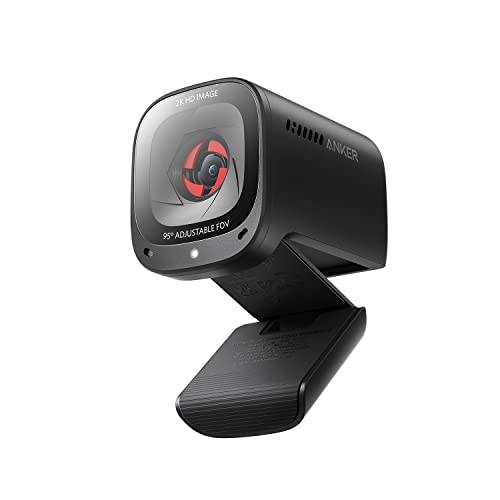
The C200 shoots 2K video with low-light correction and lets you choose 65, 78, or 95-degree viewing angles via software. A conference microphone with 360-degree voice coverage handles calls. It works with Windows 7 and later and macOS 10.11 and later.
Resolution2K
Viewing angles65, 78, or 95 degrees
Microphone360-degree voice coverage
CompatibilityWindows 7+, macOS 10.11+
Pros
- Adjustable field of view for tight spaces
- 2K detail with low-light correction
- 360-degree mic coverage for group calls
Cons
- Not a 4K camera
- Software needed to change viewing angles
Check price on Amazon ›
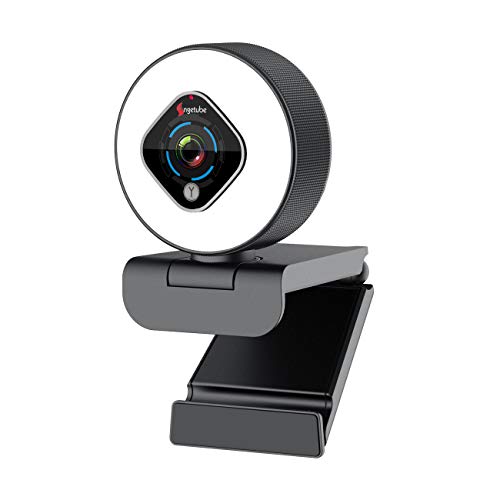
This Angetube model includes a three-level ring light with touch control, so you can brighten your face without software. It offers 1080p at 30fps, autofocus, and 5x digital zoom. The manual PTZ base rotates 360 degrees horizontally and 100 degrees vertically.
Resolution1080p at 30fps
Lighting3-level ring light
Zoom5x digital
MountManual PTZ, 360 horizontal, 100 vertical
Pros
- Built-in ring light adjusts without software
- Autofocus and digital zoom add flexibility
- Plug-and-play USB with no drivers
Cons
- Digital zoom does not work at 1080p
- 30fps only
Check price on Amazon ›
The Poly Studio P5 is a 1080p webcam with an 80-degree field of view and a directional microphone that focuses on your voice. It includes a privacy shutter and works with Teams and Zoom. The Poly Lens app adds custom video settings.
Resolution1080p
Field of view80 degrees
MicrophoneDirectional
PrivacyBuilt-in shutter
Pros
- Privacy shutter for peace of mind
- Directional mic reduces background noise
- Certified for Teams and Zoom
Cons
- Field of view is narrower than wide-angle rivals
- No high frame rate option
Check price on Amazon ›
The Cybertrack H5 is a straightforward 1080p webcam with autofocus and a built-in microphone. It uses a 2.1 MP CMOS sensor and H.264 compression for efficient video. There are no extra features, which keeps it easy to use.
Resolution1080p
Sensor2.1 MP CMOS
CompressionH.264
FocusAutofocus
Pros
- Autofocus keeps you sharp
- H.264 compression saves bandwidth
- Simple USB setup
Cons
- Fewer features than pricier models
- No wide-angle or tracking options
Check price on Amazon ›
What to look for
Resolution and frame rate
For most streamers, 1080p at 30fps is enough, but 60fps makes fast motion look smoother. 4K cameras like the Elgato Facecam 4K and Insta360 Link 2 offer more detail if your computer can handle it. Match the frame rate to your content: gameplay benefits from 60fps, while talking-head videos are fine at 30fps.
Field of view and framing
A wide field of view captures more of your room, which helps for group streams or showing a workspace. Narrower angles like 65 or 80 degrees keep the focus on you. Some cameras, including the AVerMedia PW315 and Anker PowerConf C200, let you adjust the view in software.
Lighting and low-light performance
Built-in ring lights, like the one on the Angetube, help in dim rooms without extra gear. HDR and low-light correction on models such as the Insta360 Link 2 and Logitech C920x keep video clear when light is uneven. Consider your room's lighting before you buy.
Microphones and audio
Many streaming webcams include dual mics that are fine for casual streams. Directional mics, like the Poly Studio P5, focus on your voice and reduce background noise. For professional audio, plan to add an external microphone, but a good built-in mic is a solid start.
Frequently asked questions
What should I look for in a streaming webcam with plug and play?
Check that the camera works with your operating system without extra drivers. The Logitech C920x and Angetube both connect over USB and work with common apps. Plug and play matters most if you switch between computers or stream on the go.
Does a USB-C connection matter for streaming?
USB-C is convenient for newer laptops and tablets, but most streaming webcams still use USB-A. The Elgato Facecam 4K uses USB-C. If your computer only has USB-C ports, plan for an adapter or choose a USB-C model.
Is a 60fps webcam better for gaming streams?
Yes, 60fps makes fast movement look smoother, which helps in multiplayer gaming and action content. The AVerMedia PW315 and OBSBOT Tiny 2 Lite offer 60fps. For slower content like interviews, 30fps is usually fine.
Can a streaming webcam work well for console capture?
A webcam does not capture console gameplay directly; a capture card handles that. The webcam is for your face and reactions. Any USB webcam here works alongside a capture card in streaming software.
How do I evaluate a webcam for a small desk?
Look for adjustable field-of-view settings and a compact mount. The Anker PowerConf C200 lets you switch between 65, 78, and 95 degrees, which helps on a narrow desk. A narrower angle keeps your background out of the shot.
What makes a webcam good for YouTube creators?
Reliable autofocus, clear audio, and easy setup matter most. The Logitech C920x covers all three with wide app support. If you want more control, the Elgato Facecam 4K adds lens filters and uncompressed video.
Should I buy a webcam with adjustable lighting for multiplayer gaming?
It can help if your room is dim, but ring lights may reflect on a screen. The Angetube offers three brightness levels with touch control. Consider whether the light will distract you during long sessions.
How do I choose a webcam for online teaching?
Prioritize a clear microphone and a field of view that shows you and your whiteboard or desk. The Poly Studio P5 has a directional mic and privacy shutter. The Insta360 Link 2 adds a Whiteboard mode for demonstrating lessons.
The verdict
Logitech C920x HD Pro PC Webcam with Micro...
9.2/10/10
The Logitech C920x HD Pro remains the best streaming webcam for most people, balancing sharp 1080p video, dual mics, and broad app support. If you need 4K detail, the Elgato Facecam 4K is a strong step up, while the AVerMedia PW315 wins for smooth 60fps gaming. Choose based on your content and your computer's power.
Check price on Amazon ›
Our top pick, secure checkout via Amazon
Note: Availability and specifications change often. Always confirm the current details on Amazon before buying.