Standing Desk Converters Best Standing Desk Converters for Any Workspace
P
By the Pickpedia Team
·9 picks compared
·Last verified November 2026
Affiliate disclosure: As an Amazon Associate, Pickpedia earns from qualifying purchases. Links on this page are paid links, and we may earn a commission at no extra cost to you. This never affects our picks or scores.
Quick answer
The Vari Pro Plus 48 is our top pick for its wide two-tier surface and sturdy steel build. For a narrower desk, the VIVO 32 inch converter offers a 33 lb lift in a compact frame. The Ergotron WorkFit-TL suits dual monitor users who want a large, stable worksurface.
Best Standing Desk Converters for Any Workspace at a glance
Why you can trust this guide
We compared these picks using verified manufacturer specifications, available manuals and documentation, current retailer listings, and patterns in owner feedback, alongside editorial research. We focus on measurable differences such as performance, capacity, usability, and build quality. Pickpedia does not present editorial research as laboratory testing, and we do not claim hands-on testing unless it was actually performed.
A standing desk converter turns your existing table into a sit-stand workstation without replacing furniture. The right model depends on your monitor count, available desk depth, and how often you change posture during the day. We compared lift mechanisms, surface dimensions, and stability features across eight popular converters to help you choose.
Key trade-offs include surface width, keyboard tray design, and whether the lift moves straight up or outward. Straight-up lifts save desk depth, while wide surfaces accommodate dual or triple monitors. Assembly requirements vary, and some models arrive fully assembled. The picks below cover compact desks, shared offices, and long computer sessions.
Our top picks
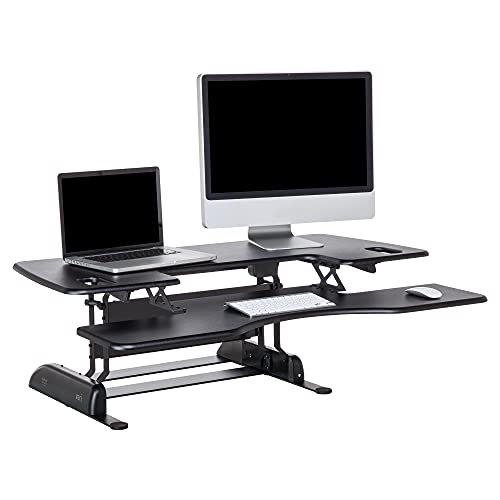
The Pro Plus 48 sets a high bar for wide converters. Its 48 by 13.25 inch upper tier holds two monitors, and the lower deck keeps your keyboard and mouse at a comfortable height. Thick steel, dual stability bars, and a heavy base add sturdiness at any height. It arrives fully assembled, so you can start using it right away.
Upper tier48 x 13.25 inches
ConstructionThicker steel with 3D laminate finish
StabilityDual stability bars and heavy base
AssemblyFully assembled
Pros
- Wide upper tier fits two monitors with room to spare
- Separate lower deck for keyboard and mouse
- Sturdy steel build with dual stability bars
Cons
- Wide footprint needs a spacious desk
- Heavier than compact single-tier models
Check price on Amazon ›
The VIVO DESK-V000K keeps a small footprint while still offering a 31.5 by 15.7 inch top that fits dual monitors. Its 33 lb lift assist moves from sitting to standing in one smooth motion, with a height range of 4.5 to 20 inches. The keyboard tray raises in sync with the top surface, and the steel frame is backed by a 3-year warranty.
Top surface31.5 x 15.7 inches
Keyboard tray31.3 x 11.8 inches (10.5 inches center)
Lift capacity33 lbs
Height range4.5 to 20 inches
Warranty3-year manufacturer warranty
Pros
- Compact surface maximizes desk space
- Simple touch height locking mechanism
- Keyboard tray raises in sync with the top
Cons
- Manual lift may require two hands when loaded
- Smaller surface limits accessories
Check price on Amazon ›
The WorkFit-TL offers a 37.5 by 23 inch worksurface that comfortably supports two monitors or a monitor and laptop. Its 27 by 11 inch keyboard tray moves in tandem with the worksurface and sits 4.5 inches below it for proper ergonomic spacing. The hand-brake lever provides 15 inches of no-sway lift straight up and down, and the unit is backed by a 5-year warranty.
Worksurface37.5 x 23 inches
Keyboard tray27 x 11 inches
Lift range15 inches, straight up and down
Weight capacity10 to 40 lbs
Warranty5-year
Pros
- Extra-large worksurface for dual monitors
- No-sway vertical lift saves desk depth
- Keyboard tray maintains ergonomic spacing
Cons
- Hand-brake lever requires manual operation
- Heavier than smaller converters
Check price on Amazon ›
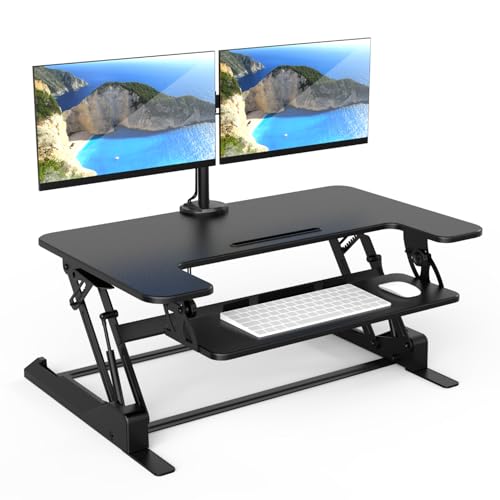
This Mount-It! model includes a built-in dual monitor mount that supports screens up to 32 inches with tilt, swivel, and rotation. The 36 inch wide top surface provides ample room for monitors, laptops, and accessories. A manual gas spring lift adjusts from 6.5 to 16.3 inches, and the desktop supports up to 33 lbs while each monitor arm holds up to 17.6 lbs.
Top surface36 inches wide
Monitor capacityTwo monitors up to 32 inches
Height range6.5 to 16.3 inches
Weight capacity33 lbs desktop, 17.6 lbs per arm
Pros
- Integrated monitor mount with tilt, swivel, and rotation
- Wide 36-inch surface for dual monitors and more
- Nonskid pads protect desk surface
Cons
- Monitor arms add to overall height
- Assembly required for monitor mount
Check price on Amazon ›
The Rocelco R DADRB-46 offers a 45.7 by 23.6 inch work surface that supports up to three monitors. Its dual gas-spring lift provides smooth manual adjustment from 5 to 20 inches and supports up to 45 lbs. The retractable keyboard tray extends for comfortable typing and can also hold a laptop. It arrives fully assembled and includes a rear grommet for cable routing or an optional monitor arm.
Work surface45.7 x 23.6 inches
Weight capacity45 lbs
Height range5 to 20 inches
Keyboard tray25.6 x 11.25 inches, retractable
AssemblyFully assembled
Pros
- Extra-wide surface fits up to three monitors
- Dual gas-spring lift for smooth adjustment
- Retractable keyboard tray saves space
Cons
- Large footprint requires a deep desk
- Heavy unit may be difficult to move
Check price on Amazon ›
The Flexpro Hero Corner is designed for cubicles and L-shaped desks with a 37 by 18 inch footprint. Its hydraulic pump lift assist raises the two-level workspace up to 20 inches above the desktop. The separate keyboard shelf keeps typing comfortable while the monitor riser positions your screen for easier viewing. The sturdy metal base supports up to 35 lbs.
Surface size37 x 18 inches
Height range4.5 to 20 inches
Weight capacity35 lbs
Lift typeHydraulic pump lift assist
Pros
- Corner-friendly shape fits cubicles and L-desks
- Two-level design with separate keyboard shelf
- Hydraulic lift for smooth height changes
Cons
- Lower weight capacity than some wide models
- Assembly may be required
Check price on Amazon ›
The FLEXISPOT 36 inch converter uses a reinforced steel frame and thickened square tubes for stability at any height. The top surface supports up to 33 lbs, while the keyboard tray holds 11 lbs. Its 36 inch width comfortably fits dual monitors with extra room for accessories, making it a versatile choice for ergonomic upgrades.
Surface width36 inches
Top weight capacity33 lbs
Keyboard tray capacity11 lbs
FrameReinforced steel with thickened square tubes
Pros
- Reinforced steel frame for stability
- Fits dual monitors with room for accessories
- Separate keyboard tray weight rating
Cons
- Assembly required
- Limited depth may not suit very large monitors
Check price on Amazon ›
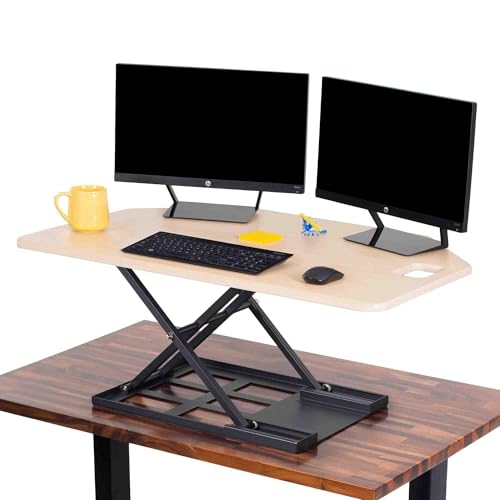
The X-Elite Pro features a 28 by 20 inch single-level surface that holds a monitor, laptop, and keyboard. Its durable metal base supports up to 20 lbs and keeps the unit stable while you work. The minimalist frame fits into home or office spaces without drawing attention.
Surface size28 x 20 inches
Weight capacity20 lbs
LevelsSingle level
FrameDurable metal base
Pros
- Simple single-level design is easy to set up
- Compact 28-inch width suits smaller desks
- Sturdy metal base
Cons
- Lower weight capacity limits monitor size
- No separate keyboard tray
Check price on Amazon ›
This X-Elite Pro model offers a 40 inch wide desktop with 27.5 inches of depth, providing room for dual monitors, a keyboard, and accessories. The built-in pneumatic lift raises the converter from 2.25 to 16.75 inches in seconds. Its corner-friendly design suits L-shaped desks and cubicles, and it arrives fully assembled.
Desktop width40 inches
Depth27.5 inches
Height range2.25 to 16.75 inches
Lift typePneumatic
AssemblyFully assembled
Pros
- Wide 40-inch surface with generous depth
- Smooth pneumatic lift for quick transitions
- Fully assembled for immediate use
Cons
- Lower maximum height than some competitors
- Large footprint may not suit narrow desks
Check price on Amazon ›
What to look for
How lift mechanisms affect desk depth and stability
Converters use manual, gas-spring, hydraulic, or pneumatic lifts. Straight-up lifts like the Ergotron WorkFit-TL and Rocelco save desk depth because they do not extend outward. Gas-spring and pneumatic lifts offer smooth adjustment, while manual locking mechanisms are simple and reliable. Consider how often you change posture and whether you need one-hand operation.
Matching surface size to your monitor count
Single-monitor users can choose a 28 to 32 inch surface, while dual-monitor setups need at least 36 inches of width. Three-monitor users should look for 45 inches or more, such as the Rocelco 46 inch model. Depth matters too: a deeper surface accommodates larger monitors and accessories without crowding the keyboard tray.
Keyboard tray design and ergonomic spacing
A separate keyboard tray keeps your keyboard lower than the monitor, which supports better typing posture. Trays that move in tandem with the worksurface maintain that spacing as you raise or lower the desk. Retractable trays, like the one on the Rocelco, can slide away when not in use to free up space.
Assembly, footprint, and shared-space considerations
Some converters arrive fully assembled, including the Vari Pro Plus 48, Rocelco 46 inch, and X-Elite Pro 40 inch. Others require assembly, which may involve attaching a keyboard tray or monitor mount. In shared offices, a compact footprint and cable management features help keep your workspace tidy and reduce tripping hazards.
Frequently asked questions
Do standing desk converters work well on narrow desks?
Yes, provided you check the footprint. Models like the VIVO 32 inch and Stand Steady X-Elite Pro are designed to maximize space on smaller desks. Straight-up lifts also help because they do not extend outward, so you need less desk depth behind the converter.
Which converter is easiest to assemble?
The Vari Pro Plus 48, Rocelco 46 inch, and X-Elite Pro 40 inch arrive fully assembled. Others may require attaching a keyboard tray or monitor mount. If you want to avoid setup, look for models that state they are fully assembled.
Can I use a standing desk converter for long computer sessions?
Yes, but choose a model with a stable lift and an ergonomic keyboard tray. A separate tray that sits below the monitor helps maintain proper posture. Wide surfaces like the Ergotron WorkFit-TL or Rocelco 46 inch reduce clutter during long sessions.
How much weight can these converters hold?
Weight capacities range from 20 lbs on the Stand Steady X-Elite Pro to 45 lbs on the Rocelco 46 inch. Check both the desktop and keyboard tray ratings if you plan to place multiple monitors or a laptop on the unit.
Do any converters include a monitor mount?
The Mount-It! model includes a built-in dual monitor mount with tilt, swivel, and rotation. The Rocelco 46 inch has a rear grommet that supports an optional Rocelco monitor arm. Other models may require a separate monitor arm kit.
What is the difference between a straight-up lift and an outward lift?
A straight-up lift raises the worksurface vertically, so it does not need extra desk depth behind the converter. An outward lift extends the surface toward you as it rises, which can be less space-efficient on narrow desks. Most models in this list use straight-up lifts.
Are these converters suitable for shared offices?
Yes, especially compact models with a small footprint. Look for nonskid pads to protect the desk and cable management features to keep wires organized. A converter that adjusts easily also lets multiple users find their preferred height.
Can I use a converter with an L-shaped desk or cubicle?
The Flexpro Hero Corner and X-Elite Pro 40 inch are designed for corner and L-shaped desks. Their shapes fit into cubicle layouts while providing a wide worksurface. Check the dimensions against your desk to ensure a proper fit.
The verdict
Vari Pro Plus 48 Standing Desk Converter
9.5/10/10
The Vari Pro Plus 48 remains our top recommendation for its wide two-tier surface, sturdy steel construction, and fully assembled design. If your desk is narrower, the VIVO 32 inch offers a compact footprint with a 33 lb lift. Dual monitor users who need a large, stable worksurface should consider the Ergotron WorkFit-TL. Match the converter to your monitor count and desk depth for the best fit.
Check price on Amazon ›
Our top pick, secure checkout via Amazon
Note: Availability and specifications change often. Always confirm the current details on Amazon before buying.