Electronics 9 Smart Power Strips for App-Controlled Outlets
P
By the Pickpedia Team
·9 picks compared
·Last verified October 2026
Affiliate disclosure: As an Amazon Associate, Pickpedia earns from qualifying purchases. Links on this page are paid links, and we may earn a commission at no extra cost to you. This never affects our picks or scores.
Quick answer
Pick a strip by how many outlets need independent app control and whether you want energy monitoring. Kasa KP303 suits basic app and voice setups with three switched outlets. For denser rigs, six-outlet models from Amazon Basics, Geeni, Tapo, and GHome give room to grow. Match cord length and USB needs to your desk.
9 Smart Power Strips for App-Controlled Outlets at a glance
Why you can trust this guide
We compared these picks using verified manufacturer specifications, available manuals and documentation, current retailer listings, and patterns in owner feedback, alongside editorial research. We focus on measurable differences such as performance, capacity, usability, and build quality. Pickpedia does not present editorial research as laboratory testing, and we do not claim hands-on testing unless it was actually performed.
How we chose: We compared nine smart power strips across outlet count, individual versus grouped control, USB output, surge rating, and hub-free setup.
Smart power strips replace a wall of manual switches with app schedules, voice commands, and remote on and off. Choosing one comes down to how many outlets you actually need to control separately, and whether always-on ports for routers or clocks matter to you.
Every option here connects over Wi-Fi without a separate hub, and most work with Alexa and Google Assistant. Below, each pick is framed by its listed features so you can see who it fits, from tidy desks to larger entertainment centers.
Our top picks
Kasa keeps things simple with three independently controllable smart outlets and two always-on USB ports, enough to run and charge five devices at once. It pairs with Alexa and Google Assistant for hands-free switching, and the Kasa app handles remote control plus schedules and timers on each outlet. ETL-certified surge protection guards sensitive electronics, and setup is a quick app download followed by a Wi-Fi connection. Owners often praise how dependable the app feels day to day. One limitation: only three of the outlets are smart, so heavy users with many gadgets may find three switched sockets tight.
Smart outlets3
USB ports2 always-on
Voice controlAlexa, Google
Surge ratingETL-certified
Pros
- Three individually switched outlets
- Stable, well-regarded app
- Straightforward hub-free setup
Cons
- Only three smart sockets
- USB ports cannot be app-controlled
Check price on Amazon ›
Six individually controlled outlets and three USB ports give this strip real headroom for a busy desk or media stand. You can switch each outlet alone or group them for unified operation, and the Alexa app builds routines and schedules with no hub required. Setup runs in minutes: plug in, connect, and start automating from anywhere. Reviewers note the versatile grouping as a standout for organizing lamps, chargers, and electronics together. The main tradeoff is ecosystem focus, since the listing centers on Alexa, so Google Assistant fans should confirm compatibility before committing.
Smart outlets6
USB ports3
ControlIndividual or grouped
HubNot required
Pros
- Six independently controlled outlets
- Flexible grouping in the app
- Fast, hub-free setup
Cons
- Listing leans toward Alexa
- No stated surge joule rating
Check price on Amazon ›
Eight AC outlets split into four app-controlled and four always-on, so essentials like routers stay powered while lamps run on schedules. Four USB ports handle phones, tablets, and streaming sticks, and a 1680-joule surge rating protects the AC side. Voice control works through Alexa or Google Assistant, and the Smart Life app adds timers, grouping, and sunrise routines. Backed by a listed 12-month warranty and responsive support. Buyers must note it needs 2.4GHz Wi-Fi and will not join 5GHz or password-free networks, a common stumbling point during setup.
AC outlets8 (4 smart)
USB ports4 always-on
Surge rating1680 joules
Wi-Fi2.4GHz only
Pros
- Mix of smart and always-on outlets
- Four USB charging ports
- Stated surge joule rating
Cons
- No 5GHz Wi-Fi support
- USB and always-on ports not app-controlled
Check price on Amazon ›
Geeni packs eight outlets, six of them individually controllable and two always-on for devices that must never lose power. A 1200-joule rating shields your electronics, while the six-foot cord reaches across a room and cuts clutter. Control happens through the Geeni app or voice via Alexa and Google Assistant, and no hub is needed to get running. Owners report the longer cord as a genuine convenience for awkward outlet placements. One caveat: the 1200-joule figure sits below some rivals here, so those protecting high-end gear may want a stronger rating.
AC outlets8 (6 smart)
Surge rating1200 joules
Cord length6 ft
HubNot required
Pros
- Six independently controlled outlets
- Long six-foot cord
- Two always-on outlets included
Cons
- Lower joule rating than some rivals
- No USB ports listed
Check price on Amazon ›
Tapo stands out with per-outlet energy monitoring across six individually controlled AC sockets, plus three always-on USB ports at 5V 2.4A. Matter certification lets it work with Alexa, Google Home, Apple HomeKit, and Samsung SmartThings, a rare breadth here. A flush-fitting plug tucks behind couches, and overcharge prevention shuts off once devices finish charging to spare battery health. Reviewers highlight the detailed consumption insights as useful for trimming waste. The short three-foot cord is the tradeoff, so anyone needing to reach a distant outlet should measure the run first.
Smart outlets6
USB ports3 always-on
Energy monitorPer-outlet
PlatformsMatter, HomeKit, more
Pros
- Per-outlet energy monitoring
- Wide Matter platform support
- Overcharge prevention feature
Cons
- Short three-foot cord
- USB ports are always-on only
Check price on Amazon ›
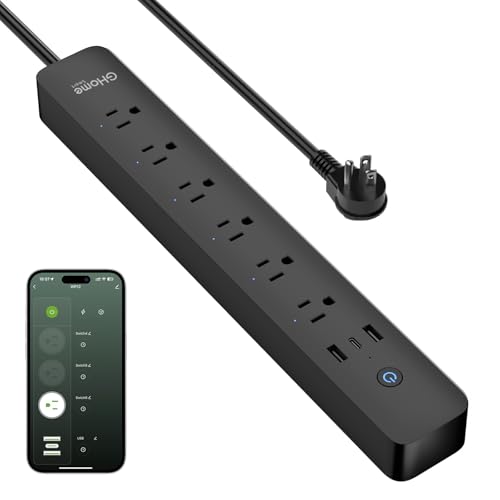
GHome combines six smart outlets rated to 1800W with two USB-A and one 30W USB-C port for quick top-ups. You control each socket individually or in groups by voice through Alexa and Google, and the app adds schedules for lamps, fans, aquarium lights, and more. Energy monitoring tracks each plugged-in device so you can spot waste. Multiple safety layers cover overload, surge, and short circuit, with fireproof housing. It runs on 2.4GHz Wi-Fi only, so dual-band users should point it at the correct band during setup to avoid connection headaches.
Smart outlets6
USB ports2A + 1C (30W)
Energy monitorYes
Wi-Fi2.4GHz only
Pros
- 30W USB-C fast charging
- Six switched outlets with grouping
- Built-in energy monitoring
Cons
- No 5GHz Wi-Fi support
- USB ports lack independent control
Check price on Amazon ›
meross offers four individually controlled outlets and four grouped USB ports, including a 20W PD USB-C port for phones and tablets. It stands out for broad voice support across Apple HomeKit, Siri, Alexa, Google Home, and SmartThings, with no hub required on 2.4GHz or dual-band routers. Timers and schedules automate devices, and sunrise and sunset settings add convenience. Flame-retardant housing and ETL and FCC certification back the safety story. Note that HomeKit remote access needs an Apple TV or iPad as a bridge, an extra requirement Apple users should plan for.
Smart outlets4
USB ports4 grouped, 20W PD
PlatformsHomeKit, Alexa, more
Max load15A
Pros
- Full Apple HomeKit and Siri support
- 20W USB-C PD charging
- ETL and FCC certified
Cons
- Only four switched outlets
- HomeKit remote access needs a bridge
Check price on Amazon ›
Anker brings sheer capacity with 12 AC outlets, one USB-C, and two USB-A ports, plus a 2100-joule surge rating for solid protection. A 20W USB-C port charges an iPhone from empty to half in about 26 minutes, and an eight-point safety system covers surge, fire resistance, overload, and temperature control. Extra spacing between outlets fits bulky plugs, and the five-foot cord suits desks and bedside tables. Owners value the sturdy build and long warranty. This is not a smart strip, though, so app scheduling and voice control are not part of the package.
AC outlets12
USB ports1C + 2A, 20W
Surge rating2100 joules
Cord length5 ft
Pros
- Twelve AC outlets for big setups
- Strong 2100-joule protection
- Wide spacing for bulky plugs
Cons
- No app or voice control
- Shared 15W total USB output
Check price on Amazon ›
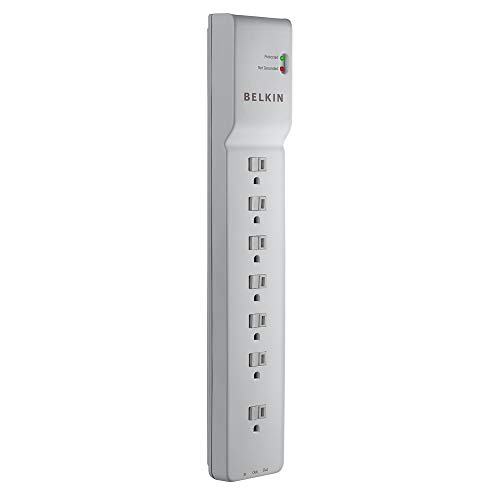
Belkin turns one wall socket into seven surge-protected AC outlets with a strong 2320-joule energy rating. Widely spaced outlets accept large charger bricks, and a six-foot cord with a built-in holder keeps cables tidy on a home office setup. The durable case resists fire, damage, and rust, and a lifetime warranty plus connected-equipment coverage back the design. Reviewers point to its heavy-duty feel and clean cable management. Since it carries no Wi-Fi, this pick skips scheduling and voice entirely, making it a plain but rugged choice for those who only need protection.
AC outlets7
Surge rating2320 joules
Cord length6 ft
Max load15A, 1875W
Pros
- High 2320-joule protection
- Wide spacing for bulky plugs
- Built-in cord management
Cons
- No smart or app features
- No USB ports
Check price on Amazon ›
What to look for
How many smart outlets do you really need
Count the devices you actually want to switch remotely, then add one or two for growth. Three-outlet strips like the Kasa suit lamps and a fan, while six-outlet models handle a full media stand. Remember that always-on outlets and USB ports usually cannot be app-controlled.
Smart versus plain surge protection
Not every strip here is smart. Anker and Belkin focus purely on outlet capacity and surge protection with no app or voice. If you want schedules, remote switching, and voice commands, choose a Wi-Fi model such as Kasa, Tapo, Geeni, or GHome instead.
Wi-Fi and platform compatibility
Most smart strips need a 2.4GHz network, and several will not join 5GHz bands, so check your router. For voice, confirm your assistant is listed. Tapo and meross reach further with Matter and HomeKit support, while some rivals center on Alexa.
Surge rating, cord length, and USB
Higher joule ratings, like Belkin's 2320 and Anker's 2100, mean stronger protection for pricey gear. Match cord length to your outlet distance, since Tapo's three-foot cord is short. If you charge phones or laptops, look for USB-C models such as GHome and meross.
Frequently asked questions
Do smart power strips need a hub
Most of the Wi-Fi models here, including Kasa, Amazon Basics, Geeni, Tapo, GHome, and meross, connect directly to your home network with no separate hub required. You just install the app and join Wi-Fi.
Can I control each outlet separately
On smart strips, yes, though it varies. Amazon Basics, Geeni, Tapo, and GHome offer six individually controlled outlets, while Kasa gives three and meross gives four. Many also let you group outlets for unified switching.
Are the USB ports app-controlled
Usually not. On several models, including Kasa, POWSAV, and Tapo, the USB ports are always-on and cannot be switched from the app. meross groups its USB ports together rather than controlling each alone.
Will these work with Alexa and Google
Most do. Kasa, POWSAV, Geeni, GHome, and meross all list Alexa and Google Assistant support. Tapo and meross add Apple HomeKit and Siri, with Tapo also covering Samsung SmartThings through Matter.
Why does it only support 2.4GHz Wi-Fi
Many smart-home devices use 2.4GHz for better range and lower power draw. POWSAV and GHome explicitly require it and will not join 5GHz networks, so set your phone to the 2.4GHz band during setup.
Do any track energy usage
Yes. Tapo monitors consumption for each AC outlet, and GHome includes an energy monitor viewable in its app. Both let you see which plugged-in devices draw the most power so you can trim waste.
Which picks are not smart
Anker and Belkin are traditional surge protectors without Wi-Fi, apps, or voice control. They focus on many outlets and strong surge ratings, so choose them only if you do not need remote or scheduled control.
What surge protection should I look for
Higher joule ratings absorb larger spikes. Belkin lists 2320 joules and Anker 2100, POWSAV 1680, and Geeni 1200. For sensitive or high-end electronics, lean toward the stronger ratings and confirm the strip is safety certified.
The verdict
Kasa Smart Plug Power Strip KP303
9.1/10
For most people, the Kasa KP303 is the top pick, blending dependable app and voice control with easy setup. Need more sockets? Tapo adds per-outlet energy tracking and wide platform support, while Amazon Basics and Geeni offer six switched outlets. meross fits Apple homes, and GHome wins on USB-C charging. If you only want protection without smarts, Anker covers big setups and Belkin keeps things rugged and simple.
Check price on Amazon ›
Our top pick, secure checkout via Amazon
Note: Availability and specifications change often. Always confirm the current details on Amazon before buying.