Electronics 8 Signal Generators for Electronics Bench Work
P
By the Pickpedia Team
·8 picks compared
·Last verified October 2026
Affiliate disclosure: As an Amazon Associate, Pickpedia earns from qualifying purchases. Links on this page are paid links, and we may earn a commission at no extra cost to you. This never affects our picks or scores.
Quick answer
Pick a signal generator by the job. Audio techs want a tone and pink noise unit with cable checks. Bench builders reach for DDS modules that output sine, triangle, and square waves. RF work needs a broadband noise source, while video installers test HDMI links directly.
8 Signal Generators for Electronics Bench Work at a glance
Why you can trust this guide
We compared these picks using verified manufacturer specifications, available manuals and documentation, current retailer listings, and patterns in owner feedback, alongside editorial research. We focus on measurable differences such as performance, capacity, usability, and build quality. Pickpedia does not present editorial research as laboratory testing, and we do not claim hands-on testing unless it was actually performed.
How we chose: We compared eight signal generators across audio, RF, DDS bench, and HDMI use, weighing waveform range, interfaces, power options, and how honestly each fits a working bench.
Signal generators cover wildly different jobs, so one tool rarely suits every bench. Some inject a clean audio tone into a mixer, others clock a stepper driver with square pulses, and a few sweep radio frequencies for spectrum work. Matching the generator to the signal you actually need matters more than raw feature counts.
This roundup groups eight options by real purpose, from a five in one audio tester to bare DDS modules for microcontroller projects. Every claim here rests on published specifications and how reviewers and owners describe each unit. Read each entry with your workflow in mind, because the best fit depends on whether you troubleshoot PA rigs, prototype circuits, or test video links.
Our top picks
Xvive packs five tools into one pocket unit, and that breadth is its strength. A built in generator sends a 1kHz sine or pink noise into mixers, DI boxes, and active speakers, with pad levels at minus 10, minus 20, and minus 40 dB to match common inputs. It also checks 48V phantom power on pins 2 and 3, meters XLR input signal, and tests cables pin by pin. Monitoring runs through headphones or the onboard speaker, and USB-C charging reaches full in about 1.5 hours. That runtime is the catch, since a short battery means daily charging for heavy touring use.
Signal types1kHz sine, pink noise
Output pads-10, -20, -40 dB
Phantom check48V on pins 2 and 3
ChargingUSB-C, ~1.5 hr full
Pros
- Five audio tools in one compact body
- Phantom power and cable checks built in
- Onboard speaker plus headphone monitoring
Cons
- Battery runtime is fairly short
- Focused on audio, not bench RF work
Check price on Amazon ›
Built around an AD9833 DDS chip, this module suits anyone driving signals from code. A 28-bit register gives 0.004Hz frequency resolution across sine, triangle, and square output, all set over a 3-wire SPI link that runs up to 40MHz. It talks to Arduino, Raspberry Pi, and STM32 boards, so integration into a microcontroller project stays straightforward. A rail-to-rail op amp keeps output clean, with amplitude adjustable from 50mV to 5V by potentiometer. Sleep current drops to 1.8 microamps for battery rigs. One honest limit stands out, since the maker warns against use in systems above 50V.
WaveformsSine, triangle, square
Resolution0.004Hz, 28-bit register
Interface3-wire SPI up to 40MHz
Amplitude50mV to 5V adjustable
Pros
- Fine frequency resolution for testing
- Works with common maker boards
- Very low sleep current for portable use
Cons
- Not rated for systems above 50V
- Needs coding to control output
Check price on Amazon ›
This two pack of DIY kits appeals to tinkerers who want to solder their own noise source. Each runs on 12V DC and offers two separate outputs that stay independent. The J1 line puts out a fixed 1V noise signal with high internal resistance, suited to feeding a preamp input. The JK1 line gives a continuously adjustable 1V white noise with low internal resistance, strong enough to drive headphones directly. Owners often use it for burn-in testing and sleep-noise projects. Remember it ships as a kit, so you build it yourself and results depend on your soldering.
FormDIY solder kit, 2 pack
PowerDC 12V
Outputs2 independent channels
JK1 driveAdjustable, drives headphones
Pros
- Two independent noise outputs
- Adjustable channel drives headphones directly
- Two kits let you build a spare
Cons
- Requires soldering and assembly
- Fixed 12V supply, no battery option
Check price on Amazon ›
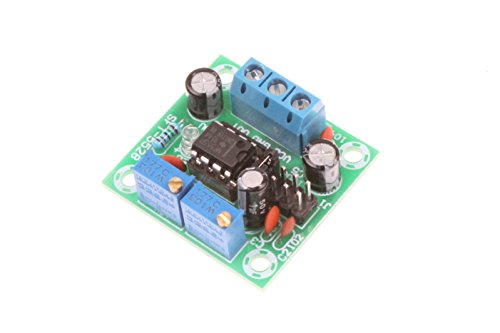
Anyone needing clean square pulses will find this NE555 module practical. It generates adjustable square waves to drive stepper motor drivers, clock MCU inputs, or exercise related circuitry. Input accepts 5V to 15V DC, and output amplitude scales with supply, running roughly 4.2V to 11.4V peak to peak. Four selectable ranges span 1Hz to 200kHz, from a 1Hz to 50Hz low band up to a 10kHz to 200kHz high band, so tuning stays continuous. An onboard LED shows output activity at a glance. Output current is modest, near 15mA on 5V and 35mA on 12V, so it signals rather than powers heavy loads.
WaveformSquare wave
Frequency1Hz to 200kHz, 4 ranges
Input5V to 15V DC
Output4.2V to 11.4V peak to peak
Pros
- Wide selectable frequency ranges
- LED shows output at a glance
- Drives stepper drivers and MCU inputs
Cons
- Low output current, not for heavy loads
- Amplitude shifts with supply voltage
Check price on Amazon ›
For radio frequency work, this hardware noise source spans a broad 0.001 to 3000MHz range through an SMA output. It uses a voltage regulator tube in breakdown to create real electronic noise, then amplifies it for steady output, so there are no recorded loops to color results. That makes it usable as a simple spectrum tracking source, interference source, or block source for comparison tests. Power comes from a 12V DC adapter drawing 0.3A to 1A, with a US plug supply included. Keep expectations grounded, since this is a raw noise reference rather than a calibrated instrument with precise level readouts.
Range0.001 to 3000MHz
OutputSMA connector
SourceBreakdown tube noise, amplified
PowerDC 12V, 0.3A to 1A adapter
Pros
- Very wide RF frequency coverage
- Continuous non-looping noise output
- Standard SMA output for lab gear
Cons
- Raw source without calibrated levels
- Needs mains adapter, no battery
Check price on Amazon ›
Weighing just 9 grams and measuring 50 by 31 by 8mm, this SMDAT12 module is the pocket option here. It outputs a stable sine wave from 0.01Hz to 9999Hz at 3V amplitude, defaulting to 7.83Hz for meditation and practice spaces. A high-speed DAC keeps the waveform clean, and a 3.5mm jack connects external antennas sold separately. Multi-step tuning shifts in 0.01Hz increments at the low end and 1Hz steps up high, so adjustment stays precise. Push-button controls, a digital display, and a save function round it out. Its narrow scope is the trade, since it targets low-frequency sine output rather than general bench duty.
Range0.01Hz to 9999Hz
Default7.83Hz sine
Amplitude3V
Size50x31x8mm, 9g
Pros
- Extremely compact and light
- Fine low-frequency step tuning
- USB-C powered with save function
Cons
- Sine only, narrow use case
- Antenna sold separately
Check price on Amazon ›
Video installers get a purpose-built tool with this LINDY unit. It generates HDMI 2.0 signals up to 4K at 60Hz to confirm a display actually supports the format you expect. On the analysis side, it tests the full path an HDMI signal traveled, including cable quality, and detects signal details such as resolution and HDCP version. A compact body makes it easy to carry between jobs on site. Its focus is the limitation to weigh, since this handles HDMI links only and does nothing for audio tone or RF bench tasks. For AV work it stays tightly on target.
SignalHDMI 2.0, 4K at 60Hz
TestsCable path and quality
DetectsResolution, HDCP version
DesignCompact for installers
Pros
- Generates and analyzes HDMI links
- Reports resolution and HDCP details
- Portable for on-site AV jobs
Cons
- HDMI only, no audio or RF use
- Single-purpose tool for one bench task
Check price on Amazon ›
NooElec keeps things simple with this AD9850 DDS module, aimed at newcomers to function generators. Reviewers note its plain controls and quad signal outputs, which give flexibility for basic waveform testing on a bench. Low power operation suits it to small experiments and portable setups where a full instrument would be overkill. It fits neatly into learning projects and quick prototype checks. The main drawback is sparse documentation on published specs, so the exact frequency and amplitude ceilings are not spelled out here. Treat it as a capable entry module rather than a precision lab reference.
TypeAD9850 DDS module
OutputsQuad signal outputs
PowerLow power operation
ControlsSimple, beginner friendly
Pros
- Simple controls for beginners
- Four signal outputs for flexibility
- Low power draw for small rigs
Cons
- Limited published specifications
- Entry module, not a precision reference
Check price on Amazon ›
What to look for
Match the generator to the signal you need
Signal generators split into clear camps. Audio testers push tone and noise into sound gear, DDS modules synthesize sine, triangle, and square waves for circuits, RF noise sources feed spectrum work, and HDMI units test video links. Decide which signal your bench actually needs before comparing anything else, because a tool built for one camp rarely helps in another.
Waveform types and frequency range
Check both the shapes and the span a unit covers. Square wave modules clock motors and logic, sine sources feed audio and resonance work, and DDS boards do several shapes at once. Frequency range matters just as much, from sub-1Hz sine up to hundreds of kilohertz or into the gigahertz for RF. Confirm the range brackets your intended tests.
Interface, control, and integration
Consider how you will drive the output. Standalone testers use push buttons and knobs for instant use, while DDS modules often need SPI wiring and code from an Arduino, Raspberry Pi, or STM32 board. If you want plug-and-go, a self-contained unit saves setup. If you are building a system, a programmable module integrates more cleanly.
Power, portability, and honest limits
Weigh how the unit powers up and where it will live. Some run on USB-C and light batteries for field use, others need a bench adapter. Note output current and amplitude limits, since many modules signal rather than drive heavy loads, and several are not rated for higher-voltage systems. Reading those limits up front prevents mismatched expectations.
Frequently asked questions
What does a signal generator actually do
It produces a known, controlled electrical signal so you can test how a circuit, cable, or device responds. Depending on the type, that output might be an audio tone, a square pulse train, a swept sine wave, broadband noise, or a full HDMI video pattern.
Which type suits audio troubleshooting
A dedicated audio tester works best. Units like the Xvive AT-2 send a 1kHz tone or pink noise into mixers and speakers while also checking phantom power and cables, which covers most live-sound diagnostics in one pocket tool.
Can I control these from an Arduino or Raspberry Pi
Some, yes. DDS modules such as the AD9833 and AD9850 boards use an SPI interface and libraries that run on Arduino, Raspberry Pi, and STM32 platforms, so you program the frequency and waveform from your microcontroller code.
What is the difference between sine, square, and noise output
Sine is a smooth single-frequency wave used for audio and resonance work. Square waves switch sharply between levels to clock drivers and logic. Noise output spreads energy across many frequencies at once, which suits burn-in tests and RF spectrum comparisons.
Do I need a soldering kit or a ready-made unit
It depends on your comfort level. DIY kits, like the two-channel white noise boards, ship as parts you assemble, which rewards hobbyists who enjoy building. Ready-made testers and modules work straight away with no soldering required.
How do I test an HDMI display or cable
Use an HDMI generator and analyzer such as the LINDY unit. It outputs 4K signals to confirm display support and reports the full signal path, including cable quality, resolution, and HDCP version, which pinpoints where a video link fails.
Are these calibrated instruments
Most modules here are working sources, not lab-calibrated references. They produce reliable signals for testing and learning, but for precise measurement work you would pair them with a properly calibrated meter or analyzer.
What power source do signal generators use
It varies widely. Compact sine and audio units often run on USB-C or small batteries for portability, while RF noise sources and many modules need a 12V DC bench adapter. Check the input rating so it matches your available supply.
The verdict
Xvive AT-2 Audio Tester Pro, 5-in-1 Signal...
9.2/10
For most working benches the Xvive AT-2 is the standout, folding tone, noise, phantom checks, and cable testing into one audio tool. Makers who prototype from code should choose the MusRock AD9833 for its clean DDS output and fine resolution. RF experimenters want the broadband noise source, video installers need the LINDY HDMI unit, and beginners will find the NooElec AD9850 the friendliest first step. Pick by the signal you truly need.
Check price on Amazon ›
Our top pick, secure checkout via Amazon
Note: Availability and specifications change often. Always confirm the current details on Amazon before buying.