Shipping Label Printers Best Shipping Label Printers for Fast Order Fulfillment
P
By the Pickpedia Team
·9 picks compared
·Last verified November 2026
Affiliate disclosure: As an Amazon Associate, Pickpedia earns from qualifying purchases. Links on this page are paid links, and we may earn a commission at no extra cost to you. This never affects our picks or scores.
Quick answer
For most sellers, the DYMO LabelWriter 5XL bundle is the best shipping label printer thanks to its jam-free direct thermal design and two included label rolls. The Brother QL-1110NWB suits wide 4-inch formats, while the Zebra ZD421 is the durable pick for busy warehouse desks.
Best Shipping Label Printers for Fast Order Fulfillment at a glance
Why you can trust this guide
We compared these picks using verified manufacturer specifications, available manuals and documentation, current retailer listings, and patterns in owner feedback, alongside editorial research. We focus on measurable differences such as performance, capacity, usability, and build quality. Pickpedia does not present editorial research as laboratory testing, and we do not claim hands-on testing unless it was actually performed.
Shipping label printers have become essential for small ecommerce shops, Etsy sellers and home shipping setups. A direct thermal model skips ink and toner entirely, so each 4x6 label comes out clean and scan-ready. The right pick depends on label width, connection type and how much space you have.
We compared real models on print resolution, label handling, wireless options and setup speed. Owners report that adhesive-backed thermal labels stay readable through transit, which matters for carrier scans. Below are the machines we rank highest for mail order businesses and warehouse desks.
Our top picks
The 5XL bundle ships with the printer and two rolls, so you can start printing right away. Automatic Label Recognition reads DYMO-branded labels to display size, type and remaining quantity, which cuts misprints and label waste. It uses direct thermal printing, so no ink or toner is needed.
Printing technologyDirect thermal
Ink or tonerNot required
Label recognitionAutomatic for DYMO-branded labels
IncludedPrinter and 2 label rolls
Pros
- Automatic label recognition reduces misprints
- Two rolls included for immediate use
- No ink or toner to replace
Cons
- Works exclusively with DYMO-branded labels
- Fewer third-party label options
Check price on Amazon ›
This Brother model prints on labels up to 4 inches wide, covering mailing, address and postage labels plus visitor badges. Bluetooth, Ethernet and 802.11b/g/n wireless give you several connection paths, and mobile printing is supported. The Plug & Label feature lets Windows users create labels without installing software.
Max label width4 inches
ConnectivityBluetooth, Ethernet, wireless 802.11b/g/n
Print typeThermal monochrome
Special featurePlug & Label for Windows
Pros
- Wide 4-inch label support
- Multiple wired and wireless connections
- Free SDKs for Windows, iOS and Android
Cons
- Monochrome printing only
- Software setup can take time on older systems
Check price on Amazon ›
The ZD421 prints at 203 DPI and 6 inches per second with no ink or toner. A three-button interface and five LED icons show what needs attention, from media replenishment to printer issues. It supports EPL and ZPL languages and can emulate other printer brands, so existing label formats keep working.
Resolution203 DPI
Print speed6 ips
ConnectivityBluetooth, Ethernet, USB
Warranty2-year
Pros
- Field-upgradeable media handling and wireless kits
- Supports EPL and ZPL plus emulations
- Clear LED status indicators
Cons
- Setup is more technical than plug-and-play models
- Bluetooth and Ethernet add complexity for home users
Check price on Amazon ›
The Rollo USB prints one 4x6 label per second at 203 DPI using direct thermal technology. It works with Windows XP and newer plus Mac 10.9 and newer, and drivers install after connecting by USB. Labels from 1.57 to 4.1 inches wide let it double as a custom sticker maker.
Print speed150mm/s, about one 4x6 label per second
Resolution203 DPI
Label width range1.57 to 4.1 inches
ConnectionUSB
Pros
- Fast one-label-per-second output
- Wide label width range for stickers
- Works with Windows and Mac
Cons
- USB only, no wireless printing
- Requires driver download before use
Check price on Amazon ›
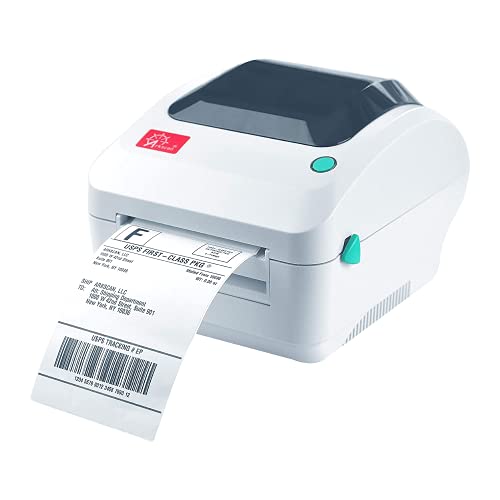
The Arkscan 2054A handles roll and fanfold paper, printing from 0.75 to 4.25 inches wide and up to 90 inches long at 5 inches per second. It connects by USB to Windows, Mac, Chromebook and Android. Support covers Amazon, eBay, PayPal, Etsy, Shopify, ShipStation, UPS, USPS, FedEx and DHL labels.
Print speed5 inches per second
Label width0.75 to 4.25 inches
Label length0.4 to 90 inches
ConnectionUSB
Pros
- Supports roll and fanfold paper
- Broad platform and carrier support
- US-based phone, chat and remote tech support
Cons
- USB only, no Bluetooth
- Speed is lower than the fastest models here
Check price on Amazon ›
The NIIMBOT B4 has a built-in label bin that holds a full 4x6 roll, and its compact body takes up about half the space of conventional printers. Bluetooth connects to phones and PCs through the NIIMBOT app, and it prints at 203 DPI and up to 50 labels per minute. It handles labels from 0.78 to 4.25 inches wide.
Resolution203 DPI
Print speed50 labels per minute
Label width0.78 to 4.25 inches
Battery2000mAh
Pros
- Built-in label bin saves desk space
- Bluetooth printing from phone or PC
- App includes templates, fonts and symbols
Cons
- Bluetooth must connect through the NIIMBOT app
- Smaller included roll than bulk bundles
Check price on Amazon ›
The PL80E prints up to 72 4x6 labels per minute at 203 DPI and accepts roll or fanfold labels from 0.97 to 4.25 inches wide. Bluetooth printing runs through the labelnize app on Android and iOS 13 or above. Windows users install the driver by USB before connecting over Bluetooth.
Print speedUp to 72 labels per minute
Resolution203 DPI
Label width0.97 to 4.25 inches
Warranty2-year
Pros
- Very fast 72-label-per-minute output
- Accepts roll and fanfold labels
- Two-year warranty with phone and email support
Cons
- Mac does not support Bluetooth connection
- Does not support Chrome OS
Check price on Amazon ›
The SP410BT prints by Bluetooth through the HereLabel app on iPhone, Android, Windows 10/11 and macOS. USB covers Windows, macOS, Linux and Raspberry Pi for stable desktop printing. It prints standard 4x6 PDF labels from UPS, USPS, Amazon, eBay, Shopify and FedEx, and accepts roll or fanfold thermal paper up to 4.25 inches wide.
Printing technologyDirect thermal
Wireless appHereLabel
Label widthUp to 4.25 inches
USB systemsWindows, macOS, Linux, Raspberry Pi
Pros
- Works with major carrier and marketplace labels
- USB support includes Linux and Raspberry Pi
- No ink, toner or ribbons needed
Cons
- Bluetooth printing depends on the HereLabel app
- Requires thermal labels to operate
Check price on Amazon ›
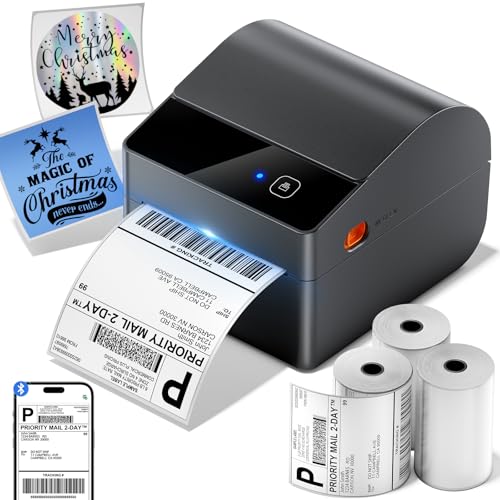
The A64M arrives with three rolls of 250 4x6 labels, giving you 750 labels before reordering. Its built-in bin holds a 250-label roll and the body measures 7.2 by 6.3 by 5.3 inches, using about half the space of traditional models. Bluetooth 5.0 connects to Windows, macOS, iOS and Android, and USB is also available.
Included labels750 labels, three 250-label rolls
Label width1 to 4.6 inches
Bluetooth5.0
Dimensions7.2 x 6.3 x 5.3 inches
Pros
- 750 labels included in the box
- Built-in bin holds a full roll
- Works with USPS, UPS, FedEx and 30+ platforms
Cons
- Wireless setup relies on the companion app
- Larger label widths need compatible stock
Check price on Amazon ›
What to look for
How thermal printing changes the label workflow
Direct thermal printers burn the image into heat-sensitive label stock, so there is no ink, toner or ribbon to replace. That keeps adhesive-backed 4x6 labels crisp and scan-ready. Owners report fewer smudges than inkjet output, especially on shipping labels that pass through carrier scanners.
Matching label width to your carrier and platform
Most shipping labels are 4x6 inches, but wide-format models reach 4.25 or 4.6 inches for postage and name badges. Check the width range before buying if you also print barcode, return or product labels. Narrow stock from 0.75 inches up opens up sticker and inventory work.
Setup speed and connection types
USB remains the fastest path for a desktop setup, while Bluetooth through a companion app suits phones and pop-up shops. Some models need a USB driver install before Bluetooth will work, so read the setup notes. Ethernet and wireless 802.11b/g/n are worth having at a warehouse desk.
Durability and long-term running for busy desks
A sturdy chassis and clear status indicators matter when a printer runs all day. Field-upgradeable media and wireless kits let a machine grow with your order volume. Bundles with included rolls reduce the number of reorders in your first months.
Frequently asked questions
Do I need ink or toner with a shipping label printer?
No. Every model here uses direct thermal printing, which needs no ink, toner or ribbons. You only replace the thermal label stock.
Can these printers handle adhesive-backed labels?
Yes. Direct thermal printers are built for adhesive-backed thermal labels in standard 4x6 sizes. Stick to thermal-compatible stock so the print head produces a clear image.
Which model is easiest to set up for an Etsy shop?
The Rollo USB is the simplest for a single computer, since you connect by USB and install drivers. For phone-based printing, the NIIMBOT B4 and iDPRT SP410BT set up through their apps.
Is Bluetooth reliable enough for daily shipping?
Bluetooth works well for moderate volume, but some models require app-based pairing and a few do not support Mac over Bluetooth. A USB connection is more stable for high daily volume.
What label width should a warehouse desk choose?
A 4-inch width covers standard shipping labels. If you also print postage, badges or wider barcode labels, choose a wide-format model like the Brother QL-1110NWB.
Can I print labels from Amazon, Shopify and USPS?
Yes. Most models print standard 4x6 PDF labels from major platforms and carriers. The Arkscan 2054A and ASprink A64M list broad platform support directly.
How fast are these printers?
Speeds range from about one 4x6 label per second on the Rollo to 72 labels per minute on the POLONO PL80E. The Zebra ZD421 prints at 6 inches per second.
Do these printers work with Mac computers?
Several do. The Rollo USB supports Mac 10.9 and newer, the iDPRT SP410BT supports macOS, and the ASprink A64M connects to macOS over Bluetooth. Check each model's notes before buying.
The verdict
DYMO LabelWriter 5XL Label Printer Bundle
9.4/10/10
The DYMO LabelWriter 5XL bundle earns the top spot for its jam-free direct thermal design and two included rolls. Choose the Brother QL-1110NWB for wide labels, the Zebra ZD421 for a tough warehouse desk, or the Rollo USB for the simplest home setup.
Check price on Amazon ›
Our top pick, secure checkout via Amazon
Note: Availability and specifications change often. Always confirm the current details on Amazon before buying.