RGB Monitor Lights Best RGB Monitor Lights: 6 Top Picks for Your Setup
P
By the Pickpedia Team
·6 picks compared
·Last verified November 2026
Affiliate disclosure: As an Amazon Associate, Pickpedia earns from qualifying purchases. Links on this page are paid links, and we may earn a commission at no extra cost to you. This never affects our picks or scores.
Quick answer
The Govee Gaming Light for Monitor G1 is our top pick because its four-sided strip captures screen color on 27 to 34 inch displays. The Quntis Curved Monitor Light Bar suits ultrawide curved screens, and the SAMPHON RGB Monitor Light Bar covers dual front and back lighting on a smaller bar.
Best RGB Monitor Lights: 6 Top Picks for Your Setup at a glance
Why you can trust this guide
We compared these picks using verified manufacturer specifications, available manuals and documentation, current retailer listings, and patterns in owner feedback, alongside editorial research. We focus on measurable differences such as performance, capacity, usability, and build quality. Pickpedia does not present editorial research as laboratory testing, and we do not claim hands-on testing unless it was actually performed.
An RGB monitor light does two jobs at once: it lights your desk without glaring on the screen, and it throws colored light behind the monitor for atmosphere. The right balance depends on your screen size, curvature, and how much control you want over color.
We compared six real models on mounting, color modes, and front-light quality. Some are backlight strips only, others combine a task light bar with RGB, and a few add app or voice control. The picks below are ranked by how well each one handles those jobs for typical desks and gaming setups.
Our top picks
This is a backlight strip rather than a front task light, and its strength is color matching. The four-sided strip wraps the screen and uses Govee's DreamView to sync with other Govee lights and Razer Chroma. It fits 27 to 34 inch curved screens and offers 123 scene modes plus 11 music modes in the app.
TypeRGBIC backlight strip
Screen fit27 to 34 inch, curved supported
Scene modes123
Music modes11
SyncGovee DreamView, Razer Chroma
Pros
- Four-sided strip captures color from all edges of the screen
- Works with Razer Chroma and other Govee lights
- Large preset library for scenes and music
Cons
- No front task light for desk illumination
- App and desktop software required for color matching
Check price on Amazon ›
The Quntis bar extends to 26 inches and clamps onto curved screens from 800R to 3000R. Its foldable dual light design puts up to 1400 lux at the center, with an asymmetrical 45 degree beam that aims at the desk rather than the screen. The front light runs 3000K to 6500K with stepless dimming, and 15 RGB backlight modes handle the color side.
TypeDual light bar with RGB backlight
Curvature fit800R to 3000R
BrightnessUp to 1400 lux center
Color temp3000K to 6500K
RGB modes15
CRIRa98
Pros
- Contours to large curved screens to reduce dark corners
- High center brightness with an anti-glare beam angle
- High color rendering for design and reading work
Cons
- Designed for screens over 34 inches, so smaller monitors are a poor fit
- Clamp needs enough room on irregular monitor backs
Check price on Amazon ›
YEELIGHT combines a 350 lumen front light with a 16 million color RGB backlight and adds Matter and Alexa support. The bar fits flat and curved monitors from 10mm to 50mm thick, including R1000 to R1800 curves, and covers 19 to 27 inch displays. Front color temperature adjusts from 2700K to 6000K with stepless dimming.
TypeDual light bar with RGB backlight
Brightness350 lm
Color temp2700K to 6000K
RGB colors16 million
CRIRa98
Mount fit10mm to 50mm thick, 19 to 27 inch screens
Pros
- Matter and Alexa support for voice and app routines
- Tool-free clip installs without drilling
- High CRI front light with wide color temperature range
Cons
- Screen fit tops out at 27 inches
- USB-powered with a fixed 1.5m cable
Check price on Amazon ›
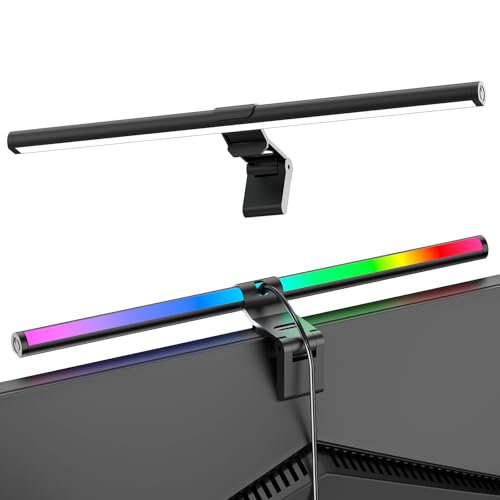
Monster splits the bar into two zones: a touch-controlled multiwhite front light and 117 individually addressable RGB+IC LEDs on the back. The 17.4 inch bar includes an adjustable multi-position mount and a 6ft USB cord with inline button control. App, voice, and Razer Chroma support round out the control options.
TypeDual-zone bar with RGBIC backlight
Length17.4 inches
Backlight LEDs117 addressable RGB+IC
ControlsTouch, app, voice, inline button
Cord6ft USB
Pros
- Addressable LEDs allow flowing multicolor effects
- Front and back zones controlled separately
- Works with Alexa, Google, and Razer Chroma
Cons
- Power adapter not included
- Front light is multiwhite only, no RGB on the desk side
Check price on Amazon ›
At 15.75 inches, the SAMPHON bar suits narrower monitors and tight desks. It pairs a 45 degree front light with 3 color temperatures and 9 RGB backlight modes, and both run independently through buttons on the bar. A memory function restores your last settings each time you switch it on.
TypeDual light bar with RGB backlight
Length15.75 inches
Front color temps3
RGB modes9
ControlOn-bar buttons with memory
Pros
- Short bar leaves room on compact desks
- Front and back lights adjust independently
- Memory function recalls the last used setting
Cons
- No app or voice control
- Fewer RGB modes than the larger bars
Check price on Amazon ›
This 16.73 inch bar offers 3 color temperatures at 2700K, 4000K, and 6500K, plus 16 million colors for the RGB backlight. Touch buttons handle the front light and backlight scenes, and the Tuya, Smart Life, and Colorpanda apps add phone control over 2.4G WiFi. The phone mic can sync the backlight to music.
TypeDual light bar with RGB backlight
Length16.73 inches
Color temps2700K, 4000K, 6500K
RGB colors16 million
App supportTuya, Smart Life, Colorpanda
Connectivity2.4G WiFi
Pros
- Music sync through the phone microphone
- Memory function keeps your last setting
- Works with Alexa for voice control
Cons
- App control needs a 2.4G WiFi network
- Front light has only three color temperature steps
Check price on Amazon ›
What to look for
Backlight strip or light bar
The first decision is whether you want a backlight only or a bar that also lights the desk. The Govee G1 is a strip that wraps the screen for color matching, while the Quntis, YEELIGHT, Monster, SAMPHON, and 16.73 inch bars all include a front task light. If you already have a desk lamp, a strip can be enough. If you work at night and need glare-free light on papers or a keyboard, a dual bar does more.
Matching the bar to your screen
Screen size and curvature decide which bars fit. The Govee strip targets 27 to 34 inch monitors and supports curved panels. The Quntis bar is built for screens over 34 inches with 800R to 3000R curvature. YEELIGHT covers 19 to 27 inch flat or curved displays from 10mm to 50mm thick. The SAMPHON and 16.73 inch bars are shorter, so measure your monitor before choosing.
Front light quality and eye comfort
Look at beam angle, color rendering, and brightness for the front light. Quntis uses a 45 degree asymmetrical beam with up to 1400 lux and Ra98 color rendering. YEELIGHT offers 350 lumens and Ra98 with a 25 degree tilt adjustment. SAMPHON and the 16.73 inch bar also use a 45 degree angle to keep light off the screen. Higher CRI helps when color accuracy matters for design or editing.
Color control and connectivity
RGB effects range from preset scenes to addressable LEDs. Govee provides 123 scene modes and Razer Chroma sync. Monster uses 117 addressable RGB+IC LEDs for flowing effects. YEELIGHT adds Matter and Alexa, while the 16.73 inch bar uses Tuya, Smart Life, and Colorpanda apps with music sync. If you want plug and play, the SAMPHON bar relies on on-bar buttons with no app required.
Frequently asked questions
Can an RGB monitor light be used for console capture?
Yes, as ambient lighting it works alongside a capture setup. The Govee G1 syncs with Razer Chroma and other Govee lights, and the Monster bar supports Alexa, Google, and Razer Chroma. Neither captures video itself, so treat the light as atmosphere rather than part of the capture chain.
Is a USB-C connection available on these lights?
The Quntis bar includes a 5.9ft USB-C cable and a 5V/2.4A adapter. The other models use USB power with their own cords, such as the 6ft USB cord on the Monster bar and the 1.5m cable on the YEELIGHT. Check the plug type on your monitor or hub before you commit.
Do these lights work well on small desks?
Short bars leave more room. The SAMPHON bar is 15.75 inches and the 16.73 inch bar is only slightly longer, so both suit compact setups. The Quntis bar extends to 26 inches and is meant for large curved screens, so it is a poor match for a small desk.
Which RGB monitor light is best for beginner streamers?
The Govee G1 is the simplest route to screen-reactive color because it wraps the monitor and syncs with other Govee lights. If you also need desk light on camera, the YEELIGHT or Monster bars combine a front light with RGB backlight and app control.
What should I check for glare before buying?
Look for an asymmetrical beam angle that aims light at the desk. Quntis, SAMPHON, and the 16.73 inch bar use a 45 degree design, and YEELIGHT uses a 25 degree tilt adjustment. A bar without that angle can reflect on the screen and cause eye strain.
Can these lights sync with music?
The Govee G1 includes 11 music modes. The 16.73 inch bar can sync its backlight to music using the phone microphone. Other models focus on preset scenes and app control rather than audio reactivity.
Do I need an app to control the colors?
Not always. The SAMPHON bar uses on-bar buttons for its 9 RGB modes and 3 front color temperatures. Govee, Monster, YEELIGHT, and the 16.73 inch bar offer app control, and YEELIGHT adds Matter and Alexa for voice commands.
Will an RGB backlight help with eye strain?
A bias light behind the monitor can soften the contrast between a bright screen and a dark room. Quntis and YEELIGHT both cite anti-glare and blue light certifications for their front lights. The backlight itself is for atmosphere, so pair it with a well-aimed front light for long sessions.
The verdict
Govee Gaming Light for Monitor G1
9.2/10/10
The Govee Gaming Light for Monitor G1 wins for most gamers because its four-sided strip turns the whole screen edge into color. Choose the Quntis bar if you own a large curved monitor and want strong desk light, or the YEELIGHT if smart control matters. The SAMPHON and 16.73 inch bars serve smaller desks, and the Monster bar is the pick for addressable LED effects.
Check price on Amazon ›
Our top pick, secure checkout via Amazon
Note: Availability and specifications change often. Always confirm the current details on Amazon before buying.