Electronics 7 Portable Barcode Printers for Warehouse Work
P
By the Pickpedia Team
·7 picks compared
·Last verified October 2026
Affiliate disclosure: As an Amazon Associate, Pickpedia earns from qualifying purchases. Links on this page are paid links, and we may earn a commission at no extra cost to you. This never affects our picks or scores.
Quick answer
For warehouse labeling on the move, pick a thermal label printer that pairs by Bluetooth, supports 2 inch wide media, and runs on battery. Handheld inkjet guns suit marking cartons and dates directly on surfaces. Match the width, connection, and label freedom to how your team actually works.
7 Portable Barcode Printers for Warehouse Work at a glance
Why you can trust this guide
We compared these picks using verified manufacturer specifications, available manuals and documentation, current retailer listings, and patterns in owner feedback, alongside editorial research. We focus on measurable differences such as performance, capacity, usability, and build quality. Pickpedia does not present editorial research as laboratory testing, and we do not claim hands-on testing unless it was actually performed.
How we chose: We compared seven portable label and coding printers across print width, connection type, media freedom, and how well each fits fast warehouse workflows.
Warehouse labeling rarely happens at a desk. Workers need a device that clips to a pocket, connects to a phone in seconds, and prints scannable barcodes on the aisle floor. That practical need shaped every pick on this list.
Two broad tools appear here. Thermal label printers handle sticker labels for bins, shelves, and products without ink. Handheld inkjet guns instead spray codes and dates straight onto boxes, wood, or metal. We grouped both because warehouses often use them side by side.
Our top picks
SUPVAN's T50M Pro prints labels from 3/4 inch up to 2 inch wide, which covers most shelf, bin, and product tags in a small warehouse. The free app needs no registration and adds over 30 fonts, 50 frames, and 660 icons, so barcodes, QR codes, and brand logos are quick to lay out. Auto label size recognition means less fiddling between rolls, and thermal printing skips ink and toner entirely. Reviewers note the ecosystem leans on SUPVAN tapes, so plan your label stock around the brand rather than assuming any roll fits.
Print width3/4 in to 2 in
ConnectionBluetooth app
PrintingThermal, no ink
App extras30+ fonts, 660+ icons
Pros
- Wide label range covers most warehouse tags
- Free app with no account required
- Auto label size recognition speeds reloads
Cons
- Leans on brand tapes for best results
- App-only setup, no computer editing
Check price on Amazon ›
Phomemo's M110 targets anyone printing many labels at once. Its Print Master app supports Excel batch printing, so a full spreadsheet of SKUs or retail tags flows straight to labels. An OCR feature reads text from photos in about four seconds, handy for copying details fast. Bluetooth 4.0 reaches roughly 33 feet and connects in about two seconds, and label width runs from 20mm to 50mm. Owners report that some premium templates, icons, and fonts sit behind a paid membership, and the M110 does not print color or shipping labels, so confirm your label needs first.
Print width20mm to 50mm
ConnectionBluetooth 4.0, 33 ft
Batch printingExcel supported
ExtraOCR text capture
Pros
- Excel batch printing suits large label runs
- Fast OCR pulls text from photos
- Quick two second Bluetooth pairing
Cons
- Some templates locked behind paid membership
- No color or shipping label support
Check price on Amazon ›
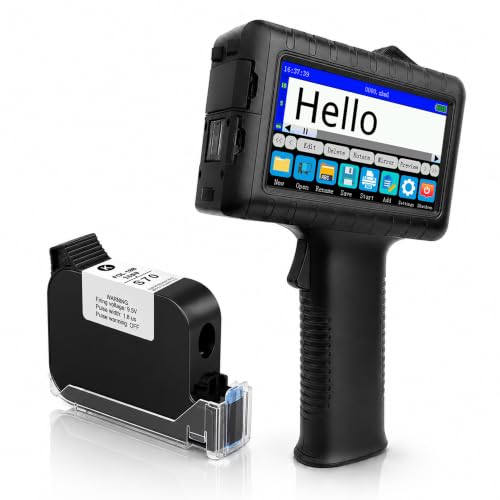
This INPTNOV inkjet gun marks codes directly onto surfaces instead of printing stickers. Its 42ml quick drying ink sets in two to five seconds, resists water, and prints on fabric, wood, plastic, metal, glass, and cardboard. A 4.3 inch touchscreen edits templates on the device, and USB import handles JPG, PNG, and BMP logos or barcodes. Rated battery life reaches up to 16 hours, and 28 language interfaces suit mixed teams. Print height tops out at 0.5 inch though, so multi line or tall markings need more than one pass. It ships with a one year warranty.
TypeHandheld inkjet
Ink42ml quick drying
BatteryUp to 16 hours
Screen4.3 in touchscreen
Pros
- Marks many surfaces including metal and glass
- Long rated battery life for full shifts
- On device template editing plus USB import
Cons
- Print height limited to 0.5 inch
- Ink not permanent on every material
Check price on Amazon ›
The CLABEL 221B stands out because it uses no RFID chips and no brand lock, so any standard thermal roll works. That freedom matters in a warehouse burning through label stock. It prints 25mm to 50mm wide, covering barcodes, address labels, retail tags, and jewelry tags. The Clabel app connects over Bluetooth in seconds and adds hundreds of templates, Excel batch printing, and image to text. Matched thermal labels resist water, oil, and scratches for busy shelves. One limit stands out for tablet users: it does not support iPad, and computer use requires a USB cable rather than wireless.
Print width25mm to 50mm
MediaAny standard roll
ConnectionBluetooth, USB for PC
AppBatch print, image to text
Pros
- Accepts any standard thermal roll
- Durable water and oil resistant labels
- App supports Excel batch printing
Cons
- No iPad support at all
- Computer use needs a USB cable
Check price on Amazon ›
Nelko's P21 shrinks a traditional label maker to about half the weight and size, so it slips into a pocket for aisle work. Direct thermal printing at 203 DPI produces sharp text and barcodes without ink or toner, and a built in rechargeable battery keeps it going. The app carries a deep library, with 3600 icons, 700 borders, 750 templates, and support for QR codes and barcodes across 29 languages. Buyers should note the fixed label lengths and that it prints black only, plus it does not work with computers or Google phones running Android 14. A charging adapter is not included.
Resolution203 DPI
PrintingDirect thermal
App library3600+ icons, 750+ templates
PowerBuilt in rechargeable
Pros
- Very light and pocket sized
- Large template and icon library
- Sharp 203 DPI thermal output
Cons
- Fixed label lengths, monochrome only
- No computer or Android 14 Pixel support
Check price on Amazon ›
NIIMBOT's D110 is a pocket sized thermal label maker built for fast, basic labeling. Intelligent Identification reads the roll you load and supports clear, colorful, round, and gift label types, all waterproof and oil proof. Printing runs at 203 DPI with no ink or toner, and the Type C battery fully charges in about two hours. The NIIMBOT app handles batch printing over Bluetooth for iOS and Android. It prints black text only, so color labels require patterned tapes, and like most units here it does not connect to computers. Best suited to light duty tagging rather than heavy volume runs.
Resolution203 DPI
ChargingType C, ~2 hours
MediaAuto recognized rolls
ConnectionBluetooth, iOS and Android
Pros
- Compact and easy to carry
- Auto recognizes the loaded roll
- Fast Type C charging
Cons
- Monochrome black text only
- No computer connection
Check price on Amazon ›
Minssine's MS-Z10 is a handheld inkjet gun aimed at warehousing, retail, and logistics marking. It reaches 300, 400, and 600 DPI, so codes stay crisp on carton boxes, metal, wood, glass, and even curved surfaces, helped by an auxiliary positioning plate. Print height spans 0.078 inch to 0.5 inch across one to five lines of text, and content covers QR codes, barcodes, dates, and logos in BMP, JPG, or PNG. The 42ml quick drying ink resists water but, as Minssine notes, is not permanent, so heavily handled items may smear over time. A 4.3 inch touchscreen keeps setup simple, and a carry case is included.
TypeHandheld inkjet
ResolutionUp to 600 DPI
Print lines1 to 5 lines
Ink42ml quick drying
Pros
- High 600 DPI resolution output
- Prints on curved and hard surfaces
- Handles up to five lines of content
Cons
- Ink is not permanent
- Short print height per pass
Check price on Amazon ›
What to look for
Thermal labels or inkjet coding
Decide what you are marking first. Sticker labels for bins, shelves, and products call for a thermal label printer. Marking codes and dates straight onto cartons, wood, or metal points you toward a handheld inkjet gun. Many warehouses keep both on hand.
Match the print width to your labels
Most portable label printers here top out around 2 inch, or 50mm. That range fits barcodes, address labels, and retail tags comfortably. Confirm your widest label fits before buying, since shipping labels usually need a larger dedicated printer these units do not cover.
Check the connection and media rules
Nearly every model connects by Bluetooth to a phone app rather than a computer. Read the fine print: some skip iPad, older Pixel phones, or PC use entirely. Media freedom matters too, since a few printers accept any roll while others expect their own brand.
Plan for battery and daily volume
Portable use lives or dies on the battery. Thermal units run on built in cells and recharge over Type C, while inkjet guns can push toward a full shift. If you print constantly, favor faster charging, longer runtime, and batch printing to keep the aisle moving.
Frequently asked questions
Do these printers need ink or toner?
The thermal label printers use direct thermal technology, so they need no ink or toner, only the label rolls. The handheld inkjet models use a refillable ink cartridge instead, since they spray codes directly onto surfaces.
Can they print real scannable barcodes?
Yes. Every model here supports barcodes and QR codes through its app or on device editor. Owners report clean, scannable output, though resolution varies, with the inkjet guns reaching up to 600 DPI for sharper small codes.
Will they connect to a computer?
Most connect only by Bluetooth to a phone app. The CLABEL 221B allows computer use through a USB cable, while several others, including the Nelko P21 and NIIMBOT D110, state they do not work with computers at all.
What label widths do they handle?
The thermal label printers generally print from around 20mm up to 50mm, or roughly 2 inch. That suits bin, shelf, and product tags. None of these are meant for full sized shipping labels, so check your widest label first.
Are the printed labels durable?
Several models use waterproof and oil resistant thermal labels that resist scratches, based on their listings. The inkjet ink dries in seconds and resists water, though both Minssine and INPTNOV note the ink is not fully permanent on every surface.
Do the apps charge extra for features?
Core printing is free across these apps. Some, like Phomemo's Print Master, mark certain premium templates, icons, and fonts as paid, while unmarked ones stay free. SUPVAN and CLABEL advertise their template libraries as free to use.
Which one works best on cardboard boxes?
For marking directly onto boxes, choose a handheld inkjet gun like the Minssine MS-Z10 or INPTNOV unit. Both print on cardboard, metal, wood, and glass. Thermal label printers instead produce stickers you apply to the box.
Do they support batch printing from a list?
Yes, several do. The Phomemo M110 and CLABEL 221B both support Excel batch printing, letting you send a full spreadsheet of SKUs or tags at once. The NIIMBOT D110 also supports batch printing through its app.
The verdict
SUPVAN T50M Pro Bluetooth Label Maker with...
9.1/10
The SUPVAN T50M Pro earns our top pick for its wide label range, free app, and warehouse ready thermal printing. Choose the Phomemo M110 or CLABEL 221B when spreadsheet batch printing drives your day, and the CLABEL if roll freedom matters most. For marking codes straight onto cartons and curved surfaces, the Minssine MS-Z10 and INPTNOV inkjet guns fit best. Pocket first workers will like the light Nelko P21 or compact NIIMBOT D110.
Check price on Amazon ›
Our top pick, secure checkout via Amazon
Note: Availability and specifications change often. Always confirm the current details on Amazon before buying.