Phone Bluetooth Keyboards Best Phone Bluetooth Keyboards: 9 Top Picks Ranked
P
By the Pickpedia Team
·9 picks compared
·Last verified November 2026
Affiliate disclosure: As an Amazon Associate, Pickpedia earns from qualifying purchases. Links on this page are paid links, and we may earn a commission at no extra cost to you. This never affects our picks or scores.
Quick answer
The Arteck Compact Wireless Bluetooth Keyboard is our top pick for most people, with broad iOS, Android, Mac, and Windows support and up to four months of battery life. The OMOTON backlit keyboard suits long typing sessions, and the Macally multi-device keyboard is best if you switch between three devices.
Best Phone Bluetooth Keyboards: 9 Top Picks Ranked at a glance
Why you can trust this guide
We compared these picks using verified manufacturer specifications, available manuals and documentation, current retailer listings, and patterns in owner feedback, alongside editorial research. We focus on measurable differences such as performance, capacity, usability, and build quality. Pickpedia does not present editorial research as laboratory testing, and we do not claim hands-on testing unless it was actually performed.
A phone Bluetooth keyboard turns a small screen into a usable writing space, but the category is wider than it looks. Some models are slim, quiet boards built for tablets and phones, while others add touchpads, backlights, or multi-device switching. The right choice depends on where you type and which devices you carry.
We compared nine real models on compatibility, battery, key feel, and portability. Every spec below comes from the manufacturer's own feature list, and our scores reflect editorial judgment rather than customer ratings. The goal is simple: match the keyboard to your phone, your bag, and your daily typing load.
Our top picks
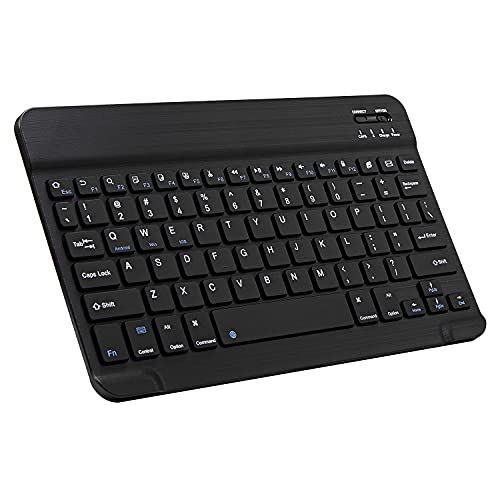
The HB098 covers all four major Bluetooth operating systems, so it pairs with an iPhone, an Android phone, a Mac, or a Windows laptop without extra software. Owners report a comfortable ultra-slim layout, and the automatic sleep mode stretches two AAA batteries to about four months of daily use. It is the broadest, simplest fit for a mixed-device desk.
ConnectionBluetooth, up to 10 meters
CompatibilityiOS, Android, Mac OS, Windows
Battery2 x AAA, up to 4 months
ExtrasAutomatic sleep mode, 24-month warranty
Pros
- Works across iOS, Android, Mac, and Windows
- Long battery life with automatic sleep
- Slim, cable-free design for travel
Cons
- No backlight for dim rooms
- No built-in device stand
Check price on Amazon ›
Oversized keycaps are 27 percent larger than standard, which cuts accidental presses during long essays or email marathons. The built-in backlight runs up to 200 hours with it off and 3 to 5 hours with it on, and a foldable stand holds a phone or tablet at five angles. It covers Android, iOS, and Windows in one board.
Keycaps27% larger than standard
BatteryRechargeable, up to 200 hours without backlight
ChargingUSB Type-C, full in 2 to 3 hours
Dimensions9.7 x 5.9 x 0.2 inches
Pros
- Large keycaps reduce mistypes
- Backlight and foldable stand suit low light
- Three-system compatibility
Cons
- Backlight shortens battery life to 3 to 5 hours
- Larger footprint than pocket keyboards
Check price on Amazon ›
A 10.5-inch slot docks your phone or tablet directly on the board, so the screen sits at a readable angle without a separate stand. You can pair three devices and switch instantly, and the 78 keys include 13 shortcuts plus LED indicators. The 280mAh battery keeps it travel-ready.
Device slot10.5 inches
Keys78 keys, 13 shortcuts
Multi-devicePairs with 3 devices
Battery280mAh rechargeable
Pros
- Built-in slot holds phone or tablet
- Quick switching across three devices
- Compact enough for a bag
Cons
- Small keys compared with full-size boards
- No backlight
Check price on Amazon ›
At 374 grams and 16.5 mm thin, the Joro is a 75 percent board with a function row and full arrow keys. Bluetooth 5.0 pairs up to three devices, and Razer Snap Tap prioritizes inputs for faster direction changes in games. The 1800-hour battery and aluminum frame make it a serious travel gaming pick.
Weight374 g
Thickness16.5 mm
ConnectionBluetooth 5.0, up to 3 devices
BatteryUp to 1800 hours
Pros
- Very light and thin for a gaming board
- Snap Tap improves game responsiveness
- RGB lighting with Chroma effects
Cons
- Gaming focus may be overkill for basic typing
- No touchpad or device slot
Check price on Amazon ›
The EX3 offers three Bluetooth channels plus a 2.4 GHz dongle, so a Mac, Windows PC, tablet, and phone can all stay connected. Instant OS key remap adjusts the layout as you switch, and the 450mAh battery lasts up to five weeks per charge. It is a quiet, full-size keyboard with a numpad for spreadsheet work.
Connection3 Bluetooth channels + 2.4 GHz dongle
Battery450mAh, up to 5 weeks
LayoutFull-size with numpad
CompatibilitymacOS, Windows, Android
Pros
- Four-device connectivity with instant switching
- Full-size layout with numpad
- Quiet typing feel
Cons
- No backlit keys
- Larger than travel-focused models
Check price on Amazon ›
A 3-in-1 mini keyboard and touchpad with a 33-foot range, the Rii pairs over Bluetooth for smart TVs and Fire Stick or uses a 2.4 GHz receiver for non-Bluetooth devices. The 500mAh battery lasts over 30 days per charge and recharges over USB-C. It is built for media browsing and slide control more than long documents.
ConnectionBluetooth + 2.4 GHz USB receiver
Range33 feet
Battery500mAh, over 30 days
ChargingUSB-C
Pros
- Touchpad replaces a separate mouse
- Dual-mode pairing for older devices
- Long range for couch use
Cons
- Mini keys are cramped for typing
- Check device compatibility before buying
Check price on Amazon ›
At 180 grams and 0.24 inches thick, this 10-inch keyboard disappears into a bag. The rechargeable battery runs more than 20 days at two hours a day, and sleep mode kicks in after 10 minutes idle. Hot keys cover volume and playback, and the aluminum back adds rigidity.
Dimensions9.84 x 5.9 x 0.24 inches
Weight180 g
BatteryRechargeable, over 20 days
LayoutUS QWERTY with hot keys
Pros
- Very light and thin
- Stable Bluetooth up to 10 meters
- Media hot keys built in
Cons
- No backlight
- Compact keys suit short sessions more than all-day typing
Check price on Amazon ›
Scissor keys give a responsive rebound while cutting noise, which helps in libraries or open offices. The 7 mm body is magnetically detachable and pairs over Bluetooth at a 10-meter range. A two-hour Type-C charge powers it, and sleep mode starts after 10 minutes idle.
KeysMechanical scissor keys
Thickness7 mm
BatteryRechargeable, full in 2 hours
CompatibilityiOS and Android
Pros
- Quiet scissor keys
- Very slim detachable design
- Fast Type-C charging
Cons
- Limited to iOS and Android
- No backlight
Check price on Amazon ›
This slim keyboard connects to a Windows 10 PC out of the box with Swift Pair and adds dedicated Office 365, search, and emoji keys. Media controls, screen snipping, and calculator shortcuts are built in. Battery life reaches up to two years, making it a low-maintenance desk companion.
ConnectionBluetooth with Swift Pair
BatteryUp to 2 years
ShortcutsOffice 365, search, emoji, media
CompatibilityWindows 10
Pros
- Two-year battery life
- Dedicated Office and emoji keys
- Solid, durable feel
Cons
- Windows-focused rather than cross-platform
- No backlight
Check price on Amazon ›
What to look for
Match the keyboard to your phone and other devices
The first question is compatibility. Arteck and OMOTON cover iOS, Android, and Windows, while Microsoft's board is built around Windows 10 and Swift Pair. If you carry an iPhone and a Windows laptop, a cross-platform model saves pairing headaches. Check the manufacturer's device list before you commit.
Decide how much portability you need
Travel boards like the FINTIE and the Ultra-Slim Mini weigh under 200 grams and slip into a bag, but their compact keys favor short sessions. A full-size board such as the Satechi EX3 adds a numpad and a more relaxed typing posture at a desk. Students often land in the middle with a stand-equipped model.
Look at battery and charging style
Battery approaches vary widely. The Arteck uses two AAA batteries rated for four months, the Microsoft board claims up to two years, and the Satechi lasts up to five weeks per charge. Rechargeable models add USB-C convenience but need a cable in your bag. Backlights cut runtime sharply, so weigh that against late-night typing.
Consider the extras that change daily use
A built-in stand or slot, like the ones on the OMOTON and Macally, keeps your phone at eye level and removes the need for a separate holder. Multi-device pairing on the Macally, Satechi, and Razer Joro lets you jump between a phone and a computer. Touchpads, as on the Rii, help with media browsing but add bulk.
Frequently asked questions
Which phone Bluetooth keyboard is best for digital nomads?
The Arteck HB098 is the strongest fit because it works with iOS, Android, Mac, and Windows and runs for months on two AAA batteries. Digital nomads who want a stand should look at the Macally, which docks a phone and switches between three devices.
Can a compact Bluetooth keyboard work with older phones?
Yes, as long as the phone supports Bluetooth. The Rii Mini adds a 2.4 GHz USB receiver for devices without Bluetooth, which helps with older hardware. For phones that do have Bluetooth, the Ultra-Slim Mini and FINTIE pair directly.
Do these keyboards work well for remote work?
They do for writing, email, and chat, especially models with larger keycaps like the OMOTON. Low-latency boards such as the Razer Joro suit fast-paced gaming more than office work. For spreadsheet-heavy days, the Satechi EX3 and its numpad are the better desk choice.
Which model is best for students?
Students who type at night benefit from the OMOTON's backlight and oversized keycaps, while its foldable stand props up a phone during lectures. The Macally is a lighter alternative with a built-in slot and three-device switching.
How do I compare keyboards with wide compatibility?
Check the operating systems listed by the maker, not just the word universal. Arteck names iOS, Android, Mac OS, and Windows, and OMOTON names Android, iOS, and Windows. If a board lists only one system, assume it is optimized for that one.
What should business travelers know about plug-and-play pairing?
Most of these boards pair over Bluetooth without a dongle, which keeps a bag light. The Satechi EX3 and Rii Mini also include a 2.4 GHz option for quick connections. Pairing usually takes seconds, but carrying a charged cable avoids surprises.
Is a backlit keyboard worth it for phone typing?
A backlight helps in dim rooms, but it drains battery quickly. The OMOTON runs up to 200 hours with the light off and only 3 to 5 hours with it on. If you mostly type in daylight, a non-backlit model lasts much longer between charges.
What mistakes should I avoid when buying?
Do not assume every Bluetooth keyboard supports every phone, and do not overlook key size if you type for hours. Check whether you need a stand, a numpad, or multi-device switching before choosing. Finally, confirm the charging method so you are not hunting for the wrong cable.
The verdict
Arteck Compact Wireless Bluetooth Keyboard
9.2/10/10
The Arteck HB098 remains the safest pick for most phone users because it covers every major system and sips battery. Choose the OMOTON for backlit, large-key typing, the Macally for three-device switching with a built-in stand, or the Razer Joro if gaming speed matters. Match the board to your devices and your bag, and the rest follows.
Check price on Amazon ›
Our top pick, secure checkout via Amazon
Note: Availability and specifications change often. Always confirm the current details on Amazon before buying.