NVME SSD Enclosures Best NVMe SSD Enclosures: 7 Top Picks for Fast Storage
P
By the Pickpedia Team
·7 picks compared
·Last verified November 2026
Affiliate disclosure: As an Amazon Associate, Pickpedia earns from qualifying purchases. Links on this page are paid links, and we may earn a commission at no extra cost to you. This never affects our picks or scores.
Quick answer
The UGREEN Thunderbolt 5 enclosure takes our top spot for its 80G link, aluminum body and built-in fan. The SABRENT EC-SNVE is the easy tool-free pick for NVMe and SATA drives, and the Inateck FE2028 suits Thunderbolt 4 setups with no-tools install.
Best NVMe SSD Enclosures: 7 Top Picks for Fast Storage at a glance
Why you can trust this guide
We compared these picks using verified manufacturer specifications, available manuals and documentation, current retailer listings, and patterns in owner feedback, alongside editorial research. We focus on measurable differences such as performance, capacity, usability, and build quality. Pickpedia does not present editorial research as laboratory testing, and we do not claim hands-on testing unless it was actually performed.
An NVMe enclosure turns a bare M.2 drive into portable storage, and the differences between models come down to link speed, cooling and which drives fit. Some units target Thunderbolt 5 hosts, others lean on USB 3.2, and a few accept both NVMe and SATA drives.
We compared seven enclosures on the specs that matter: maximum transfer speed, supported drive lengths, capacity limits and how each one handles heat. The picks below cover fast desktop workflows, tool-free swaps and dual-drive cloning.
Our top picks
This is the speed leader of the group, pairing a JHL9480 chip with an 80G Thunderbolt 5 link. An aluminum shell and a built-in fan that spins up at 40C keep heat in check, and the silicone case adds grip for travel. It handles 2280 M-Key and B+M Key PCIe drives up to 8TB.
ChipJHL9480
Max link80G Thunderbolt 5
Drive support2280 PCIe M-Key and B+M Key
CapacityUp to 8TB
Pros
- 80G Thunderbolt 5 link with backward compatibility
- Aluminum body plus temperature-triggered cooling fan
- Slim profile with an extra silicone case
Cons
- Full speed needs Thunderbolt 5 cables and ports
- Does not take B-Key SATA NGFF drives
Check price on Amazon ›
SABRENT keeps it simple: the drive slides in and out in seconds with no tools. It takes both M.2 NVMe and M.2 SATA drives in 2242, 2260 and 2280 lengths over a 10Gbps USB 3.2 Type-C link. Bus powered, with no drivers needed.
InterfaceUSB 3.2 Type-C 10Gbps
Drive supportM.2 NVMe and SATA, 2242/2260/2280
PowerBus powered
In the boxEnclosure and 8in Type-C to Type-C cable
Pros
- 100 percent tool-free install and removal
- Accepts both NVMe and SATA M.2 drives
- Works with Windows, macOS and Linux
Cons
- No room for a drive with a pre-installed heatsink
- Does not take 2.5in SATA or mSATA drives
Check price on Amazon ›
Inateck pairs a 40Gbps USB4 link with read and write speeds up to 2700MB/s. The perforated aluminum shell uses thermal silicone grease inside for heat spread, and the flip cover means no tools are needed. It also supports 8K at 60Hz video output.
InterfaceUSB4 / Thunderbolt 4, 40Gbps
Drive supportM-Key 2230/2242/2260/2280
CapacityUp to 8TB
Size3.96 x 2.02 x 0.55 in
Pros
- 40Gbps link with up to 2700MB/s transfers
- Flip cover, no tools required
- Perforated aluminum with thermal silicone grease
Cons
- Not compatible with Thunderbolt 3
- M-Key drives only
Check price on Amazon ›
Satechi builds for the desk, with an aluminum housing and active cooling in a space black finish. It reaches up to 80Gbps USB4 V2 speeds and takes single-sided 2280 NVMe drives up to 8TB. A Thunderbolt 5 cable, screwdriver, screws and thermal pad come in the box.
Max link80Gbps USB4 V2
Drive supportSingle-sided 2280 NVMe
CapacityUp to 8TB
IncludedThunderbolt 5 cable, screwdriver, screws, thermal pad
Pros
- 80Gbps USB4 V2 link for large files and 8K video
- Aluminum housing with active cooling
- Cable and mounting tools included
Cons
- Double-sided SSDs are not supported
- Actual speeds depend on host device and SSD
Check price on Amazon ›
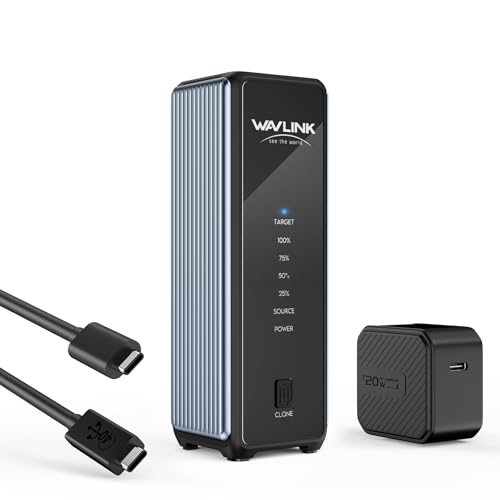
WAVLINK fits two M.2 slots into one enclosure and adds a one-click offline clone button. The USB4 link delivers read rates up to 3300MB/s and write speeds up to 3000MB/s. It accepts M-Key and B+M Key drives from 2230 to 2280, up to 8TB each.
InterfaceUSB4 40Gbps
SlotsDual M.2
SpeedsUp to 3300MB/s read, 3000MB/s write
CapacityUp to 8TB per drive
Pros
- Dual slots with one-click offline cloning
- Works with Thunderbolt 5, 4 and 3 hosts
- Active cooling and palm-sized footprint
Cons
- Target drive is formatted during cloning
- Target drive must match or exceed source capacity
Check price on Amazon ›
Rosewill targets the 20Gbps USB 3.2 Gen 2x2 tier, with reads up to 2054MB/s and writes up to 2070MB/s. It takes M-Key and B+M Key NVMe drives in 2230 through 2280 sizes up to 8TB. An LED indicator shows drive activity, and both USB-C and USB-A cables are included.
InterfaceUSB 3.2 Gen 2x2 20Gbps
Drive supportM-Key and B+M Key NVMe, 2230-2280
SpeedsUp to 2054MB/s read, 2070MB/s write
CapacityUp to 8TB
Pros
- 20Gbps link with UASP and Trim support
- Includes USB-C and USB-A cables
- LED activity indicator
Cons
- NVMe drives only, no SATA support
- New drives may need formatting before use
Check price on Amazon ›
ELUTENG runs an RTL9210B chip to handle NVMe at up to 10Gbps and SATA at up to 5Gbps in the same enclosure. It fits M-Key and B+M Key NVMe plus B+M Key NGFF SATA drives from 2230 to 2280. The included cable splits into USB-C to A and USB-C to C ends.
ChipRTL9210B
InterfaceUSB 3.2 Gen 2 Type-C 10Gbps
Drive supportNVMe M-Key/B+M Key and NGFF SATA B+M Key
CapacityUp to 4TB
Pros
- Handles both NVMe and SATA M.2 drives
- Dual USB-A and USB-C cable in the box
- UASP and Trim support
Cons
- 4TB capacity ceiling is the lowest here
- SATA drives run at the slower 5Gbps rate
Check price on Amazon ›
What to look for
What an NVMe enclosure actually does
An enclosure is a bridge between a bare M.2 SSD and a USB or Thunderbolt port. The drive provides the storage and the enclosure sets the ceiling on speed. Matching the enclosure to your host port matters more than the drive inside, since a 40Gbps case on a 10Gbps port runs at 10Gbps.
Matching the link to your computer
Thunderbolt 5 and USB4 V2 enclosures reach the highest speeds but need matching cables and ports. Thunderbolt 4 and USB4 cases sit in the middle, and USB 3.2 Gen 2x2 or 10Gbps models suit most laptops. Check backward compatibility notes, since some units skip older standards.
Drive size, keying and capacity
Most enclosures take 2280 drives, and several also accept 2230, 2242 and 2260 lengths. Keying matters: M-Key drives fit almost everything, while B+M Key drives need a slot that supports them. Capacity ceilings range from 4TB to 8TB, so confirm your drive fits before buying.
Cooling and installation
NVMe drives run hot under sustained transfers, so aluminum bodies, thermal pads and fans all help. Tool-free designs with flip covers make drive swaps quick, while screw-based cases take longer. Some enclosures leave no clearance for a drive that already has a heatsink attached.
Frequently asked questions
What is the best NVMe SSD enclosure overall?
The UGREEN Thunderbolt 5 enclosure leads our list for its 80G link, aluminum body and built-in fan. If you want tool-free swaps and SATA support, the SABRENT EC-SNVE is the simpler choice.
Do I need Thunderbolt 5 to use these enclosures?
No. Most units here are backward compatible with Thunderbolt 4, USB4 and USB 3.x, though they run at the slower port's speed. The UGREEN and Satechi models only hit their top rates with Thunderbolt 5 cables and hosts.
Will an NVMe enclosure work with a SATA M.2 drive?
Only dual-protocol models like the SABRENT EC-SNVE and ELUTENG accept M.2 SATA drives. The Rosewill, Inateck, Satechi, WAVLINK and UGREEN units are built for NVMe drives.
How fast can an NVMe enclosure actually go?
Speeds depend on the link and the drive. The UGREEN and Satechi units reach 80G Thunderbolt 5 rates, the Inateck and WAVLINK sit at 40Gbps, and the Rosewill tops out near 2054MB/s over 20Gbps USB.
Can I clone one SSD to another with an enclosure?
The WAVLINK model includes dual slots and a one-click offline clone function. The target drive must be equal to or larger than the source, and it gets formatted during the clone, so back up first.
Do these enclosures need external power?
The SABRENT unit is bus powered with no external supply. Most single-drive enclosures draw power from the host port, while dual-drive designs like the WAVLINK benefit from a stable USB4 connection.
What drive lengths are supported?
All seven accept 2280 drives. The SABRENT, Inateck, WAVLINK, Rosewill and ELUTENG also take 2242 and 2260, and several add 2230 for shorter drives. Check keying as well as length.
How do I keep an NVMe drive cool in an enclosure?
Look for aluminum housings, thermal pads or silicone grease, and active fans on the fastest models. The UGREEN fan starts at 40C, and the Satechi and WAVLINK designs use active cooling to hold speeds during long transfers.
The verdict
UGREEN Thunderbolt 5 Portable NVMe SSD
9.4/10/10
The UGREEN Thunderbolt 5 enclosure is our top pick, with the fastest link here and cooling to match. Choose the SABRENT EC-SNVE for tool-free swaps and SATA support, the Inateck FE2028 for Thunderbolt 4 rigs, or the WAVLINK if you want to clone drives without a computer.
Check price on Amazon ›
Our top pick, secure checkout via Amazon
Note: Availability and specifications change often. Always confirm the current details on Amazon before buying.