Multiport Chargers Best Multiport Chargers for Every Device Lineup
P
By the Pickpedia Team
·9 picks compared
·Last verified November 2026
Affiliate disclosure: As an Amazon Associate, Pickpedia earns from qualifying purchases. Links on this page are paid links, and we may earn a commission at no extra cost to you. This never affects our picks or scores.
Quick answer
The Anker 112W 6-Port Desktop Charger is our top pick, with three USB-C and three USB-A ports for a full desk. For laptops, the Belkin 112W 3C1A GaN block is a strong alternative, and the UGREEN Nexode Pro 160W suits high-wattage work.
Best Multiport Chargers for Every Device Lineup at a glance
Why you can trust this guide
We compared these picks using verified manufacturer specifications, available manuals and documentation, current retailer listings, and patterns in owner feedback, alongside editorial research. We focus on measurable differences such as performance, capacity, usability, and build quality. Pickpedia does not present editorial research as laboratory testing, and we do not claim hands-on testing unless it was actually performed.
A multiport charger replaces a drawer full of single-device adapters with one block that shares power across phones, tablets and laptops. The main variables are total wattage, how that wattage splits when several ports are busy, and which port types your devices need.
We compared nine multiport chargers on port layout, single-port output, shared output and safety features, then sorted them by the setups they suit best. Laptop owners should look at the USB-C output first, while phone and tablet households can lean on port count.
Our top picks
Six ports in a compact block that measures 3.0 x 3.2 x 1.3 inches, so it sits quietly on a desk. A single USB-C port reaches 30W, enough to take a MacBook Air to 50% in about 1 hour 40 minutes. Three USB-C and three USB-A ports cover a mixed household of devices.
Total output112W across 6 ports
Ports3 USB-C, 3 USB-A
Single USB-C max30W
Single USB-A max18W
Pros
- Six ports cover a whole desk
- Compact footprint for the port count
- Cable organizer included
Cons
- Cables are not included
- 30W cap limits fast laptop charging
Check price on Amazon ›
A GaN block with three USB-C and one USB-A port that delivers up to 100W from a single USB-C port. Shared output splits to 70W plus 30W across two ports, or 60W/20W/20W across three. Foldable prongs make it easier to pack for travel.
Total output112W across 4 ports
Ports3 USB-C, 1 USB-A
Single USB-C max100W
Two-port split70W + 30W
Pros
- 100W from one USB-C port
- Smart Protect overvoltage protection
- Foldable prongs for travel
Cons
- Only four ports
- Power drops sharply as ports fill
Check price on Amazon ›
A 160W GaN charger with four USB-C ports and one USB-A port. The C1 and C2 ports each support up to 140W, enough to bring a MacBook Pro 16 inch M4 Max to 56% in 30 minutes. A smart display with touch control shows charging status.
Total output160W across 5 ports
Ports4 USB-C, 1 USB-A
Single USB-C max140W
DisplaySmart display with touch control
Pros
- Highest total output here
- 140W on two separate USB-C ports
- Overheat and overcurrent protection
Cons
- Large power draw needs a free outlet
- Overkill for phone-only households
Check price on Amazon ›
Two USB-C ports and one USB-A port in a body measuring 3.2 x 1.7 x 1.7 inches and weighing 200g. A single C1 or C2 port reaches 100W with a compatible PD 3.0 device and cable. Baseus BPS 3.0 allocates power dynamically across connected devices.
Total output100W across 3 ports
Ports2 USB-C, 1 USB-A
Single USB-C max100W
Weight200g
Pros
- Foldable plug and light body
- 100W from either USB-C port
- Supports PD3.0, QC3.0 and PPS
Cons
- Three ports only
- Full 100W needs a matching cable
Check price on Amazon ›
A palm-sized hub with three USB-C and three USB-A ports and a 5ft AC extension cord. Each USB-C port delivers up to 20W and each USB-A port up to 18W. The flame-retardant shell adds over-current and over-voltage protection.
Total output100W across 6 ports
Ports3 USB-C, 3 USB-A
USB-C max20W each
Cord5ft AC extension
Pros
- Six ports with an extension cord
- Compact 3.26 x 2.73 x 1.1 inch body
- Three-year limited warranty
Cons
- 20W per USB-C port limits laptops
- Shared output across six devices
Check price on Amazon ›
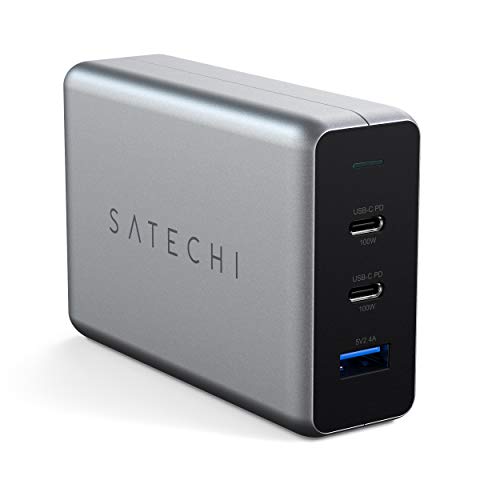
Two USB-C PD ports plus one USB-A port with a combined output of up to 100W. Power adjusts by port and device, delivering 100W, 60W/30W, or 60W/30W/12W. A compact GaN design keeps the block small for a laptop charger.
Total output100W across 3 ports
Ports2 USB-C, 1 USB-A
Single port max100W
Shared splits60W/30W or 60W/30W/12W
Pros
- 100W single-port output
- Intelligent power distribution
- Two-year limited warranty
Cons
- Only three ports
- Fast charging needs a separate cable
Check price on Amazon ›
A flat wall block with two USB-C and two USB-A ports and a 65W maximum on a single device. Power is distributed efficiently when four devices are connected. The low-profile shape reduces the number of sockets a household needs.
Max output65W single device
Ports2 USB-C, 2 USB-A
USB-C range20W to 65W allocated
FormFlat wall charger
Pros
- Four ports in a flat body
- Automatic power allocation
- Covers phones, tablets and laptops
Cons
- 65W total limits laptop speed
- No fixed output on USB-C ports
Check price on Amazon ›
A 65W GaN charger with a foldable plug, weighing 0.21 lbs and measuring 1.96 x 2.16 x 1.1 inches. It is over 60% smaller than a standard 65W charger and ships with a 6.6ft USB-C to C cable. GaN and PPS technology guard against overcharging and overheating.
Output65W
Weight0.21 lbs
Size1.96 x 2.16 x 1.1 in
Included6.6ft USB-C to C cable
Pros
- Very small and light
- Cable included
- USB-IF, FCC and UL certified
Cons
- Single port only
- No multi-device sharing
Check price on Amazon ›
A desktop power station with ten USB-A ports and 120W total output, rated at 2.4A per port. It accepts AC 110-220V input and includes a 5ft power cord. An intelligent safety microchip guards against overcharging, surges and overheating.
Total output120W, 24A
Ports10 USB-A
Per port2.4A
InputAC 110-220V
Pros
- Ten ports for large households
- Worldwide voltage input
- Surge and overheat protection
Cons
- No USB-C ports
- Low power per device for laptops
Check price on Amazon ›
What to look for
How total wattage is shared
A multiport charger splits one power allowance across every connected device. A 112W block may give 100W to a single laptop, then fall to 60W/20W/20W when three devices join. Check the shared-output table before buying if a laptop is part of the mix.
Matching ports to your devices
Count your USB-C and USB-A cables first. Laptops need USB-C PD, while older phones, watches and accessories often use USB-A. A 3C1A or 3C3A layout covers most households, and a 10-port USB-A hub suits drawers full of small gadgets.
GaN, heat and safety features
GaN designs run cooler and smaller than older silicon chargers, which matters when a block sits on a desk all day. Look for overvoltage, overcurrent and overheat protection, plus certifications such as USB-IF, FCC or UL where listed.
Travel versus desktop use
Foldable prongs, a compact body and a low weight make a charger easy to pack. Desktop stations trade that portability for more ports and an extension cord. Many buyers keep one of each rather than moving a single block between rooms.
Frequently asked questions
What wattage do I need for a laptop?
A USB-C port rated at 65W or more will fast charge most thin laptops. The Belkin block reaches 100W on one port, and the UGREEN Nexode Pro reaches 140W on its C1 and C2 ports for larger notebooks.
Can I charge a laptop and phone at the same time?
Yes, but the laptop's share drops once other ports are busy. The Belkin splits to 70W plus 30W across two ports, which still keeps a MacBook charging at a useful rate.
How many ports should a multiport charger have?
Three or four covers a laptop, phone and headphones. Six ports suit a shared desk, and a ten-port hub fits a family charging several phones and tablets overnight.
Do these chargers include cables?
Most do not. The Nekteck 65W GaN II ships with a 6.6ft USB-C to C cable, and the Anker desktop charger includes a cable organizer but no cables.
Is GaN better than a standard charger?
GaN chargers are generally smaller and run cooler for the same output. The Belkin, UGREEN, Baseus, Satechi and Nekteck models here all use GaN designs.
Which charger is best for travel?
A foldable plug and low weight matter most. The Baseus 100W folds its prongs and weighs 200g, while the Nekteck 65W is 0.21 lbs and includes a cable.
Will a multiport charger charge older USB-A devices?
Yes, if it has USB-A ports. The Anker, Belkin, UGREEN, Baseus and Nekmit models all include at least one USB-A port alongside USB-C.
What safety features should I check?
Look for overvoltage, overcurrent, overheat and short-circuit protection. Belkin Smart Protect, UGREEN's multi-protection circuitry and the Nekteck USB-IF, FCC and UL certifications are examples listed here.
The verdict
Anker Desktop Charger
9.2/10/10
The Anker 112W 6-Port Desktop Charger wins on port count and desk-friendly size, making it the easiest pick for a shared home office. Buy the Belkin 112W block if a laptop needs 100W from one port, or step up to the UGREEN Nexode Pro 160W for high-wattage notebooks.
Check price on Amazon ›
Our top pick, secure checkout via Amazon
Note: Availability and specifications change often. Always confirm the current details on Amazon before buying.