Multi Device Charging Stations Best Multi Device Charging Stations for Every Desk
P
By the Pickpedia Team
·9 picks compared
·Last verified November 2026
Affiliate disclosure: As an Amazon Associate, Pickpedia earns from qualifying purchases. Links on this page are paid links, and we may earn a commission at no extra cost to you. This never affects our picks or scores.
Quick answer
The Anker 6-port 112W desktop charger is our top pick for most desks. Belkin's Qi2.2 25W 3-in-1 suits iPhone and Apple Watch owners, while the UGREEN Nexode 200W GaN station handles eight devices at once.
Best Multi Device Charging Stations for Every Desk at a glance
Why you can trust this guide
We compared these picks using verified manufacturer specifications, available manuals and documentation, current retailer listings, and patterns in owner feedback, alongside editorial research. We focus on measurable differences such as performance, capacity, usability, and build quality. Pickpedia does not present editorial research as laboratory testing, and we do not claim hands-on testing unless it was actually performed.
A multi device charging station replaces a drawer full of wall adapters with one box on your desk. The right one depends on how many devices you charge at once and whether any of them are laptops.
We compared port counts, single-port wattage, cable kits and cooling across the models below. Every spec here comes from the manufacturer's own listings, and our scores reflect editorial judgment, not customer ratings.
Our top picks
Anker fits three USB-C and three USB-A ports into a body measuring 3.0 x 3.2 x 1.3 inches. The 112W total spreads across six devices, with up to 30W from a single USB-C port. A MacBook Air reaches 50% in about 1 hour 40 minutes on that port.
Ports3 USB-C, 3 USB-A
Total output112W
Max single port30W USB-C, 18W USB-A
Size3.0 x 3.2 x 1.3 in
Pros
- Six ports cover a full desk lineup
- Compact footprint at 10.65 oz
- Cable organizer included
Cons
- 30W cap limits fast laptop charging
- USB-C cables not included
Check price on Amazon ›
The Nexode pushes 200W across six USB-C and two USB-A ports, with 100W available from a single port for a MacBook Pro 16 or Dell XPS. GaN technology keeps the unit cooler and more efficient than traditional chargers. A 6ft extension cord lets you place it away from the wall.
Ports6 USB-C, 2 USB-A
Total output200W
Max single port100W
Cord6ft extension
Pros
- 100W single-port output for laptops
- Eight ports at full speed
- GaN design runs cooler
Cons
- Larger than a phone-first dock
- No wireless charging
Check price on Amazon ›
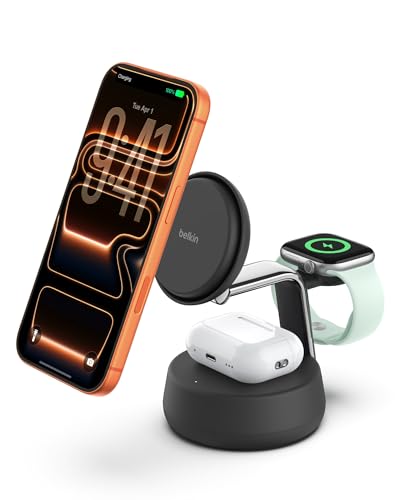
Belkin uses Qi2.2 magnetic charging at up to 25W for iPhone, with fast charging limited to iOS 26 and newer. An iPhone goes from 0 to 50% in 25 minutes, and an Apple Watch Series 10 reaches 80% in 45 minutes. ChillBoost active cooling keeps the dock up to 10 degrees cooler.
ChargingQi2.2 magnetic, 25W
DevicesiPhone, Apple Watch, AirPods
CoolingChillBoost smart fan
Included45W PSU, 5ft USB-C cable
Pros
- 25W magnetic iPhone charging
- StandBy support on the stand
- Power supply and cable included
Cons
- Fast charging needs iOS 26 or newer
- Fan produces a light hum
Check price on Amazon ›
Baseus combines six widely spaced AC outlets with three USB-C and one USB-A port in a vertical stand. USB-C output reaches 67W for a laptop or tablet. GaN6 material improves heat dissipation, and the unit shuts off in 0.1 seconds when it detects overvoltage or overpower.
Outlets6 AC, 3 USB-C, 1 USB-A
USB-C outputUp to 67W
Surge protection1200J
Cord5ft extension
Pros
- AC outlets for printers and monitors
- Vertical stand saves desk space
- 1200J surge protection
Cons
- Only one USB-A port
- USB-C tops out at 67W
Check price on Amazon ›
Zobirez rates all five USB-C ports at up to 120W each and all five USB-A ports at 30W each, for 750W total across ten devices. Ten cables ship in the box, including a 3.28ft 100W USB-C to C. Over-current, over-voltage and overheat protection guard every port.
Ports5 USB-C, 5 USB-A
Total output750W
USB-C outputUp to 120W each
Included10 cables, power cord
Pros
- Ten ports with high per-port wattage
- Full cable kit included
- Six protection circuits
Cons
- Large footprint for a single desk
- Overkill for phone-only setups
Check price on Amazon ›
Moezuti packs 20 mixed ports into one dock: two PD 65W USB-C, ten PD 30W USB-C and eight QC 20W USB-A. The 800W rating keeps the top two USB-C ports at 65W even with everything plugged in. Ten short cables come included, and GaN V monitoring checks temperature in real time.
Ports20 mixed USB-C and USB-A
Total output800W
Top USB-C2 x 65W
Included10 short cables, 5ft cord
Pros
- Twenty ports in one unit
- Dual 65W laptop ports
- Real-time temperature monitoring
Cons
- Takes up real desk depth
- More capacity than most homes need
Check price on Amazon ›
Mergroly splits 320W across two 65W and three 30W PD USB-C ports plus five USB-A ports. Eight short cables are included, along with an Apple Watch charger holder. Anti-slip pads on the base keep the stand steady and protect the desktop.
Ports5 USB-C, 5 USB-A
Total output320W
USB-C output2 x 65W, 3 x 30W
Included8 short cables
Pros
- Two 65W ports for laptops
- Eight cables in the box
- Watch charger holder built in
Cons
- Watch cable not included
- Less total power than 750W rivals
Check price on Amazon ›
Mophie folds an iPhone MagSafe pad, a magnetic Apple Watch charger and an AirPods spot into one portable hub. Wireless charging runs up to 15W. A USB-C cable and 30W USB-C PD wall adapter are included, so it works from the box.
ChargingMagSafe wireless, up to 15W
DevicesiPhone, Apple Watch, AirPods
IncludedUSB-C cable, 30W PD adapter
CompatibilityiPhone 12 to 18, Watch Series 1 to 11
Pros
- Folds for travel
- Wall adapter included
- Covers three Apple devices
Cons
- 15W is below Qi2.2 speeds
- Apple devices only
Check price on Amazon ›
NANAMI charges a Pixel phone, Pixel Watch and Pixel Buds together on one stand. The phone sits vertically or horizontally, so you can watch video or take calls while it charges. A 20W PD adapter is included, and a four-point magnet holds the watch in place.
ChargingWireless, 3 devices
Phone fitPixel 5 through 9 Pro XL
Watch fitPixel Watch 3 and 2, Fitbit Versa 4
Included20W PD adapter
Pros
- Built for the Pixel lineup
- Vertical or horizontal phone stand
- Adapter included
Cons
- Not for Pixel Watch 1 or 4
- No Apple or Galaxy Watch support
Check price on Amazon ›
What to look for
How many ports do you actually need
Count every device that charges overnight on the same surface. A phone, tablet, watch and earbuds case is four ports. Add a laptop and you are at five, which is where six-port docks like the Anker model start to make sense. Households with several laptops should look at ten ports or more.
Wattage per port matters more than the total
A big total figure means little if one port cannot carry a laptop. Look for at least 65W on a single USB-C port if a MacBook or XPS is in the mix, and 100W if it is a 16-inch machine. Phones are happy with 20W to 30W, and earbuds need very little.
Wired or magnetic wireless
Wired docks give you the most ports and the highest speeds per device. Magnetic docks such as the Belkin and Mophie models suit iPhone owners who want to drop a phone on a stand and see StandBy. Wireless is slower and device-specific, so check the compatibility list before you commit.
Desk setups, travel and family rooms
For a fixed desk, a GaN desktop charger with a long extension cord keeps clutter off the work surface. Frequent travelers should favor foldable or compact designs with an included power supply. Family charging areas need anti-slip stands, cable kits and enough ports that nobody unplugs anyone else.
Frequently asked questions
Can a multi device charging station with USB-C PD charge an iPhone?
Yes. USB-C PD ports work with a USB-C to Lightning or USB-C to USB-C cable, and iPhones draw power at whatever rate they support. The Anker and UGREEN stations both include USB-C PD ports that handle iPhones alongside laptops.
Is a magnetic charging station worth it for iPhone users?
It is if convenience matters more than port count. The Belkin Qi2.2 dock delivers up to 25W magnetically and also charges an Apple Watch and AirPods. Wired docks still win on total ports and per-device speed.
Do GaN charging stations run cooler on a desk?
GaN designs handle heat better than older silicon chargers. UGREEN states its GaN build is 65% more efficient than traditional chargers, and the Baseus GaN6 tower is built for heat dissipation. Neither needs a fan for normal desk use.
What should frequent travelers look for?
A compact body, an included power supply and ports that match your devices. The Mophie 3-in-1 ships with a 30W PD adapter and folds for packing. The Anker 112W unit weighs 10.65 oz and fits in a laptop bag.
How do I pick a station for a family charging area?
Start with port count, then check that the stand stays put. The Zobirez and Mergroly docks both ship with short cables and anti-slip bases. Ten ports let several phones, tablets and earbuds charge at once without swapping cables.
Does a 100W USB-C port really charge a laptop?
It does when the laptop accepts 100W over USB-C. UGREEN rates a single Nexode port at 100W, which covers a MacBook Pro 16 or Dell XPS 13. Check your laptop's USB-C charging rating before relying on one port.
What is the difference between USB-C and USB-A ports here?
USB-C ports carry higher wattage and handle laptops, tablets and newer phones. USB-A ports top out lower and suit earbuds, Kindles, controllers and older phones. Most of these stations mix both, and the 20-port Moezuti leans heavily on USB-C.
Should I buy a station with AC outlets too?
Only if your desk also needs wall plugs. The Baseus 10-in-1 adds six AC outlets and 1200J surge protection beside its USB ports. If everything you own charges over USB, a USB-only dock is smaller and simpler.
The verdict
Anker Desktop Charger
9.2/10/10
The Anker 112W 6-port desktop charger wins for most people because it covers a laptop, phone, tablet and accessories in a body that barely takes up desk space. Step up to the UGREEN Nexode 200W if a high-power laptop is the center of your setup, or choose the Belkin Qi2.2 dock if you want magnetic charging for an iPhone, Watch and AirPods in one stand.
Check price on Amazon ›
Our top pick, secure checkout via Amazon
Note: Availability and specifications change often. Always confirm the current details on Amazon before buying.