Mini PCs Best Mini PCs: 9 Compact Desktops Ranked
P
By the Pickpedia Team
·9 picks compared
·Last verified November 2026
Affiliate disclosure: As an Amazon Associate, Pickpedia earns from qualifying purchases. Links on this page are paid links, and we may earn a commission at no extra cost to you. This never affects our picks or scores.
Quick answer
The Beelink SER3 is our pick for most people, with a Ryzen 3 3200U, 16GB of DDR4 RAM and a 500GB SSD in a tiny chassis. The MINISFORUM AI X1 Pro-370 is the power pick, and the ASUS NUC 13 Pro suits office and multi-monitor work.
Best Mini PCs: 9 Compact Desktops Ranked at a glance
Why you can trust this guide
We compared these picks using verified manufacturer specifications, available manuals and documentation, current retailer listings, and patterns in owner feedback, alongside editorial research. We focus on measurable differences such as performance, capacity, usability, and build quality. Pickpedia does not present editorial research as laboratory testing, and we do not claim hands-on testing unless it was actually performed.
A mini PC puts a full desktop into a case you can hide behind a monitor or stand on a shelf. The trade-off is that the internals differ a lot between models, so the processor, memory layout and port set matter more than the size of the box.
We compared the nine machines below on the specs each maker publishes, plus what owners report about cooling and daily use. Every entry lists the memory, storage and display support you actually get, so you can match a model to your workload rather than a marketing claim.
Our top picks
The SER3 pairs an AMD Ryzen 3 3200U with 16GB of DDR4 and a 500GB M.2 SSD, which is a sensible starting point for browsing, documents and streaming. Two HDMI ports drive dual displays at 4K@60Hz, and the memory can be upgraded to 32GB later. Gigabit LAN, dual-band WiFi and Bluetooth cover wired and wireless setups.
ProcessorAMD Ryzen 3 3200U, 2 cores / 4 threads, up to 3.5GHz
Memory16GB DDR4 2400MHz, upgradable to 32GB
Storage500GB M.2 PCIe 3.0 x4 SSD
Ports4x USB 3.2, 2x HDMI, 1000M LAN, audio jack
Pros
- Dual HDMI outputs for two screens
- Memory can be upgraded to 32GB
- Gigabit Ethernet plus dual-band WiFi
Cons
- Two-core processor limits heavy multitasking
- Radeon Vega 3 graphics suit light gaming only
Check price on Amazon ›
The AI X1 Pro-370 runs an AMD Ryzen AI 9 HX370 with 12 cores and 24 threads, backed by Radeon 890M graphics. It ships with 32GB of DDR5 at 5600MHz and a 1TB PCIe 4.0 SSD, and memory can go to 128GB. Dual USB4, HDMI 2.1 and DisplayPort 2.0 support up to four 4K displays, with an OCuLink port for an external GPU.
ProcessorAMD Ryzen AI 9 HX370, 12 cores / 24 threads, up to 5.1GHz
Memory32GB DDR5 5600MHz, upgradable to 128GB
Storage1TB PCIe 4.0 SSD, three SSD slots, up to 12TB
NetworkingDual 2.5G LAN, WiFi 7, Bluetooth 5.4
Pros
- Twelve-core processor for heavy workloads
- Four-display support with USB4 and OCuLink
- Three SSD slots for large storage builds
Cons
- Built-in 135W adapter adds bulk
- Full-load noise rated up to 45dB
Check price on Amazon ›
This NUC 13 Pro uses a 13th Gen Intel Core i5-13420H with 8 cores and 12 threads, paired with 16GB of DDR4 and a 512GB NVMe SSD. HDMI 2.1, DisplayPort 2.1 and Thunderbolt 4 can drive up to four 4K screens or one 8K display. The 4.6 by 4.4 by 2.1 inch chassis supports VESA mounting and arrives with Windows 11 Pro.
ProcessorIntel Core i5-13420H, 8 cores / 12 threads, up to 4.6GHz
Memory16GB DDR4
Storage512GB M.2 NVMe SSD, expandable to 2TB
ConnectivityWiFi 6E, Bluetooth 5.3, 2.5G Ethernet, Thunderbolt 4
Pros
- Thunderbolt 4 plus HDMI and DisplayPort
- Four 4K displays or a single 8K screen
- Compact VESA-mountable design
Cons
- Integrated UHD graphics limit gaming
- Storage expansion drive sold separately
Check price on Amazon ›
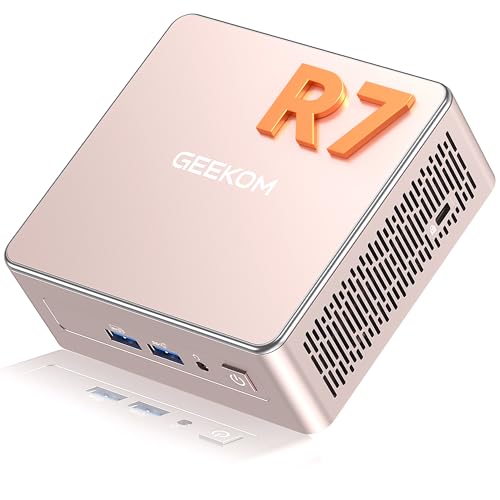
The A5 runs a 15W AMD Ryzen 7 7730U with 16GB of dual-slot DDR4 that can reach 64GB. A 500GB NVMe SSD sits up front, and an extra M.2 2242 slot plus a 2.5 inch bay take total storage to 10TB. Radeon Vega 8 graphics feed up to four 4K displays through two HDMI and two USB-C ports.
ProcessorAMD Ryzen 7 7730U, 15W
Memory16GB DDR4 dual-slot, upgradable to 64GB
Storage500GB NVMe SSD, up to 10TB total
DisplayUp to 4x 4K, 8K via USB-C
Pros
- Dual RAM slots and three storage options
- Quad 4K display output
- Low 15W thermal design
Cons
- Vega 8 graphics are modest for gaming
- WiFi standard not specified in listing
Check price on Amazon ›
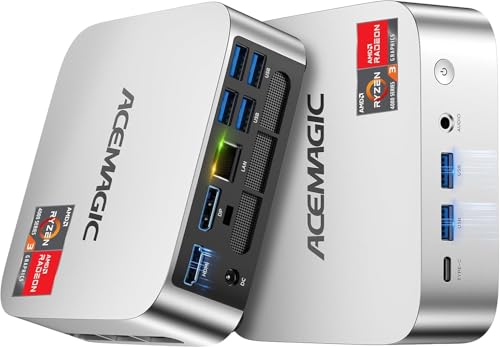
The K1 uses an AMD Ryzen Pro 7330U with 4 cores and 8 threads, running at 28W. It comes with 16GB of LPDDR4 and a 256GB M.2 SSD, and you can add another M.2 drive for up to 2TB. A built-in power supply means one cable for power, and the 5 by 5 by 1.6 inch body supports VESA mounting.
ProcessorAMD Ryzen Pro 7330U, 4 cores / 8 threads, up to 4.3GHz
Memory16GB LPDDR4 3200MT/s, soldered
Storage256GB M.2 2280 SSD, expandable to 2TB
Ports6x USB 3.2 Type-A, USB-C with DP 1.4, HDMI 2.0, DP 1.4
Pros
- Internal power supply keeps cabling simple
- Triple 4K display support
- Small enough to carry in a bag
Cons
- Memory is soldered and not upgradable
- WiFi 5 and Bluetooth 4.2 are older standards
Check price on Amazon ›
The K17 centers on an Intel Core Ultra 5 226V with 97 total TOPS across its NPU and GPU, aimed at local AI tasks like text generation and code completion. Intel Arc 130V graphics handle gaming and content creation, and 16GB of LPDDR5x at 8533 MT/s provides wide memory bandwidth. Dual HDMI 2.1 and USB4 support three 4K displays at 60Hz.
ProcessorIntel Core Ultra 5 226V, up to 4.50GHz
Memory16GB LPDDR5x at 8533 MT/s, soldered
Storage512GB SSD
Display3x 4K at 60Hz via dual HDMI 2.1 and USB4
Pros
- Dedicated NPU for local AI workloads
- Arc 130V graphics with ray tracing support
- Triple 4K display output
Cons
- Memory is soldered and fixed at 16GB
- Discrete GPU performance still out of reach
Check price on Amazon ›
The ROG NUC 16 packs an Intel Core Ultra 9 290HX Plus and an NVIDIA GeForce RTX 5080 mobile GPU with DLSS support. It comes with 64GB of DDR5-5600 and a 2TB SSD, and thumb screws give tool-free access for upgrades. Three fans and dual vapor chambers handle cooling, and the 3L chassis stands vertically or lies flat.
ProcessorIntel Core Ultra 9 290HX Plus
GraphicsNVIDIA GeForce RTX 5080 mobile GPU
Memory64GB DDR5-5600
Storage2TB SSD
Pros
- Discrete RTX 5080 graphics
- 64GB RAM and 2TB storage out of the box
- Tool-free access to memory and storage
Cons
- Large 3L chassis for a mini PC
- High-end components need the triple-fan cooling
Check price on Amazon ›
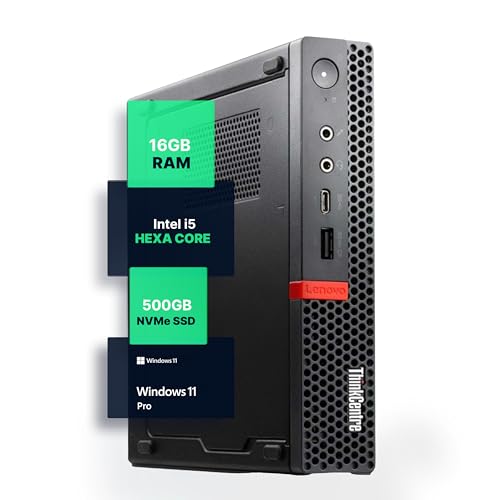
This renewed ThinkCentre M720Q pairs an 8th Gen Intel Core i5 six-core processor with 16GB of DDR4 and a 500GB NVMe drive. Windows 11 Pro comes pre-installed, and a WiFi and Bluetooth adapter adds wireless connectivity. The micro footprint suits desks with little room to spare.
ProcessorIntel Core i5-8500T, 8th Gen, six cores
Memory16GB DDR4
Storage500GB NVMe M.2 SSD
SoftwareWindows 11 Pro pre-installed
Pros
- Six-core Intel processor
- Windows 11 Pro included
- Very small desktop footprint
Cons
- Renewed unit, not new
- Wireless comes from an added adapter
Check price on Amazon ›
The OptiPlex 3080 Micro runs a 10th Gen Intel Core i5 six-core processor with 16GB of DDR4 and a 512GB SSD. Windows 11 Pro is pre-installed, and WiFi plus Bluetooth are included for wireless setups. The larger SSD helps with big files and business software.
ProcessorIntel Core i5-10500T, 10th Gen, six cores
Memory16GB DDR4
Storage512GB SSD
SoftwareWindows 11 Pro, WiFi and Bluetooth included
Pros
- 10th Gen six-core processor
- 512GB SSD for larger files
- Windows 11 Pro ready to use
Cons
- Renewed unit, not new
- Integrated graphics only
Check price on Amazon ›
What to look for
How to size a mini PC to your workload
Everyday browsing and documents run fine on a two-core or four-core processor with 16GB of RAM. Local AI tasks, video editing and gaming push you toward newer chips with stronger integrated graphics. Match the processor to the heaviest thing you do regularly, not the lightest.
Memory and storage: what to check before buying
Soldered LPDDR memory cannot be changed, so buy the capacity you expect to need. Models with SO-DIMM slots, like the SER3 and the A5, let you add RAM later. For storage, check whether there is a spare M.2 slot or a 2.5 inch bay if you plan to expand.
Displays, ports and quiet cooling
Dual monitor support is common, and several models here drive three or four screens. Look for HDMI 2.1, DisplayPort or USB-C with video output depending on your monitors. If the machine sits on your desk, read the cooling notes: fan count, vapor chambers and rated noise levels all affect how quiet it runs.
New versus renewed mini PCs
Renewed business machines like the ThinkCentre and OptiPlex put six-core Intel processors and Windows 11 Pro into a small chassis. Newer consumer mini PCs often bring faster memory, WiFi 6 or 7, and USB4. Pick renewed for basic office work and new for longevity and modern ports.
Frequently asked questions
What matters most when choosing a mini PC for everyday browsing?
Processor, memory and ports matter most. A modern two-core or four-core chip with 16GB of RAM handles browsing, email and streaming comfortably. Check that it has the video outputs your monitor needs.
Can a mini PC with dual monitor support handle a home office?
Yes. Models like the Beelink SER3 have two HDMI ports, and the ASUS NUC 13 Pro can drive up to four 4K displays. Two screens are plenty for spreadsheets, email and video calls at once.
Is a mini PC with quiet cooling a good choice for a home office?
It helps if the machine sits on your desk. The ROG NUC 16 uses three fans and dual vapor chambers, and the ACEMAGIC K1 uses an axial fan that stays fairly quiet under load. Check the rated noise figures where the maker publishes them.
Should I choose a mini PC with 16GB of RAM for a home server?
16GB is a reasonable baseline for file serving, media streaming and light virtualization. If you plan to run several services, pick a model with upgradeable memory such as the GEEKOM A5, which supports up to 64GB.
Does USB-C charging matter on a mini PC?
Most mini PCs here use a barrel-style power input rather than USB-C charging. Look for USB-C ports that carry video and data, such as the USB4 ports on the MINISFORUM AI X1 Pro-370, if you want to connect displays and drives.
Which mini PC is best for a college student?
A compact model with 16GB of RAM and a 512GB SSD covers coursework well. The ASUS NUC 13 Pro and the GMKtec K17 both fit that profile, and the NUC 13 Pro adds Thunderbolt 4 for docks and external drives.
How do I compare mini PCs with dual monitor support?
Count the video outputs and check their standards. Two HDMI ports are the simplest path, while HDMI plus DisplayPort or USB-C gives more flexibility. Confirm the resolution and refresh rate each port supports.
What mistakes should I avoid when buying a mini PC?
Do not buy soldered memory you cannot grow, and do not assume every USB-C port carries video. Check the WiFi generation and whether storage can be expanded before you commit.
The verdict
Beelink SER3 Mini PC
8.9/10/10
The Beelink SER3 is the safest starting point for most buyers, with 16GB of RAM, a 500GB SSD and dual HDMI in a small case. Step up to the MINISFORUM AI X1 Pro-370 for heavy work, or choose the ASUS NUC 13 Pro for multi-monitor office use.
Check price on Amazon ›
Our top pick, secure checkout via Amazon
Note: Availability and specifications change often. Always confirm the current details on Amazon before buying.