Travel & Luggage Best Messenger Bags for a Polished Workday Look
P
By the Pickpedia Team
·2 picks compared
·Last verified September 2026
Affiliate disclosure: As an Amazon Associate, Pickpedia earns from qualifying purchases. Links on this page are paid links, and we may earn a commission at no extra cost to you. This never affects our picks or scores.
Quick answer
Choose the Timbuk2 Flight Classic Messenger in Small if you want adjustable left- or right-shoulder carry and keep your computer in a separate sleeve. Choose the Commute Messenger 2.0 in Medium if a padded laptop pocket and luggage pass-through better suit your working routine. These are two different approaches to organizing a workday, not simply different finishes of the same bag.
Best Messenger Bags for a Polished Workday Look at a glance
Why you can trust this guide
This research-based comparison uses manufacturer feature descriptions and exact product identifiers. The linked Flight is Small in Jet Black; the Commute is Medium in Eco Black. We have not performed load, comfort or weather tests. Our recommendations concern organization and carrying options, rather than measured protection or all-day comfort.
The key question is how you carry your computer and reach the smaller items around it. A messenger bag should make that routine straightforward without requiring you to overfill its pockets.
Our top picks
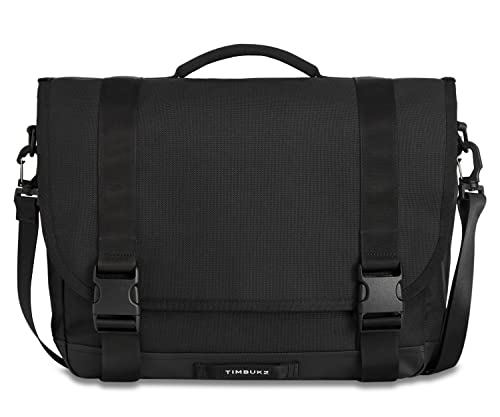
The Flight offers a switchable shoulder strap, foam strap pad and dual-side access to its front zip pocket. We would choose it for someone who wants flexibility in which shoulder carries the bag and a clear place for frequently used essentials. Flight features Its important limitation is the unpadded internal divider. Use an appropriate sleeve if your computer needs that additional layer, and include the sleeve when checking fit. Timbuk2's size guidance differs across sections of the page, so do not select this bag from screen diagonal alone. Skip it if you specifically want a built-in padded computer pocket.
Computer organizationUnpadded internal divider
Distinctive carrying featureSwitchable left- or right-shoulder strap
Pros
- Unpadded internal divider
- Switchable left- or right-shoulder strap
Cons
- Skip it if you specifically want a built-in padded computer pocket.
Who should buy it
- choose it for someone who wants flexibility in which shoulder carries the bag and a clear place for frequently used essentials.
Skip it if
- Skip it if you specifically want a built-in padded computer pocket.
Check price on Amazon ›
The Commute has a padded laptop pocket, internal organization and closure-silencing strips. A removable shoulder strap and luggage pass-through add options when you move between carrying the bag and using rolling luggage. Commute features We would choose it for a computer-centered kit that regularly leaves the office. Skip it if you only need a small document bag or want to minimize compartment management. Its padded pocket does not establish compatibility with every laptop, and the complete load still needs to feel manageable on one shoulder.
Computer organizationPadded laptop pocket
Distinctive carrying featureRemovable shoulder strap and luggage pass-through
Pros
- Padded laptop pocket
- Removable shoulder strap and luggage pass-through
Cons
- Skip it if you only need a small document bag or want to minimize compartment management.
Who should buy it
- choose it for a computer-centered kit that regularly leaves the office.
Skip it if
- Skip it if you only need a small document bag or want to minimize compartment management.
Check price on Amazon ›
What to look for
Messenger bags compared
Selection: Flight Classic Messenger, Small, Jet Black; Best fit in this comparison: A compact work kit with a separate computer sleeve; Computer organization: Unpadded internal divider; Distinctive carrying feature: Switchable left- or right-shoulder strap; Main limitation: Divider alone is not a padded laptop compartment. Selection: Commute Messenger 2.0, Medium, Eco Black; Best fit in this comparison: A work kit that moves between office and travel; Computer organization: Padded laptop pocket; Distinctive carrying feature: Removable shoulder strap and luggage pass-through; Main limitation: Check the loaded size against your usual carry needs. Construction details come from Timbuk2's Flight page and Commute page. Confirm the computer's actual fit before choosing either version.
Measure the complete computer setup
Measure the closed laptop with any fitted shell or sleeve you plan to use. Screen size does not describe the chassis, and an additional sleeve can change both width and thickness. Check the opening and the intended computer compartment, rather than assuming the main bag dimensions answer the fit question. Keep chargers and hard objects from pressing against the computer. If fitting a charger means forcing the flap or zipper closed, reorganize the load rather than treating the closure as a compression tool.
Think about how the bag opens at work
A front pocket can be useful for an access card, pen or small notebook that you retrieve repeatedly. A flap-covered compartment suits items you only need when seated. Give each essential a consistent place so that adding more pockets does not turn into more searching. Consider the setting too. If you often open the bag during meetings, closure noise and the space needed to lift the flap matter. Decide whether you can reach the relevant pocket while the bag is beside the chair, rather than relying on a standing demonstration.
Try the normal load on your normal route
Load the bag with the equipment you actually carry, adjust the strap and walk with it. Check whether it swings, rests awkwardly against your hip or obstructs your arm. Changing the strap position may improve the arrangement, but an unsuitable load may be better carried in a backpack. Do not fill spare space simply because it is available. A messenger bag works best when the load remains deliberate and the frequently used items stay accessible.
Care and alternatives
Empty the bag periodically and remove grit from the pockets. Follow the manufacturer's care instructions for the exact fabric and lining. A moisture-resistant component should not be interpreted as a guarantee that the complete bag keeps electronics dry in every condition. A laptop backpack is an alternative for a larger kit or longer walking route. A slim sleeve may be enough for a short move between nearby workspaces. A briefcase-style bag can suit a routine centered on hand carry. Choose the carrying arrangement that fits your working day before choosing the appearance.
Frequently asked questions
Is every messenger bag a laptop bag?
No. Some include a padded device compartment; others provide an unpadded divider or general storage. Check the construction and exact fit rather than assuming the style name implies computer protection.
Can I put a sleeve inside a messenger bag?
Yes, when the combined dimensions fit the opening and compartment without force. Account for the sleeve before choosing the bag, especially if the computer already sits close to the stated size guidance.
Should I choose a messenger bag for cycling?
Check the specific carry configuration and how the loaded bag behaves on your route. Do not infer stability or visibility from the messenger label. Keep straps clear of moving parts and choose a carrying system appropriate to the activity.
The verdict
Timbuk2 Flight Classic Messenger, Small, J...
Choose the Flight for adaptable shoulder carry and a separately sleeved computer. Choose the Commute for its padded laptop pocket and travel-oriented organization. In both cases, a manageable load and reliable access matter more than filling every compartment.
Check price on Amazon ›
Our top pick, secure checkout via Amazon
Note: Availability and specifications change often. Always confirm the current details on Amazon before buying.