Mesh Wifi Systems Best Mesh WiFi Systems: 9 Top Picks Compared
P
By the Pickpedia Team
·9 picks compared
·Last verified November 2026
Affiliate disclosure: As an Amazon Associate, Pickpedia earns from qualifying purchases. Links on this page are paid links, and we may earn a commission at no extra cost to you. This never affects our picks or scores.
Quick answer
The TP-Link Deco X55 AX3000 WiFi 6 Mesh System is the top pick, covering up to 6,500 square feet with three Gigabit ports per unit. The Deco 7 Pro BE63 leads for WiFi 7 speed and 2.5G ports, while the NETGEAR Orbi 370 suits homes that want simple setup and room to expand.
Best Mesh WiFi Systems: 9 Top Picks Compared at a glance
Why you can trust this guide
We compared these picks using verified manufacturer specifications, available manuals and documentation, current retailer listings, and patterns in owner feedback, alongside editorial research. We focus on measurable differences such as performance, capacity, usability, and build quality. Pickpedia does not present editorial research as laboratory testing, and we do not claim hands-on testing unless it was actually performed.
A mesh WiFi system replaces a single router and its extenders with several units that share one network name. That means your phone, TV and laptop stay connected as you move from room to room instead of dropping when you leave the router's reach.
We compared nine kits here on coverage, port count, WiFi generation and the extras each brand bundles, such as parental controls and network security. The list runs from WiFi 6 workhorses to WiFi 7 kits built for multi-gig internet plans, so you can match a system to your home and your provider.
Our top picks
The Deco X55 covers up to 6,500 square feet with three units and connects up to 150 devices. Each unit carries three Gigabit Ethernet ports, so you can wire a console, TV or desktop wherever a node sits. HomeShield adds basic network security, quality of service and parental controls at no extra charge.
WiFi standardWiFi 6 (AX3000)
CoverageUp to 6,500 sq ft
DevicesUp to 150
Ports3 Gigabit per unit, Ethernet backhaul
Pros
- Three Gigabit ports on every unit
- Covers up to 6,500 sq ft with the 3-pack
- HomeShield security and parental controls included
Cons
- WiFi 6 rather than WiFi 7
- No multi-gig port for plans above Gigabit
Check price on Amazon ›
This tri-band WiFi 7 kit reaches up to 7,600 square feet and supports more than 200 devices. Speeds run to 5,188 Mbps on the 6 GHz band, 4,324 Mbps on 5 GHz and 574 Mbps on 2.4 GHz. Four 2.5G ports plus a USB 3.0 port give it room for wired backhaul and future upgrades.
WiFi standardWiFi 7 tri-band (BE10000)
CoverageUp to 7,600 sq ft
DevicesOver 200
Ports4 x 2.5G WAN/LAN, USB 3.0
Pros
- WiFi 7 speeds across three bands
- Four 2.5G ports per unit
- Handles over 200 devices
Cons
- WiFi 7 gains need WiFi 7 client devices
- Tri-band backhaul needs at least two units
Check price on Amazon ›
The Orbi 370 blankets up to 6,000 square feet and links up to 70 devices on one network. WiFi 7 speeds reach up to 5 Gbps, and a 2.5 Gig port is ready for plans up to that rate. Adding a satellite later extends coverage by up to 2,000 square feet.
WiFi standardWiFi 7 dual-band
CoverageUp to 6,000 sq ft
DevicesUp to 70
Ports2.5 Gig port
Pros
- Satellites add up to 2,000 sq ft each
- Works with cable or fiber provider equipment
- 2.5 Gig port for faster internet plans
Cons
- Armor security needs a separate subscription after the trial
- Dual-band rather than tri-band
Check price on Amazon ›
Three eero 7 units cover up to 6,000 square feet and support 120 or more devices. Two auto-sensing 2.5 GbE ports handle internet plans up to 2.5 Gbps, with wireless speeds up to 1.8 Gbps. The kit is backward compatible with earlier eero generations and with eero Built-in on select Echo devices.
WiFi standardWiFi 7 dual-band
CoverageUp to 6,000 sq ft
Devices120+
Ports2 x 2.5 GbE auto-sensing
Pros
- Two 2.5 GbE ports per unit
- Backward compatible with older eero gear
- Works with eero Built-in on select Echo devices
Cons
- Dual-band design
- Wireless speeds cap at 1.8 Gbps
Check price on Amazon ›
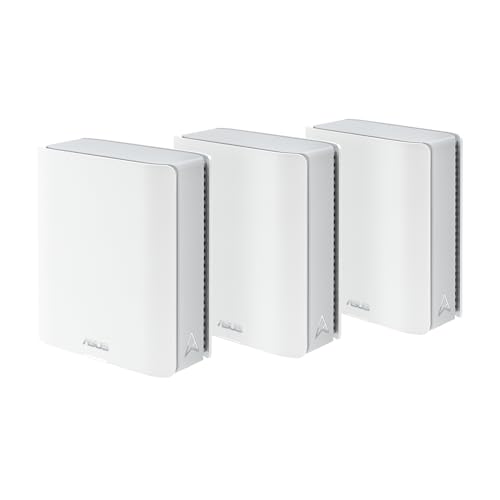
ASUS rates this tri-band WiFi 7 kit for up to 9.4 Gbps with MLO and 4K-QAM, and AiMesh coverage up to 7,600 square feet with three units. Two 10G ports support wired backhaul through thick walls. AiProtection Pro security and parental controls are included with no subscription.
WiFi standardWiFi 7 tri-band
CoverageUp to 7,600 sq ft (3-pack)
Ports2 x 10G
SecurityAiProtection Pro, no subscription
Pros
- Security and parental controls included
- Two 10G ports for wired backhaul
- Extends with compatible ASUS routers
Cons
- Large three-unit footprint
- Advanced features lean toward tinkerers
Check price on Amazon ›
Each Velop Micro 7 node covers up to 2,200 square feet, and the three-pack spreads WiFi 7 across a large home. Speeds run up to 5 Gbps across four WiFi streams, with a 2.5G auto-sensing port for multi-gig plans. The housing uses over 60 percent post-consumer recycled plastics and foam-free packaging.
WiFi standardWiFi 7 dual-band (BE5000)
CoverageUp to 2,200 sq ft per node
Streams4 WiFi streams, up to 5 Gbps
Ports2.5G auto-sensing Internet/LAN
Pros
- Compact nodes with per-node coverage of 2,200 sq ft
- 2.5G port for multi-gig internet
- Recycled plastics and recyclable aluminum
Cons
- Dual-band design
- Node count matters more than raw range
Check price on Amazon ›
Motorola's two-unit kit runs AX1800 WiFi 6 and is rated for over 100 devices at speeds up to 1 Gigabit. A 1 Gigabit Ethernet port handles wired connections, and the Motosync app bundles security, ad blocking and parental controls. It suits homes that do not need a third node.
WiFi standardWiFi 6 (AX1800)
Units2
DevicesOver 100
Ports1 Gigabit Ethernet
Pros
- Security, ad blocking and parental controls in one app
- Rated for over 100 devices
- Simple two-unit layout
Cons
- AX1800 speeds are modest for heavy use
- Only one Gigabit Ethernet port
Check price on Amazon ›
This three-pack of Google WiFi AC1200 routers covers up to 4,500 square feet and keeps one seamless network for streaming, gaming and browsing. Setup is designed to be quick, and the kit arrives in retail packaging with everything needed in one box. A 30-day return guarantee backs the purchase.
WiFi standardAC1200
CoverageUp to 4,500 sq ft
Units3
Return window30 days
Pros
- Three routers cover up to 4,500 sq ft
- Single-box setup
- 30-day return guarantee
Cons
- Older AC1200 standard
- No WiFi 6 or WiFi 7 support
Check price on Amazon ›
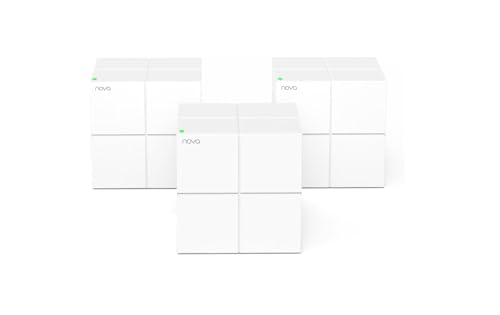
The Nova MW6 covers up to 3,500 square feet with three units and handles up to 90 devices using MU-MIMO and beamforming. WPA2-PSK encryption secures the network, and a separate guest network keeps visitors isolated. The Tenda app handles setup, monitoring and adding nodes in three steps.
WiFi standardAC1200 dual-band
CoverageUp to 3,500 sq ft
DevicesUp to 90
SecurityWPA2-PSK, guest network
Pros
- Guest network keeps visitors separate
- Handles up to 90 devices
- Adding a node takes three steps in the app
Cons
- Smallest coverage on this list
- AC1200 speeds suit basic plans only
Check price on Amazon ›
What to look for
How mesh WiFi differs from a router and extender
A mesh system uses several units that broadcast one network name and hand devices off as you move. Traditional extenders create a second network name and often halve throughput on the far side. If your home has rooms where the signal drops, a mesh kit removes that handoff problem. The Deco X55 and Orbi 370 both replace a router and extender with one coordinated network.
Matching coverage to your floor plan
Published coverage figures assume open space, so treat them as a ceiling rather than a promise. Thick walls, brick chimneys and metal appliances all cut range, which is why wired Ethernet backhaul helps in older homes. The Deco X55 covers up to 6,500 square feet, the Deco 7 Pro up to 7,600 and the Nova MW6 up to 3,500. Multi-storey homes often do better with an extra node than with a single more powerful unit.
Ports, backhaul and internet plan speed
Check the WAN port before you buy, because a Gigabit port caps any plan faster than that. The Deco 7 Pro offers four 2.5G ports plus USB 3.0, the ZenWiFi BT6 has two 10G ports, and the eero 7 and Velop Micro 7 each include 2.5G ports. Ethernet backhaul between units keeps speed high through thick walls. The Deco X55 puts three Gigabit ports on every unit, which helps when you want to wire a console or desktop.
Parental controls, security and gaming
Parental controls and network security vary widely between brands. TP-Link HomeShield covers the Deco X55 and Deco 7 Pro, ASUS includes AiProtection Pro with no subscription, and Motorola bundles ad blocking in the Motosync app. NETGEAR Armor requires a separate subscription after its trial. For gaming, prioritize wired ports and a low-latency band rather than headline speed alone.
Frequently asked questions
Does a mesh system with Gigabit ports work well for large homes?
Yes, provided your internet plan stays at or below Gigabit. The Deco X55 pairs 6,500 square feet of coverage with three Gigabit ports per unit, so you can wire devices in several rooms. If your plan runs above Gigabit, look at a kit with 2.5G or 10G ports instead.
How do I choose a mesh system for a garden office?
Distance and walls matter more than square footage claims. Place a node near the office and use Ethernet backhaul if you can run a cable. The ZenWiFi BT6 and Deco 7 Pro both support wired backhaul, which holds speed through exterior walls better than a wireless hop.
Which mesh system combines parental controls and Gigabit ports for large homes?
The Deco X55 is the clearest match. It includes HomeShield parental controls and basic network security, and each of its three units carries three Gigabit Ethernet ports. The Deco 7 Pro adds the same HomeShield tools with faster 2.5G ports.
Is dual-band enough, or should I look at tri-band?
Dual-band kits like the eero 7 and Orbi 370 handle most homes well. Tri-band models such as the Deco 7 Pro and ZenWiFi BT6 add a dedicated band that can carry traffic between units, which helps when many devices stream at once. Choose tri-band if your household is busy and your walls are thick.
Should I pick a system with easy setup for gaming?
Setup ease and gaming performance are separate questions. The eero 7 and Google WiFi three-pack are the simplest to get running, but for gaming look at wired ports and latency. The Deco X55 and Deco 7 Pro give you Ethernet ports on every unit, which beats WiFi for a console or PC.
Can a mesh system handle a home office and remote work?
Yes. Video calls and file transfers benefit from a stable node near the desk rather than a distant router. The eero 7 supports 120 or more devices and 2.5 GbE ports, and the Motorola MH7602 is rated for over 100 devices. Wired backhaul between units keeps that stability consistent.
What should I check before buying for thick walls?
Look for Ethernet backhaul support and enough units to place one near each problem area. The ZenWiFi BT6 specifically lists Ethernet backhaul for thick walls and includes two 10G ports. The Deco X55 and Deco 7 Pro also support wired backhaul between units.
Do WiFi 7 mesh systems work with older phones and laptops?
Yes. WiFi 7 is backward compatible, and the Orbi 370 explicitly connects WiFi 6 and WiFi 5 devices. The eero 7 also works with all previous eero generations and with eero Built-in on select Echo devices. You only see the full speed gain once you add WiFi 7 client devices.
The verdict
TP-Link Deco X55 AX3000 WiFi 6 Mesh System
9.2/10/10
For most homes, the TP-Link Deco X55 is the safest pick: 6,500 square feet of coverage, three Gigabit ports on every unit and HomeShield parental controls included. Step up to the Deco 7 Pro BE63 if you have a multi-gig plan or a house full of devices, and choose the Orbi 370 if you want room to add satellites later.
Check price on Amazon ›
Our top pick, secure checkout via Amazon
Note: Availability and specifications change often. Always confirm the current details on Amazon before buying.