Mechanical Keyboards Best Mechanical Keyboards for Home Use
P
By the Pickpedia Team
·6 picks compared
·Last verified November 2026
Affiliate disclosure: As an Amazon Associate, Pickpedia earns from qualifying purchases. Links on this page are paid links, and we may earn a commission at no extra cost to you. This never affects our picks or scores.
Quick answer
For a home desk the Logitech MX Mechanical is the pick to start with, a quiet low-profile board that pairs with three devices for work and everyday use. The Logitech G413 SE is the best simple reliable wired board, and the AULA F75 Pro is the best value for a wireless hot-swappable custom keyboard.
Best Mechanical Keyboards for Home Use at a glance
Why you can trust this guide
We compared these picks using verified manufacturer specifications, available manuals and documentation, current retailer listings, and patterns in owner feedback, alongside editorial research. We focus on measurable differences such as performance, capacity, usability, and build quality. Pickpedia does not present editorial research as laboratory testing, and we do not claim hands-on testing unless it was actually performed.
A mechanical keyboard brings a crisp, satisfying typing feel and lasts far longer than a membrane board, which is why it suits a home desk used for work, study and gaming alike. The choice comes down to the switch feel, wired or wireless, and the layout that fits your space.
The picks below are judged on switch type, connection, layout and extras like hot-swap sockets and backlighting, using each maker figures. A low-profile board suits productivity, a full-size gaming board suits play, and a compact 75 percent layout saves desk space.
Our top picks
The Logitech MX Mechanical pairs quiet tactile low-profile switches with smart backlighting that lights as your hands approach, and connects to three devices over Bluetooth. A full-size layout, USB-C recharging and up to 15 days of battery make it a polished home and work board.
SwitchesTactile quiet, low-profile
ConnectionBluetooth, 3 devices
BacklightSmart auto-adjust
BatteryUp to 15 days
LayoutFull-size
Pros
- Quiet tactile typing
- Pairs with three devices
- Smart backlight
Cons
- Premium price
- Low-profile feel differs from tall switches
Check price on Amazon ›
The Logitech G413 SE is a full-size wired board with tactile mechanical switches in a brushed aluminum top, with 6-key rollover anti-ghosting and backlighting. It works on Windows and macOS and comes in a tenkeyless version, for a dependable, good-looking home desk.
SwitchesTactile mechanical
ConnectionWired
BuildAluminum top
Feature6-key rollover anti-ghosting
OSWindows and macOS
Pros
- Sturdy aluminum build
- Simple reliable wired
- Tenkeyless option
Cons
- No wireless
- Single backlight color
Check price on Amazon ›
The AULA F75 Pro is a 75 percent hot-swappable board with tri-mode connection over Bluetooth, 2.4GHz and USB-C, pre-lubed switches and side-printed PBT keycaps. A volume knob and 16.8 million color RGB make it a feature-packed custom keyboard at a wallet-friendly price.
Layout75 percent
ConnectionBluetooth, 2.4GHz, USB-C
SocketsHot-swappable
KeycapsPBT, side-printed
ExtraKnob, RGB
Pros
- Three ways to connect
- Hot-swap and pre-lubed
- Compact with a knob
Cons
- 75 percent layout takes adjusting
- Value-brand software
Check price on Amazon ›
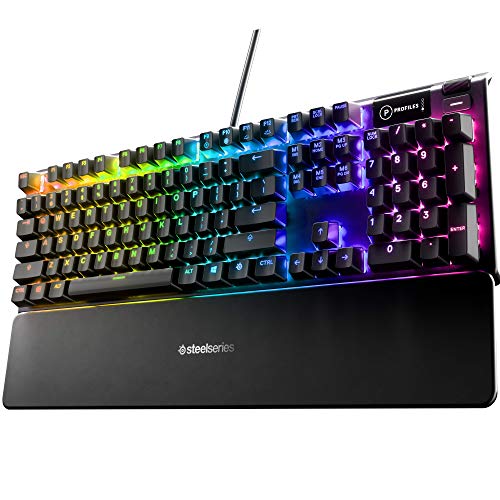
The SteelSeries Apex 5 pairs hybrid blue mechanical switches with an aircraft-grade aluminum frame and an OLED smart display for game info and messages. Per-key RGB and a tactile clicky feel make it a standout for a gaming-leaning home desk.
SwitchesHybrid blue mechanical
DisplayOLED smart display
FrameAluminum alloy
LightingPer-key RGB
ConnectionWired USB
Pros
- OLED info display
- Durable aluminum frame
- Per-key RGB
Cons
- Clicky switches are loud
- Wired only
Check price on Amazon ›
The Womier SK80 is a 75 percent gasket-mounted hot-swappable board with a color multimedia display, pre-lubed linear switches and a creamy sound. Full software customization of RGB, macros and the display suits an enthusiast who wants a tinker-friendly keyboard.
Layout75 percent, gasket
SocketsHot-swappable
SwitchesPre-lubed linear
DisplayColor multimedia
SoftwareRGB, macros
Pros
- Gasket-mounted feel
- Multimedia screen
- Fully customizable
Cons
- Wired
- Enthusiast features over work focus
Check price on Amazon ›
The Redragon K671 is a wired hot-swappable board with linear red switches, double-shot PBT keycaps and 11 backlight modes, with full anti-ghosting. Macro editing and a low price make it an easy entry into mechanical keyboards for a home PC or Mac.
SwitchesHot-swap linear red
KeycapsDouble-shot PBT
Lighting11 backlit modes
FeatureFull anti-ghosting, macros
ConnectionWired
Pros
- Affordable
- Hot-swap and PBT keycaps
- Macro support
Cons
- Wired only
- Software is basic
Check price on Amazon ›
What to look for
Switch type sets the feel
Tactile switches give a bump you feel, linear switches are smooth for gaming, and clicky switches are loud and crisp. For a shared home, a quiet tactile or linear switch keeps the noise down while still feeling mechanical.
Wired or wireless
A wired board is simple and never needs charging, while a wireless one with Bluetooth or a 2.4GHz dongle tidies the desk and can pair with several devices. Pick wireless if you switch between a laptop and a desktop.
Layout for your desk
A full-size board has a number pad, a tenkeyless drops it to save width, and a compact 75 percent layout keeps the arrows while shrinking further. For a small desk, 75 percent or tenkeyless frees up mouse room.
Hot-swap sockets for customizing
A hot-swappable board lets you change switches without soldering, so you can tune the feel or replace a failed switch. The AULA and Womier here are hot-swap, which suits anyone who likes to tinker.
Backlighting and keycaps
RGB backlighting looks good and helps in a dim room, and durable PBT keycaps resist shine over years of use. Smart lighting that adjusts to the room, as on the MX Mechanical, is a nice productivity touch.
Frequently asked questions
Are mechanical keyboards good for work as well as gaming?
Yes. A low-profile tactile board like the Logitech MX Mechanical is built for productivity with quiet keys and multi-device pairing, while gaming boards suit play. Many people use one board for both.
Which switch type should I choose?
Tactile switches give a bump you feel for typing, linear switches are smooth for gaming, and clicky switches are loud. For a shared home, a quiet tactile or linear switch is the easiest choice.
Should I get a wired or wireless keyboard?
Wired is simple and never needs charging, while wireless tidies the desk and can pair with several devices. Choose wireless like the AULA or MX Mechanical if you switch between computers.
What keyboard layout saves desk space?
A compact 75 percent or tenkeyless layout drops the number pad to free up room for your mouse, which suits a small desk. A full-size board is best if you enter a lot of numbers.
What is a hot-swappable keyboard?
It lets you change the switches by pulling and pushing them in, with no soldering, so you can tune the feel or replace a switch. The AULA and Womier here are hot-swap boards.
Are PBT keycaps worth it?
Yes, if you type a lot. PBT keycaps resist the shine and wear that cheaper ABS keycaps develop over time, so the board looks and feels better for longer.
The verdict
Logitech MX Mechanical Wireless Illuminate...
9.2/10/10
The Logitech MX Mechanical is the best home keyboard for most people, quiet and productive with multi-device pairing. Choose the Logitech G413 SE for a simple reliable wired board, the AULA F75 Pro for a wireless custom build, or the Redragon on a budget.
Check price on Amazon ›
Our top pick, secure checkout via Amazon
Note: Availability and specifications change often. Always confirm the current details on Amazon before buying.