Low Profile Keyboards Best Low Profile Keyboards for Desk, Travel, Gaming
P
By the Pickpedia Team
·9 picks compared
·Last verified November 2026
Affiliate disclosure: As an Amazon Associate, Pickpedia earns from qualifying purchases. Links on this page are paid links, and we may earn a commission at no extra cost to you. This never affects our picks or scores.
Quick answer
The Logitech G915 X takes our top spot for its low-profile GL mechanical switches and aluminum plate. The Razer BlackWidow V4 Low Profile TKL brings long battery life and a multi-function roller, while the Keychron K5 Version 2 suits typists who want a full-size wireless board.
Best Low Profile Keyboards for Desk, Travel, Gaming at a glance
Why you can trust this guide
We compared these picks using verified manufacturer specifications, available manuals and documentation, current retailer listings, and patterns in owner feedback, alongside editorial research. We focus on measurable differences such as performance, capacity, usability, and build quality. Pickpedia does not present editorial research as laboratory testing, and we do not claim hands-on testing unless it was actually performed.
Low profile keyboards sit closer to the desk, so your wrists rest at a flatter angle and key travel is shorter. That shorter travel can mean faster actuation in games and less reach when you type for hours. The trade-off is feel: slim boards vary widely in how much feedback they give.
We compared nine real models across switch type, layout, wireless options and battery claims, then ranked them for different jobs. Some are wired gaming boards with aluminum frames, others are tri-mode wireless models built for travel or shared offices. Every spec below comes from the manufacturer's own listing.
Our top picks
The G915 X pairs low-profile GL mechanical switches with a 1.3 mm actuation point and 3.2 mm total travel, so keys register early and bottom out quickly. A sand-blasted aluminum top plate and double-shot PBT keycaps give it a solid, durable feel. KEYCONTROL lets you set up to 15 functions per key through G HUB.
SwitchesLow-profile GL mechanical, linear
Actuation1.3 mm, 3.2 mm total travel
BuildSand-blasted aluminum top plate, PBT keycaps
LightingLIGHTSYNC RGB, about 16.8M colors
ConnectionWired, PC and Mac compatible
Pros
- Short 1.3 mm actuation point suits fast-paced games
- Double-shot PBT keycaps resist shine over time
- KEYCONTROL remaps up to 15 functions per key
Cons
- Wired only, so no wireless pairing
- Full-size footprint takes more desk space
Check price on Amazon ›
Razer's low-profile Orange switches need 45 g of force with a 1.6 mm actuation point and a tactile bump, so actuation stays quick but quieter than a clicky switch. The 18.5 mm front height and 5052 aluminum top case keep the deck low and rigid. HyperSpeed 2.4 GHz and Bluetooth cover three devices, with up to 980 hours claimed in Power Saving Mode.
SwitchesLow-profile Orange mechanical, tactile
Actuation1.6 mm, 45 g force
Front height18.5 mm
Build5052 aluminum alloy top case
BatteryUp to 980 hours in Power Saving Mode
Connection2.4 GHz HyperSpeed, Bluetooth, 3 devices
Pros
- Tactile bump with a light 45 g force
- Multi-function roller and three control buttons
- Long battery claim for wireless use
Cons
- Tenkeyless layout drops the number pad
- Tactile bump may not suit fans of pure linear feel
Check price on Amazon ›
The K5 Version 2 keeps a full 100% layout in a low-profile body and adds QMK firmware for remapping. Bluetooth 5.2 pairs up to three devices, and USB-C wired mode runs at a 1000 Hz polling rate. A 2000 mAh battery is rated up to 105 hours at low brightness and up to 160 hours in lab tests.
LayoutLow-profile 100%
SwitchesMilk POM Banana, low profile
ConnectionBluetooth 5.2, USB-C wired
Polling1000 Hz wired
Battery2000 mAh, up to 105 hours at low brightness
FirmwareQMK
Pros
- Full number pad in a slim chassis
- Pairs with three devices over Bluetooth 5.2
- QMK firmware for custom layouts
Cons
- White backlight only, no RGB
- Full-size width needs a wide desk
Check price on Amazon ›
The LUMA100 uses a gasket-mount structure built for a low-profile chassis, which suspends the plate and softens each keystroke. Epomaker low-profile Mint switches shorten travel for quicker response, and the anodized aluminum case with DSA double-shot keycaps keeps legends crisp. VIA support handles macros and remaps, and Bluetooth 5.0, 2.4 GHz and USB-C cover Windows, Mac and Linux.
SwitchesEpomaker low-profile Mint
MountGasket mount
BuildAnodized aluminum case, DSA double-shot keycaps
ConnectionBluetooth 5.0, 2.4 GHz, USB-C
SoftwareVIA programmable
Layout100-key compact
Pros
- Gasket mount absorbs shock on hard keystrokes
- VIA support for macros and remapping
- Three connection modes across three systems
Cons
- Mac modifier keycaps add a learning curve
- DSA profile is flatter than sculpted sets
Check price on Amazon ›
Magnetic switches on the K618 HE let you save actuation profiles between 0.1 mm and 2.8 mm through the desktop or web driver. The low-profile switches and keycaps shorten travel, which Redragon says registers keystrokes faster and feels lighter on the wrists. A 4x5 macro zone records combos on the fly without software.
SwitchesMagnetic, rapid trigger
Actuation range0.1 mm to 2.8 mm, software tuned
Layout104 keys
Macros20 on-the-fly macro keys
ConnectionWired
Pros
- Actuation adjusts from 0.1 mm to 2.8 mm
- Dedicated 4x5 macro zone needs no software
- Media controls and control wheel onboard
Cons
- Wired only
- Magnetic switch feel differs from mechanical
Check price on Amazon ›
The Immersion A3 uses Kailh low-profile switches rated for 50 million keystrokes inside a 27.7 mm aluminum frame. Three-pin hot-swap sockets let you change switch types without soldering. It connects up to five devices over 2.4 GHz, Bluetooth 5.0 or USB-C, and the 87-key tenkeyless layout frees desk space for mouse movement.
SwitchesKailh low profile, rated 50 million keystrokes
Hot swap3-pin sockets, no soldering
Profile27.7 mm slim aluminum frame
Connection2.4 GHz, Bluetooth 5.0, USB-C, up to 5 devices
Layout87-key tenkeyless
LightingRGB, 16.8 million colors
Pros
- Hot-swap sockets for easy switch changes
- Pairs with up to five devices
- Tenkeyless layout leaves room for the mouse
Cons
- Three-pin sockets limit switch choices
- No number pad
Check price on Amazon ›
The N80 is a 75% top-mount board with a small display that shows custom GIFs, connection mode, layout and battery status. A single knob handles volume, connection switching, backlight brightness and RGB modes. Bluetooth 5.0, 2.4 GHz and USB-C wired cover three ways to connect.
Layout75% top mount
DisplayShows GIFs, mode, layout, battery
ControlsKnob for volume, modes, brightness
ConnectionBluetooth 5.0, 2.4 GHz, USB-C
SoftwareSupported
Pros
- Onboard screen shows battery and connection state
- One knob covers volume and lighting
- Compact 75% footprint
Cons
- 75% layout drops the number pad
- Screen adds a feature some typists never use
Check price on Amazon ›
The Skiff 100 carries an IP53 rating for dust and water protection, which covers everyday spills and long sessions. Ten-zone RGB lighting lets you set color groups across the deck, and a media dial handles volume and playback. It is a wired US QWERTY board in black.
ProtectionIP53 dust and water resistant
Lighting10-zone RGB
ControlsMedia dial
LayoutUS QWERTY, 100%
ConnectionWired
Pros
- IP53 rating against spills and dust
- Media dial for quick volume changes
- Ten lighting zones for custom looks
Cons
- Wired only
- Fewer published switch details than rivals
Check price on Amazon ›
This tenkeyless board uses low-profile HyperX Aqua tactile switches in a full aluminum body. Three adjustable angles let you set the typing rake, and 100% anti-ghosting with N-key rollover keeps every keystroke registered. It works with PC, PS5, PS4 and Xbox consoles and supports HyperX NGENUITY software for RGB control.
SwitchesLow-profile HyperX Aqua, tactile
BuildFull aluminum body
AnglesThree adjustable
Rollover100% anti-ghosting, N-key rollover
ConnectionWired, 1.8 m cable
CompatibilityPC, PS5, PS4, Xbox Series X|S, Xbox One
Pros
- Three angles to tune typing rake
- N-key rollover with anti-ghosting
- Works with consoles as well as PC
Cons
- Renewed unit rather than new stock
- Tenkeyless layout omits the number pad
Check price on Amazon ›
What to look for
What makes a keyboard low profile
A low profile board uses shorter switches and flatter keycaps, so the whole deck sits closer to the desk. That shorter travel is why slim boards can actuate faster in games and why your wrists sit at a flatter angle during long typing sessions. The G915 X, for example, lists a 1.3 mm actuation point and 3.2 mm total travel, while the Razer BlackWidow V4 Low Profile TKL lists an 18.5 mm front height.
Wired or wireless for your desk
Wired boards skip charging entirely, which suits a fixed gaming setup. Wireless models add Bluetooth and 2.4 GHz, and the battery claims vary a lot: the BlackWidow V4 Low Profile TKL claims up to 980 hours in Power Saving Mode, while the Keychron K5 Version 2 rates its 2000 mAh battery at up to 105 hours at low brightness. The Hexgears Immersion A3 pairs with up to five devices, which helps if you move between a laptop, tablet and desktop.
Switch feel and noise in shared spaces
Quiet matters in open offices and shared rooms. Tactile low-profile switches like Razer's Orange option need 45 g of force and add a bump without a loud click. Redragon's magnetic switches let you set actuation anywhere from 0.1 mm to 2.8 mm through software, which changes how easily a key fires. If you want to change switches later, the Hexgears Immersion A3 uses three-pin hot-swap sockets.
Layout and comfort for long sessions
Full-size boards keep the number pad, which helps with spreadsheets and data entry, while tenkeyless and 75% layouts free desk space for mouse movement. Comfort comes from the angle as much as the height: the HyperX Alloy Origins Core offers three adjustable angles, and the Epomaker LUMA100 uses a gasket mount to soften the bottom-out. Programmers who remap keys often should look for QMK or VIA support, found on the Keychron K5 Version 2 and the LUMA100.
Frequently asked questions
Are low profile keyboards good for open plan offices?
They can be, especially with tactile or quiet switches rather than loud clicky ones. The Razer BlackWidow V4 Low Profile TKL uses 45 g Orange tactile switches, and the Corsair Skiff 100 adds an IP53 rating for spills. A shorter travel distance also means less key noise from bottoming out.
Can I use a low profile keyboard for gaming?
Yes. Shorter travel and early actuation suit fast games, and the G915 X lists a 1.3 mm actuation point. The Redragon K618 HE goes further with magnetic switches you can tune from 0.1 mm to 2.8 mm per profile.
Which low profile keyboard is best for travel?
Look for a compact layout and wireless modes. The Hexgears Immersion A3 is an 87-key tenkeyless board with a 27.7 mm aluminum frame and three connection modes. The RK N80 is a 75% model with Bluetooth 5.0, 2.4 GHz and USB-C.
How long does a wireless low profile keyboard battery last?
It depends on the model and lighting. Razer claims up to 980 hours for the BlackWidow V4 Low Profile TKL in Power Saving Mode, and Keychron rates the K5 Version 2 at up to 105 hours at low brightness or up to 160 hours in lab tests.
Is a low profile keyboard better for carpal tunnel comfort?
A flatter deck can keep wrists at a more neutral angle, and adjustable angles help you fine-tune it. The HyperX Alloy Origins Core offers three adjustable angles, and the Epomaker LUMA100 uses a gasket mount to cushion each keystroke. Anyone with persistent pain should still consult a medical professional.
Do low profile keyboards work with Mac?
Several do. The G915 X lists PC and Mac compatibility, the Keychron K5 Version 2 covers Mac, Windows and Linux, and the Epomaker LUMA100 ships with Mac modifier keycaps and works across all three systems.
Can I change the switches on a low profile keyboard?
Only on hot-swappable models. The Hexgears Immersion A3 uses three-pin hot-swap sockets that need no soldering, so you can swap in different switch types. Most other boards here have fixed switches.
What should programmers look for in a low profile keyboard?
Remapping support, a comfortable angle and enough battery for long sessions. QMK on the Keychron K5 Version 2 and VIA on the Epomaker LUMA100 both allow macros and custom layouts, and both offer wireless modes for a cleaner desk.
The verdict
Logitech G915 X Wired Gaming Keyboard (Lin...
9.4/10/10
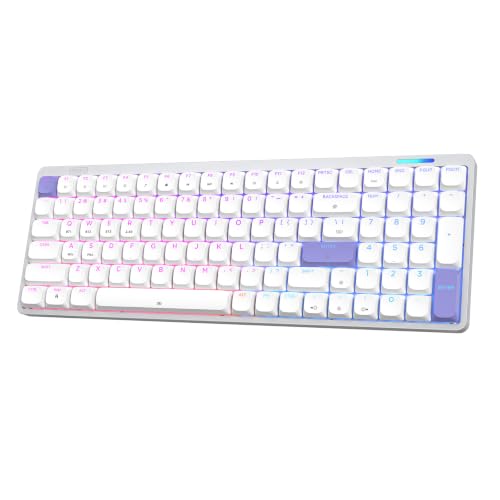
The Logitech G915 X wins on switch speed, aluminum build and PBT keycaps, which makes it the strongest all-round slim board here. Choose the Razer BlackWidow V4 Low Profile TKL if you want wireless gaming with a long battery claim, or the Keychron K5 Version 2 if a full number pad and Bluetooth matter more than RGB.
Check price on Amazon ›
Our top pick, secure checkout via Amazon
Note: Availability and specifications change often. Always confirm the current details on Amazon before buying.