Lightweight Chromebooks Best Lightweight Chromebooks: 7 Top Picks Ranked
P
By the Pickpedia Team
·7 picks compared
·Last verified November 2026
Affiliate disclosure: As an Amazon Associate, Pickpedia earns from qualifying purchases. Links on this page are paid links, and we may earn a commission at no extra cost to you. This never affects our picks or scores.
Quick answer
The Acer Chromebook 315 is our top pick for most people, pairing a large 15.6 inch anti-glare screen with 12.5 hours of battery life. The ASUS CM30 2-in-1 is the lightest option at under 2.2 pounds, and the Lenovo 14 inch touchscreen is the strongest all-rounder for daily use.
Best Lightweight Chromebooks: 7 Top Picks Ranked at a glance
Why you can trust this guide
We compared these picks using verified manufacturer specifications, available manuals and documentation, current retailer listings, and patterns in owner feedback, alongside editorial research. We focus on measurable differences such as performance, capacity, usability, and build quality. Pickpedia does not present editorial research as laboratory testing, and we do not claim hands-on testing unless it was actually performed.
Lightweight Chromebooks trade size and weight for portability, and the best ones keep battery life, a usable screen, and enough ports for daily work. We compared seven models here, from an 11.6 inch Samsung to a 15.6 inch Acer, using the manufacturer specs and owner feedback.
Our ranking weighs portability first, then battery life, display quality, and connectivity. The Acer Chromebook 315 wins because it combines a large anti-glare display and long battery life with a practical port set, while the ASUS CM30 is the clear pick if you want the lightest possible machine.
Our top picks
The Chromebook 315 pairs a 15.6 inch HD anti-glare display with a narrow 0.37 inch bezel, so you get a generous workspace even in bright rooms. An integrated numeric keypad helps with spreadsheets, and 12.5 hours of battery life covers a full day away from a charger. Two USB-C and two USB-A ports mean you can connect a monitor and accessories without a hub.
Display15.6 inch HD anti-glare, 0.37 inch bezel
ProcessorIntel Celeron N4020 up to 2.80 GHz
Memory and storage4GB RAM, 64GB eMMC
Battery and ports12.5 hours, 2x USB-C 3.1, 2x USB-A 3.1, headphone jack
Pros
- Large anti-glare screen with a narrow bezel
- 12.5 hours of battery life
- Two USB-C and two USB-A ports
Cons
- 4GB RAM limits heavy multitasking
- 15.6 inch body is larger than an 11.6 inch model
Check price on Amazon ›
At under 2.2 pounds, the CM30 is the lightest machine on this list and switches between tablet and laptop modes with a detachable keyboard and adjustable stand. The 10.5 inch WUXGA touchscreen is stylus-ready, and the auto-charging stylus is included for notes and sketches. MediaTek Kompanio 520 with 8GB RAM and 128GB storage handles browsing and productivity, and Wi-Fi 6 keeps connections stable.
Display10.5 inch WUXGA touchscreen
Processor and memoryMediaTek Kompanio 520, 8GB RAM, 128GB storage
Weight and batteryUnder 2.2 lbs, up to 12 hours
ExtrasDetachable keyboard, stylus, MIL-STD 810H, Wi-Fi 6
Pros
- Under 2.2 lbs with a detachable keyboard
- 8GB RAM and 128GB storage
- Stylus included and MIL-STD 810H toughness
Cons
- Renewed unit with a 90-day warranty
- 10.5 inch screen is smaller than a 14 inch panel
Check price on Amazon ›
The Lenovo pairs a 14 inch Full HD IPS touchscreen with an octa-core MediaTek Kompanio 520, and the 1920 x 1080 panel gives wide viewing angles for video calls and reading. At 2.86 pounds and 0.73 inches thick, it stays easy to carry between rooms or in a backpack. Wi-Fi 6 and Bluetooth 5.1 cover modern wireless, and a privacy shutter on the 720p webcam is a useful touch for remote work.
Display14 inch FHD 1920 x 1080 IPS touchscreen
ProcessorMediaTek Kompanio 520 octa-core
Memory and storage4GB RAM, 64GB eMMC
Weight and ports2.86 lb, USB-A 3.2, USB-C 3.2, microSD, headphone jack
Pros
- Full HD IPS touchscreen with wide viewing angles
- Webcam privacy shutter and dual array microphone
- Wi-Fi 6 and Bluetooth 5.1
Cons
- 4GB RAM is modest for many open tabs
- 64GB eMMC storage fills quickly with local files
Check price on Amazon ›
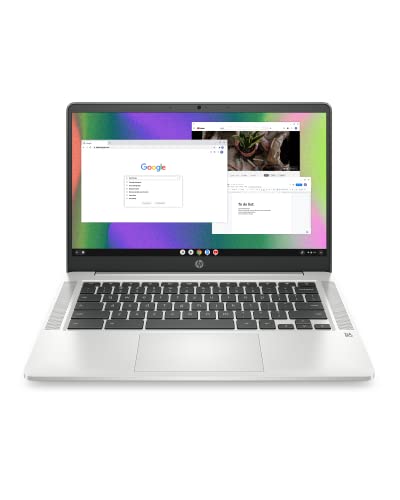
HP builds the Chromebook 14 around a micro-edge 14 inch HD anti-glare display and a thin chassis that moves easily from room to room. The quad-core Intel Celeron N4120 and 4GB RAM handle assignments and browser tabs, while custom-tuned stereo speakers suit shows and video. Intel UHD Graphics 600 supports smooth 4K streaming.
Display14 inch HD 1366 x 768 anti-glare, micro-edge
ProcessorIntel Celeron N4120 quad-core
Memory and storage4GB RAM, 64GB eMMC
GraphicsIntel UHD Graphics 600
Pros
- Thin, portable 14 inch design
- Custom-tuned stereo speakers
- Quad-core Intel Celeron N4120
Cons
- HD resolution rather than Full HD
- 4GB RAM limits heavy multitasking
Check price on Amazon ›
The Pixelbook Go weighs barely 1kg and measures 13 mm thin, with a grippable design that makes it easy to carry. Up to 12 hours of battery life means you can leave the charger at home, and a 20 minute charge gives up to 2 hours of use. The 8th Gen Intel Core processor starts up in seconds, and dual stereo speakers support movies and video chatting.
Weight and thicknessBarely 1kg, 13 mm thin
BatteryUp to 12 hours, 20 minutes for up to 2 hours
Processor8th Gen Intel Core
Display and audioTouch screen, up to 8.3 million pixels, dual stereo speakers
Pros
- Barely 1kg and 13 mm thin
- Up to 2 hours of use from a 20 minute charge
- Touch screen with dual stereo speakers
Cons
- 8th Gen Intel Core is an older generation
- Grippable finish shows handling marks over time
Check price on Amazon ›
Dell's 11.6 inch Chromebook keeps the footprint small at 1366 x 768, which suits tight desks and backpack pockets. A Celeron N4020 and 4GB RAM cover Chrome OS basics, and Bluetooth is on board for wireless accessories. The 16GB flash storage is best treated as a cache for cloud files rather than a local library.
Display11.6 inch, 1366 x 768
ProcessorIntel Celeron N4020
Memory and storage4GB RAM, 16GB flash
WirelessBluetooth
Pros
- Small 11.6 inch footprint
- Celeron N4020 with 4GB RAM
- Bluetooth for wireless accessories
Cons
- 16GB storage is very limited
- Renewed unit rather than new
Check price on Amazon ›
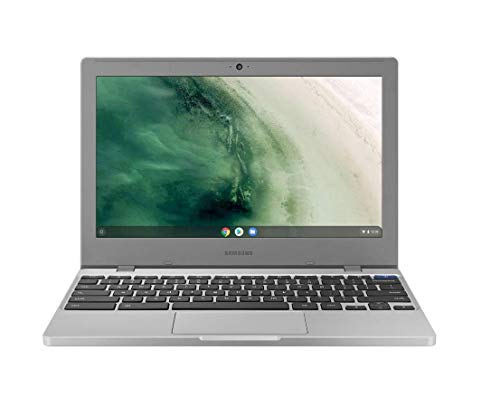
Samsung's Chromebook 4 is a compact 11.6 inch machine with a light design that slips into a bag. The Intel Celeron N4000 and 4GB RAM suit browsing and documents, and 32GB of eMMC storage leaves room for offline files. Battery life reaches 12.5 hours, and Gigabit Wi-Fi supports fast connections.
Display11.6 inch HD
ProcessorIntel Celeron N4000
Memory and storage4GB RAM, 32GB eMMC
Battery and wireless12.5 hours, Gigabit Wi-Fi
Pros
- 12.5 hours of battery life
- Compact, light 11.6 inch design
- Gigabit Wi-Fi
Cons
- Intel Celeron N4000 is an entry processor
- 32GB storage limits local files
Check price on Amazon ›
What to look for
What lightweight means in practice
Weight and thickness decide how easily a Chromebook travels. The ASUS CM30 comes in under 2.2 pounds, the Pixelbook Go is barely 1kg and 13 mm thin, and the Lenovo sits at 2.86 pounds. Anything under three pounds is comfortable in a backpack, while 11.6 inch models save the most desk space.
Battery life and charging
Battery figures here range from 12 hours on the ASUS CM30 to 12.5 hours on the Acer and Samsung. The Pixelbook Go adds fast top-ups, giving up to 2 hours of use from a 20 minute charge. If you work away from outlets, treat the stated hours as the main filter and keep the charger light.
Screens, ports, and dual monitors
The Acer Chromebook 315 has two USB-C 3.1 ports, which makes it the easiest of these to pair with an external display alongside USB-A accessories. The Lenovo offers one USB-C and one USB-A plus a microSD reader. Smaller models like the Samsung and Dell focus on portability rather than desktop docking.
Matching memory and storage to your day
4GB RAM is common across this group and suits browsing, documents, and video. The ASUS CM30 stands out with 8GB RAM and 128GB storage, which helps with many tabs and local files. Storage ranges from 16GB on the Dell to 128GB on the ASUS, so cloud-first users can accept less.
Frequently asked questions
Which of these is the lightest?
The ASUS CM30 weighs under 2.2 pounds, making it the lightest model here. The Pixelbook Go is next at barely 1kg, and the Lenovo follows at 2.86 pounds.
Do any of these Chromebooks have 16GB of RAM?
No, the models compared here top out at 8GB RAM on the ASUS CM30. The Acer, Lenovo, HP, Dell, and Samsung all use 4GB RAM.
Can I connect a dual monitor setup?
The Acer Chromebook 315 has two USB-C 3.1 ports, which gives the most flexibility for an external display. The Lenovo and HP each provide a single USB-C connection for a monitor.
Is USB-C charging available?
The Acer lists two USB-C 3.1 ports and the Lenovo lists one USB-C 3.2 port, so both can use USB-C accessories. The Pixelbook Go emphasizes fast charging with up to 2 hours of use from a 20 minute charge.
Which model suits college students best?
The ASUS CM30 is the easiest to carry at under 2.2 pounds and includes a stylus for notes. The Lenovo adds a 14 inch Full HD touchscreen for longer reading and writing sessions.
How much storage do I need for everyday browsing?
Most of these rely on cloud storage, so 32GB or 64GB is workable. The Dell offers 16GB, which is tight for local files, while the ASUS provides 128GB for offline use.
Which Chromebook has the best screen for bright rooms?
The Acer Chromebook 315 uses an anti-glare coating on its 15.6 inch HD display, which helps in bright conditions. The HP Chromebook 14 also uses an anti-glare panel.
Are renewed Chromebooks worth considering?
The ASUS CM30 and Dell 3100 are renewed units. The ASUS listing states it is tested and certified to look and work like new and includes a 90-day warranty, so check the warranty terms before buying.
The verdict
acer Chromebook 315 Laptop
9.2/10/10
The Acer Chromebook 315 is the best lightweight Chromebook for most buyers, with a large anti-glare display, 12.5 hours of battery, and four USB ports. Choose the ASUS CM30 if you want the lightest 2-in-1, or the Lenovo if a Full HD touchscreen matters more than weight.
Check price on Amazon ›
Our top pick, secure checkout via Amazon
Note: Availability and specifications change often. Always confirm the current details on Amazon before buying.