Label Makers Label Makers Compared: 7 for Home and Office
P
By the Pickpedia Team
·7 picks compared
·Last verified September 2026
Affiliate disclosure: As an Amazon Associate, Pickpedia earns from qualifying purchases. Links on this page are paid links, and we may earn a commission at no extra cost to you. This never affects our picks or scores.
Quick answer
The Brother P-Touch PTD220 is the best label maker overall, with a QWERTY keyboard and durable laminated tape. For high volume printing the DYMO LabelWriter 550 wins, and the DYMO LetraTag 100H is the best budget pick.
Label Makers Compared: 7 for Home and Office at a glance
Why you can trust this guide
We compared these picks using verified manufacturer specifications, available manuals and documentation, current retailer listings, and patterns in owner feedback, alongside editorial research. We focus on measurable differences such as performance, capacity, usability, and build quality. Pickpedia does not present editorial research as laboratory testing, and we do not claim hands-on testing unless it was actually performed.
How we chose: We compared keyboard and design, tape type and durability, connectivity, volume and value across seven current label makers, alongside how owners rate real use.
A label maker brings order to drawers, cables, pantries and offices with clear, durable labels. The Brother P-Touch PTD220 is our overall pick, easy to type on with tough laminated tape.
The choice comes down to handheld versus desktop, tape durability and how many labels you print. Handhelds suit home organising, while desktop printers handle shipping volume. We compared the specifications and owner feedback to match each to a real need.
Our top picks
A QWERTY keyboard, clear preview screen and many fonts and symbols make labelling quick and flexible. Durable laminated tape resists water and fading. The balance of features, tape quality and price makes it the top pick.
KeyboardQWERTY
DisplayPreview screen
TapeLaminated, durable
Best forHome and office labelling
Pros
- Easy QWERTY typing
- Durable laminated tape
- Lots of fonts and symbols
Cons
- Tape can be pricey
- Not the smallest
Check price on Amazon ›
A desktop thermal printer that connects to a computer to print address, shipping and file labels fast, with no ink needed. It handles high volumes for shipping and offices. The pick for printing many labels quickly.
TypeDesktop thermal, PC connected
InkNone, thermal
UseAddress and shipping labels
Best forHigh volume
Pros
- Fast high volume printing
- No ink needed
- Great for shipping
Cons
- Needs a computer
- Uses DYMO label rolls
Check price on Amazon ›
A handheld QWERTY label maker with a bright display and quick formatting keys for everyday labels. It is light and grab and go for around the house. A dependable handheld pick.
KeyboardQWERTY
DisplayBright screen
DesignHandheld
Best forEveryday quick labels
Pros
- Easy handheld typing
- Quick format keys
- Portable
Cons
- Runs on batteries
- Standard tape only
Check price on Amazon ›
A compact Brother with a QWERTY keyboard and durable laminated tape in a light body. It suits organising drawers, cables and pantry jars on the move. A tidy, portable everyday labeller.
KeyboardQWERTY
TapeLaminated
DesignCompact portable
Best forAround the home
Pros
- Compact and light
- Durable laminated tape
- Easy to use
Cons
- Small screen
- Battery powered
Check price on Amazon ›
A business grade Brother with a large display, Bluetooth to print from a phone or PC, and wide tape support. It suits offices, warehouses and heavy labelling. The pick for professional volume and connectivity.
ConnectivityBluetooth, PC
DisplayLarge
TapeWide support
Best forBusiness use
Pros
- Bluetooth printing
- Large display
- Handles wide tape
Check price on Amazon ›
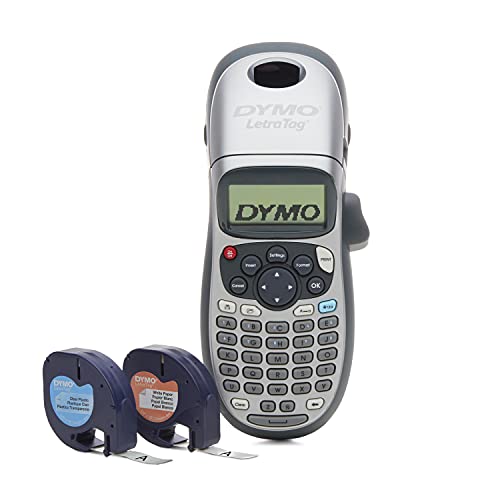
A very affordable handheld with an ABC keyboard for simple home labelling. It prints on paper, plastic and metallic tapes for basic needs. A no fuss budget pick.
KeyboardABC layout
TapePaper, plastic, metallic
PriceBudget
Best forSimple home use
Pros
- Low price
- Several tape types
- Simple to use
Cons
- ABC not QWERTY
- Basic features
Check price on Amazon ›
A compact thermal label maker that pairs with a phone app for templates, icons and fonts, printing without ink. Wide 2 inch labels suit storage and organising. A modern, app driven pick.
TypeThermal, app based
WidthUp to 2 inch labels
InkNone, thermal
Best forApp label design
Pros
- Design on your phone
- No ink needed
- Wide labels
Cons
- Needs the app
- Thermal labels fade over years
Check price on Amazon ›
What to look for
Handheld or desktop
A handheld label maker, like the Brother PTD220, types and prints labels anywhere for home organising. A desktop printer, like the DYMO LabelWriter 550, connects to a computer to print address and shipping labels in volume. Choose by whether you organise or ship.
Tape type and durability
Laminated tape, used by Brother P-Touch, resists water, fading and rubbing, ideal for cables and kitchens. Paper and thermal labels cost less but fade sooner, better for temporary use. Match tape durability to where the label lives.
Keyboard and connectivity
A QWERTY keyboard is far faster to type on than an ABC layout. Bluetooth, on the Brother PT-D610BT, and app based design, on the NIIMBOT, let you create labels on a phone or PC with more fonts and icons. Decide how you want to design labels.
Volume and running costs
For occasional labels, a handheld with standard tape is fine. For high volume shipping, a thermal desktop printer like the DYMO 550 prints fast with no ink. Factor in the cost of tape or label rolls, which varies by brand.
Frequently asked questions
What is the best label maker overall?
The Brother P-Touch PTD220 is the best all rounder, with a QWERTY keyboard, preview screen and durable laminated tape. For high volume printing the DYMO LabelWriter 550 is the pick, and the DYMO LetraTag 100H is the budget choice.
Handheld or desktop label maker?
A handheld like the Brother PTD220 types and prints labels anywhere for home organising. A desktop printer like the DYMO LabelWriter 550 connects to a computer for fast, high volume address and shipping labels. Choose by your main use.
What is laminated label tape?
Laminated tape, used by Brother P-Touch models, seals the printed text under a clear layer so it resists water, fading and rubbing. It lasts far longer than paper labels, which suits cables, kitchens and outdoor use.
Do label makers need ink?
Handheld and thermal label makers print without ink, using heat on special tape or labels. Desktop thermal printers like the DYMO 550 also skip ink, using label rolls instead. You only replace the tape or rolls, not ink cartridges.
Can I design labels on my phone?
Some let you. The NIIMBOT M2 pairs with a phone app for templates, icons and fonts, and the Brother PT-D610BT supports Bluetooth printing. App design offers more layout options than typing on the device itself.
What is the best label maker for shipping?
A desktop thermal printer like the DYMO LabelWriter 550 prints address and shipping labels quickly in volume with no ink. It connects to a computer and suits home businesses and offices that ship regularly.
Is a QWERTY or ABC keyboard better?
QWERTY, like the Brother PTD220, matches a computer keyboard and is much faster to type on. ABC layouts, on budget models like the LetraTag, are slower but keep the price down. For frequent use, choose QWERTY.
Are budget label makers any good?
Yes for simple home labelling. The DYMO LetraTag 100H prints basic labels cheaply on several tape types. The trade offs are an ABC keyboard and fewer features, not poor core labelling.
The verdict
Brother P-Touch PTD220 Label Maker
9.1/10
The Brother P-Touch PTD220 is the label maker most homes and offices should buy, easy to type on with durable laminated tape. The DYMO LabelWriter 550 is the pick for high volume shipping, while the DYMO LetraTag 100H is the budget choice.
Check price on Amazon ›
Our top pick, secure checkout via Amazon
Note: Availability and specifications change often. Always confirm the current details on Amazon before buying.