HDMI Switches Best HDMI Switches: 8 Picks for Every Setup
P
By the Pickpedia Team
·8 picks compared
·Last verified November 2026
Affiliate disclosure: As an Amazon Associate, Pickpedia earns from qualifying purchases. Links on this page are paid links, and we may earn a commission at no extra cost to you. This never affects our picks or scores.
Quick answer
For most people the Anker 2-in-1 HDMI Switch is the pick, with 4K@60Hz, HDR and a compact build. Need 8K or audio extraction? The J-Tech Digital 8K switch adds optical and 3.5mm outputs. For four next-gen consoles, the OREI 8K 4-port switch covers 48Gbps and VRR.
Best HDMI Switches: 8 Picks for Every Setup at a glance
Why you can trust this guide
We compared these picks using verified manufacturer specifications, available manuals and documentation, current retailer listings, and patterns in owner feedback, alongside editorial research. We focus on measurable differences such as performance, capacity, usability, and build quality. Pickpedia does not present editorial research as laboratory testing, and we do not claim hands-on testing unless it was actually performed.
An HDMI switch lets several devices share one display port, so you stop crawling behind the TV to swap cables. The right one depends on how many sources you have, what resolution your display handles, and whether you need extras like audio extraction or a remote.
We compared eight switches here on port count, supported resolutions, bandwidth, HDCP support and switching modes. The picks below run from simple two-input boxes to 8K HDMI 2.1 units built for PS5 and Xbox Series X, and each entry notes who it suits best.
Our top picks
Anker keeps it simple: two inputs, one output, and support for 4K@60Hz with HDR, 3D and Dolby. The smooth finish and small footprint make it easy to tuck behind a monitor. One caveat from Anker: to hold 4K60, keep input and output cables under 3.3 feet each with 30AWG, and keep the combined length under 6.5 feet.
Ports2 in, 1 out
Max resolution4K@60Hz
HDRHDR, 3D, Dolby supported
Warranty18 months
Pros
- Straightforward 2-in-1-out design
- 4K@60Hz with HDR and Dolby support
- 18-month warranty from Anker
Cons
- Only one display output at a time
- Short cable runs needed for 4K60
Check price on Amazon ›
This 2x1 switch handles 8K@60Hz, 4K@120Hz and 1080p@240Hz with HDR10, HDR10+ and Dolby Vision. Its standout feature is audio extraction to optical and 3.5mm, with support for Dolby TrueHD, DTS-HD MA, Dolby Digital and LPCM. Fifteen EDID presets help match resolution and audio to older displays.
Ports2 in, 1 out
Max resolution8K@60Hz, 4K@120Hz
Audio outputsOptical and 3.5mm
EDID modes15 presets plus bypass
Pros
- Optical and 3.5mm audio extraction
- 15 EDID modes for tricky displays
- Auto and manual switching
Cons
- 8K60 and 4K120 need cables of 6.6 feet or less
- Auto mode works best with devices powered off first
Check price on Amazon ›
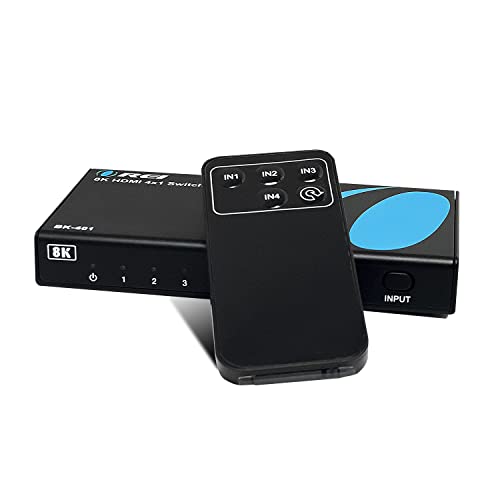
OREI's 4-in-1-out switch runs 8K@60Hz, 4K@120Hz and 1080p@240Hz over 48Gbps, with HDR10+, Dolby Vision and HLG. It adds VRR, ALLM and FVA, which matter for PS5 and Xbox play. Switching works automatically or manually via a front button or the included IR remote.
Ports4 in, 1 out
Max resolution8K@60Hz, 4K@120Hz
Bandwidth48Gbps
Gaming featuresVRR, ALLM, FVA
Pros
- Four HDMI 2.1 inputs
- VRR and ALLM for consoles
- IR remote included
Cons
- One-year warranty
- Needs the included power adapter
Check price on Amazon ›
StarTech's four-port unit supports 8K@60Hz and 4K@144Hz/120Hz over 48Gbps, with HDR10, Dolby Atmos and DTS:X audio. Auto mode jumps to the latest active source, and you can switch manually with the button or included remote. The metal housing, wall mount brackets and rubber feet suit permanent installs.
Ports4 in, 1 out
Max resolution8K@60Hz, 4K@144Hz
Bandwidth48Gbps
PowerUSB powered, wall charger included
Pros
- Durable metal housing with mount brackets
- Supports VRR, ALLM and CEC
- USB power with wall charger included
Cons
- Remote batteries not included
- Auto mode follows the most recent source, which may surprise some users
Check price on Amazon ›
GE's two-port switch moves up to 48Gbps, with 8K@60Hz, 4K@120Hz, Dolby Atmos and HD Dolby 5.1 and 7.1 audio. The aluminum housing looks good on a shelf, and LED indicators show which source is live. It is powered over USB-C with the included 6ft cable.
Ports2 in, 1 out
Max resolution8K@60Hz, 4K@120Hz
Bandwidth48Gbps
PowerUSB-C, 6ft cable included
Pros
- Premium aluminum housing
- 48Gbps with Dolby Atmos support
- LED indicator for the active source
Cons
- HDMI cables sold separately
- Only two inputs
Check price on Amazon ›
Tripp Lite's four-port switch supports UHD resolutions up to 3840 x 2160 at 60Hz. It covers the essentials for a TV, monitor or projector with several sources attached. A one-year limited warranty backs the unit.
Ports4 in, 1 out
Max resolution3840 x 2160 at 60Hz
Warranty1 year limited
Pros
- Four inputs for multiple devices
- Handles 4K UHD at 60Hz
- Simple, no-fuss operation
Cons
- No 8K or 120Hz support
- Fewer extras than gaming-focused switches
Check price on Amazon ›
Insignia's three-port switch passes full 4K HDR signals at up to 18Gbps and is HDCP 2.2 compatible. That covers modern streaming devices and consoles on a 4K TV. Three inputs hit a useful middle ground between two and four.
Ports3 in, 1 out
Max resolution4K HDR
Bandwidth18Gbps
HDCP2.2
Pros
- Three inputs, a useful middle ground
- 4K HDR pass-through
- HDCP 2.2 compatible
Cons
- 18Gbps caps it at 4K60
- No 8K support
Check price on Amazon ›
Rocketfish's four-port selector supports 4K at 60Hz for smooth motion and sharp detail on compatible TVs, monitors and projectors. HDR pass-through improves color depth and contrast, and HDCP 2.2 compatibility keeps streaming devices and consoles working.
Ports4 in, 1 out
Max resolution4K at 60Hz
HDRHDR pass-through
HDCP2.2
Pros
- Four inputs
- HDR pass-through for better contrast
- HDCP 2.2 for streaming services
Cons
- No 8K or high refresh support
- Basic feature set
Check price on Amazon ›
What to look for
What an HDMI switch actually does
A switch takes several HDMI sources and routes one at a time to a single display input. That saves you from unplugging a console to connect a streamer. Most units switch automatically to a newly active source, and many add a button or remote for manual control. Check that the switch supports the resolution and HDCP version your devices use.
Match the switch to your resolution and refresh rate
A 4K@60Hz switch with 18Gbps bandwidth is fine for most TVs, streamers and older consoles. If you have a PS5, Xbox Series X or a 120Hz display, look for HDMI 2.1 with 48Gbps and support for 4K@120Hz or 8K@60Hz. Cable length matters at these speeds: several makers specify short, high-quality cables to hold full bandwidth.
Port count and switching modes
Two inputs cover a laptop and a console, while three or four suit a full entertainment shelf. Auto switching is convenient but can misbehave with devices that keep a standby HDMI signal, so a manual button or remote is worth having. Some switches also offer EDID presets to fix resolution or audio handshake problems with older displays.
Audio, HDCP and installation extras
If you route sound to a soundbar or older receiver, a switch with optical or 3.5mm audio extraction helps. Confirm HDCP 2.2 or 2.3 support for streaming services, and Dolby Atmos or DTS:X if your setup uses them. For wall-mounted installs, metal housings, mount brackets and USB power options make cable management easier.
Frequently asked questions
What should I look for in an HDMI switch?
Check the resolution and refresh rate you need, the bandwidth it supports, and the HDCP version. Then match port count to your devices and decide whether you want auto switching, a remote or audio extraction.
How many ports do I need?
Two inputs handle a laptop and a console, three covers a console, streamer and disc player, and four suits a full shelf of devices. Buying one extra port leaves room for future gear.
Do HDMI switches support 4K at 120Hz?
Only HDMI 2.1 models with 48Gbps bandwidth, such as the J-Tech Digital, OREI and StarTech units here, list 4K@120Hz support. Standard 18Gbps switches top out at 4K@60Hz.
Will a switch work with PS5 and Xbox Series X?
Yes, provided the switch supports HDMI 2.1 features like VRR and ALLM for the best results. The OREI and StarTech switches list VRR and ALLM, which help with next-gen console play.
Why does my 4K signal drop out?
Cable length and quality are common causes. Several makers specify short, high-quality cables for full bandwidth, and EDID presets on switches like the J-Tech Digital can help resolve handshake issues.
Can I get audio out of an HDMI switch?
Some can. The J-Tech Digital switch extracts HDMI audio to optical and 3.5mm outputs and supports Dolby TrueHD, DTS-HD MA, Dolby Digital and LPCM, which suits soundbars and older receivers.
Do I need a powered HDMI switch?
Higher-bandwidth switches generally include a power adapter or USB power cable, and using it is recommended for stable 8K or 4K120 signals. Simpler 4K switches may run without external power.
Does HDCP matter for streaming?
Yes. Services like Netflix require HDCP 2.2 or higher end to end. Most switches listed here state HDCP 2.2 or 2.3 support, so confirm that before connecting a streaming device.
The verdict
Anker HDMI Switch
9.2/10/10
The Anker 2-in-1 HDMI Switch is the easiest recommendation for most homes, pairing 4K@60Hz and HDR with a compact build and an 18-month warranty. Step up to the J-Tech Digital for audio extraction or the OREI for four HDMI 2.1 inputs with VRR. Match the switch to your display's resolution and your port count, and the rest falls into place.
Check price on Amazon ›
Our top pick, secure checkout via Amazon
Note: Availability and specifications change often. Always confirm the current details on Amazon before buying.