Gaming TV Mounts Best Gaming TV Mounts for Every Room and Screen
P
By the Pickpedia Team
·9 picks compared
·Last verified November 2026
Affiliate disclosure: As an Amazon Associate, Pickpedia earns from qualifying purchases. Links on this page are paid links, and we may earn a commission at no extra cost to you. This never affects our picks or scores.
Quick answer
The VIVO STAND-V155D is our top pick because its clamp-on arm swivels 200 degrees and fits screens up to 55 inches. The ECHOGEAR MaxMotion suits big wall-mounted screens, and the Amazon Basics full motion mount handles mid-size panels on a single stud.
Best Gaming TV Mounts for Every Room and Screen at a glance
Why you can trust this guide
We compared these picks using verified manufacturer specifications, available manuals and documentation, current retailer listings, and patterns in owner feedback, alongside editorial research. We focus on measurable differences such as performance, capacity, usability, and build quality. Pickpedia does not present editorial research as laboratory testing, and we do not claim hands-on testing unless it was actually performed.
A gaming TV mount has to do more than hold a screen. It has to put the display at the right height, hold a heavy panel steady, and move when you change seats. We compared the real specs on nine mounts, from clamp-on desk arms to ceiling hangers and ultra-low-profile fixed plates, and ranked them for gaming rooms, shared living spaces, and small setups.
Screen size, weight, and VESA pattern decide most of the choice. A 55 inch panel on a desk needs a different mount than an 85 inch screen on a wall. Below, each entry names the screen range and load limit from the manufacturer, so you can match a mount to the TV you own.
Our top picks
This clamp-on arm holds screens from 32 to 55 inches and up to 44 lbs, with a C-clamp that fits desks up to 1.7 inches thick. The arm tilts plus or minus 10 degrees, swivels 200 degrees, and levels plus or minus 3 degrees, and the bracket slides up the center pole to a maximum screen height of 22.1 inches. A grommet mount is included if you prefer that route.
Screen size32 to 55 inches
Load limit44 lbs
VESA range75x75 to 400x400mm
Motion200 degree swivel, plus or minus 10 degree tilt
Pros
- Clamp and grommet options cover most desks
- Wide VESA range up to 400x400mm
- Height adjusts along the center pole
Cons
- Clamp fits desks only up to 1.7 inches thick
- Max screen height of 22.1 inches limits tall setups
Check price on Amazon ›
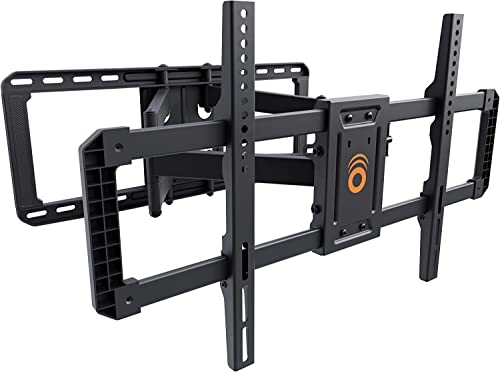
Built for 42 to 90 inch TVs up to 125 lbs, this full motion mount extends up to 22 inches from the wall and swivels 130 degrees. Push it back and the screen sits 2.4 inches from the wall. A 15 degree tilt adjusts without tools, and the kit includes a drilling template and hardware for a stated 30 minute install.
Screen size42 to 90 inches
Load limit125 lbs
ExtensionUp to 22 inches from wall
Motion130 degree swivel, 15 degree tilt
Pros
- Heavy-duty steel frame for large panels
- Tool-free tilt for glare control
- Drilling template and hardware included
Cons
- Deep extension needs clearance behind the screen
- Full motion arms suit fewer tight corners
Check price on Amazon ›
This fixed plate covers VESA patterns from 50x50 up to 900x600 and is designed for 60 to 120 inch displays, with support up to 264 lbs. Because it does not articulate, the screen stays flush and steady, which suits a dedicated gaming wall where the seating never moves.
Screen size60 to 120 inches
Load limit264 lbs
VESA range50x50 to 900x600mm
TypeFixed low profile
Pros
- Huge VESA range for oversized panels
- Very high load rating
- Simple fixed design with no moving joints
Cons
- No tilt or swivel adjustment
- Not suited to rooms with shifting seating
Check price on Amazon ›
Designed for 26 to 55 inch TVs up to 80 lbs, this single-stud mount articulates from 2.6 to 16.3 inches and swivels 180 degrees. Tilt runs from plus 10 to minus 5 degrees, and the plate covers VESA patterns from 3.9 x 3.9 inches through 15.7 x 15.7 inches.
Screen size26 to 55 inches
Load limit80 lbs
Extension2.6 to 16.3 inches
Motion180 degree swivel, plus 10 to minus 5 degree tilt
Pros
- Single stud install saves wall space
- Solid swivel range for corner seating
- Covers common mid-size VESA patterns
Cons
- Tilt range is narrower than some rivals
- Load limit rules out large panels
Check price on Amazon ›
This steel mount handles 45 to 60 inch TVs up to 50 kg and installs either on a wall or from the ceiling, with tilt and swivel adjustment. The 1.69mm steel and reinforced support bar are built to cut wobble, which helps when a screen hangs over a gaming chair.
Screen size45 to 60 inches
Load limit50 kg
Mount typeWall or ceiling
MotionTilt and swivel
Pros
- Two mounting routes in one kit
- Reinforced support bar reduces wobble
- Frees floor and wall space
Cons
- Ceiling install needs solid framing above
- Limited to 45 to 60 inch screens
Check price on Amazon ›
Made for 19 to 32 inch TVs, with some LED models up to 42 inches, this ceiling mount holds up to 66 lbs on 100x100 or 75x75 VESA patterns. It swivels a full 360 degrees, rotates 90 degrees, and tilts 20 degrees forward or 5 degrees back, with the plate sitting 10 to 28 inches from the ceiling.
Screen size19 to 32 inches, some up to 42
Load limit66 lbs
VESA range100x100 and 75x75mm
Motion360 degree swivel, 90 degree rotate
Pros
- Full 360 degree swivel
- Adjustable drop from 10 to 28 inches
- Works on flat and vaulted ceilings
Cons
- Small VESA patterns only
- Best suited to compact screens
Check price on Amazon ›
The LF100 keeps a TV just 0.5 inches from the wall for a picture-frame look. It fits most 15 to 45 inch TVs up to 50 lbs with 100x100 or 200x200 VESA plates, and an extended Allen key reaches the gap where normal screwdrivers cannot.
Screen size15 to 45 inches
Load limit50 lbs
VESA range100x100 and 200x200mm
Profile0.5 inches from wall
Pros
- Very slim 0.5 inch profile
- Two VESA plates included
- Extended Allen key simplifies tightening
Cons
- No tilt or swivel
- Small screen and weight range
Check price on Amazon ›
This tilt mount fits 32 to 70 inch TVs up to 85 lbs with VESA patterns up to 600x400. It sits 2.3 inches from the back of the TV, and you can level it plus or minus 3 degrees after installation to straighten the screen.
Screen size32 to 70 inches
Load limit85 lbs
VESA rangeUp to 600x400mm
Depth2.3 inches
Pros
- Post-install leveling of plus or minus 3 degrees
- Slim 2.3 inch depth
- Wide VESA coverage up to 600x400mm
Cons
- No swivel
- Tilt only, so seating must stay in front
Check price on Amazon ›
TygerClaw's mount holds most 14 to 40 inch flat panels up to 79 lbs, with tilt from minus 5 to plus 15 degrees and swivel up to 180 degrees. The arm moves the TV between 83 and 257mm, and the plate takes universal patterns up to 200x200mm.
Screen size14 to 40 inches
Load limit79 lbs
VESA rangeUp to 200x200mm
Motion180 degree swivel, minus 5 to plus 15 degree tilt
Pros
- High load limit for its screen range
- Wide tilt range
- Articulating arm swings the screen outward
Cons
- Small VESA patterns limit larger TVs
- Screen size range tops out at 40 inches
Check price on Amazon ›
What to look for
Match the mount to your screen size and weight
Every mount lists a screen range and a load limit, and the tighter of the two decides. Check the weight of your TV and its VESA hole pattern before ordering. A mount rated for a 55 inch screen may still fail on a heavier panel of the same size.
Decide between wall, desk, and ceiling mounting
Wall mounts keep the room open and suit shared living spaces. A clamp-on desk arm like the VIVO puts the screen right behind a keyboard. Ceiling mounts hang a screen over a chair when no wall is free, but they need solid framing above.
Choose fixed, tilt, or full motion
A fixed plate sits flush and never moves, which suits a screen that stays put. Tilt mounts angle the screen down to cut glare. Full motion arms swivel and extend, so several players can share one screen from different seats.
Plan the install before you drill
Single-stud mounts are quicker to hang than wide plates that span two studs. Check the depth you need behind the screen, the height you want, and whether hardware is included. A drilling template and a full hardware kit shorten the job considerably.
Frequently asked questions
What should I check before buying a gaming TV mount?
Confirm three numbers: your TV's weight, its screen size, and its VESA hole pattern. Then match those to the mount's stated range. A mount that fits the size but not the weight is the wrong choice.
Can a desk clamp mount work for a small gaming setup?
Yes. The VIVO STAND-V155D clamps to desks up to 1.7 inches thick and holds screens from 32 to 55 inches. It also includes a grommet option if your desk has a cable hole.
Does a full motion mount help in a shared living room?
It can. A swivel arm like the ECHOGEAR MaxMotion turns 130 degrees, so the screen can face different seats. The Amazon Basics mount swivels 180 degrees for smaller panels.
How do I pick a mount for tournament nights?
Look for a stable mount with enough swivel to face every seat, and check that the load limit leaves headroom. Fixed plates stay steadiest, while full motion arms let you reposition quickly between matches.
Is a ceiling mount a good idea over a gaming chair?
It frees wall space and puts the screen at eye level. The VideoSecu mount drops 10 to 28 inches from the ceiling and swivels 360 degrees. Make sure the ceiling framing can carry the load.
What VESA pattern do most gaming TVs use?
Mid-size screens commonly use 200x200 or 400x400mm, while small panels use 75x75 or 100x100mm. The Monoprice EZ Series covers 50x50 up to 900x600mm for very large displays.
How much tilt do I need to cut glare?
A tilt range of about 10 to 15 degrees handles most window glare. The Stanley mount also lets you level the screen plus or minus 3 degrees after it is on the wall.
Can I install a gaming TV mount myself?
Most single-stud and fixed mounts are a one-person job with a drill and a stud finder. The ECHOGEAR kit includes a drilling template and hardware. Large fixed plates may need a second pair of hands to lift the screen.
The verdict
VIVO Ultrawide Monitor and TV Desk Mount
9.3/10/10
The VIVO STAND-V155D wins for most gaming rooms because it clamps to a desk, swivels 200 degrees, and covers screens up to 55 inches. For a big wall-mounted panel, the ECHOGEAR MaxMotion carries up to 125 lbs. Pick the Amazon Basics mount for mid-size screens on a single stud, and go fixed or ceiling only when the seating never moves.
Check price on Amazon ›
Our top pick, secure checkout via Amazon
Note: Availability and specifications change often. Always confirm the current details on Amazon before buying.