Gaming Capture Cards Best Gaming Capture Cards for Every Setup
P
By the Pickpedia Team
·9 picks compared
·Last verified November 2026
Affiliate disclosure: As an Amazon Associate, Pickpedia earns from qualifying purchases. Links on this page are paid links, and we may earn a commission at no extra cost to you. This never affects our picks or scores.
Quick answer
The Elgato 4K S is our top pick for most players, pairing 4K60 capture with 1440p120 and 1080p240 passthrough. The AVerMedia Live Gamer Extreme 3 and ASUS CU4K30 are strong alternatives for plug-and-play streaming.
Best Gaming Capture Cards for Every Setup at a glance
Why you can trust this guide
We compared these picks using verified manufacturer specifications, available manuals and documentation, current retailer listings, and patterns in owner feedback, alongside editorial research. We focus on measurable differences such as performance, capacity, usability, and build quality. Pickpedia does not present editorial research as laboratory testing, and we do not claim hands-on testing unless it was actually performed.
A capture card turns your console or PC gameplay into a stream or recording, and the right one depends on the resolution you play at and the ports your desk can spare. We compared capture resolution, passthrough refresh rates, HDR handling, and connection type across the models below.
Some cards are built for simple USB plug-and-play streaming, while others install inside a PC and capture several sources at once. The list runs from beginner-friendly boxes to professional multi-input hardware, so match the card to your setup before you commit.
Our top picks
The 4K S records at 4K60 while passing through 1440p120 or 1080p240, so competitive play stays smooth on the monitor. HDR10 capture with tone mapping on Windows keeps colors accurate, and the 3.5mm analog input takes commentary or chat audio. It connects over USB-C and works with PS5, Xbox Series X/S, and Switch 2.
Capture4K60
Passthrough1440p120 or 1080p240
HDRHDR10 with tone mapping on Windows
ConnectionUSB-C
Audio3.5mm analog input
Pros
- High frame rate passthrough up to 1080p240
- HDR10 capture with tone mapping on Windows
- Analog audio input for commentary
Cons
- USB-C connection requires the right port on your PC
- Console-focused feature set
Check price on Amazon ›
The Live Gamer Extreme 3 captures 4K30 while passing through 4K60 HDR, and it supports VRR passthrough at 1440p120 or 1080p120. No drivers or external power are needed, and it works with OBS and Twitch out of the box. A 3.5mm audio in and out lets you connect a headset or mic directly.
Capture4K30
Passthrough4K60 HDR, up to 1080p240
VRR1440p120 or 1080p120 passthrough
ConnectionUSB, plug and play
Audio3.5mm in and out
Pros
- No drivers or external power required
- VRR passthrough for smooth gameplay
- Works with OBS, Twitch, and major platforms
Cons
- Capture tops out at 4K30
- Relies on third-party software for advanced features
Check price on Amazon ›
The CU4K30 passes through 4K HDR at 60 Hz and captures up to 4K30, 2K60, or Full HD at 120 fps. UVC plug-and-play over USB 3.2 Type-C means no drivers or utilities, and it is certified for OBS. The near-zero latency design suits fast-paced games.
Capture4K30, 2K60, 1080p120
Passthrough4K HDR at 60 Hz
ConnectionUSB 3.2 Type-C
SetupUVC plug and play
CertificationOBS certified
Pros
- Full HD capture at 120 fps
- Driver-free UVC setup
- 4K HDR passthrough at 60 Hz
Cons
- 4K capture limited to 30 fps
- No analog audio input listed
Check price on Amazon ›
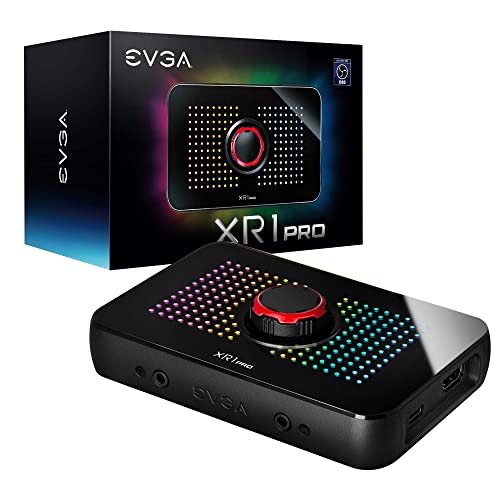
The XR1 Pro captures at 1440p60 or 4K30 and passes through true 1440p at 144 Hz or 4K at 60 Hz with HDR. A control dial gives you audio mixer controls and customizable RGB LEDs at your fingertips. It is certified for OBS and connects over USB 3.1.
Capture1440p60 or 4K30
Passthrough1440p144 HDR or 4K60 HDR
ConnectionUSB 3.1
ExtrasAudio mixer dial, ARGB lighting
Warranty2 year limited
Pros
- Onboard audio mixer controls
- 1440p144 HDR passthrough
- Customizable RGB lighting
Cons
- 4K capture capped at 30 fps
- RGB features add setup steps
Check price on Amazon ›
This Magewell device captures true DCI 4K60 over HDMI 2.0 and supports HDR10 and deep color passthrough. USB 3.2 connectivity is driver-free on Windows, macOS, and Linux, and analog audio in and out are included. A metal housing with thermal protection is built for continuous 24/7 operation.
CaptureUp to 4096x2160 at 60fps
HDRHDR10 and deep color passthrough
ConnectionUSB 3.2 Gen2x2
AudioAnalog in and out
Warranty3 year limited
Pros
- True 4K60 capture
- Driver-free on Windows, macOS, and Linux
- Built for 24/7 operation
Cons
- HDR10 needs Magewell SDK support
- Professional feature set may overwhelm beginners
Check price on Amazon ›
This USB 3.0 card supports 4K60 HDMI input and loop-out while capturing up to 1080p60, with 2K30 output over USB. Plug-and-play design needs no driver or external power, and the aluminum body helps with heat dissipation. A 3.5mm mic input adds commentary, though party chat is not recorded.
Capture1080p60, 2K30 over USB
Input and loop-out4K60 HDMI
ConnectionUSB 3.0
Audio3.5mm mic input
CompatibilityWindows, macOS, Linux, Android
Pros
- No driver or external power needed
- Works across Windows, macOS, Linux, and Android
- Aluminum body for heat dissipation
Cons
- Does not record party chat
- Capture limited to 1080p60
Check price on Amazon ›
This card accepts up to 4K30 input and captures Full HD at 1080p60 over USB 3.0. A 3.5mm microphone input and headphone output let you add commentary and monitor audio. It is driver-free and works with PC, PS5, PS4, Xbox, and Switch.
Capture1080p60
InputUp to 4K30
ConnectionUSB 3.0
Audio3.5mm mic in, headphone out
Warranty1 year
Pros
- Microphone input and headphone output
- No driver or external power required
- Works with consoles and PC
Cons
- Output limited to 1080p60
- Must connect directly to a USB 3.0 port
Check price on Amazon ›
This PCIe card captures HDMI, VGA, DVI, and component video at up to 1080p30. H.264 encoding keeps exported files widely compatible, and the included Streamcatcher Pro software supports multiple capture devices at once. It is a fit for archiving older consoles and analog gear.
CaptureUp to 1080p30
InputsHDMI, VGA, DVI, component
EncodingH.264
InterfacePCIe
SoftwareStreamcatcher Pro, Windows 10
Pros
- Multiple analog and digital inputs
- H.264 encoding for compatibility
- Supports multiple capture devices
Cons
- Requires an open PCIe slot
- Capture capped at 1080p30
Check price on Amazon ›
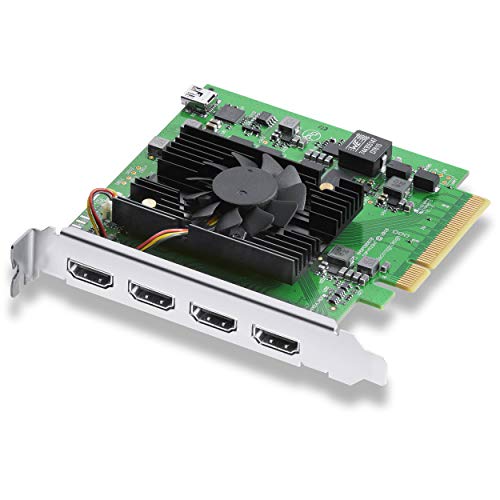
The DeckLink Quad HDMI carries four HDMI 2.0b inputs for simultaneous capture of multiple sources. It installs in a PCIe 8-lane Gen 3 slot and supports SD, HD, and 4K standards with deep color and HDR. Eight channels of embedded 24-bit audio are supported.
Inputs4x HDMI 2.0b
InterfacePCIe 8-lane Gen 3
FormatsSD, HD, 4K
ColorDeep Color and HDR
Audio8 channels embedded 24-bit
Pros
- Four simultaneous HDMI inputs
- Supports HDR and deep color
- Works on macOS, Windows, and Linux
Cons
- Needs a desktop with an open PCIe slot
- Aimed at professional multi-source workflows
Check price on Amazon ›
What to look for
Capture resolution and passthrough
Capture resolution is what you record; passthrough is what you see on your monitor. Many cards capture at 4K30 while passing through 4K60 HDR, and some pass through 1440p120 or 1080p240 for competitive play. Decide which matters more before you buy, because few cards do both at the highest settings.
USB versus PCIe connections
USB cards are plug-and-play and move easily between consoles and laptops, with USB-C and USB 3.0 the common options. PCIe cards install inside a desktop and suit multi-input or analog capture. If your desk is small, a single-cable USB card keeps the setup tidy.
HDR, VRR, and audio features
HDR10 passthrough keeps colors accurate on modern displays, and VRR passthrough reduces screen tearing during capture. Audio matters just as much: look for a 3.5mm mic input for commentary and check whether the card records party chat, since not all do. Built-in audio mixers help balance game and voice levels.
Matching a card to your workflow
Beginners streaming to Twitch or YouTube can start with a plug-and-play USB card and OBS. Console players should check passthrough refresh rates and console compatibility. Creators archiving retro gear need analog inputs, while studios capturing several feeds should look at multi-input PCIe hardware.
Frequently asked questions
Which capture card is best for a small desk?
A single-cable USB card keeps a small desk tidy. The Elgato 4K S uses USB-C, and the AVerMedia Live Gamer Extreme 3 is plug-and-play with no external power, so neither adds much clutter.
Do I need USB-C for a capture card?
USB-C is convenient for modern laptops and single-cable setups, but USB 3.0 cards work just as well for streaming. Match the connection to the ports on your PC rather than chasing the connector type.
Can a low-latency capture card handle multiplayer gaming?
Yes. Cards with high refresh passthrough, such as 1440p120 or 1080p240, keep gameplay responsive on your monitor while the card records. The ASUS CU4K30 and AVerMedia GC551G2 both emphasize low-latency passthrough.
Is a plug-and-play card good for beginner streamers?
Plug-and-play cards skip driver installation, so you can start streaming in OBS quickly. The AVerMedia Live Gamer Extreme 3 and the USB 3.0 card both work without extra drivers or external power.
What should I look for in a capture card for home recording?
Check capture resolution, passthrough refresh rate, HDR support, and audio inputs. A 3.5mm mic input and headphone output help you record commentary and monitor levels without extra gear.
Can a capture card with RGB lighting work for console capture?
Yes. The EVGA XR1 Pro adds customizable RGB lighting and an audio mixer dial, and it supports PS5, Xbox Series X and S, and Nintendo Switch over USB 3.1.
How do I choose between a USB and a PCIe capture card?
Choose USB for portability and simple console streaming. Choose PCIe if you need multiple HDMI inputs or analog connections, or if you want the card installed permanently inside a desktop.
What makes a capture card suitable for multiplayer gaming?
High refresh passthrough, low latency, and VRR support matter most. A card that passes through 1440p120 or 1080p240 lets you play at full speed while it captures in the background.
The verdict
Elgato 4K S Capture Card for PS5
9.4/10/10
The Elgato 4K S leads for most players thanks to 4K60 capture, high refresh passthrough, and HDR10 support. Streamers who want driver-free setup should look at the AVerMedia Live Gamer Extreme 3, while the ASUS CU4K30 suits 1080p120 recording. Pick the card that matches your console, display, and desk.
Check price on Amazon ›
Our top pick, secure checkout via Amazon
Note: Availability and specifications change often. Always confirm the current details on Amazon before buying.