Echo Wall Brackets Best Echo Wall Brackets: 5 Mounts for Show and Hub
P
By the Pickpedia Team
·5 picks compared
·Last verified November 2026
Affiliate disclosure: As an Amazon Associate, Pickpedia earns from qualifying purchases. Links on this page are paid links, and we may earn a commission at no extra cost to you. This never affects our picks or scores.
Quick answer
The Full Motion TV Wall Mount Bracket is our pick among the best Echo wall brackets, with a wide VESA range and a long extension arm. The PUTORSEN Wall Mount for Echo Show 21 and 15 is the dedicated fit, and the WALI Mount for Show 21 and Show 15 adds a heavy duty 15 inch arm.
Best Echo Wall Brackets: 5 Mounts for Show and Hub at a glance
Why you can trust this guide
We compared these picks using verified manufacturer specifications, available manuals and documentation, current retailer listings, and patterns in owner feedback, alongside editorial research. We focus on measurable differences such as performance, capacity, usability, and build quality. Pickpedia does not present editorial research as laboratory testing, and we do not claim hands-on testing unless it was actually performed.
Wall mounting an Echo Show or Echo Hub frees up counter space and puts the screen at eye level, which matters most in kitchens, bedrooms and crowded desks. The catch is that these displays come in several sizes, and a bracket that fits a Show 21 will not hold a Show 8. The mounts below cover the range from the 21 inch Show down to the 8 inch Hub.
We compared the supplied specs on VESA patterns, arm extension, tilt and swivel ranges, weight capacity and wall plate size. Each bracket here mounts to wood studs, brick or concrete, and none should go on drywall alone. Cable management and anti slip contact points are noted where the manufacturer lists them.
Our top picks
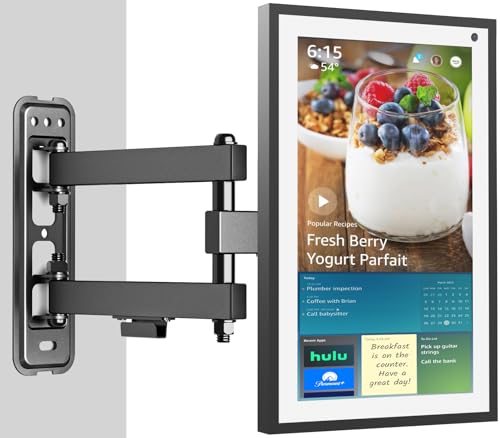
This is the most flexible mount in the group. It supports VESA patterns from 75x75mm to 400x400mm and screens from 19 to 55 inches up to 66 lbs, so it covers Echo Show 21 and 15 plus most flat or curved TVs and monitors. The arm extends to 16.7 inches and retracts to 2.8 inches, with +10/-5 degree tilt and 90 degrees of swivel each way.
VESA range75x75mm to 400x400mm
Screen sizes19 to 55 inches
Weight capacityUp to 66 lbs
Extension2.8 to 16.7 inches
Tilt / swivel+10/-5 degrees, +/-90 degrees
Pros
- Widest VESA and size range here
- Long 16.7 inch reach for corner viewing
- Handles both Echo Show and a standard TV
Cons
- Bulky look for a small smart display
- No cable management listed
Check price on Amazon ›
Built for the Echo Show 21 and Show 15, this steel bracket also takes TVs and monitors up to 32 inches. The articulating arm holds up to 44 lbs with +5/-15 degree tilt, +5/-90 degree rotation and 90 degrees of swivel each way, so portrait to landscape switching is smooth. It extends 2.4 to 14.4 inches from the wall.
CompatibilityEcho Show 21, Show 15, screens to 32 inches
Weight capacityUp to 44 lbs
VESA75x75mm and 100x100mm
Extension2.4 to 14.4 inches
Wall plate8.4 x 2.4 inches
Pros
- Made for the two largest Show sizes
- Rotation allows portrait or landscape
- Narrow 2.4 inch profile when pushed in
Cons
- 44 lb limit rules out heavier TVs
- No cable management listed
Check price on Amazon ›
WALI's bracket fits the Show 21 and Show 15 and holds up to 33 lbs on a heavy duty articulating arm. Tilt runs +15/-15 degrees, with 180 degree swivel and 360 degree rotation for switching portrait to landscape. The arm extends from 2 to 15 inches, and the small 5.9 x 1.6 inch plate suits tight stud spacing.
CompatibilityEcho Show 21, Show 15
Weight capacityUp to 33 lbs
Tilt / swivel / rotation+15/-15 degrees, 180 degrees, 360 degrees
Extension2 to 15 inches
Wall plate5.9 x 1.6 inches
Pros
- Full 360 degree rotation
- Compact wall plate for narrow studs
- Hardware kit and manual included
Cons
- 33 lb capacity is the lowest of the large Show mounts
- No cable management listed
Check price on Amazon ›
This aluminum bracket is made for the Echo Show 11 and the Echo Show 8 2025 release. A stable base holds the display in place while you adjust it, with left right rotation and 20 degrees of up and down tilt. Cable management keeps the power lead tidy, and the slim aluminum body suits a kitchen or bedside wall.
CompatibilityEcho Show 11, Echo Show 8 4th Gen
MaterialAluminum alloy
Tilt20 degrees up and down
AdjustmentLeft right rotation
ExtrasCable management
Pros
- Only bracket here with cable management
- Aluminum body is light on the wall
- Stable base resists slips during adjustment
Cons
- Tilt range is limited to 20 degrees
- Does not fit Show 15 or Show 21
Check price on Amazon ›
Precision fit for the Echo Hub 8 inch, this steel gimbal mount rotates a full 360 degrees and tilts 60 degrees forward and back. Swivel runs 60 degrees left and right, and the 2.5 mm rust resistant steel frame uses stainless steel screws. At roughly 300 grams it allows one handed attachment while holding the Hub firmly.
CompatibilityEcho Hub 8 inch
Material2.5 mm rust resistant steel
Rotation360 degrees
Tilt / swivel60 degrees, 60 degrees
WeightAbout 300 g
Pros
- True gimbal movement in every direction
- Rust resistant steel and stainless screws
- One handed attach and release
Cons
- Fits only the Echo Hub 8
- No cable management listed
Check price on Amazon ›
What to look for
Matching the bracket to your display size
Echo Show models differ enough that the bracket has to match. The Show 21 and Show 15 use the PUTORSEN and WALI arms, while the Show 11 and Show 8 4th Gen need the ZHGM mount. The Echo Hub 8 takes the shinar gimbal, and the Full Motion bracket covers the larger Shows through its VESA range.
Why swivel and tilt matter for wall outlets
A wall mounted display often sits near an outlet, and the plug can block part of the viewing arc. A swivel arm lets you angle the screen away from the plug without moving the mount. The Full Motion bracket swivels 90 degrees each way, WALI offers 180 degrees, and the shinar gimbal rotates a full 360 degrees.
Mounting surfaces and wall plate size
Every bracket here needs a vertical wood stud, brick or concrete, and none should be mounted on drywall alone. Check the plate dimensions against your stud spacing before you commit. The WALI plate is 5.9 x 1.6 inches, PUTORSEN lists 8.4 x 2.4 inches, and the smaller plates leave more room on narrow walls.
Bedrooms, kitchens and crowded desks
In a bedroom, push the arm in close to the wall and tilt down for viewing from bed. In a small kitchen, a short extension keeps the screen out of the way while you cook, and the ZHGM mount adds cable management to keep the cord tidy. For a crowded desk, wall mounting clears the surface entirely and the stable base resists slips.
Frequently asked questions
Which bracket fits the Echo Show 21 and Show 15?
The PUTORSEN and WALI mounts are both built for those two models. The Full Motion bracket also fits through its VESA range, and it holds up to 66 lbs against 44 lbs for PUTORSEN and 33 lbs for WALI.
Can I switch the screen from portrait to landscape?
Yes on the PUTORSEN, WALI and Full Motion mounts. PUTORSEN lists +5/-90 degree rotation, WALI lists 360 degree rotation, and the shinar gimbal rotates a full 360 degrees on the Echo Hub 8.
Will a swivel mount work near a wall outlet?
It helps. Angling the arm moves the screen away from a plug that crowds one side. The shinar mount gives the widest movement at 360 degrees, and the Full Motion bracket swivels 90 degrees each way.
Do any of these brackets include cable management?
The ZHGM mount for the Echo Show 11 and Echo Show 8 4th Gen lists cable management. The other four brackets here do not list it, so plan a clip or raceway for the power lead.
Can I mount one on drywall without a stud?
No. Each manufacturer specifies vertical wood studs, brick or concrete, and warns against drywall alone. Find a stud or use the appropriate masonry anchors for brick and concrete.
How far do the arms extend from the wall?
The Full Motion bracket reaches 16.7 inches, WALI reaches 15 inches, PUTORSEN reaches 14.4 inches, and PUTORSEN retracts to 2.4 inches while WALI goes to 2 inches. A short retracted depth keeps the screen close in a bedroom.
Which bracket suits a small kitchen?
The ZHGM mount is a good fit for a Show 11 or Show 8 because it holds the screen steady and manages the cord. The stable base resists slips when you tilt the screen during a recipe.
Is a wall bracket worth it for a crowded desk?
It clears the surface completely and puts the screen at a comfortable height. The shinar mount weighs about 300 grams and allows one handed attachment, which suits a desk that doubles as a charging spot.
The verdict
Full Motion TV Wall Mount Bracket Swivel T...
9.2/10/10
For most people, the Full Motion TV Wall Mount Bracket is the safest choice because it covers the Show 21 and 15 plus a regular TV or monitor. Show 21 and Show 15 owners who want a purpose built arm should look at the PUTORSEN, and WALI suits anyone who tilts the screen often. Smaller Show and Hub owners have dedicated options in the ZHGM and shinar mounts.
Check price on Amazon ›
Our top pick, secure checkout via Amazon
Note: Availability and specifications change often. Always confirm the current details on Amazon before buying.