Digital Photo Frames Best Digital Photo Frames for Sharing Photos
P
By the Pickpedia Team
·9 picks compared
·Last verified November 2026
Affiliate disclosure: As an Amazon Associate, Pickpedia earns from qualifying purchases. Links on this page are paid links, and we may earn a commission at no extra cost to you. This never affects our picks or scores.
Quick answer
Digital Picture Frame Powered by Nixplay 10.1" is our top pick, thanks to app, email and Alexa sharing plus free cloud storage. The Aura Carver is the gifting choice, and the 64GB Uhale 15.6 inch frame suits anyone who wants a big screen and plenty of room for photos.
Best Digital Photo Frames for Sharing Photos at a glance
Why you can trust this guide
We compared these picks using verified manufacturer specifications, available manuals and documentation, current retailer listings, and patterns in owner feedback, alongside editorial research. We focus on measurable differences such as performance, capacity, usability, and build quality. Pickpedia does not present editorial research as laboratory testing, and we do not claim hands-on testing unless it was actually performed.
A digital photo frame turns a phone full of pictures into something the whole room can see. The models here split into two camps: Wi-Fi frames that pull photos from an app or email, and plug-and-play frames that read a USB drive or SD card with no network at all.
We compared screen resolution, storage, sharing methods, auto-rotate and extra features like video playback, clocks and weather. The list starts with the frame that balances sharing options and ease of setup best, then moves through larger screens, gift-friendly designs and simple offline frames.
Our top picks
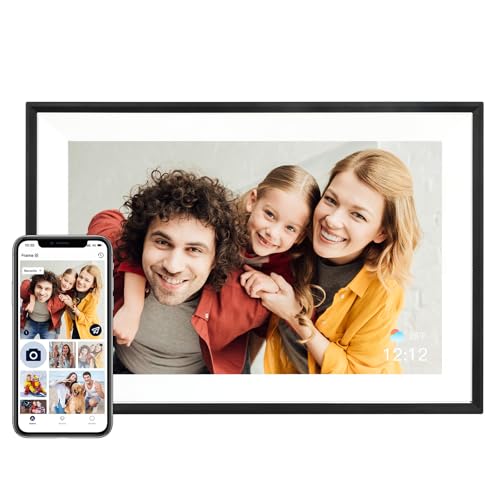
This frame runs on Nixplay, so several people can upload photos through the app, the desktop web app or by emailing the frame directly. The 10.1 inch IPS touchscreen runs at 1280 x 800 and keeps colors accurate from wide angles. It also supports Alexa and free cloud storage.
Screen10.1 inch IPS HD touchscreen
Resolution1280 x 800 (16:10)
SharingNixplay app, desktop web app, email, Alexa
Cloud storageFree
Pros
- Multiple sharing routes including direct email
- Invite several users and link multiple frames
- Free cloud storage with no subscription
Cons
- Requires the Nixplay app or web account to set up
- Touchscreen controls may be unfamiliar to some users
Check price on Amazon ›
Aura's Carver is built around easy gifting, with portrait pairing so a frame can be linked to a specific person. Slideshow speed is adjustable and the frame turns itself on and off automatically. It handles iOS live photos and video clips up to 30 seconds with sound.
Size10 inch
FinishCarver Black
VideoUp to 30 seconds with sound
ExtrasPortrait pairing, auto on/off, screen mirroring from Windows PC
Pros
- Portrait pairing simplifies setup for the recipient
- Supports live photos and short video with audio
- Adjustable slideshow speed and automatic on/off
Cons
- No memory card slot mentioned for offline loading
- Video clips are limited to 30 seconds
Check price on Amazon ›
At 15.6 inches with a 1920 x 1080 IPS touchscreen, this is the biggest frame on the list. The 64GB of built-in storage holds a very large library, and the Uhale app limits uploads to invited users. Videos play with audio through the built-in speaker.
Screen15.6 inch FHD IPS touchscreen
Resolution1920 x 1080
Storage64GB built-in, plus SD and USB
ExtrasAuto rotation, PC web transfer, clock and weather
Pros
- Largest screen and highest resolution here
- 64GB built-in storage plus card and USB support
- Video playback with sound through the speaker
Cons
- Uhale app limits video uploads to 2 minutes
- SD and USB cards need FAT32 formatting first
Check price on Amazon ›
The Pix-Star LUX uses a 4:3 no-glare IPS screen that preserves the original composition of smartphone photos. Cloud storage is free forever with no subscription, and one account can manage up to 25 frames. A motion sensor saves energy between views.
Screen10.4 inch IPS, 4:3 ratio
Cloud storageUnlimited, free
Frame managementUp to 25 frames per account
ExtrasWeather, calendar, web radio, motion sensor
Pros
- No-crop 4:3 display suits phone photos
- Unlimited free cloud storage with no subscription
- Motion sensor and custom sleep hours
Cons
- Smaller screen than the large-format options
- Extra features add menus to learn
Check price on Amazon ›
Brookstone's 10 inch frame pairs a touchscreen with 32GB of internal storage for local albums. Automatic picture rotation keeps portraits and landscapes upright, and a built-in speaker handles video sound. Clock, calendar and weather forecast round out the daily display.
Screen10 inch touchscreen
Storage32GB internal
AudioBuilt-in speaker
ExtrasClock, calendar, weather forecast, auto rotation
Pros
- 32GB of local storage for large albums
- Touchscreen navigation with auto rotation
- Clock, calendar and weather on screen
Cons
- White finish may not suit every room
- Video sound depends on the small built-in speaker
Check price on Amazon ›
AEEZO fits a 1280 x 800 IPS touchscreen with adjustable brightness into a 10.1 inch frame. The 32GB of internal memory holds tens of thousands of photos, and a gravity sensor rotates images to match how the frame sits. A Fill Frame mode lets you adjust how much of a photo is shown.
Screen10.1 inch IPS touchscreen
Resolution1280 x 800
Storage32GB internal, up to 64GB SD card
SetupAiMOR app
Pros
- 32GB internal storage holds a very large library
- Auto-rotate via gravity sensor
- Fill Frame mode adjusts the display area
Cons
- Photos on an SD card must be imported first
- Setup depends on the AiMOR app
Check price on Amazon ›
Kodak's 10.1 inch frame uses a 1280 x 800 IPS touchscreen with a 178 degree viewing angle. Photos and videos arrive over 2.4 GHz Wi-Fi through the Kodak Digital Frame app, and uploaded music can play as background audio. Calendar, alarm and weather forecast are built in.
Screen10.1 inch IPS touchscreen
Resolution1280 x 800 (16:10)
Storage32GB internal, plus SD, MMC and USB
ExtrasMusic playback, calendar, alarm, weather
Pros
- Wide 178 degree viewing angle
- Plays uploaded music as background audio
- Card and USB slots alongside built-in storage
Cons
- Wi-Fi is limited to the 2.4 GHz band
- Requires app registration and QR code pairing
Check price on Amazon ›
The Sungale DPF710 skips Wi-Fi and apps entirely: insert a USB flash drive or SD card and the slideshow starts. The 7 inch LCD runs at 1024 x 600, and the ultra slim body fits on a shelf or nightstand. Cards up to 32GB are supported.
Screen7 inch HD LCD
Resolution1024 x 600
InputsUSB flash drive, SD card up to 32GB
SetupNone required
Pros
- No Wi-Fi, app or account needed
- Straightforward for seniors and kids
- Slim design with card and USB support
Cons
- Smallest screen on the list
- No app sharing or cloud storage
Check price on Amazon ›
Philips keeps it basic with a 7 inch display at 800 x 480 and 128MB of pre-installed memory. A 5 in 1 card reader covers several memory card formats, so photos can come straight from a camera card. It suits a desk or side table where space is tight.
Screen7 inch
Resolution800 x 480
Memory128MB pre-installed
Card reader5 in 1
Pros
- 5 in 1 card reader covers several formats
- Compact 7 inch footprint
- Some memory included out of the box
Cons
- Lower resolution than the larger frames
- No Wi-Fi or app sharing
Check price on Amazon ›
What to look for
How Wi-Fi frames and card frames differ
Wi-Fi frames connect to an app or email address and pull new photos automatically, which suits family members who live far apart. Card and USB frames read files from removable media and need no network, so they work anywhere. Neither type is better in every case; the choice comes down to who sends the photos and how often.
Screen size and resolution
The frames here range from 7 inches to 15.6 inches. Bigger panels suit a living room wall or a shared shelf, while 7 inch models fit a desk or nightstand. Resolution matters as much as size: 1280 x 800 is common at 10 inches, and the 15.6 inch frame steps up to 1920 x 1080.
Storage and cloud options
Built-in storage ranges from 128MB on the Philips to 64GB on the Uhale frame. Several models pair internal memory with SD or USB slots, and the Pix-Star LUX offers unlimited free cloud storage with no subscription. Larger internal storage means fewer trips to a computer to swap files.
Sharing, video and extras
App sharing lets invited users send photos and short videos straight to a frame, and some models accept email uploads or Alexa commands. Video support varies from 30 second clips on the Aura to unlimited SD card playback on the Uhale frame. Clock, weather, calendar and music features are worth checking if the frame will sit in a busy room.
Frequently asked questions
What should I look for in a digital photo frame?
Look at the screen size and resolution, how photos get onto the frame, and how much storage it has. If family members will send pictures remotely, pick a Wi-Fi frame with app or email sharing. If you just want a slideshow from a camera card, a plug-and-play frame is simpler.
Do digital photo frames need Wi-Fi?
Only the app-connected ones. Frames like the Sungale DPF710 and the Philips SPF3470 read a USB drive or SD card with no network at all. Wi-Fi models such as the Nixplay-powered frame and the Uhale frame need a connection to receive photos.
Can more than one person send photos to a frame?
Yes on several models. The Nixplay-powered frame lets you invite multiple users and link more than one frame to the app. The Uhale frame restricts access to invited users, and the Pix-Star LUX account can manage up to 25 frames.
How many photos will a frame hold?
It depends on storage. The Uhale frame's 64GB built-in memory holds a very large library, and the AEEZO frame's 32GB stores tens of thousands of photos. The Philips SPF3470 ships with 128MB of pre-installed memory, so a card is useful there.
Do these frames play video?
Several do. The Aura Carver handles clips up to 30 seconds with sound, and the Uhale frame plays video with audio through its speaker, with a 2 minute limit on app uploads. The Brookstone frame includes a built-in speaker for video playback.
What is auto-rotate on a digital photo frame?
Auto-rotate turns portrait photos upright when the frame is placed vertically. The AEEZO frame uses a gravity sensor to adjust orientation, and the Brookstone and Uhale frames also rotate pictures automatically. It saves you from editing each photo before loading it.
Are digital photo frames good gifts for parents?
They work well because photos can arrive without the recipient doing anything, once the frame is set up. Aura builds its Carver around portrait pairing for gifting, and the Uhale frame uses simple swipe and tap controls aimed at grandparents.
Can I use an SD card or USB drive with a Wi-Fi frame?
Many Wi-Fi frames include both slots. The Kodak frame has SD, MMC and USB slots alongside 32GB of internal memory, and the Uhale frame accepts SD and USB cards. Check the card format first, since the Uhale frame asks for FAT32.
The verdict
Digital Picture Frame Powered by Nixplay 1...
9.2/10/10
The Digital Picture Frame Powered by Nixplay 10.1 inch wins because it covers the most ground: app, web and email uploads, multiple users, free cloud storage and a sharp IPS touchscreen. Choose the Aura Carver if the frame is a gift, or the 15.6 inch Uhale frame if screen size and storage come first.
Check price on Amazon ›
Our top pick, secure checkout via Amazon
Note: Availability and specifications change often. Always confirm the current details on Amazon before buying.