Office & Stationery Best Desk Mats for a Sleek Workspace Refresh
P
By the Pickpedia Team
·1 picks compared
·Last verified September 2026
Affiliate disclosure: As an Amazon Associate, Pickpedia earns from qualifying purchases. Links on this page are paid links, and we may earn a commission at no extra cost to you. This never affects our picks or scores.
Quick answer
The Logitech Studio Series Desk Mat is our focused pick for a keyboard-and-mouse workspace that needs a defined patch of color. Choose it when a fabric surface and a compact rectangular footprint suit your routine. For a desk used mainly for handwriting, start by deciding whether you prefer a firm writing surface; that preference can matter more than appearance.
Why you can trust this guide
This research-based guide evaluates one specific desk mat and compares it with other practical workspace arrangements. We used Logitech's specifications and material descriptions, then considered equipment placement, writing habits and everyday upkeep. We have not tested mouse tracking, stain removal or long-term wear. The recommendation concerns the use case described here.
Our top picks
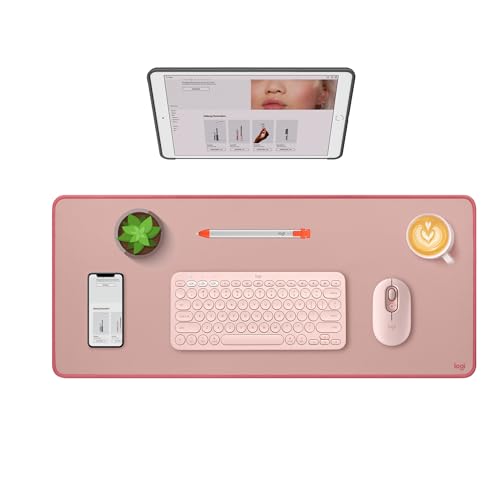
The Studio Series measures 27.56 inches wide by 11.81 inches deep and 0.08 inch thick, equivalent to 700 by 300 by 2 mm. It combines a polyester fabric surface with a natural-rubber base and stitched edges. Logitech describes the surface as spill resistant. The linked selection is Dark Rose, part number 956-000048. Logitech product specifications. Its appeal is the simple layout it supports: keyboard toward the center, mouse alongside it and a visible boundary around those devices. Treat that as a starting arrangement, then adjust for how you actually work. A large keyboard and a wide mouse sweep may need more horizontal room than this rectangle gives you. A compact keyboard can leave more space to either side. Choose it if you want a coordinated area for computer input and like a textile surface. Skip it if you need a substantially deeper writing area, want a rigid desktop covering or require a mat without natural rubber. For those uses, identify the required material and dimensions first.
Selected configurationLogitech Studio Series Desk Mat, Dark Rose
Pros
- The Studio Series measures 27.56 inches wide by 11.81 inches deep and 0.08 inch thick, equivalent to 700 by 300 by 2 mm.
Cons
- Skip it if you need a substantially deeper writing area, want a rigid desktop covering or require a mat without natural rubber.
Who should buy it
- Choose it if you want a coordinated area for computer input and like a textile surface.
Skip it if
- Skip it if you need a substantially deeper writing area, want a rigid desktop covering or require a mat without natural rubber.
Check price on Amazon ›
What to look for
Compare the desk arrangements
Arrangement: Logitech Studio Series Desk Mat; Strongest fit: One fabric zone for keyboard and mouse; Main compromise: The fixed footprint must fit both devices and your mouse movements. Arrangement: Separate mouse pad and uncovered desk; Strongest fit: Frequent movement between typing and handwritten work; Main compromise: Accessories remain visually separate. Arrangement: Larger desk mat; Strongest fit: A broad spread of input devices; Main compromise: More of the desktop becomes covered. Arrangement: Firm writing pad; Strongest fit: Paperwork takes priority; Main compromise: Check whether you still want a separate mouse surface. The alternatives describe layouts to consider, rather than additional products reviewed here. Choose the arrangement around your most common task before choosing a color.
Measure the active area, not the whole desk
Place your keyboard where it normally sits and move the mouse through a normal work session. Mark the outer limits on a sheet of paper or a temporary layout sketch. Measure the combined width, including the space between devices. Leave yourself some working room instead of placing either device directly against a proposed edge. Depth deserves a separate check. Account for the keyboard, the position of your hands and anything you keep in front of it. If a notebook regularly replaces the keyboard, sketch both arrangements. A mat that fits one arrangement neatly may complicate the other. Also check the monitor stand, lamp base and cable path. Decide whether those objects belong inside or outside the mat's boundary. An intentional arrangement is easier to maintain than one that relies on balancing equipment across an edge. The desk's full width tells you little about the usable space between these obstacles.
Match the surface to your routine
Think through a typical hour at the desk. If you mostly type and use a mouse, a combined input area can be a useful organizing choice. If you repeatedly sign forms, sketch or annotate loose sheets, reserve an easily accessible paper zone as well. You should not need to rebuild the entire desk each time you switch tasks. For handwriting, compare the feel of your normal notebook with a loose sheet on the intended surface before committing your routine to it. A backed notebook and single-sheet paperwork are different situations. If you want consistently firm support, keep a writing board nearby or leave a section of the desk clear. Color is the finishing decision. Start with the keyboard, monitor and furniture already in place. Choose a mat that either repeats an existing accent or creates one deliberate focal point. There is no need to match every accessory. A small number of clearly defined zones often makes the arrangement easier to read visually.
Everyday upkeep
Keep drinks in a separate spot and clean up spills promptly. Spill resistance is a surface feature, not permission to leave moisture underneath equipment. Logitech says accidental liquids can be wiped from the coating. Logitech surface description. Periodically lift the mat and check the desktop beneath it. Remove loose debris before putting it back, and let any cleaned area dry. Follow the product's care instructions before using cleaners or attempting machine washing. Keep sharp craft tools on a purpose-made cutting surface.
Frequently asked questions
Should a desk mat cover the entire desk?
No. Choose the coverage needed for the activity you want to contain. An uncovered area can remain useful for a notebook, documents or objects that you regularly move.
Does every keyboard need to sit on the mat?
No. You can use a separate mouse pad, especially if your keyboard placement changes frequently. The combined layout is a preference, not a requirement for an organized workspace.
What should decide the final choice?
Measure your working footprint and decide how much handwriting space you need. Choose the Logitech Studio Series when its fabric rectangle suits that layout. Choose another size or a separate writing-and-mousing arrangement when your tasks need a different shape.
The verdict
Logitech Studio Series Desk Mat, Dark Rose
The Logitech Studio Series Desk Mat is our focused pick for a keyboard-and-mouse workspace that needs a defined patch of color. Choose it when a fabric surface and a compact rectangular footprint suit your routine. For a desk used mainly for handwriting, start by deciding whether you prefer a firm writing surface; that preference can matter more than appearance.
Check price on Amazon ›
Our top pick, secure checkout via Amazon
Note: Availability and specifications change often. Always confirm the current details on Amazon before buying.