Curved Computer Monitors Best Curved Computer Monitors for Immersive Work and Play
P
By the Pickpedia Team
·9 picks compared
·Last verified November 2026
Affiliate disclosure: As an Amazon Associate, Pickpedia earns from qualifying purchases. Links on this page are paid links, and we may earn a commission at no extra cost to you. This never affects our picks or scores.
Quick answer
The Samsung 27" Essential S3 (S36GD) is our pick for most people, pairing a 1800R curve with a 100Hz panel and eye comfort features. The ASUS TUF VG27VQ3B suits competitive gamers, and the LG 32MR50C-B gives you a larger 32-inch screen.
Best Curved Computer Monitors for Immersive Work and Play at a glance
Why you can trust this guide
We compared these picks using verified manufacturer specifications, available manuals and documentation, current retailer listings, and patterns in owner feedback, alongside editorial research. We focus on measurable differences such as performance, capacity, usability, and build quality. Pickpedia does not present editorial research as laboratory testing, and we do not claim hands-on testing unless it was actually performed.
A curved screen wraps the picture around your field of view, which pulls you into games and makes wide documents easier to scan. The curve matters most on larger panels, where a tighter radius keeps the edges closer to your eyes.
We compared nine curved monitors built around different priorities. Refresh rates run from 100Hz to 280Hz, sizes span 24 to 49 inches, and panel types split between VA and other designs. Below, each entry notes what the supplied specs say it does well.
Our top picks
The 1800R curve and 100Hz refresh rate cover the basics well for mixed use. Advanced eye comfort technology is TÜV certified for reduced blue light and flicker, which helps during long sessions. Game Mode adjusts color and contrast when you switch to play.
Screen size27 inches
ResolutionFHD
Curve1800R
Refresh rate100Hz
PortsHDMI and D-sub
Pros
- 1800R curve suits a desk setup
- 100Hz reduces lag and motion blur
- TÜV certified eye comfort features
Cons
- FHD resolution limits fine detail on a 27-inch panel
- D-sub is a legacy connection
Check price on Amazon ›
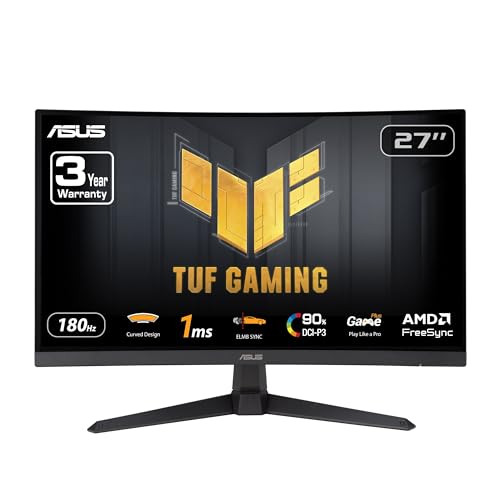
A 180Hz refresh rate and 1ms GTG response time give this TUF model the speed competitive players want. ELMB Sync works to cut ghosting, and FreeSync Premium keeps frames tear-free. The 1500R curve and 90% DCI-P3 coverage add immersion and color depth.
Screen size27 inches
Resolution1920 x 1080
Curve1500R
Refresh rate180Hz
Response time1ms GTG
Color coverage90% DCI-P3
Pros
- 180Hz with ELMB Sync for motion clarity
- FreeSync Premium support
- Built-in speakers and 3 year warranty
Cons
- 1080p resolution is modest for the size
- Tighter 1500R curve takes adjusting to
Check price on Amazon ›
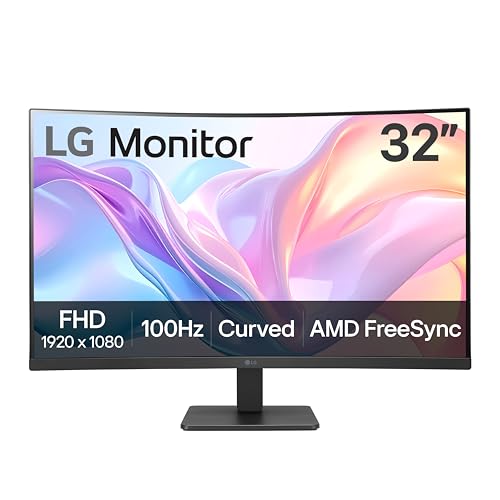
At 32 inches this LG gives you more desktop space than the 27-inch options. The VA panel delivers vivid color at 1920x1080, and the 100Hz refresh rate keeps streaming and casual games smooth. AMD FreeSync, Dynamic Action Sync and Black Stabilizer round out the gaming side.
Screen size32 inches
Resolution1920x1080
PanelVA
Refresh rate100Hz
SyncAMD FreeSync
Pros
- Large 32-inch viewing area
- 100Hz with reduced stuttering
- FreeSync and Black Stabilizer for games
Cons
- 1080p is stretched thin across 32 inches
- Tilt is the only stand adjustment listed
Check price on Amazon ›
A 280Hz refresh rate and 1ms response time put this Nitro at the top of the speed range here. The 1500R curve and ZeroFrame bezels make multi-monitor setups feel continuous. FreeSync Premium and 99% sRGB coverage cover both play and color work.
Screen size27 inches
Resolution1920 x 1080
Curve1500R
Refresh rate280Hz
Response time1ms
Color coverage99% sRGB
Pros
- 280Hz refresh rate for very high frame rates
- ZeroFrame design suits multi-monitor builds
- Ergonomic stand and VESA mounting
Cons
- 1080p resolution on a 27-inch panel
- High refresh rates depend on a strong GPU
Check price on Amazon ›
The 34-inch 3440x1440 panel gives you a wider field of view than any 16:9 option here. A 200Hz refresh rate over DisplayPort 1.4 and 0.3ms MPRT response time suit fast-paced PC games. The stand adds height, tilt and swivel adjustment, and a three year warranty backs it.
Screen size34 inches
Resolution3440x1440
Aspect ratio21:9
Curve1500R
Refresh rate200Hz via DisplayPort
Response time0.3ms MPRT
Pros
- Sharp UWQHD resolution with a 1500R curve
- 200Hz over DisplayPort 1.4
- Height, tilt and swivel adjustment
Cons
- 200Hz requires DisplayPort rather than HDMI
- Ultrawide needs desk depth to sit comfortably
Check price on Amazon ›
A 49-inch DQHD panel at 5120x1440 in 32:9 replaces a dual-monitor setup with one continuous curve. The built-in 5MP camera and dual microphones with DNN noise cancellation handle calls without extra gear. USB-C conferencing delivers up to 140W of power delivery, and the 165Hz refresh rate keeps motion fluid.
Screen size49 inches
Resolution5120 x 1440
Aspect ratio32:9
PanelVA
Refresh rate165Hz
Response time5ms GtG
WebcamBuilt-in 5MP
Pros
- Built-in 5MP camera and dual microphones
- USB-C with up to 140W power delivery
- 165Hz refresh rate for a display this size
Cons
- Very wide footprint needs a deep desk
- Mount compatible design means no stand listed
Check price on Amazon ›
The 1000R curve is the tightest here, wrapping the 34-inch UWQHD panel closely around your view. A 165Hz DisplayPort refresh rate and 2ms response time keep motion smooth. USB-C power delivery of 65W charges a laptop while extending the display, and the stand adjusts for height.
Screen size34 inches
Resolution3440 x 1440
Curve1000R
PanelVA
Refresh rate165Hz via DisplayPort
Response time2ms OD
USB-C power delivery65W
Pros
- Tight 1000R curve for immersion
- USB-C with 65W charging
- Height adjustable stand
Cons
- 165Hz is limited to DisplayPort
- Tight curve can distort straight lines at the edges
Check price on Amazon ›
The 1500R curve and 99% sRGB coverage give this Sceptre solid fundamentals for a 27-inch 1080p screen. Two HDMI ports and one VGA port each support refresh rates up to 100Hz. Built-in speakers remove the need for separate desktop audio.
Screen size27 inches
Resolution1080p
Curve1500R
Refresh rateUp to 100Hz
Color coverage99% sRGB
PortsTwo HDMI, one VGA
Pros
- 99% sRGB for deeper color
- Two HDMI ports plus VGA
- Built-in speakers
Cons
- 100Hz is the lowest refresh rate here
- VGA is outdated for modern PCs
Check price on Amazon ›
At 24 inches this Pixio takes up little desk space while still offering a 1500R curve. The 200Hz refresh rate and 1ms GTG response time suit fast FPS play, and Adaptive Sync with HDR support smooths out frames. The white finish stands out from the usual black chassis.
Screen size24 inches
Resolution1080p
Curve1500R
PanelFast VA
Refresh rate200Hz
Response time1ms GTG
Pros
- 200Hz in a compact 24-inch frame
- Adaptive Sync and HDR support
- Distinctive white finish
Cons
- Smallest screen in this group
- 1080p only
Check price on Amazon ›
What to look for
How the curve radius changes the experience
Curve figures here run from a gentle 1800R on the Samsung to a tight 1000R on the CrystalPro. A smaller number means a tighter bend, which pulls the edges of the screen closer to your eyes. Tighter curves work best on wide panels, where the sides would otherwise sit far from your line of sight. On a 27-inch screen, an 1800R or 1500R curve is usually the more comfortable choice.
Matching refresh rate to what you do
The 100Hz panels here handle office work, streaming and casual games without visible stutter. Gamers who play fast shooters will notice the jump to 180Hz on the ASUS TUF or 200Hz on the AOC and Pixio. The Acer Nitro goes furthest at 280Hz. Higher refresh rates only pay off if your graphics card can push the frames.
Resolution and screen size together
A 1080p picture looks sharp on a 24-inch panel but softer across 32 inches. The ultrawide entries step up to 3440x1440 on 34 inches and 5120x1440 on the HP 49-inch. More pixels mean more desktop room for side-by-side windows, and they ask more of your GPU in games. Pick the resolution first, then the curve.
Ports, stands and desk fit
Check the connections before you commit. Several models here reach their top refresh rate only over DisplayPort, while HDMI caps lower. USB-C on the HP and CrystalPro carries video and charges a laptop over one cable. Height adjustable stands on the AOC and CrystalPro help you line the screen up with your eyes, and VESA mounting is listed on the Acer and AOC.
Frequently asked questions
Is a curved monitor better than a flat one?
A curve brings the edges of a wide screen closer to your eyes, which reduces the distance your gaze travels. That helps most on ultrawide panels and on large 32-inch and up screens. On a small 24-inch display the difference is subtle.
What curve radius should I pick?
Tighter radii like 1000R wrap the screen around you and suit wide ultrawide panels. Gentler 1500R and 1800R curves feel more natural on 27-inch screens. Sit roughly at the center of the radius for the intended effect.
Do curved monitors work for office work?
Yes. The Samsung, LG and Sceptre entries handle documents and spreadsheets well, and the ultrawides fit several windows side by side. Eye comfort features on the Samsung help during long sessions.
Can I use a curved monitor with a PS5 or Xbox?
The ASUS TUF VG27VQ3B is listed for PS5 and Xbox use. Consoles generally cap their output, so the highest refresh rates here apply mainly to PC gaming over DisplayPort.
How many HDMI ports do I need?
Two HDMI ports, as on the Sceptre and AOC, let you keep a PC and a console connected at once. If you plan to run a laptop over USB-C, look at the HP or CrystalPro instead.
Will a 34-inch ultrawide fit my desk?
A 34-inch 21:9 panel is wider than a standard 27-inch screen and needs more depth for comfortable viewing. Measure your desk and check the stand footprint before ordering. The 49-inch HP is wider still.
What refresh rate do I need for gaming?
Casual play is fine at 100Hz. Competitive shooters benefit from 180Hz and up, where the ASUS TUF, AOC, Pixio and Acer Nitro sit. Your frame rate has to match the panel to see the gain.
Do these monitors include speakers?
The ASUS TUF, Sceptre and HP models list built-in speakers, and the HP adds dual microphones for calls. Other entries rely on the audio out or earphone jack for sound.
The verdict
Samsung 27" Essential S3 (S36GD) Series FH...
9.0/10/10
The Samsung 27" Essential S3 (S36GD) remains the safest starting point for a curved computer monitor, balancing a comfortable 1800R curve, a 100Hz panel and certified eye comfort. Gamers should look at the ASUS TUF VG27VQ3B for its 180Hz speed, while the LG 32MR50C-B rewards anyone who wants a bigger screen for everyday work.
Check price on Amazon ›
Our top pick, secure checkout via Amazon
Note: Availability and specifications change often. Always confirm the current details on Amazon before buying.