Controller Charging Docks Best Controller Charging Docks: 8 Top Picks Ranked
P
By the Pickpedia Team
·8 picks compared
·Last verified November 2026
Affiliate disclosure: As an Amazon Associate, Pickpedia earns from qualifying purchases. Links on this page are paid links, and we may earn a commission at no extra cost to you. This never affects our picks or scores.
Quick answer
For Xbox players, the Upgraded Controller Charger Station from NinABXY is our top pick, since it ships with two 6200mWh battery packs and back covers for both controller generations. The 8BitDo Charging Dock is the cleaner officially licensed alternative, and the PlayStation DualSense Charging Station is the simplest choice for PS5 owners.
Best Controller Charging Docks: 8 Top Picks Ranked at a glance
Why you can trust this guide
We compared these picks using verified manufacturer specifications, available manuals and documentation, current retailer listings, and patterns in owner feedback, alongside editorial research. We focus on measurable differences such as performance, capacity, usability, and build quality. Pickpedia does not present editorial research as laboratory testing, and we do not claim hands-on testing unless it was actually performed.
A charging dock does two jobs at once. It keeps a pair of controllers topped up and gives them a place to sit between sessions, which matters more in a small setup than most accessories. The right dock depends on which console you own, because battery packs, cradles and connectors are not interchangeable across Xbox, PlayStation and Switch.
We compared eight real docks across those platforms, from dual Xbox stations with bundled battery packs to single-cradle stands and multi-brand units. The picks below are ranked by fit, charging behavior and how well each one handles daily use. Scores are our editorial judgement.
Our top picks
This is the most complete Xbox package on the list. Two 6200mWh battery packs and four back covers are included, so it fits Xbox One, One X, One S, Elite and Series X|S controllers. The X-shaped LED turns red while charging and green when charged or idle.
Battery capacity2 x 6200mWh
Play time per charge18 to 25 hours
Charge time4 to 5 hours
Recharge cycles2000+
CompatibilityXbox One, One X, One S, Elite, Series X|S
Pros
- Battery packs and back covers included for two controller generations
- Drop-in charging with separate red and green status lights
- Built-in protection against overcharge, overcurrent and overheating
Cons
- Not compatible with Xbox 360, Elite Series 2 or third-party controllers
- Battery slots sit at the bottom of the dock
Check price on Amazon ›
8BitDo's dock is officially licensed and shaped to sit alongside first-party Xbox controllers. Magnetic contacts pull the controller into place, and the box includes one 1100 mAh battery pack with two battery doors.
Battery capacity1100 mAh
Battery doors included2
ChargingMagnetic secure charging
CompatibilityXbox Series X|S and Xbox One controllers
LicensingOfficially licensed
Pros
- Magnetic seating makes placement forgiving
- Officially licensed design
- Includes a battery pack and two battery doors
Cons
- One battery pack covers a single controller
- Smaller capacity than the top pick
Check price on Amazon ›
Sony's own station charges two DualSense controllers at once and frees up the console's USB ports. Charging speed matches a direct connection to the PS5, so nothing is lost by docking instead of plugging in.
Controllers chargedUp to 2
CompatibilityDualSense wireless controllers
Charge speedSame as PS5 console connection
PowerFrees up console USB ports
Pros
- Charges two DualSense controllers simultaneously
- No performance penalty versus charging from the console
- Frees USB ports for other accessories
Cons
- DualSense only, no other controller types
- No bundled battery packs
Check price on Amazon ›
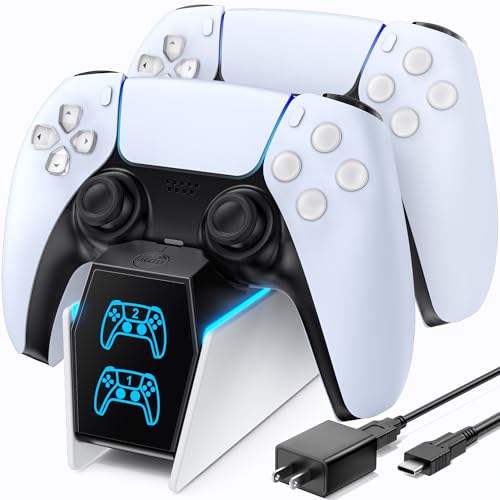
OIVO builds a two-controller PS5 stand around copper connector ports and a bundled AC adapter. Full charges take about 2 hours, and it fits both standard DualSense and the Edge controller. An on/off switch on the back cuts power when the dock is idle.
Controllers chargedUp to 2
Charge timeAbout 2 hours
CompatibilityPS5 and PS5 Edge controllers
PowerCustom AC adapter included
ExtrasOn/off switch, red and blue status lights
Pros
- AC adapter included in the box
- Fits both standard and Edge controllers
- Power switch saves energy between sessions
Cons
- Bright front lighting may distract in a dark room
- Anti-scratch film must be removed before use
Check price on Amazon ›
Razer's stand holds one DualSense in a curved cradle that resists tipping. A full charge takes under 3 hours, with overcharge protection built in. The shape lets you navigate PS5 menus with the controller still docked.
Controllers charged1
Charge timeUnder 3 hours
PowerUSB powered
CompatibilityPS5 DualSense wireless controller
ProtectionOvercharge, overheating and short circuit
Pros
- Stable cradle design that resists tipping
- Controller stays usable while docked
- Overcharge protection built in
Cons
- Charges only one controller at a time
- Wall adapter sold separately
Check price on Amazon ›
This two-port station accepts Switch Pro and Switch 2 Pro controllers, DualSense, Xbox Series X|S and Xbox Elite Series 2. It charges two pads at once and uses LED status lights. A 5V/2A wall adapter is recommended for stable charging.
Ports2
CompatibilitySwitch Pro, Switch 2 Pro, PS5, Xbox Series X|S, Elite Series 2
Power5V/2A USB adapter recommended
StatusLED indicators
Pros
- Covers several console families in one dock
- Charges two controllers at once
- Simple LED status readout
Cons
- Does not support PowerA, Luna or other third-party pro controllers
- Wall adapter not included
Check price on Amazon ›
FASTSNAIL's stand is built around Joy-Con rails and can hold up to four controllers at once. LED indicators show charging status, and a charging cable is included. It is a straightforward storage and charging block for Switch setups.
Controllers chargedUp to 4 Joy-Con
CompatibilityNintendo Switch Joy-Con
StatusLED indicator
IncludedCharging cable
Pros
- Charges up to four Joy-Con at once
- Purpose-built fit for Joy-Con rails
- Cable included
Cons
- Joy-Con only, no Pro or other controllers
- No battery packs included
Check price on Amazon ›
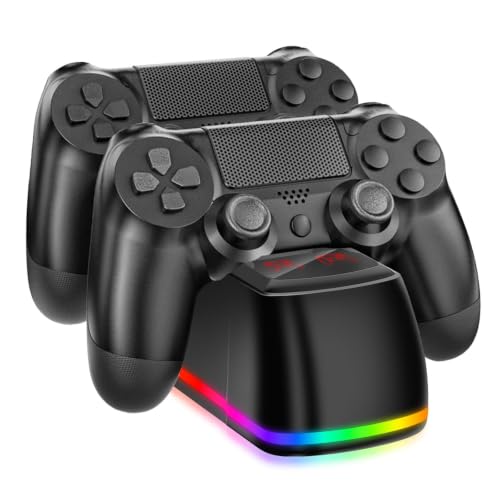
NBGame's dock charges two PS4 controllers in about 2 hours and doubles as a storage stand. A front LED shows blue when charged and red while charging. Power comes over USB from a PS4, PS4 Slim, PS4 Pro or a PC.
Controllers charged2
Charge timeAbout 2 hours
PowerUSB from PS4, PS4 Slim, PS4 Pro or PC
StatusRed charging, blue charged
IncludedUSB cable and user manual
Pros
- Charges two PS4 controllers at once
- Clear two-color status light
- USB cable included
Cons
- PS4 controllers only
- Requires a powered USB source nearby
Check price on Amazon ›
What to look for
Match the dock to your console family
Xbox, PlayStation and Switch controllers use different connectors and battery arrangements, so a dock built for one rarely fits another. Xbox docks often bundle rechargeable battery packs and replacement doors, while PS5 and PS4 docks simply seat the controller on contacts. The multi-brand two-port dock on this list is the exception, but it still excludes third-party pro controllers.
Decide between one cradle and two
Single-cradle stands like the Razer unit suit a desk where one controller lives, and their narrow footprint helps in small setups. Dual docks charge a second pad while you play, which is useful for family gaming and couch sessions. If you rotate between two controllers, a two-port station removes the wait entirely.
Check the power source and cabling
Some docks ship with an AC adapter, others rely on USB from the console or a wall plug you already own. The OIVO PS5 station includes its adapter, while the Razer stand and the multi-brand dock expect you to supply power. USB-powered docks can be slower on low-power ports, so a 5V/2A adapter is worth keeping on hand.
Look at battery packs and long-term use
For Xbox, the bundled battery pack matters as much as the dock. The top pick includes two 6200mWh packs rated for 18 to 25 hours of play and more than 2000 recharge cycles, which removes disposable AA batteries from the routine. PS5 and PS4 controllers have built-in batteries, so those docks focus on cradle fit and charge time instead.
Frequently asked questions
Do controller charging docks work with any controller?
No. Each dock is built for specific controller families, and the supplied models cover Xbox, PS5, PS4 and Joy-Con separately. The two-port multi-brand dock accepts Switch Pro, DualSense and several Xbox pads, but it does not support PowerA, Luna or other third-party pro controllers.
How long does a full charge take on these docks?
Charge times vary by model. The OIVO PS5 dock and the NBGame PS4 dock list about 2 hours, the Razer PS5 stand lists under 3 hours, and the Xbox station lists 4 to 5 hours for its 6200mWh packs. Those packs then provide 18 to 25 hours of play.
Can I leave a controller on the dock after it is charged?
Yes, on docks that advertise protection circuitry. The Xbox station lists overcharge, overcurrent, overheating and short circuit protection, and the Razer stand lists overcharge protection. Leaving a controller seated is part of how these docks are meant to be used.
Is a charging dock useful in a small setup?
It can be. A dock replaces loose cables and gives each controller a fixed spot, which keeps a desk or shelf tidier. Single-cradle stands take up less room, while dual docks need a little more space but keep two pads ready.
Which dock should a mixed-console household pick?
The two-port multi-brand dock is the one model here that spans Switch Pro, PS5 and several Xbox controllers. It charges two pads at once, so a household with more than one console can share it. Confirm your exact controller model first, since third-party pads are excluded.
Do Xbox docks include rechargeable batteries?
The Xbox models on this list do. The top pick includes two 6200mWh packs with four back covers, and the 8BitDo dock includes one 1100 mAh pack with two battery doors. That removes the need to buy AA batteries separately.
How do I know when a controller is finished charging?
Each dock uses indicator lights. The Xbox station shows red while charging and green when charged, the OIVO PS5 dock uses red and blue lights, the NBGame PS4 dock shows red while charging and blue when full, and the Razer and FASTSNAIL units also use LED status.
What should I check before buying a dock for couch gaming?
Confirm the controller model, the number of cradles you need and how the dock is powered. A USB-powered stand needs a nearby port or adapter, and a dual dock needs enough shelf space. If you play in a dark room, consider how bright the status lights are.
The verdict
Upgraded Controller Charger Station
9.2/10/10
The Upgraded Controller Charger Station wins because it bundles two high-capacity battery packs, fits both Xbox controller generations and protects against overcharge. The 8BitDo dock is the tidier licensed option for a single Xbox pad, and the official DualSense Charging Station remains the easiest PS5 choice. Match the dock to your console first, then decide how many cradles you need.
Check price on Amazon ›
Our top pick, secure checkout via Amazon
Note: Availability and specifications change often. Always confirm the current details on Amazon before buying.