Compact Second Screens Best Compact Second Screens: 9 Portable Picks Ranked
P
By the Pickpedia Team
·9 picks compared
·Last verified November 2026
Affiliate disclosure: As an Amazon Associate, Pickpedia earns from qualifying purchases. Links on this page are paid links, and we may earn a commission at no extra cost to you. This never affects our picks or scores.
Quick answer
The ASUS ZenScreen MB169CK is our pick for the best compact second screen, thanks to its 15.6 inch anti-glare IPS panel, 360 degree kickstand, and dual USB-C plug-and-play setup. The KYY 15.6 inch travel monitor and the Arzopa Z1FC 16.1 inch 144Hz screen round out the top three.
Best Compact Second Screens: 9 Portable Picks Ranked at a glance
Why you can trust this guide
We compared these picks using verified manufacturer specifications, available manuals and documentation, current retailer listings, and patterns in owner feedback, alongside editorial research. We focus on measurable differences such as performance, capacity, usability, and build quality. Pickpedia does not present editorial research as laboratory testing, and we do not claim hands-on testing unless it was actually performed.
A compact second screen turns a laptop into a two-panel workstation without adding a full desktop display to your bag. The category now spans slim 14 to 16 inch panels, stacked dual-screen foldables, and battery-powered smart touch screens that roll from room to room.
We compared the supplied specs on size, weight, panel type, ports, and stand design to rank these models for travel, office, and entertainment use. Scores reflect our editorial judgment of how well each screen fits a compact, portable role.
Our top picks
The ZenScreen MB169CK pairs a 15.6 inch FHD anti-glare IPS panel with a 360 degree kickstand and a tripod socket. At 11.8mm thin and 0.78kg, it slips into a standard backpack. Dual USB-C and plug-and-play setup keep the connection simple.
Panel15.6 inch FHD IPS, anti-glare
Thickness11.8mm
Weight0.78kg
Stand360 degree kickstand plus tripod socket
Pros
- Anti-glare IPS panel suits bright cafes and coworking spaces
- 360 degree kickstand and tripod socket give flexible viewing angles
- Dual USB-C plug-and-play connection
Cons
- 15.6 inch panel is larger than 14 inch rivals
- Kickstand design rather than a laptop-mounted extender
Check price on Amazon ›
KYY's 15.6 inch travel monitor uses an integrated kickstand with 65 degree tilt and 90 degree rotation for landscape or portrait use. It measures 0.23 inches thick and weighs 1.65 pounds. Dual full-function USB-C and Mini HDMI cover laptops, phones, and consoles.
Panel15.6 inch
Thickness0.23 inches
Weight1.65 pounds
PortsDual USB-C, Mini HDMI
Pros
- Kickstand rotates 90 degrees for vertical placement
- Very slim 0.23 inch profile
- Dual speakers built in
Cons
- Single-cable USB-C video requires a compatible device
- No anti-glare coating specified
Check price on Amazon ›
The Arzopa Z1FC steps up to a 16.1 inch 144Hz panel with 106% sRGB coverage and HDR support. Two full-function USB-C ports and Mini HDMI connect laptops, consoles, and handhelds. A kickstand folds out for desk use.
Panel16.1 inch FHD IPS, 144Hz
Color106% sRGB
PortsTwo USB-C, Mini HDMI
FeaturesHDR, kickstand
Pros
- 144Hz refresh rate for smoother motion
- 106% sRGB color coverage
- Plug-and-play with consoles and handhelds
Cons
- No adaptive sync or FreeSync
- 16.1 inch size is the largest here
Check price on Amazon ›
This 14 inch FHD IPS extender weighs 1.87 pounds and measures 0.27 inches thin. A telescopic stand fits 14 to 17.3 inch laptops with protective padding. One full-function USB-C cable carries video, audio, and power.
Panel14 inch FHD IPS, 60Hz
Brightness300 nits
Weight1.87 pounds
Fit14 to 17.3 inch laptops
Pros
- Attaches directly to the laptop for a stacked setup
- 226 degree rotation and anti-glare coating
- Includes USB-C, USB-A, and HDMI cables
Cons
- Fits only 14 to 17.3 inch laptops
- 60Hz panel limits gaming appeal
Check price on Amazon ›
The Duex Max DS uses a 14.1 inch IPS panel and weighs 1.8 pounds at 0.25 inches at its thinnest point. HDMI and USB-C cover Windows, Mac, Android, Switch, and DeX. A single interchangeable 2-in-1 USB cable handles plug and play.
Panel14.1 inch IPS FHD
Weight1.8 pounds
Thickness0.25 inches at thinnest point
PortsUSB-C, USB-A, HDMI
Pros
- Very slim 0.25 inch profile
- Works with Windows, Mac, Android, Switch, and DeX
- Single 2-in-1 USB cable
Cons
- 14.1 inch panel is smaller than 15.6 inch rivals
- Fewer supplied details on stand adjustment
Check price on Amazon ›
InnoView packs two 15.6 inch 1080P IPS panels into a foldable stacked frame. Screens rotate 0 to 315 degrees with 180 degree adjustable stands and gravity sensors that auto-rotate in Windows or Mac. A single-cable connection handles setup, with a 30W or higher power source recommended.
PanelsTwo 15.6 inch IPS, 1080P
Rotation0 to 315 degrees
Stands180 degree adjustable
Power30W or higher recommended
Pros
- Two full panels for vertical multitasking
- Gravity sensors auto-rotate the image
- Foldable design saves desk space
Cons
- Needs a 30W or higher power source for best performance
- Stacked layout takes more vertical space
Check price on Amazon ›
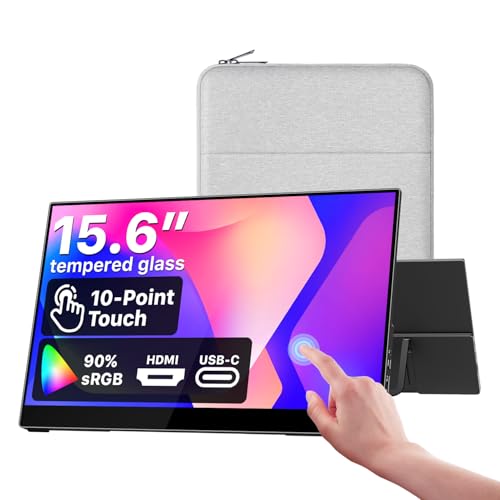
The cocopar 15.6 inch panel adds touch to a 1080P IPS screen with 90% sRGB coverage. One USB-C cable carries power, video, and touch signals when the computer supports Thunderbolt 3, 4, or 5 or USB-C DP Alt Mode. Dual USB-C and HDMI ports plus VESA mounting add flexibility.
Panel15.6 inch FHD IPS, 90% sRGB
Brightness270 nits
Viewing angle178 degrees
MountVESA mountable
Pros
- Touch input over a single USB-C cable
- 90% sRGB coverage and 178 degree viewing angles
- VESA mountable for fixed setups
Cons
- Single-cable touch needs USB-C DP Alt Mode or Thunderbolt
- 270 nits is modest for very bright rooms
Check price on Amazon ›
The StanbyME 2 is a 27 inch QHD touch screen with a detachable panel and a built-in battery rated for four hours. An Alpha 8 AI processor refines picture and sound, and webOS plus LG Channels bring streaming apps and over 400 free channels. Far-field voice recognition works from across the room.
Screen27 inch QHD touch, 2560 x 1440
BatteryBuilt-in, 4 hours
ProcessorAlpha 8 AI
PlatformwebOS with LG Channels
Pros
- Detachable touchscreen with a four-hour battery
- QHD resolution and AI picture processing
- Far-field voice recognition
Cons
- 27 inch size is far from laptop-bag compact
- Smart TV focus rather than laptop extension
Check price on Amazon ›
The Movingstyle rolls on hidden wheels and detaches with one button slide, with a handle that converts to a kickstand. A built-in battery, WiFi, and the NQ4 AI Gen2 processor keep it working away from outlets. Touch, Bixby voice, and Galaxy Watch gestures control the screen.
Screen27 inch touch
ProcessorNQ4 AI Gen2
MotionMotion Xcelerator 120Hz
BatteryBuilt-in
Pros
- Hidden wheels and a detachable panel with kickstand handle
- Multiple control methods including voice and gestures
- Daily Board widgets for weather, memos, and music
Cons
- 27 inch frame is not backpack compact
- Gesture control requires a Galaxy Watch
Check price on Amazon ›
What to look for
What counts as compact
Compact second screens span roughly 14 to 16 inch panels that fit in a laptop bag, plus larger smart touch screens that move on a stand. Weight matters as much as size: the models here range from 0.78kg to 1.87 pounds for the laptop-style panels. Decide whether compact means bag-friendly or room-to-room before you compare specs.
Connection and power
Most portable panels run from a full-function USB-C cable that carries video, audio, and power. Some devices need HDMI or USB-A adapters, which most of these kits include. A few setups, like the InnoView stacked pair, recommend a 30W or higher power source for stable performance. Check that your laptop supports USB-C video output before relying on a single cable.
Stand and mounting design
Stand design separates these screens. The ASUS ZenScreen uses a 360 degree kickstand and tripod socket, while the KYY rotates 90 degrees for portrait work. Laptop-mounted extenders such as the Duex Max DS and the 14 inch telescopic model clip to the lid. VESA mounting on the cocopar opens up fixed desk setups.
Matching the screen to the job
Gamers should look at the Arzopa Z1FC and its 144Hz panel, while touch users can choose the cocopar or the LG and Samsung smart screens. Multitaskers who want stacked panels should consider the InnoView dual display. For a general travel monitor, the ASUS ZenScreen MB169CK remains the most balanced pick.
Frequently asked questions
How do I connect a compact second screen to a laptop?
A full-function USB-C cable handles video, audio, and power on compatible laptops. If your laptop lacks USB-C video output, use the HDMI or USB-A cables included with models like the 14 inch extender and the Arzopa Z1FC.
What size portable monitor is best for travel?
Panels from 14 to 15.6 inches fit most backpacks and briefcases. The Duex Max DS measures 14.1 inches, while the ASUS ZenScreen and KYY models use 15.6 inch panels. Thickness and weight matter too, with the KYY at 0.23 inches and 1.65 pounds.
Can a portable monitor work with a Mac?
Yes. The ASUS ZenScreen MB169CK is described for MacBook and PC, and the InnoView dual display auto-rotates when connected to Windows or Mac. The Duex Max DS also lists Mac support alongside Windows, Android, Switch, and DeX.
Do these screens need drivers or software?
Most models here are plug and play. The KYY, Arzopa, and cocopar screens state that no drivers or downloads are required. The cocopar touch function does need a computer with Thunderbolt 3, 4, or 5 or USB-C DP Alt Mode.
Which compact screen suits gaming?
The Arzopa Z1FC offers a 144Hz refresh rate and 106% sRGB coverage for smoother motion. It connects over USB-C or Mini HDMI to laptops, PS5, Xbox, and Steam Deck. It does not include adaptive sync or FreeSync.
Can I mount a portable monitor on an arm?
The ASUS ZenScreen MB169CK includes a tripod socket for a standard portable monitor stand mount. The cocopar 15.6 inch touchscreen is VESA mountable. Other models rely on their built-in kickstands or laptop attachments.
How long does a battery-powered portable screen last?
The LG StanbyME 2 has a built-in battery rated for four hours. Samsung's Movingstyle also has a built-in battery and WiFi for use away from outlets. Laptop-style monitors here draw power over USB-C instead.
What should I check before buying a laptop screen extender?
Confirm your laptop size and port type. The 14 inch telescopic extender fits 14 to 17.3 inch laptops, and the InnoView stacked pair recommends a 30W or higher power source. Match the panel size and stand style to how you plan to work.
The verdict
ASUS ZenScreen MB169CK 15.6 Inch 1080p Por...
9.2/10/10
For most shoppers, the ASUS ZenScreen MB169CK is the best compact second screen because it balances a 15.6 inch anti-glare IPS panel, a flexible 360 degree kickstand, and simple dual USB-C setup. The KYY travel monitor adds portrait rotation, and the Arzopa Z1FC covers gaming with a 144Hz panel. Choose by stand style, port compatibility, and whether you need touch or a built-in battery.
Check price on Amazon ›
Our top pick, secure checkout via Amazon
Note: Availability and specifications change often. Always confirm the current details on Amazon before buying.