Coding Robot Toys Best Coding Robot Toys: Makeblock mBot and 6 More Picks Ranked
P
By the Pickpedia Team
·7 picks compared
·Last verified November 2026
Affiliate disclosure: As an Amazon Associate, Pickpedia earns from qualifying purchases. Links on this page are paid links, and we may earn a commission at no extra cost to you. This never affects our picks or scores.
Quick answer
The Makeblock mBot is our top pick for best coding robot toys, moving from Scratch to Arduino as skills grow. Wonder Workshop Dash suits younger kids with app coding and no assembly. Learning Resources Code & Go Robot Mouse is the screen-free starter for ages 4 and up.
Best Coding Robot Toys: Makeblock mBot and 6 More Picks Ranked at a glance
Why you can trust this guide
We compared these picks using verified manufacturer specifications, available manuals and documentation, current retailer listings, and patterns in owner feedback, alongside editorial research. We focus on measurable differences such as performance, capacity, usability, and build quality. Pickpedia does not present editorial research as laboratory testing, and we do not claim hands-on testing unless it was actually performed.
Coding robot toys split into two rough camps: screen-free sets where kids build a program with physical blocks or buttons, and app-driven robots that teach block coding on a tablet. The right pick depends on your child's age and how much adult help is on hand.
We compared build effort, coding progression, durability and how well each kit survives repeat play in classrooms and at home. Every pick below comes from real product specs, and the notes flag which kids each one suits.
Our top picks
The mBot builds in about 15 minutes and then grows with your child, starting in Scratch and moving to Arduino. Line-follow and obstacle-avoidance modes work as a remote control car too. An open-source platform accepts 100+ electronic modules and 500+ parts.
CodingScratch and Arduino
Build timeAbout 15 minutes
Batteries4 AA, not included
ExtrasCoding cards and lessons
Pros
- Clear path from Scratch to Arduino
- Builds in about 15 minutes
- Compatible with LEGO parts and add-on packs
Cons
- Batteries and remote battery sold separately
- Needs a device for mBlock software
Check price on Amazon ›
Dash arrives ready to use with no assembly, aimed at kids 6 to 11. Blockly and the Wonder apps drive coding activities, and the robot runs up to 5 hours per charge. It is used in 40,000+ schools globally, which says a lot about durability.
Ages6-11
AssemblyNone required
Battery lifeUp to 5 hours
Included2 building brick connectors, USB cable
Pros
- No assembly, play starts immediately
- Runs up to 5 hours on a charge
- Widely used in schools
Cons
- No camera on board
- Coding happens on a screen
Check price on Amazon ›
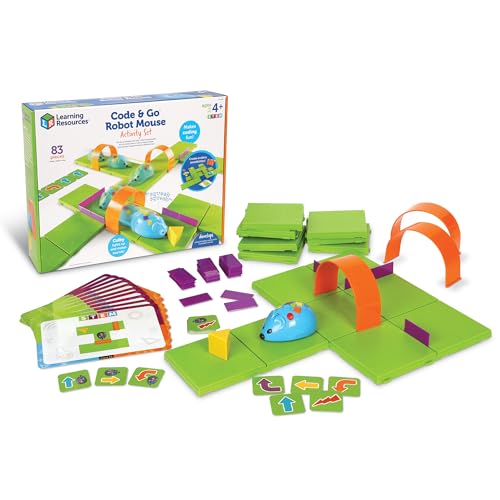
Colby the robot mouse teaches sequencing with 30 double-sided coding cards and a maze kids build themselves. The 16 grid pieces form a 20" x 20" board with 22 walls, 3 tunnels and a cheese wedge. Trial-and-error play builds confidence without any screen.
Ages4+
Maze board20" x 20"
Coding cards30 double-sided
Batteries3 AAA, not included
Pros
- Truly screen-free coding
- Large maze with tunnels and walls
- Designed for the youngest coders
Cons
- Maze must be rebuilt for new layouts
- Requires 3 AAA batteries
Check price on Amazon ›
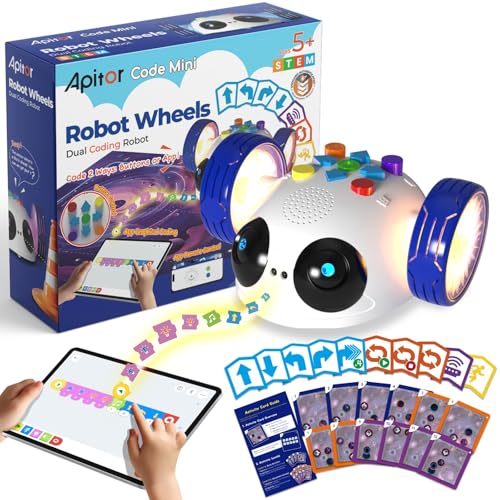
Robot Wheels starts with 48 coding cards and physical buttons, then graduates to drag-and-drop programming in the Apitor Kit app. A space map, 12 activity cards and a guide card keep play structured but open-ended. Simple buttons and a durable build suit classrooms and family rooms.
Ages5-8
Coding cards48
ExtrasSpace map, 12 activity cards, guide card
Batteries3 AA, not included
Pros
- Screen-free start, app coding later
- Structured challenges plus open play
- Built to hold up in classrooms
Cons
- Requires 3 AA batteries
- App needed for the advanced stage
Check price on Amazon ›
Cubetto+ turns coding into three steps: place blocks, press the blue button, watch the robot move. The 24 coding blocks cover sequence, direction, functions, negation and randomness. A world map and storybook turn programs into guided challenges.
Coding blocks24
Robot2WD wooden mobile robot
IncludedInterface board, world map, storybook
ChargingUSB-A to USB-C cable
Pros
- Fully screen-free with no device
- Wooden pieces store in an included bag
- Storybook and map add guided play
Cons
- Block set is smaller than some kits
- Adult setup helps younger kids
Check price on Amazon ›
This 15-inch chameleon has articulated eyes, torso and leg joints for realistic movement across 3 modes. A 48-page manual walks kids through assembly and explains how nature inspires engineering design. Ages 8+ build with adult help, and 12+ can go independent.
Length15 inches
Modes3
Manual48 pages
Ages8+ with help, 12+ solo
Pros
- Teaches bionic design alongside coding
- Articulated joints for lifelike motion
- Detailed 48-page guide
Cons
- Assembly takes patience
- Younger kids need adult support
Check price on Amazon ›
Robot PU is a micro:bit humanoid that walks, dances, talks and plays soccer with a gamepad. A companion textbook backs 70+ step-by-step projects in block coding and Python. Snap-on brick mounts and expansion headers invite open-ended tinkering.
CodingBlock coding and Python
Projects70+ with video lessons
CodingBlock coding and Python
ExpansionI/O headers, brick mounts
Pros
- 70+ guided projects with video lessons
- Block coding through Python progression
- Expandable for maker projects
Cons
- More advanced than a first robot
- Add-on modules sold separately
Check price on Amazon ›
What to look for
Screen-free or app-based coding
Screen-free sets use physical blocks or buttons to build a program, which suits preschoolers and kids who lose focus on a tablet. App-based robots teach block coding with drag-and-drop tools and usually offer a deeper progression. Many families start screen-free and move to an app once the child reads comfortably.
Matching the robot to your child's age
For ages 4 to 6, look for large pieces, simple buttons and short build times, like the Code & Go Robot Mouse or Robot Wheels. Kids 8 and up can handle a real build and a Scratch-to-text coding path, which is where the mBot and the Coding Chameleon fit. Dash sits in the middle with no assembly at all.
Durability and storage for repeat play
Classroom and rainy-day use punishes plastic joints and loose parts, so check battery doors, brick connectors and how the pieces pack away. Sets with a storage bag or a single tray survive better between sessions. Reusable maze grids and coding cards also mean the same kit supports many different challenges.
What to check before buying for homeschool or a classroom
Confirm the battery type and whether batteries are included, since several kits need AA or AAA cells you supply. Check whether the coding software runs on the device you own. Finally, weigh how much adult help assembly needs, because a kit that stalls at step one rarely gets a second session.
Frequently asked questions
Is a screen-free coding robot a good choice for homeschool families?
Yes, for early learners. Sets like Cubetto+ and Code & Go Robot Mouse teach sequencing with physical pieces, so no tablet is needed and several children can take turns at one board.
Which coding robot toy suits kids ages 4 to 6?
The Learning Resources Code & Go Robot Mouse is built for ages 4+, and Apitor Robot Wheels targets ages 5-8. Both use simple buttons or cards rather than on-screen programming.
How do I compare robots with reusable pieces for rainy days?
Look at how the pieces store, whether the maze or map can be rebuilt into new layouts, and how many coding cards come in the box. Reusable grids and card sets stretch one kit across many afternoons.
Do these robots need batteries?
Several do. The mBot needs 4 AA batteries and a CR2025 for the remote, Code & Go Robot Mouse needs 3 AAA, and Robot Wheels needs 3 AA. Dash charges over USB and Cubetto+ uses a USB-C cable.
Which coding robot combines reusable pieces with easy storage for classroom use?
Cubetto+ ships with a bag for its coding blocks, and Robot Wheels includes a guide card and activity cards that keep a lesson organized. Both hold up to group rotation.
What should buyers know about screen-free play for birthday gifts?
Screen-free kits work the moment they are opened, with no app setup or account. That makes them a safer gift when you do not know the family's tablet situation.
How much adult help does assembly take?
Dash needs none. The mBot builds in about 15 minutes. The Coding Chameleon is rated for ages 8+ with adult help and 12+ for independent building.
Can older kids move beyond block coding?
Yes. The mBot progresses to Arduino, and Robot PU offers block coding alongside Python with 70+ guided projects.
The verdict
Makeblock mBot STEM Coding Toys Robotics
9.2/10/10
For most families, the Makeblock mBot is the best coding robot toy because it builds fast and then keeps teaching through Scratch and Arduino. Choose Dash if you want no assembly, Code & Go Robot Mouse for a screen-free start at age 4, and Robot PU once your child is ready to write Python.
Check price on Amazon ›
Our top pick, secure checkout via Amazon
Note: Availability and specifications change often. Always confirm the current details on Amazon before buying.