Capture Cards Best Capture Cards for Streaming and Recording
P
By the Pickpedia Team
·9 picks compared
·Last verified November 2026
Affiliate disclosure: As an Amazon Associate, Pickpedia earns from qualifying purchases. Links on this page are paid links, and we may earn a commission at no extra cost to you. This never affects our picks or scores.
Quick answer
For most people, the Elgato 4K S is the best capture card overall, with 4K60 capture and HDR10 support. The AVerMedia GC311G2 is a strong USB-C pick for 1080p60 streaming, and the Magewell USB Capture HDMI Gen 2 suits plug-and-play work across Windows, macOS, Linux, and Chrome OS.
Best Capture Cards for Streaming and Recording at a glance
Why you can trust this guide
We compared these picks using verified manufacturer specifications, available manuals and documentation, current retailer listings, and patterns in owner feedback, alongside editorial research. We focus on measurable differences such as performance, capacity, usability, and build quality. Pickpedia does not present editorial research as laboratory testing, and we do not claim hands-on testing unless it was actually performed.
A capture card turns HDMI video from a console, camera, or computer into a signal your streaming or recording software can use. The right one depends on what you play or record, how you connect it, and whether you need 4K, high frame rates, or simple plug-and-play operation.
We compared the features that matter most: resolution and frame rate, pass-through support, connection type, and compatibility with consoles and computers. The list below covers USB and PCIe models for gaming, teaching, and archiving old tapes, ranked by how well each fits common setups.
Our top picks
The Elgato 4K S captures at 4K60 and supports HDR10 with tone mapping on Windows. It passes through 1440p120 or 1080p240 for smooth play on a compatible display. A 3.5mm analog input lets you add chat or commentary audio directly.
Capture4K60
Pass-through1440p120 or 1080p240
HDRHDR10 with tone mapping on Windows
ConnectionUSB-C
Audio input3.5mm analog
Pros
- 4K60 capture with HDR10 support
- High frame rate pass-through at 1440p120 or 1080p240
- Works with PS5, Xbox Series X/S, and Switch 2
Cons
- HDR tone mapping is limited to Windows
- Requires a USB-C port on your computer
Check price on Amazon ›
The GC311G2 captures at 1080p60 while passing through up to 4K60 HDR to your display. HDMI 2.0 pass-through also supports 1440p144 HDR or 1080p240 HDR for fast gameplay. It works with consoles, cameras, and USB-C iPads running iPadOS 17 or later.
Capture1080p60 SDR
Pass-through4K60 HDR, 1440p144 HDR, 1080p240 HDR
ConnectionUSB 3.0 Type-C
CompatibilityPS5, Xbox Series X/S, Switch, PC, DSLR, camcorder, iPadOS 17+
Build60% post-consumer recycled plastic
Pros
- 4K60 HDR pass-through keeps your display sharp
- Broad console and camera compatibility
- Compact shell made partly from recycled plastic
Cons
- Captured video is limited to 1080p60 SDR
- HDR applies to pass-through only
Check price on Amazon ›
This Magewell device captures HDMI up to 1080p60 and works instantly on Windows, macOS, Linux, and Chrome OS without drivers. It accepts HDMI input up to 2048x1080 at 60fps 4:4:4. The compact metal body includes thermal protection and status LEDs for continuous operation.
CaptureUp to 1080p60
InputHDMI up to 2048x1080 60fps 4:4:4
ConnectionUSB 3.1 Gen 1, USB 2.0 compatible
OS supportWindows, macOS, Linux, Chrome OS
Warranty3-year limited
Pros
- Plug-and-play on four operating systems
- Built for 24/7 operation with thermal protection
- Status LEDs help confirm signal at a glance
Cons
- Capture tops out at 1080p60
- No pass-through output mentioned
Check price on Amazon ›
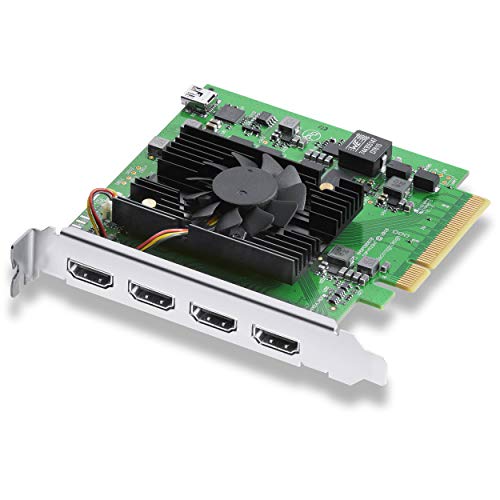
The DeckLink Quad HDMI is a PCIe card with four HDMI 2.0b inputs for simultaneous capture. It supports SD, HD, and 4K standards, Deep Color, HDR, and Rec. 601, 709, and 2020 color spaces. Eight channels of embedded 24-bit 48 kHz audio are supported.
Inputs4x HDMI 2.0b
InterfacePCIe 8-lane Gen 3
FormatsSD, HD, 4K up to 4Kp30 DCI
ColorDeep Color, HDR, Rec. 601/709/2020
Audio8 channels embedded 24-bit 48 kHz
Pros
- Four HDMI inputs for multi-camera or multi-source work
- Supports HDR and Deep Color
- Works on Mac OS, Windows, and Linux
Cons
- Requires an open PCIe slot in a desktop
- Not a portable USB solution
Check price on Amazon ›
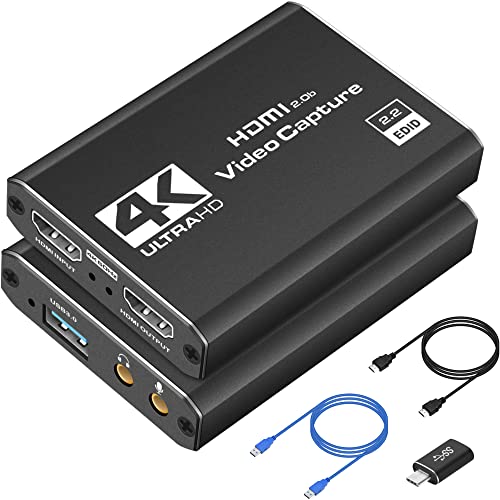
This USB 3.0 capture card records at 1080p60 and accepts 4K HDMI input with loop-out. It works with PS5, PS4, Switch, Xbox, PCs, and DSLR cameras, and supports OBS. The compact body suits creators who move between setups.
Capture1080p60
Input4K HDMI with loop-out
ConnectionUSB 3.0
CompatibilityPS5, PS4, Switch, Xbox, PC, camera, OBS
DesignCompact and portable
Pros
- 4K HDMI loop-out for lag-free play
- Works with OBS and many HDMI devices
- Lightweight enough to carry between setups
Cons
- Capture resolution is 1080p60
- No HDR support listed
Check price on Amazon ›
The AV.io HD captures VGA, DVI, and HDMI with audio up to 1080p60 over USB 3.0. It supports 4:3, 16:9, 16:10, and 5:4 aspect ratios. Optional scaling lets you fit different sources to your recording.
CaptureUp to 1080p60
InputsVGA, DVI, HDMI with audio
ConnectionUSB 3.0
Aspect ratios4:3, 16:9, 16:10, 5:4
ScalingOptional up or down scaling
Pros
- Rare VGA and DVI support alongside HDMI
- Uncompressed capture over USB 3.0
- Handles multiple aspect ratios
Cons
- Capture limited to 1080p60
- No pass-through output listed
Check price on Amazon ›
This StarTech PCIe card captures HDMI, VGA, DVI, and component video up to 1080p30. H.264 encoding keeps exported files widely compatible. The included Streamcatcher Pro software supports multiple capture devices at once on Windows.
CaptureUp to 1080p30
InputsHDMI, VGA, DVI, component
InterfacePCIe
EncodingH.264
SoftwareStreamcatcher Pro for Windows
Pros
- Four input types on one card
- H.264 encoding for easy sharing
- Software supports multiple devices
Cons
- Frame rate capped at 1080p30
- Requires a desktop with a PCIe slot
Check price on Amazon ›
The VC500 converts VHS, VCR, DVD, Hi8, Mini DV, and retro console output to digital files over USB. It captures RCA and S-Video sources and saves MP4 files you can edit or share. Setup uses free OBS Studio on Windows 10, Windows 11, or macOS 13 and later.
InputsRCA and S-Video
SourcesVHS, VCR, DVD, Hi8, Mini DV, camcorder, retro consoles
OutputMP4 files
SoftwareOBS Studio
OSWindows 10/11, macOS 13+
Pros
- Preserves analog tape content in digital files
- Works with common VCR and camcorder outputs
- No installation disc or manual driver setup
Cons
- Not designed for modern HDMI game capture
- Requires a VCR or camcorder to play tapes
Check price on Amazon ›
The Hauppauge USB-Live2 captures analog video through a removable industrial A/V connector. It is intended for recording and editing home video tapes as well as medical, industrial, and security monitoring. The removable connector lets you leave the device connected to your equipment.
InputAnalog A/V via removable connector
ConnectionUSB
UsesHome video tapes, medical, industrial, security monitoring
DesignRemovable industrial A/V connector
Pros
- Removable connector stays attached to equipment
- Suited to monitoring and archival work
- Simple USB connection
Cons
- Analog input only, no HDMI
- Limited detail on capture resolution
Check price on Amazon ›
What to look for
What a capture card does and who needs one
A capture card converts an HDMI or analog signal into video your computer can record or stream. Gamers use one to send console gameplay to OBS or similar software. Teachers and presenters use one to share a camera or second computer. Archivists use analog models to digitize tapes. The right choice starts with the source you need to capture.
Resolution, frame rate, and pass-through
Match the capture resolution to your output. 1080p60 is enough for most streaming platforms, while 4K60 suits high-detail recording. Pass-through matters for gaming because it sends the signal to your display separately, so you play at the display's native resolution and frame rate. Look for pass-through support at 1440p120 or 1080p240 if you play fast games.
USB versus PCIe connections
USB capture cards are portable and work with laptops, which suits creators who move between setups. PCIe cards install inside a desktop and can offer multiple inputs or lower overhead, as with the Blackmagic DeckLink Quad HDMI. Choose USB for plug-and-play convenience and PCIe for fixed multi-source studios.
Matching a card to your workflow
For live streaming, prioritize low latency and stable drivers. For online teaching, plug-and-play across operating systems saves setup time. For short form video, a compact USB card with loop-out keeps recording simple. For home offices, a card that works without extra software reduces friction. Check console and camera compatibility before you commit.
Frequently asked questions
Is a capture card with low latency worth buying for live streaming?
Yes, if you play while streaming. Low latency pass-through keeps your display responsive, and cards like the Elgato 4K S and AVerMedia GC311G2 support high frame rate pass-through for that reason.
Should I choose a USB-C capture card for live streaming?
USB-C is a good choice if your computer has that port. The Elgato 4K S uses USB-C, and the AVerMedia GC311G2 uses USB 3.0 Type-C, so both suit modern laptops and desktops.
Which capture card is best for YouTube creators?
The Elgato 4K S is the strongest all-around pick for creators who want 4K60 capture and HDR. The AVerMedia GC311G2 is a solid alternative if 1080p60 capture is enough for your channel.
How do I pick a capture card with plug-and-play for online teaching?
Look for a card that works without drivers on your computer. The Magewell USB Capture HDMI Gen 2 works instantly on Windows, macOS, Linux, and Chrome OS, which makes it easy to move between classroom and home setups.
Can a capture card with USB-C be used for online teaching?
Yes. A USB-C card can send a camera or computer signal into your meeting or recording software. Check that your teaching computer has a USB-C port and that the card supports your camera's output.
What should I look for in a portable capture card for home offices?
Favor a compact USB card with loop-out and broad device support. The 4K HDMI to USB 3.0 card is lightweight and works with consoles, PCs, and cameras, so it fits a desk that changes purpose.
How do I evaluate a capture card that combines low latency and portability?
Check pass-through frame rates and the connection type. A card that passes through 1080p240 or 1440p120 and connects over USB gives you responsive play without a desktop installation.
What mistakes should I avoid when buying a capture card for teaching or streaming?
Avoid assuming HDR capture when a card only passes HDR through. Also confirm your computer's port type and that the card supports your camera or console output before you buy.
The verdict
Elgato 4K S Capture Card for PS5
9.4/10/10
The Elgato 4K S leads this list for its 4K60 capture, HDR10 support, and high frame rate pass-through. The AVerMedia GC311G2 is the better fit for USB-C setups that stream at 1080p60, while the Magewell USB Capture HDMI Gen 2 wins on plug-and-play across operating systems. Match the card to your source and computer, and the rest follows.
Check price on Amazon ›
Our top pick, secure checkout via Amazon
Note: Availability and specifications change often. Always confirm the current details on Amazon before buying.