Adjustable Laptop Stands Best Adjustable Laptop Stands for Desks and Travel
P
By the Pickpedia Team
·6 picks compared
·Last verified November 2026
Affiliate disclosure: As an Amazon Associate, Pickpedia earns from qualifying purchases. Links on this page are paid links, and we may earn a commission at no extra cost to you. This never affects our picks or scores.
Quick answer
The SOUNDANCE Adjustable Laptop Stand takes the top spot for its 5.7 to 8.6 inch height range and open-frame cooling. The StarTech LTSTND offers three fixed height settings in heavy duty steel, and the Roost V3 packs to 6 ounces for travel.
Best Adjustable Laptop Stands for Desks and Travel at a glance
Why you can trust this guide
We compared these picks using verified manufacturer specifications, available manuals and documentation, current retailer listings, and patterns in owner feedback, alongside editorial research. We focus on measurable differences such as performance, capacity, usability, and build quality. Pickpedia does not present editorial research as laboratory testing, and we do not claim hands-on testing unless it was actually performed.
An adjustable laptop stand does one job well when it lifts the screen to your sightline and stays put. Height range, footprint, and how the platform holds a laptop at an angle separate the strong options from the wobbly ones.
We compared the six stands below on the specs each maker publishes: height or tilt settings, weight capacity, platform size, and how much desk space the base claims. That gives you a clear way to match a stand to a narrow desk, a shared office, or a bag.
Our top picks
The aluminum alloy frame carries up to 20lbs and fits notebooks from 10 to 17.3 inches. A height mechanism moves the platform between 5.7 and 8.6 inches, which puts the screen closer to eye level. The open dual-arm design leaves about 5 inches of clearance for a keyboard or mouse.
Height range5.7 to 8.6 inches
Laptop fit10 to 17.3 inches
Weight capacity20 lbs
MaterialAluminum alloy
Pros
- Wide height range for seated work
- Open frame leaves room for a keyboard underneath
- Silicone pads and front lip hold the laptop
Cons
- Assembly takes a couple of minutes with tools
- Dual-arm frame is bulkier than a folding stand
Check price on Amazon ›
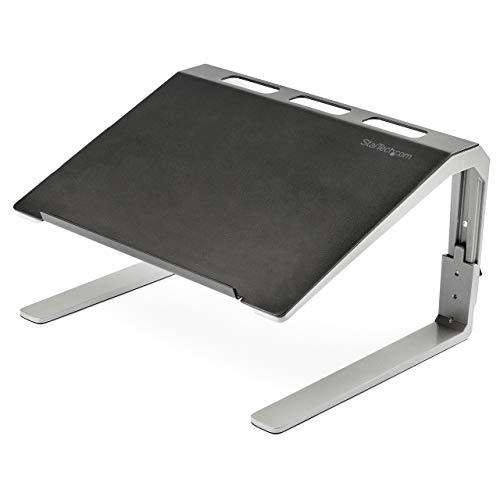
A 2.5mm steel platform on aluminum legs supports up to 22 lbs, and the 14.1 x 9.8 inch surface handles laptops up to 17 inches. You get three height settings at 7.3, 8.3, or 9.3 inches. Cable management channels and non-skid rubber feet keep the desk tidy.
Height settings7.3, 8.3, or 9.3 inches
Platform14.1 x 9.8 inches
Weight capacity22 lbs
Warranty5 years
Pros
- Three fixed heights with a raised lip
- Cable management channels built in
- Steel and aluminum build rated to 22 lbs
Cons
- Heights are fixed rather than continuous
- Larger footprint than folding stands
Check price on Amazon ›
A steel center column on a 9 x 7 inch base lifts a laptop or monitor from 4.6 to 6.5 inches, and a side knob sets any height in that range. The flat platform measures 11.75 x 8.25 inches with a raised rim. It holds one device at a time, up to 33 lbs.
Height range4.6 to 6.5 inches
Platform11.75 x 8.25 inches
Weight capacity33 lbs
WarrantyLifetime
Pros
- Holds a laptop or a 24 to 32 inch monitor
- Knob sets any height in the range
- Solid steel base with no clamp needed
Cons
- Monitor foot must fit inside the platform rim
- Not designed to reach standing height
Check price on Amazon ›
This aluminum riser folds open to 7.1 inches wide and holds laptops up to 15.6 inches or 22 lbs. Nine tilt positions run from 15 to 84 degrees, and no tools are needed to change them. It weighs 0.7 lb and folds into a bar that fits the included pouch.
Tilt positions9 settings, 15 to 84 degrees
Laptop fitUp to 15.6 inches
Weight capacity22 lbs
Weight0.7 lb
Pros
- Nine tilt angles with no tools
- Anti-slip pads and curved front lip
- Folds into a pouch for storage
Cons
- Tilt adjustment only, no height column
- Smaller laptop size limit than the top pick
Check price on Amazon ›
The Kensington fits notebooks and tablets from 12 to 17 inches and adjusts through a 25 to 50 degree tilt. It folds flat when you need to move it. A TAA compliant build rounds out the package.
Laptop fit12 to 17 inches
Tilt range25 to 50 degrees
FoldingFolds flat
ComplianceTAA compliant
Pros
- Tilt range covers a range of seated angles
- Folds flat for carrying
- Fits laptops up to 17 inches
Cons
- No height column, tilt only
- Two tilt figures rather than a fine adjustment
Check price on Amazon ›
At 6 oz the Roost V3 packs thin enough for a laptop bag. A two-handed lock sets your height, and it pops open to that same setting in one motion. Patented PivotGrips adapt to laptops from 12 to 18 inches, with screen lift between 6.5 and 12.5 inches.
Weight6 oz
Laptop fit12 to 18 inches
Screen lift6.5 to 12.5 inches
GripsPatented PivotGrips
Pros
- Very light at 6 oz
- Memorized height pops open in one motion
- Grips adapt to laptops from 12 to 18 inches
Cons
- Two-handed lock takes a moment to set
- Works best with an external keyboard and mouse
Check price on Amazon ›
What to look for
What adjustable actually means on a laptop stand
Some stands move a platform up and down on a column, like the SOUNDANCE and the Mount-It!. Others change only the tilt angle, like the Kensington and the StarTech foldable riser. A few offer fixed height steps, which is what the StarTech LTSTND does with its three settings. Decide whether you need the screen raised or just angled before you compare models.
Matching a stand to a narrow desk or small room
Footprint matters when desk space is tight. The SOUNDANCE leaves about 5 inches of clearance underneath for a keyboard, which frees up the surface in front of the screen. The Mount-It! sits on a 9 x 7 inch base with no clamp, so it needs a flat spot rather than a desk edge. Measure the depth you can spare before you commit.
Build, weight capacity, and cable management
Published capacities run from 20 lbs on the SOUNDANCE to 33 lbs on the Mount-It!. The StarTech LTSTND adds cable management channels and non-skid rubber feet, which helps in a shared office where cables get moved. Steel and aluminum frames hold steady at an angle, while folding stands trade some rigidity for portability.
Travel versus a fixed desk setup
If the stand stays on one desk, a column or multi-setting frame gives you more height choices. If it rides in a bag, the Roost V3 at 6 oz or the StarTech foldable riser at 0.7 lb makes more sense. The Kensington folds flat and fits laptops up to 17 inches, which suits a commute between two desks.
Frequently asked questions
What makes an adjustable laptop stand suitable for a narrow desk?
Look at the base dimensions and what the frame leaves open. The SOUNDANCE clears about 5 inches underneath for a keyboard, and the Mount-It! base measures 9 x 7 inches, so both fit where a wide platform would not.
Which stand combines height adjustment with easy assembly for long computer sessions?
The SOUNDANCE sets up in about two minutes with the included tools and adjusts from 5.7 to 8.6 inches. The StarTech LTSTND uses three fixed height settings and adds cable management channels for a tidier desk.
How do I choose a stand for a small bedroom?
Favor a compact base and a stand that stores flat. The Kensington folds flat, and the StarTech foldable riser folds into a bar with a pouch, so either tucks away when the desk doubles as something else.
Is a stand with height adjustment and a compact footprint good for long sessions?
Yes, if the height range reaches your sightline. The SOUNDANCE covers 5.7 to 8.6 inches, and the Mount-It! covers 4.6 to 6.5 inches, so check which range lines up with your seated eye level.
Which stand pairs easy assembly with cable management for a shared office?
The StarTech LTSTND assembles with basic tools and includes cable management channels plus non-skid rubber feet. That combination keeps a shared desk orderly when several people use it.
Can a compact adjustable stand handle remote work?
A stand that raises the screen to eye level works well for remote work, especially with an external keyboard and mouse. The Roost V3 lifts the screen 6.5 to 12.5 inches and returns to a memorized height each time.
What should I check before buying a stand for a laptop and a monitor?
Confirm the platform size against your monitor's stand foot. The Mount-It! platform is 11.75 x 8.25 inches with a raised rim and holds up to 33 lbs, and it takes one device at a time.
Is a tilt-only stand worth it for long computer sessions?
A tilt stand changes the screen angle but not the height. The StarTech foldable riser offers nine positions from 15 to 84 degrees, which helps when your desk height already suits you.
The verdict
SOUNDANCE Adjustable Laptop Stand
9.2/10/10
The SOUNDANCE Adjustable Laptop Stand earns the top spot with a 5.7 to 8.6 inch height range, a 20 lb capacity, and open-frame cooling that frees desk space. Choose the StarTech LTSTND for a steel build with cable channels, the Mount-It! if a monitor may share the stand, or the Roost V3 if the stand lives in your bag.
Check price on Amazon ›
Our top pick, secure checkout via Amazon
Note: Availability and specifications change often. Always confirm the current details on Amazon before buying.