4K Office Monitors Best 4K Office Monitors: 9 Picks for Sharp Desk Work
P
By the Pickpedia Team
·9 picks compared
·Last verified November 2026
Affiliate disclosure: As an Amazon Associate, Pickpedia earns from qualifying purchases. Links on this page are paid links, and we may earn a commission at no extra cost to you. This never affects our picks or scores.
Quick answer
The Dell 32 Monitor S3225QS is the top choice for most desks, with a 31.5 inch 4K VA panel, 99% sRGB and a 120Hz refresh rate. The Samsung ViewFinity S7 suits mixed productivity work, and the Acer CB272K adds USB-C charging for laptop setups.
Best 4K Office Monitors: 9 Picks for Sharp Desk Work at a glance
Why you can trust this guide
We compared these picks using verified manufacturer specifications, available manuals and documentation, current retailer listings, and patterns in owner feedback, alongside editorial research. We focus on measurable differences such as performance, capacity, usability, and build quality. Pickpedia does not present editorial research as laboratory testing, and we do not claim hands-on testing unless it was actually performed.
A 4K office monitor buys you pixel density, and pixel density is what makes small text, dense spreadsheets and long documents easier to read. The nine screens here all deliver 3840x2160, but they split on panel type, port selection and stand flexibility.
We compared the supplied specs on resolution, color coverage, connectivity and eye comfort features, then ranked each screen for a specific kind of desk. Some favor color accuracy, some favor a single-cable laptop dock, and one is built for a control room wall.
Our top picks
The S3225QS pairs a 31.5 inch 4K VA panel with 99% sRGB and 95% DCI-P3 coverage, so documents look clean and color work stays credible. AMD FreeSync Premium and a 120Hz refresh rate keep scrolling and window drags smooth. ComfortView Plus cuts blue light without shifting color accuracy.
Resolution3840x2160
PanelVA, 31.5 inch
Color99% sRGB, 95% DCI-P3
PortsHDMI, DisplayPort
Pros
- 120Hz refresh rate for smoother motion
- Wide 99% sRGB and 95% DCI-P3 coverage
- ComfortView Plus reduces blue light
Cons
- VA panel rather than IPS
- No USB-C docking listed
Check price on Amazon ›
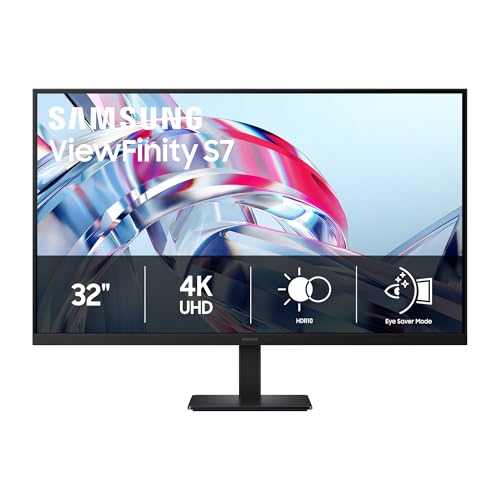
Samsung builds the S70H around a 32 inch 4K UHD panel with high pixel density, which keeps small type crisp across a wide desktop. HDR10 support adds contrast for video and images, and the 178 degree viewing angle holds brightness from off-center seats. HDMI and DisplayPort cover standard desk setups.
Resolution3840x2160
Size32 inch
HDRHDR10
PortsHDMI, DisplayPort
Pros
- High pixel density for sharp text
- HDR10 for video and imagery
- 178 degree viewing angle
Cons
- No USB-C power delivery listed
- Stand ergonomics not detailed
Check price on Amazon ›
The CB272K is a 27 inch 4K IPS office screen with 99% sRGB coverage and a zero-frame design that keeps the bezels out of the way. Its USB-C port carries display, data and device charging at up to 90W over a single cable. An ergonomic stand and built-in speaker round out a tidy desk setup.
Resolution3840x2160
PanelIPS, 27 inch
USB-C90W power delivery
Color99% sRGB
Pros
- Single-cable USB-C with 90W charging
- Ergo stand and built-in speaker
- 99% sRGB coverage
Cons
- 60Hz refresh rate
- 27 inch size limits desktop area
Check price on Amazon ›
LG's 27 inch 4K IPS panel covers up to 90% of DCI-P3 and handles HDR10 content, which suits image-heavy work. The 1000:1 contrast ratio and wide viewing angles keep detail stable across the screen. A borderless white design, Reader Mode and Flicker Safe round out a comfortable long-session display.
Resolution3840x2160
PanelIPS, 27 inch
ColorUp to 90% DCI-P3
PortsHDMI, DisplayPort
Pros
- Wide DCI-P3 coverage for creative work
- Reader Mode and Flicker Safe
- Borderless design
Cons
- 1000:1 contrast ratio is modest
- No USB-C docking listed
Check price on Amazon ›
BenQ tunes the MA270U for MacBook Pro and Air, with a P3 wide color gamut and Mac Color Match to keep tones consistent with the laptop display. Dual USB-C ports deliver 90W to the MacBook and 15W to an iPad or iPhone. Brightness and volume can be controlled from the Mac, and the stand adjusts for height and tilt.
Resolution3840x2160
Panel27 inch
USB-C90W and 15W
Ports2 HDMI, 2 USB-C
Pros
- Mac color matching and P3 gamut
- Dual USB-C with 90W delivery
- Height and tilt adjustable stand
Cons
- Tuned specifically for MacBook users
- USB hub details limited
Check price on Amazon ›
The VP327Q offers a 31.5 inch 4K IPS panel with 99% sRGB and HDR-10, plus a frameless design and 178 degree viewing angles. Adaptive-Sync, Flicker Free and a blue light filter cover long work sessions. Built-in speakers and VESA mounting keep the setup simple, and a 3 year warranty backs it.
Resolution3840x2160
PanelIPS, 31.5 inch
Color99% sRGB, HDR-10
ExtrasSpeakers, VESA mount
Pros
- Large 31.5 inch IPS panel
- Built-in speakers and VESA mount
- 3 year warranty with advanced replacement
Cons
- Tilt-only stand adjustment
- Adaptive-Sync rather than a high refresh rate
Check price on Amazon ›
ViewSonic fits a 27 inch 4K IPS panel with 400-nit brightness into an ultra-thin bezel frame, which helps in rooms with strong ambient light. HDR10 support improves contrast on compatible video and images. Dual HDMI and DisplayPort cover laptop, PC and Mac connections, and anti-glare coating reduces reflections.
Resolution3840x2160
PanelIPS, 27 inch
Brightness400 nits
PortsDual HDMI, DisplayPort
Pros
- 400-nit brightness for bright rooms
- Dual HDMI plus DisplayPort
- Anti-glare coating
Cons
- No USB-C connectivity listed
- 27 inch screen limits multi-window space
Check price on Amazon ›
The 439P1 is a 43 inch 4K VA business monitor with roughly the screen area of four 21.5 inch Full HD displays. MultiView shows up to four sources at once, and a built-in KVM lets one keyboard and mouse control multiple devices. USB-C docking adds video, data, laptop charging and RJ-45 Ethernet over one cable.
Resolution3840x2160
PanelVA, 43 inch
HDRDisplayHDR 400
ExtrasKVM, USB-C dock, RJ-45
Pros
- MultiView for up to four sources
- Built-in KVM switch
- USB-C dock with Ethernet and 4 year warranty
Cons
- Large footprint for a standard desk
- MultiView sources run in Full HD
Check price on Amazon ›
AOC's U27G4XM uses a 27 inch 4K mini-LED panel with 1152 local dimming zones and DisplayHDR1000 certification. It runs 160Hz at 4K through HDMI 2.1 and DisplayPort 1.4, or 320Hz in FHD dual mode, with a 1ms GtG response. A USB 3.2 hub and full height, swivel, pivot and tilt adjustment suit flexible desks.
Resolution3840x2160
BacklightMini-LED, 1152 zones
Refresh160Hz 4K, 320Hz FHD
HDRDisplayHDR1000
Pros
- Mini-LED with 1152 dimming zones
- 160Hz at 4K and 320Hz dual mode
- Full ergonomic adjustment and USB hub
Cons
- Gaming focus overshoots office needs
- Mini-LED tuning matters for text work
Check price on Amazon ›
What to look for
Resolution and screen size
Every screen here is 3840x2160, so the real choice is how that pixel count spreads across the panel. A 27 inch 4K display gives very sharp text for reading dense documents. A 32 inch or larger panel gives more usable desktop area at slightly lower pixel density, which many people prefer for side-by-side windows.
Panel type and color coverage
IPS panels hold color and brightness across wide viewing angles, which matters when someone sits beside your desk. VA panels trade some of that for deeper contrast. Look at sRGB coverage for office documents and DCI-P3 if you touch photos or video; the Dell S3225QS covers both well.
Ports and single-cable docking
USB-C with power delivery lets one cable carry video, data and laptop charging, which keeps a desk clean. The Acer CB272K delivers 90W, and the BenQ MA270U splits 90W and 15W across two USB-C ports. The Philips 439P1 adds Ethernet through its dock.
Comfort and adjustability
Long office days reward flicker-free backlights, blue light reduction and stands that adjust for height. The Acer, BenQ and AOC all list ergonomic stands, while the Dell adds ComfortView Plus. For bright rooms, the ViewSonic panel reaches 400 nits.
Frequently asked questions
What should I look for in a 4K office monitor?
Prioritize a 3840x2160 panel at 27 inches or larger, IPS or a well-tuned VA panel, and a stand that adjusts for height. Ports matter too: USB-C with power delivery simplifies a laptop desk, while HDMI and DisplayPort cover desktop PCs.
Is 27 inches or 32 inches better for 4K office work?
A 27 inch 4K screen gives the sharpest text and suits document-heavy work. A 32 inch panel shows more windows at once with slightly lower pixel density, which many people find easier on the eyes for all-day use.
Do I need USB-C on a 4K office monitor?
It helps if you use a laptop. A USB-C port with power delivery carries video, data and charging over one cable, so you skip a separate dock. The Acer CB272K and BenQ MA270U both list 90W delivery.
Does refresh rate matter for office work?
Higher refresh rates make scrolling and window movement smoother. The Dell S3225QS runs up to 120Hz, while most office panels here run at 60Hz, which is fine for documents and spreadsheets.
Can a 4K monitor reduce eye strain?
Sharp text reduces the squinting that low-resolution screens cause. Flicker-free backlights and blue light reduction features help further, and the Dell, LG and ASUS models all list eye comfort features.
What is a KVM switch good for on a monitor?
A KVM lets one keyboard and mouse control several connected computers. The Philips 439P1 includes one alongside MultiView, so you can watch and control multiple systems from a single desk position.
Is a mini-LED 4K monitor good for office work?
It can be, since the AOC U27G4XM offers 4K resolution and full ergonomic adjustment. Its mini-LED backlight and high refresh rates are aimed at gaming, so it makes most sense if the same screen serves both work and play.
How many ports should a 4K office monitor have?
Enough for your devices plus room to grow. Dual HDMI and DisplayPort, as on the ViewSonic VA2756-4K-MHD, cover a PC and a laptop. Add USB-A downstream ports if you want peripherals plugged into the monitor rather than the computer.
The verdict
Dell 32 Monitor S3225QS
9.2/10/10
The Dell S3225QS earns the top spot for most offices, combining a 31.5 inch 4K VA panel, wide sRGB and DCI-P3 coverage, and a 120Hz refresh rate. Choose the Samsung ViewFinity S7 for balanced work, the Acer CB272K for one-cable laptop charging, or the Philips 439P1 if you need to watch four systems at once.
Check price on Amazon ›
Our top pick, secure checkout via Amazon
Note: Availability and specifications change often. Always confirm the current details on Amazon before buying.